การแนะนำ
Welcome to the user manual for your BEBEN Wireless Earbuds, Model 1. These earbuds are designed to provide a superior audio experience with features like 36 hours of playtime, smart touch controls, ergonomic design for sports, Hi-Fi sound, and active noise reduction for clear calls. This manual will guide you through the setup, operation, maintenance, and troubleshooting of your new earbuds.

Image: The BEBEN Wireless Earbuds, featuring the two earbuds with ear hooks and their compact charging case.
สิ่งที่รวมอยู่
- BEBEN Wireless Earbuds (Left and Right)
- เคสชาร์จแบบไร้สาย
- สายชาร์จแบบ USB Type-C
- Silicone Ear Tips (S/M/L sizes)
- กระเป๋าเก็บแบบพกพา
- คู่มือการใช้งาน
ข้อมูลจำเพาะ
| คุณสมบัติ | รายละเอียด |
|---|---|
| ชื่อรุ่น | 1 |
| เทคโนโลยีการเชื่อมต่อ | บลูทูธ 5.0 |
| เวลาเล่นทั้งหมด | สูงสุด 36 ชั่วโมง (พร้อมเคสชาร์จ) |
| เวลาเล่นหูฟัง (ชาร์จครั้งเดียว) | นานถึง 6 ชั่วโมง |
| ชาร์จเร็ว | 5 minutes charge for 2 hours standby |
| ประเภทการควบคุม | การควบคุมแบบสัมผัสอัจฉริยะ |
| ระดับความต้านทานต่อน้ำ | กันน้ำ |
| การควบคุมเสียงรบกวน | ระบบตัดเสียงรบกวน (สำหรับการโทร) |
| รูปทรงของหูฟัง | ที่เกี่ยวหู |
| อุปกรณ์ที่รองรับ | Multiple Bluetooth-enabled devices (smartphones, tablets, laptops, smart speakers) |
การตั้งค่า
1. การชาร์จครั้งแรก
ก่อนใช้งานครั้งแรก ควรชาร์จหูฟังและเคสชาร์จให้เต็ม
- ใส่หูฟังเอียร์บัดทั้งสองข้างลงในกล่องชาร์จ
- เชื่อมต่อสายชาร์จ USB Type-C เข้ากับเคสชาร์จและแหล่งจ่ายไฟ
- The LED indicators on the case will show charging status. A full charge for the case takes approximately 6 hours.
- The earbuds themselves charge quickly, with 5 minutes of charging providing 2 hours of standby time.

Image: Earbuds inside the charging case, illustrating the Type-C charging port and battery life indicators.
2. การจับคู่กับอุปกรณ์ของคุณ (การจับคู่อัตโนมัติขั้นตอนเดียว)
เอียร์บัดมีระบบจับคู่อัตโนมัติขั้นตอนเดียวเพื่อความสะดวก
- โปรดตรวจสอบให้แน่ใจว่าได้เปิดใช้งานบลูทูธบนสมาร์ทโฟน แท็บเล็ต หรืออุปกรณ์ที่ใช้งานร่วมกันได้แล้ว
- เปิดกล่องชาร์จและนำหูฟังทั้งสองข้างออกมา หูฟังจะเปิดใช้งานและเข้าสู่โหมดจับคู่โดยอัตโนมัติ
- On your device, search for Bluetooth devices and select "C3" from the list.
- Once connected, you will hear a confirmation prompt, and the earbuds are ready for use.

Image: A smartphone screen showing "C3" as a discoverable Bluetooth device, with the earbuds next to it, demonstrating the one-step auto pairing process.
Note: The earbuds support single or binaural mode, allowing you to use one earbud independently or both together.
คำแนะนำการใช้งาน
การควบคุมแบบสัมผัส
The earbuds feature smart touch controls for easy management of music and calls. Please keep your hands dry when touching the controls for optimal sensitivity.
- เปิด/ปิดเครื่อง:
- Automatically power on when taken out of the charging case.
- Automatically power off when placed back into the charging case.
- เล่น/หยุดชั่วคราว: แตะที่หูฟังข้างใดข้างหนึ่งเพียงครั้งเดียว
- เพลงถัดไป: แตะสองครั้งที่หูฟังด้านขวา
- เพลงก่อนหน้า: แตะสองครั้งที่หูฟังด้านซ้าย
- ปรับระดับเสียงขึ้น: กดหูฟังด้านขวาค้างไว้
- ลดเสียงลง: กดหูฟังด้านซ้ายค้างไว้
- รับ/วางสาย: แตะที่หูฟังข้างใดข้างหนึ่งเพียงครั้งเดียว
- ปฏิเสธสาย: กดเอียร์บัดข้างใดข้างหนึ่งค้างไว้ 2 วินาที
- เปิดใช้งานผู้ช่วยเสียง (Siri/Google Assistant): แตะสามครั้งที่หูฟังข้างใดข้างหนึ่ง
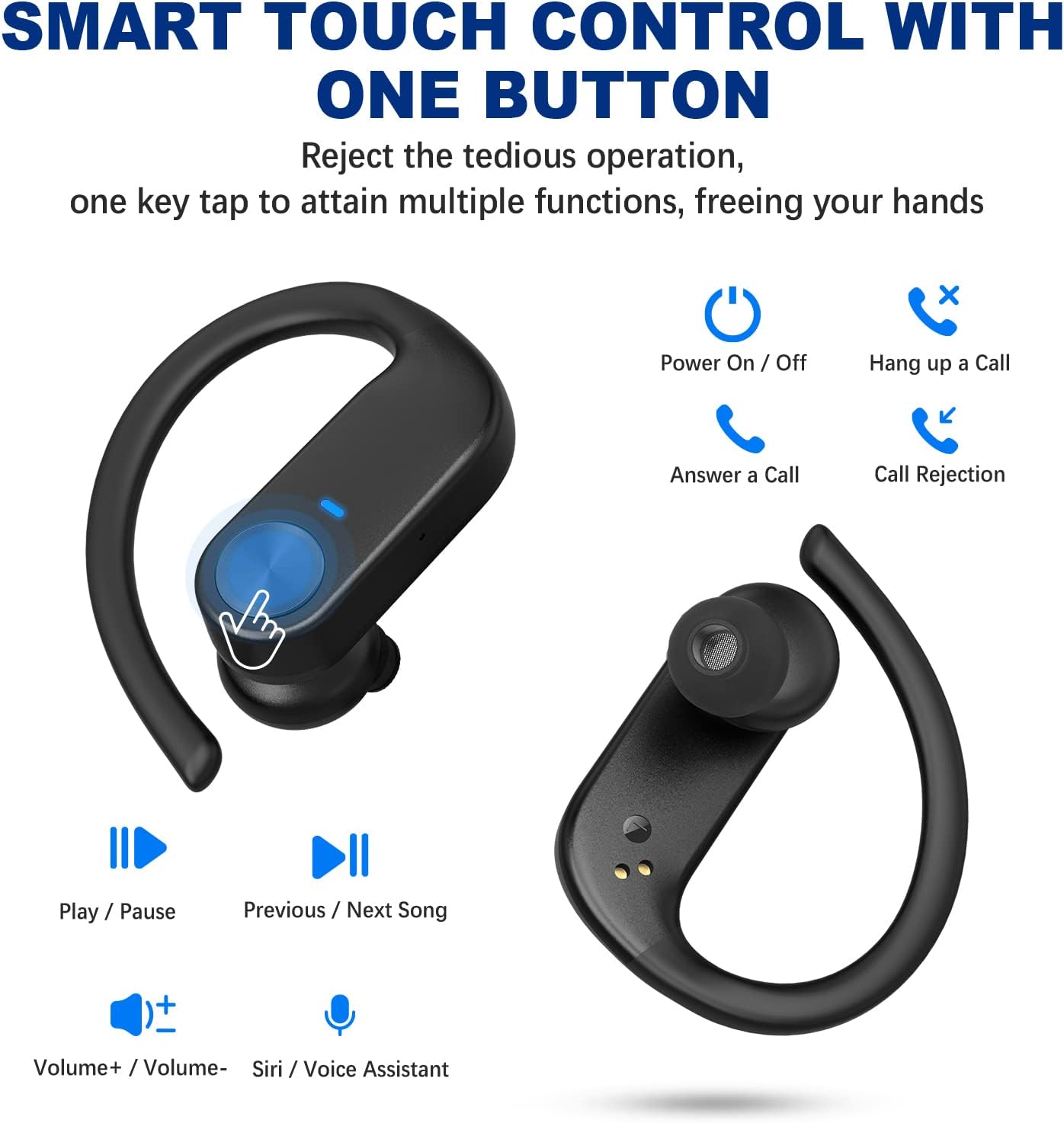
Image: Visual guide to the smart touch controls on the earbuds, showing functions like play/pause, volume, call management, and voice assistant activation.
การสวมหูฟัง
For optimal comfort and sound quality, choose the correct ear tips and adjust the ear hooks.
- Select the silicone ear tips (S/M/L) that best fit your ear canal.
- ใส่เอียร์บัดเข้าไปในช่องหูของคุณ
- Place the ear hook over your ear and adjust it for a secure and comfortable fit. The ergonomic design ensures stability during activities like sports and workouts.

Image: Instructions on how to properly wear the earbuds, highlighting the soft ear tips and secure ear hooks for a comfortable and stable fit.
การบำรุงรักษาและการดูแล
- Regularly clean the earbuds, especially the ear tips and charging contacts, with a soft, dry cloth.
- หลีกเลี่ยงการใช้สารเคมีรุนแรงหรือวัสดุขัดถูในการทำความสะอาด
- ควรเก็บหูฟังไว้ในกล่องชาร์จเมื่อไม่ได้ใช้งาน เพื่อป้องกันความเสียหายและเพื่อให้มั่นใจว่าหูฟังมีประจุไฟอยู่เสมอ
- Keep the earbuds away from extreme temperatures, humidity, and dust.
- While waterproof, avoid prolonged submersion in water. Dry thoroughly if exposed to moisture.
การแก้ไขปัญหา
| ปัญหา | สารละลาย |
|---|---|
| หูฟังไม่จับคู่/เชื่อมต่อ |
|
| มีหูฟังใช้งานได้แค่ข้างเดียว |
|
| ระดับเสียงต่ำหรือคุณภาพเสียงไม่ดี |
|
| หูฟังไม่ชาร์จ |
|
การรับประกันและการสนับสนุน
BEBEN products come with a standard manufacturer's warranty. For detailed warranty information, technical support, or customer service inquiries, please refer to the contact information provided on the product packaging or visit the official BEBEN webเว็บไซต์.
คุณยังสามารถเยี่ยมชม BEBEN Store on Amazon สำหรับข้อมูลผลิตภัณฑ์และทรัพยากรสนับสนุนเพิ่มเติม


