การแนะนำ
This manual provides comprehensive instructions for the FVTLED Smart Recessed Lighting 6-Inch RGBCW LED Downlight. Please read this manual thoroughly before installation and operation to ensure proper use and safety.

Image: FVTLED Smart Recessed Lighting 4-pack, including the downlights, remote control, and smart bridge.
เนื้อหาแพ็คเกจ
ตรวจสอบว่ามีส่วนประกอบทั้งหมดอยู่ในแพ็คเกจ:
- 4 x LED Recessed Downlights
- 1 x รีโมทคอนโทรล
- 1 x สมาร์ทบริดจ์
- 1 x คู่มือผู้ใช้ (เอกสารนี้)
ข้อมูลจำเพาะ
| คุณสมบัติ | รายละเอียด |
|---|---|
| แบบอย่าง | WK604 |
| พลัง | 9 วัตต์ |
| ชื่อ APP | ห่าวเด้ง |
| วิธีการเชื่อมต่อ | BLUETOOTH 4.2 |
| สีแสงไฟ | RGBCW (Red, Green, Blue, Warm White, Cool White) |
| อุณหภูมิสี | 2700K-6500K |
| ซ็อกเก็ตแสง | E26 |
| ฉบับทำงานtage | 100-130VAC, 50/60HZ |
| จำนวนลamp ลูกปัด | R/G/B: 2835-1W*3, WW: 2835-1W*9, CW: 2835-1W*9 |
| มุมลำแสง | 120° |
| อุณหภูมิในการทำงาน | -20 ถึง 45℃ |
| มิติแสง | Φ7.28 inch x H3.22 inch (D:185mm, H:82mm) |
| Mount Hole Size | 5.90 inch - 6.29 inch (150mm-160mm) for 6 inch fixtures |
| ความสว่าง | 700 ลูเมน |
| ประสิทธิภาพ | 78 ลูเมนต่อวัตต์ |
| วิธีการควบคุม | แอป, รีโมท, เสียง (Alexa, Google Assistant) |
| ประเภทการติดตั้ง | Flush Mount |
| วัสดุ | ทองแดง, พลาสติก |

Image: Detailed product dimensions and key components including PC plastic housing, heat-resistant LED chip, fixed card, E26 lamp holder, and connector.
การติดตั้งและการตั้งค่า
Reminder: Always turn off the main power supply before beginning any electrical installation to prevent electric shock.
1. Physical Installation of Downlights
- เตรียมรูยึด: Ensure the ceiling hole size is between 5.90 inches and 6.29 inches (150mm-160mm) for a 6-inch fixture.
- Install E26 Lamp ศีรษะ: Screw the E26 lamp head into the existing lamp holder in your recessed can.
- Connect the Downlight: Connect the downlight's connector to the E26 lamp head's connector.
- ติดตั้งไฟดาวน์ไลท์ให้แน่น: จัดตำแหน่งลamp body with the hole. Push the downlight into the recessed can. The spring clips on the side will secure it in place.

Image: Visual guide for installing the recessed downlight, showing hole drilling, E26 lamp head installation, connector connection, and final placement.
2. Smart Bridge and App Connection
The Smart Bridge facilitates communication between your mobile app and the downlights, enabling smart control features.
- Plug in the Smart Bridge: Insert the Smart Bridge into a power outlet. Ensure it is within range of your Wi-Fi network.
- ดาวน์โหลดแอป: Download the "Hao Deng" app from your smartphone's app store.
- Pair the Smart Bridge:
- Open the "Hao Deng" app.
- Navigate to the device addition section (usually indicated by a '+' or "Add Device").
- Select "Smart Bridge" from the options.
- Follow the on-screen instructions to connect the bridge to your Wi-Fi network. This typically involves pressing a button on the bridge and confirming in the app.
- Pair the Downlights:
- Once the Smart Bridge is connected, the app will guide you to scan for and add the downlights.
- Ensure the downlights are powered on.
- The app should detect the lights. Select them to add to your smart home system.
Video: This video demonstrates the easy installation process of the FVTLED Smart Recessed Downlights, including screwing in the E26 base, connecting the light, and securing it. It also shows the process of connecting the remote control and the Smart Bridge to the mobile application for full control.
คำแนะนำการใช้งาน
1. การควบคุมแอป
The "Hao Deng" mobile application provides comprehensive control over your FVTLED Smart Recessed Lights.
- การปรับสี: Select from 16 million colors to create custom scenes and ambiances.
- การควบคุมความสว่าง: ปรับความสว่างได้ตั้งแต่ 10% ถึง 100%
- อุณหภูมิสี: Change the white light from 2700K (warm white) to 6500K (cool white).
- โหมดไดนามิก: Access various pre-set dynamic lighting modes or create your own.
- การซิงโครไนซ์เพลง: Lights can change color and rhythm with music played through your device.
- ฟังก์ชั่นจับเวลา: ตั้งเวลาให้ไฟเปิด/ปิดตามเวลาที่กำหนด
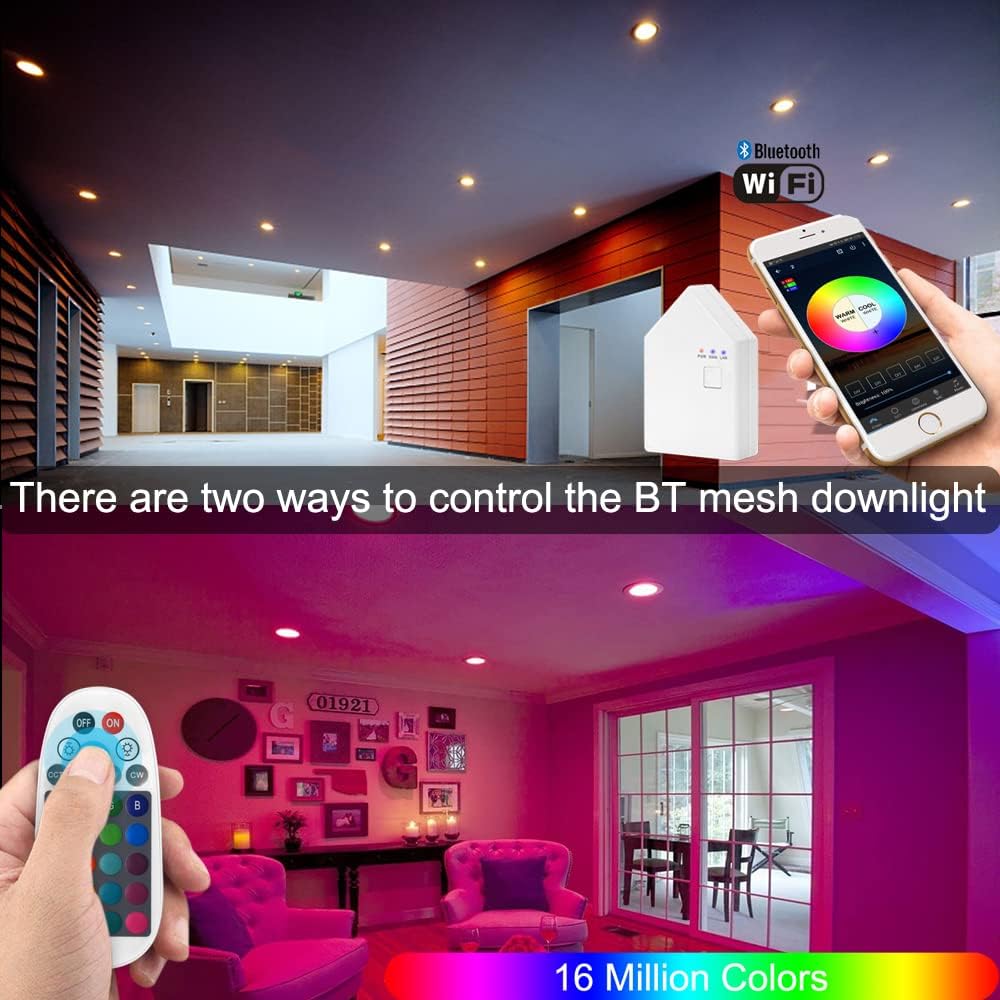
Image: Demonstrates control of the smart downlights via a mobile application and a physical remote control, showcasing color selection.

Image: Illustrates the adjustable color temperature from 2700K to 6500K and brightness dimming from 0% to 100% for the FVTLED Smart Recessed Lighting.
2. รีโมทคอนโทรล
The included remote control offers direct access to basic lighting functions without needing the app.
- เปิด/ปิดเครื่อง
- การปรับความสว่าง
- Color Selection (pre-set colors)
- Warm White/Cool White Adjustment
3. การควบคุมด้วยเสียง (Alexa และ Google Assistant)
After connecting the Smart Bridge, you can integrate your FVTLED lights with Amazon Alexa or Google Assistant for convenient voice commands.
- Ensure your Smart Bridge is successfully registered and connected to your Wi-Fi network.
- Enable the "Hao Deng" skill/action in your Alexa or Google Home app.
- ค้นพบอุปกรณ์
- ใช้คำสั่งเช่น:
- "Alexa/Hey Google, turn on the living room lights."
- "Alexa/Hey Google, set the kitchen lights to blue."
- "Alexa/Hey Google, dim the bedroom lights to 50%."
4. การควบคุมกลุ่ม
Organize your lights into groups within the "Hao Deng" app for simultaneous control. Up to 64 Bluetooth mesh devices can be added to a single group.
- Create groups for different rooms or areas (e.g., "Kitchen," "Bedroom," "Hallway").
- Adjust all lights in a group simultaneously or control individual lights within a group.

Image: Depicts the group control feature, allowing users to manage multiple lights in different areas of a home using the mobile application.
5. โหมดเพลง
Activate Music Mode in the app to synchronize your lights with audio, creating a dynamic and immersive lighting experience.

Image: Shows the Music Mode feature where the lighting changes in rhythm with music, controlled via the mobile app.
6 โหมดตั้งเวลา
Set schedules for your lights to automatically turn on or off, enhancing convenience and energy efficiency.

Image: Displays the timer mode interface in the mobile app, allowing users to schedule lights to turn on and off at specific times.
การซ่อมบำรุง
To ensure the longevity and optimal performance of your FVTLED Smart Recessed Lighting, follow these maintenance guidelines:
- การทำความสะอาด: Gently wipe the surface of the downlights with a soft, dry cloth. Avoid using abrasive cleaners, solvents, or harsh chemicals, as these can damage the finish or electronic components.
- ปิดเครื่องก่อนทำความสะอาด: Always turn off the power to the light fixture at the circuit breaker before cleaning.
- การตรวจสอบปกติ: Periodically inspect the downlights for any signs of damage or loose connections. If any issues are found, consult a qualified electrician.
- การอัปเดตซอฟต์แวร์: Keep the "Hao Deng" app updated to the latest version to ensure compatibility and access to new features and bug fixes.
การแก้ไขปัญหา
If you encounter issues with your FVTLED Smart Recessed Lighting, refer to the following common troubleshooting steps:
| ปัญหา | สาเหตุที่เป็นไปได้ | สารละลาย |
|---|---|---|
| ไฟไม่เปิด | ไม่มีไฟ, การเชื่อมต่อหลวม, หลอดไฟชำรุด | Check power supply at the circuit breaker. Ensure the E26 lamp head and downlight connector are securely fastened. Verify the light is not in sleep mode or turned off via app/remote. |
| Cannot connect to the app/Smart Bridge. | Incorrect pairing process, Wi-Fi issues, distance from bridge. | Ensure the Smart Bridge is powered on and its indicator lights are active. Restart the app and attempt pairing again. Move the smartphone closer to the bridge and lights during setup. Check Wi-Fi signal strength. |
| รีโมทคอนโทรลไม่ทำงาน | Battery depleted, not paired, out of range. | Replace remote control batteries. Re-pair the remote with the lights following the instructions in the app or manual. Ensure the remote is within effective range of the lights. |
| ระบบควบคุมด้วยเสียง (Alexa/Google Assistant) ไม่ตอบสนอง | Smart Bridge offline, skill/action not enabled, incorrect device name. | Verify the Smart Bridge is connected to Wi-Fi and the "Hao Deng" skill/action is enabled in your voice assistant app. Ensure the device names used in voice commands match those configured in the app. |
การรับประกันและการสนับสนุน
Specific warranty information for this product is not provided in the available data. Please refer to the product packaging or the manufacturer's official webเว็บไซต์สำหรับข้อกำหนดและเงื่อนไขการรับประกันโดยละเอียด
For technical support or further assistance, please contact FVTLED customer service through their official channels.
