1. บทนำ
This manual provides detailed instructions for the installation, configuration, and operation of your Hikvision DS-7104HGHI-K1 4-Channel Digital Video Recorder (DVR). Please read this manual thoroughly before using the product to ensure correct and safe operation. Keep this manual for future reference.
2. สินค้าหมดview และคุณสมบัติ
The Hikvision DS-7104HGHI-K1 is a 4-channel 1080p Lite DVR designed for reliable surveillance recording. It supports various camera types and features advanced video compression technology.

รูปที่ 2.1: สูงสุด view of the Hikvision DS-7104HGHI-K1 DVR, showing its compact design and branding.
คุณสมบัติหลัก:
- 4-Channel Video Input: Supports up to 4 analog cameras.
- 1080p Lite Recording: Provides high-definition recording at 1080p Lite resolution.
- การบีบอัด H.265+: Advanced video compression technology for efficient storage and reduced bandwidth usage.
- Multi-format Input: Compatible with HDTVI, AHD, CVI, CVBS, and up to 5 IP camera inputs (up to 2MP).
- เอาท์พุต HDMI/VGA: For local monitoring.
- การเข้าถึงระยะไกล: รองรับการทำงานระยะไกล viewing via Hik-Connect app.

รูปที่ 2.2: ด้านหน้าและด้านหลัง views of the Hikvision DVR, highlighting various ports and connectivity options, along with icons representing H.265 Pro, Mobile access, 5-in-1 compatibility, and IP/Analog XVR capabilities.
H.265+ Compression Benefits:
H.265+ compression significantly reduces the required storage space and bandwidth compared to older compression standards like H.264, without compromising video quality.

รูปที่ 2.3: A bar graph illustrating the reduction in 24-hour recording file size (GB) when using H.265+ compression compared to H.264 and H.265, showing up to an 83% gap in storage requirements.
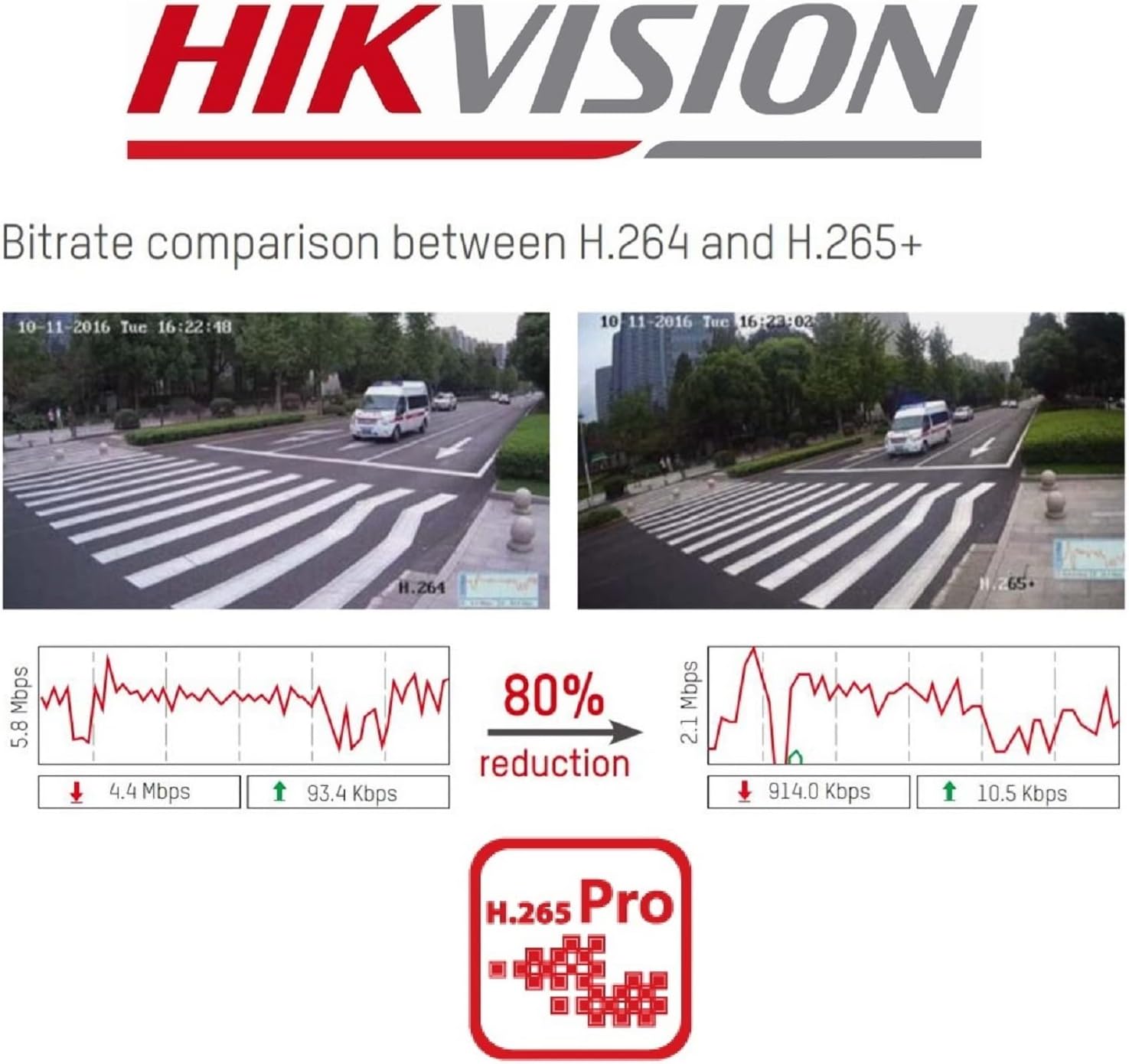
รูปที่ 2.4: A visual comparison of bitrate usage between H.264 and H.265+ compression, demonstrating an 80% reduction in bitrate with H.265+ while maintaining similar video quality in sample surveillance footage.
3. เนื้อหาบรรจุภัณฑ์
ตรวจสอบว่ามีรายการทั้งหมดอยู่ในแพ็คเกจของคุณ:
- Hikvision DS-7104HGHI-K1 DVR Unit
- อะแดปเตอร์แปลงไฟ
- USB Mouse
- สาย SATA (สำหรับเชื่อมต่อฮาร์ดดิสก์)
- คู่มือเริ่มต้นอย่างรวดเร็ว
- Note: Hard drive is not included and must be purchased separately.
4. ข้อมูลด้านความปลอดภัย
- ตรวจสอบให้แน่ใจว่าแหล่งจ่ายไฟตรงกับข้อกำหนดของเครื่องบันทึกวิดีโอ (DVR)
- อย่าให้เครื่องบันทึกวิดีโอ (DVR) โดนน้ำหรือความชื้น
- ควรหลีกเลี่ยงการวางเครื่องบันทึกวิดีโอ (DVR) ไว้ในที่ที่มีแสงแดดส่องโดยตรง หรือใกล้แหล่งความร้อน
- ตรวจสอบให้แน่ใจว่ามีการระบายอากาศที่เหมาะสมเพื่อป้องกันภาวะความร้อนมากเกินไป
- ใช้เฉพาะอุปกรณ์เสริมที่ผู้ผลิตกำหนดเท่านั้น
5. การตั้งค่า
5.1 การติดตั้งฮาร์ดแวร์
- Hard Drive Installation (HDD not included):
- คลายสกรูและถอดฝาครอบด้านบนของเครื่องบันทึกวิดีโอ (DVR) ออก
- Connect the SATA power and data cables from the DVR to the hard drive.
- Secure the hard drive inside the DVR using the provided screws.
- ปิดฝาด้านบนกลับเข้าที่และยึดด้วยสกรู
- เชื่อมต่อกล้อง: Connect your analog cameras to the BNC video input ports on the rear panel of the DVR.
- เชื่อมต่อจอภาพ: เชื่อมต่อจอภาพเข้ากับพอร์ต HDMI หรือ VGA
- เชื่อมต่อเครือข่าย: Connect an Ethernet cable from the DVR's LAN port to your router or network switch.
- เชื่อมต่อเมาส์ USB: เสียบเมาส์ USB เข้ากับพอร์ต USB บนเครื่องบันทึกวิดีโอ (DVR)
- เปิดเครื่อง: Connect the power adapter to the DVR and then to a power outlet. The DVR will power on automatically.
5.2 การกำหนดค่าเริ่มต้น
- First-Time Startup: Upon first boot, the DVR will guide you through a setup wizard.
- ตั้งรหัสผ่าน: Create a strong password for the admin user. This is crucial for security.
- การตั้งค่าเครือข่าย: ตั้งค่าเครือข่าย (โดยทั่วไป DHCP ก็เพียงพอสำหรับเครือข่ายบ้านส่วนใหญ่)
- การเริ่มต้นระบบฮาร์ดดิสก์: The DVR will prompt you to initialize the newly installed hard drive. This step is necessary for recording.
- วันที่และเวลา: ตั้งวันที่และเวลาให้ถูกต้อง
6. การดำเนินการ
6.1 สด View
หลังจากการตั้งค่าเริ่มต้น DVR จะแสดงภาพสด view from connected cameras on the monitor. You can switch between single-camera view และกริดหลายกล้อง view using the on-screen controls or mouse.
6.2 การบันทึก
The DVR is typically configured to record continuously by default once the HDD is initialized. You can customize recording schedules, motion detection recording, and alarm recording settings through the DVR's menu:
- ไปที่ เมนู > บันทึก > กำหนดเวลา to adjust recording times.
- ไปที่ Menu > Alarm > Motion Detection to configure motion-triggered recording.
6.3 การเล่นซ้ำ
ถึง view บันทึกเสียงฟูtage:
- ไปที่ เมนู > การเล่น.
- Select the camera(s) and the date/time range you wish to review.
- ใช้ปุ่มควบคุมการเล่น (เล่น หยุดชั่วคราว กรอไปข้างหน้า กรอถอยหลัง) เพื่อเลื่อนดูไฟล์เสียงtage.
6.4 การเข้าถึงระยะไกล (Hik-Connect)
The Hik-Connect app allows you to view อยู่ footage, play back recordings, and receive alerts on your smartphone or tablet from anywhere with an internet connection.

รูปที่ 6.1: The Hik-Connect application icon alongside a smartphone displaying a multi-camera live view, illustrating the remote monitoring capabilities of the DVR system.
- Download the Hik-Connect app from your device's app store.
- Create a Hik-Connect account.
- Add your DVR to the app by scanning the QR code on the DVR or manually entering its serial number.
- Ensure your DVR is connected to the internet and Hik-Connect service is enabled in the DVR's network settings.
7. การบำรุงรักษา
- การทำความสะอาดปกติ: Keep the DVR free from dust. Use a soft, dry cloth for cleaning.
- อัพเดตเฟิร์มแวร์: ตรวจสอบเว็บไซต์ทางการของ Hikvision เป็นระยะ webไซต์สำหรับอัพเดตเฟิร์มแวร์เพื่อให้มั่นใจถึงประสิทธิภาพและความปลอดภัยที่เหมาะสมที่สุด
- การสำรองข้อมูล: ควรสำรองข้อมูลการบันทึกที่สำคัญไปยังอุปกรณ์จัดเก็บข้อมูลภายนอกเป็นประจำ
- การรักษาความปลอดภัยด้วยรหัสผ่าน: Change your DVR password periodically to enhance security.
8 การแก้ไขปัญหา
- ไม่มีเอาต์พุตวิดีโอ:
- ตรวจสอบการเชื่อมต่อสาย HDMI/VGA
- ตรวจสอบให้แน่ใจว่าจอภาพเปิดอยู่และตั้งค่าอินพุตถูกต้องแล้ว
- ไม่มีการบันทึก:
- Verify that a hard drive is installed and initialized.
- Check recording schedules and ensure they are active.
- Ensure cameras are properly connected and functioning.
- ไม่สามารถเข้าถึงจากระยะไกลได้:
- Ensure the DVR is connected to the internet.
- Check network settings and Hik-Connect status on the DVR.
- Verify your Hik-Connect account and device binding in the app.
- DVR Unresponsive:
- Restart the DVR by disconnecting and reconnecting the power.
- If issues persist, consider a factory reset (note: this will erase configurations).
9. ข้อมูลจำเพาะ
| คุณสมบัติ | รายละเอียด |
|---|---|
| หมายเลขรุ่น | DS-7104HGHI-K1 |
| อินพุตวิดีโอ | 4-channel BNC (HDTVI/AHD/CVI/CVBS) + up to 5 IP channels (up to 2MP) |
| การบีบอัดวิดีโอ | H.265 Pro+/H.265+/H.265/H.264+/H.264 |
| ความละเอียดในการเข้ารหัส | 1080p Lite @ 25/30 fps |
| เอาท์พุตวิดีโอ | 1 HDMI, 1 VGA (simultaneous output) |
| อินพุตเสียง | อาร์ซีเอ 1 ช่อง |
| เอาท์พุตเสียง | อาร์ซีเอ 1 ช่อง |
| การรองรับฮาร์ดดิสก์ | อินเทอร์เฟซ SATA 1 ช่อง ความจุสูงสุด 4 TB |
| เชื่อมต่อเครือข่าย | 1 RJ45 10M/100M self-adaptive Ethernet interface |
| อินเทอร์เฟซ USB | 2 อินเทอร์เฟซ USB 2.0 |
| ขนาด (กว้าง x ยาว x สูง) | 20 x 20 x 4.5 ซม. |
| น้ำหนัก | 1.01 กก. (ไม่รวม HDD) |
10. การรับประกันและการสนับสนุน
สำหรับข้อมูลการรับประกันและการสนับสนุนทางเทคนิค โปรดดูที่เว็บไซต์อย่างเป็นทางการของ Hikvision website or contact your authorized Hikvision dealer. Keep your purchase receipt as proof of purchase.


