1. บทนำ
Thank you for choosing the TOTAL TMT460013 Digital Multimeter. This device is designed for safe and accurate measurement of various electrical parameters, including AC/DC voltage, DC current, resistance, and continuity. It is an essential tool for electricians, technicians, and hobbyists for electrical testing and troubleshooting. Please read this manual thoroughly before use to ensure proper operation and safety.
2. ข้อมูลด้านความปลอดภัย
Always adhere to basic safety precautions when using this multimeter to reduce the risk of fire, electric shock, or personal injury. Failure to follow these instructions can result in severe injury or damage to the device.
- อย่าทำ exceed the maximum input values specified for each measurement range.
- อย่าทำ use the multimeter if it appears damaged or if the test leads are compromised.
- เสมอ ensure the test leads are correctly connected to the appropriate input jacks for the desired measurement.
- ไม่เคย พยายามวัดปริมาตรtage on a circuit with the function switch set to current, resistance, or continuity mode.
- ต้องระมัดระวัง เมื่อทำงานกับ voltagแรงดันไฟฟ้าที่สูงกว่า 30V AC RMS, 42V peak หรือ 60V DC นั้นเป็นอันตรายจากไฟฟ้าช็อตได้
- ลบ the test leads from the circuit before changing the function switch position.
- แทนที่ the battery immediately when the low battery indicator appears to ensure accurate readings.
- ยึดมั่น to local and national safety codes.
3. สินค้าหมดview
The TOTAL TMT460013 Digital Multimeter is a compact and robust device designed for various electrical measurements. Its intuitive interface and clear display make it easy to use for both professionals and DIY enthusiasts.
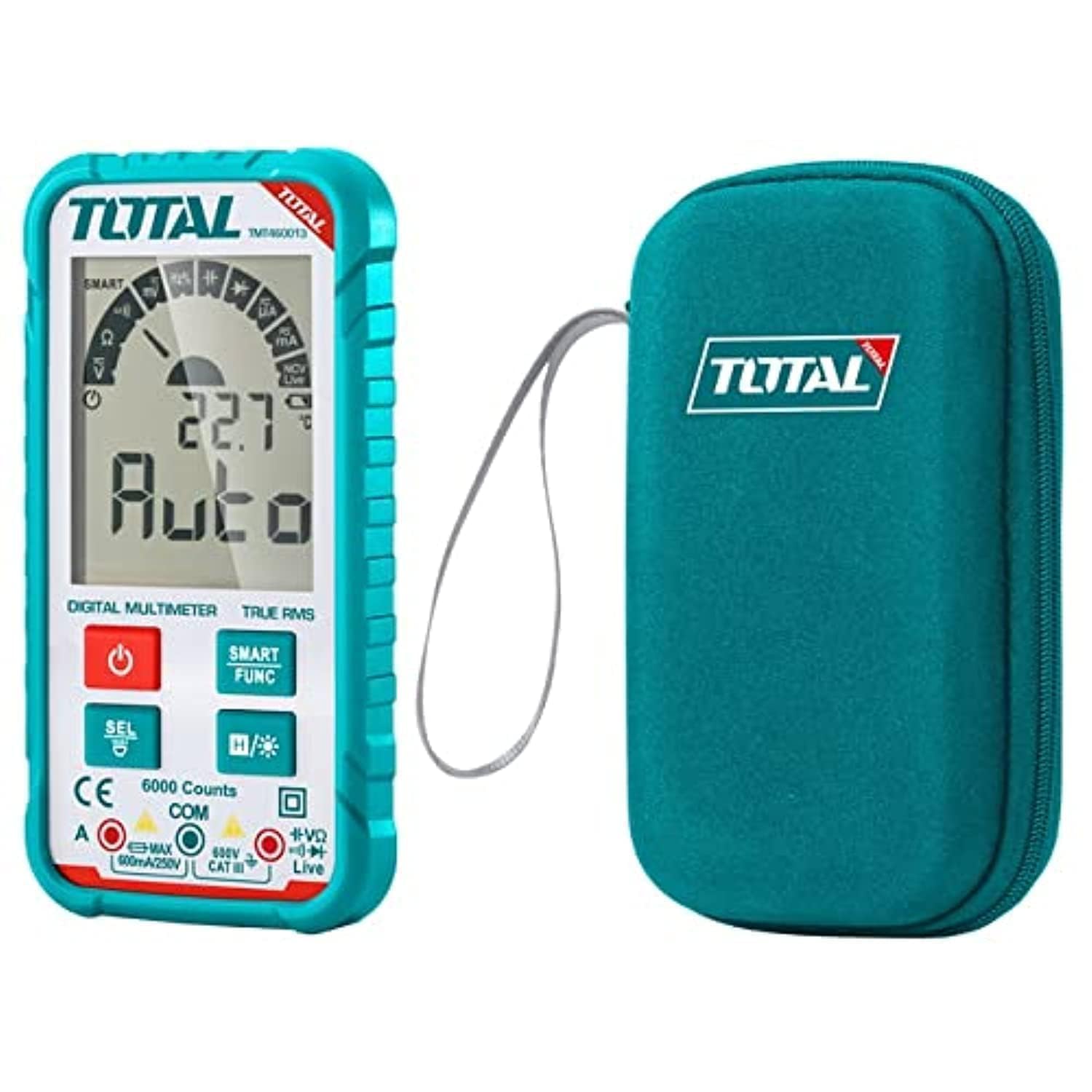
รูปที่ 1 : ด้านหน้า view of the TOTAL TMT460013 Digital Multimeter, showing the LCD display, function buttons, and input terminals.
การควบคุมและการแสดงผล
- จอแสดงผล LCD: แสดงค่าการวัด หน่วย และตัวบ่งชี้ฟังก์ชัน
- ปุ่มเปิดปิด (สีแดง): Press to turn the multimeter ON or OFF.
- SMART FUNC Button (Green): Cycles through different measurement functions within a mode (e.g., AC/DC voltagเช่น ความต้านทาน/ความต่อเนื่อง)
- HOLD Button (Blue): ฟังก์ชันนี้จะหยุดการแสดงค่าปัจจุบันบนหน้าจอ กดอีกครั้งเพื่อปล่อย
- แจ็คอินพุต: Terminals for connecting test leads (COM, VΩmA).
4. การตั้งค่า
4.1 การติดตั้งแบตเตอรี่
The multimeter is powered by internal batteries. Ensure batteries are correctly installed before first use or when replacing them.
- Turn off the multimeter by pressing the Power button.
- ค้นหาฝาครอบช่องใส่แบตเตอรี่ที่ด้านหลังของเครื่อง
- ใช้ไขควงคลายสกรูที่ยึดฝาครอบออก
- Remove the cover and insert the batteries, observing correct polarity (+ and -).
- Replace the battery compartment cover and tighten the screw(s).
4.2 การเชื่อมต่อสายทดสอบ
การเชื่อมต่อสายวัดอย่างถูกต้องเป็นสิ่งสำคัญอย่างยิ่งต่อการวัดที่แม่นยำและปลอดภัย
- ใส่สายวัดทดสอบสีดำลงใน คอม ช่องเสียบอินพุต (ทั่วไป)
- ใส่สายวัดทดสอบสีแดงลงใน VΩmA แจ็คอินพุตสำหรับปรับระดับเสียงtage, resistance, or current measurements.
- ตรวจสอบให้แน่ใจว่าการเชื่อมต่อแน่นหนาดีแล้วก่อนดำเนินการวัดใดๆ
5. คู่มือการใช้งาน
5.1 การเปิด/ปิดเครื่อง
Press the red Power button once to turn the multimeter ON. Press and hold the Power button for a few seconds to turn it OFF.
5.2 Selecting Measurement Functions
The TMT460013 features an auto-ranging function, simplifying measurement selection. The device will automatically detect the type of measurement (AC/DC voltage, resistance, continuity) when the leads are connected. Use the SMART FUNC button to cycle between specific functions if needed (e.g., between AC and DC voltage, or resistance and continuity).
5.3 การวัด
- เล่มที่tagการวัด (AC/DC):
Connect the test leads in parallel to the circuit or component you wish to measure. The multimeter will automatically detect AC or DC voltage. - การวัดความต้านทาน:
ตรวจสอบให้แน่ใจว่าวงจรไม่มีกระแสไฟก่อนทำการวัดความต้านทาน ต่อสายวัดทดสอบเข้ากับชิ้นส่วนนั้น - การทดสอบความต่อเนื่อง:
Ensure the circuit is de-energized. Connect the test leads across the component or wire. A low resistance (typically less than 50Ω) will indicate continuity, often accompanied by an audible beep. - การวัดกระแส DC:
คำเตือน: To measure current, the multimeter must be connected in series with the circuit. Ensure the circuit is de-energized before connecting the multimeter. Break the circuit, then connect the red lead to the higher potential side and the black lead to the lower potential side.
5.4 ฟังก์ชั่นการเก็บข้อมูล
กดสีน้ำเงิน ถือ button to freeze the current reading on the display. This is useful for recording measurements in difficult-to-read locations. Press the button again to release the hold and resume live readings.
6. การบำรุงรักษา
6.1 การทำความสะอาด
เช็ดเคสด้วยโฆษณาamp ใช้ผ้าและผงซักฟอกอ่อนๆ เช็ดทำความสะอาด ห้ามใช้สารขัดถูหรือตัวทำละลาย ตรวจสอบให้แน่ใจว่าอุปกรณ์แห้งสนิทก่อนใช้งาน
6.2 การเปลี่ยนแบตเตอรี่
When the low battery indicator appears on the display, replace the batteries as described in Section 4.1. Always use the specified battery type.
6.3 พื้นที่จัดเก็บ
If the multimeter is not used for an extended period, remove the batteries to prevent leakage and damage. Store the device in a cool, dry place away from direct sunlight and extreme temperatures.
7 การแก้ไขปัญหา
โปรดดูตารางด้านล่างเพื่อดูปัญหาทั่วไปและวิธีแก้ไข
| ปัญหา | สาเหตุที่เป็นไปได้ | สารละลาย |
|---|---|---|
| ไม่มีจอแสดงผลหรือจอแสดงผลมืด | แบตเตอรี่อ่อนหรือหมด; การติดตั้งแบตเตอรี่ไม่ถูกต้อง | เปลี่ยนแบตเตอรี่ ตรวจสอบขั้วแบตเตอรี่ |
| การอ่านไม่ถูกต้อง | เลือกฟังก์ชันไม่ถูกต้อง; การเชื่อมต่อสายทดสอบไม่ดี; สายทดสอบชำรุด | Ensure correct function; Check lead connections; Replace damaged leads |
| ไม่มีเสียงบี๊บแสดงความต่อเนื่อง | Circuit not continuous; Multimeter not in continuity mode | Check circuit for breaks; Select continuity function using SMART FUNC button |
| Multimeter does not respond | Internal fault; Completely drained battery | Replace batteries; Contact customer support if issue persists |
8. ข้อมูลจำเพาะ
Key technical specifications for the TOTAL TMT460013 Digital Multimeter.
| คุณสมบัติ | รายละเอียด |
|---|---|
| ผู้ผลิต | ทั้งหมด |
| หมายเลขรุ่น | TMT460013 |
| ประเภทการวัด | มัลติมิเตอร์ |
| แหล่งพลังงาน | ใช้พลังงานจากแบตเตอรี่ |
| น้ำหนักสินค้า | 209 กรัม (0.21 กิโลกรัม) |
| ขนาดสินค้า | 10 x 20 x 37 ซม. |
| สี | สีฟ้าอมเขียว |
| มาตรฐานความปลอดภัย | UL 61010-1, IEC 61010-2-030 |
| ASIN | B09QZWHFNR |
| GTIN | 06941639846475 |
9. การรับประกันและการสนับสนุน
For warranty information and technical support, please refer to the documentation provided with your purchase or visit the official TOTAL Tools webไซต์ โปรดเก็บใบเสร็จรับเงินของคุณไว้เป็นหลักฐานการซื้อสำหรับการเรียกร้องการรับประกันใดๆ


