การแนะนำ
This manual provides detailed instructions for the setup, operation, and maintenance of your Pyle PDA69BU Stereo Amplifier Audio Receiver. Please read this manual thoroughly before using the device to ensure proper function and to maximize your audio experience. Keep this manual for future reference.
สินค้าเกินview
The Pyle PDA69BU is a versatile 2.0 channel stereo amplifier designed for home audio systems. It features Bluetooth streaming, MP3/USB/SD card playback, FM radio, and multiple input options including RCA and Aux. It also includes microphone and headphone jacks, along with adjustable bass, treble, delay, and reverb controls.

Figure 1: Pyle PDA69BU Stereo Amplifier and Remote Control.
ภาพนี้แสดงด้านหน้า view of the Pyle PDA69BU stereo ampเครื่องแสดงasing its control panel, digital display, and various input ports. The included remote control is also visible, highlighting the comprehensive control options available to the user.
คุณสมบัติแผงด้านหน้า

รูปที่ 2: แผงด้านหน้าและด้านหลังview.
This diagram illustrates the key features of both the front and rear panels of the PDA69BU amplifier. The front panel includes USB and SD card slots, microphone inputs, a headphone output, and various control knobs. The rear panel shows the FM antenna connection, speaker outputs, RCA audio inputs/outputs, and an auxiliary input.
- สวิตช์เปิด/ปิด: Toggles the unit's power.
- จอแสดงผล LED ดิจิตอล: แสดงโหมดปัจจุบัน ข้อมูลแทร็ก และการตั้งค่า
- ช่องเสียบ USB/การ์ด SD: สำหรับการเล่นไฟล์เสียงดิจิทัล files (MP3, WAV, WMA, APE).
- MIC1/MIC2 Inputs: 1/4'' jacks for connecting microphones.
- MIC VOL, DELAY, REVERB Controls: Adjust microphone volume and effects.
- BASS/TREBLE Controls: Adjust low and high frequency response.
- การควบคุมความสมดุล: Adjusts left/right channel balance.
- HEADPHONE Jack: 1/4'' output for private listening.
- ตัวเลือกอินพุต: Rotary knob to select audio source (DVD, CD, AUX, BT/FM/USB/SD).
- MASTER VOL Control: Adjusts overall output volume.
- FOLDER/TRACK Knob: Navigates folders and tracks for USB/SD playback.
คุณสมบัติแผงด้านหลัง
- เสาอากาศ FM: Connection for the included FM antenna.
- AUDIO INPUT (DVD, CD, LINE): RCA stereo inputs for external audio sources.
- เอาต์พุตเสียง: RCA stereo output for connecting to another amplifier หรืออุปกรณ์บันทึก
- ช่องต่อ AUX (3.5 มม.): Stereo mini-jack input for portable devices.
- เอาต์พุตลำโพง: Screw-type banana plug speaker jacks for connecting passive speakers (4-8 Ohm impedance).
- BT ANT.: เสาอากาศบลูทูธ
- เล่มที่TAGE CONVERSION POWER INPUT: Selectable AC115V/60Hz or AC230V/50Hz power input.
คำแนะนำการตั้งค่า
Follow these steps to properly set up your Pyle PDA69BU ampชีวิต.
1. การเชื่อมต่อลำโพง
- ให้แน่ใจว่า amplifier is powered off and unplugged from the wall outlet.
- เชื่อมต่อลำโพงพาสซีฟของคุณเข้ากับ เอาต์พุตลำโพง terminals on the rear panel. Match the positive (+) terminal of the amplifier to the positive (+) terminal of the speaker, and the negative (-) to the negative (-). Ensure a secure connection for optimal sound quality. The amplifier supports speakers with an impedance of 4-8 Ohms.
2. การเชื่อมต่อแหล่งกำเนิดเสียง
Connect your desired audio sources using the appropriate inputs:
- RCA Inputs (DVD, CD, LINE): Use RCA cables to connect devices like DVD players, CD players, or other audio components to the corresponding RCA input jacks on the rear panel.
- ช่องต่อ AUX (3.5 มม.): Use a 3.5mm audio cable to connect portable devices such as smartphones or tablets to the AUX input on the rear panel.
- ยูเอสบี/การ์ด SD: Insert a USB flash drive or SD card into the respective slots on the front panel for digital media playback.
- ไมโครโฟน: เชื่อมต่อไมโครโฟนขนาด 1/4 นิ้วได้สูงสุดสองตัวเข้ากับ... MIC1 และ MIC2 inputs on the front panel.
3. การเชื่อมต่อเสาอากาศวิทยุ FM
เชื่อมต่อเสาอากาศ FM ที่ให้มากับ... เสาอากาศ FM terminal on the rear panel for improved FM radio reception.
4. การเชื่อมต่อไฟฟ้า
- ตรวจสอบความถูกต้อง เล่มที่TAGE CONVERSION POWER INPUT switch on the rear panel is set to the correct voltage for your region (AC115V/60Hz or AC230V/50Hz).
- เสียบสายไฟเข้ากับเต้ารับที่ผนัง
คำแนะนำการใช้งาน
การเปิด/ปิดเครื่อง
กดปุ่ม เปิด/ปิดเครื่อง ใช้สวิตช์ที่แผงด้านหน้าเพื่อเปิดหรือปิดเครื่อง
การเลือกแหล่งเสียง
หมุน ตัวเลือกอินพุต knob on the front panel or use the "MODE" button on the remote control to choose your desired audio source: DVD, CD, AUX, or BT/FM/USB/SD.
การควบคุมระดับเสียงและโทนเสียง
- ปรับระดับเสียงโดยรวมโดยใช้ มาสเตอร์โวล ลูกบิด
- Fine-tune the low frequencies with the BASS control and high frequencies with the เสียงแหลม ควบคุม.
- ใช้ สมดุล control to adjust the relative volume between the left and right speakers.

Figure 3: Front Panel Precision Controls.
This image highlights the independent control knobs for Delay, Reverb, Bass, and Treble on the front panel, allowing users to precisely adjust audio characteristics.
การสตรีมบลูทูธ
- Select "BT" mode using the Input Selector or remote. The digital display will show "BLUE".
- On your Bluetooth-enabled device (smartphone, tablet, etc.), search for "Pyle Audio" or "PDA69BU" in the Bluetooth settings.
- Pair with the device. Once connected, you can stream audio wirelessly.
- The wireless range is approximately 45 feet.

Figure 4: Wireless Bluetooth Streaming.
This image demonstrates the amplifier's Bluetooth streaming capability, showing a smartphone connected wirelessly to the PDA69BU, with music playing through connected speakers. It highlights the convenience of wireless audio playback.
การเล่นการ์ด USB/SD
- Insert a USB flash drive or SD card containing MP3, WAV, WMA, or APE audio fileใส่ลงในช่องที่เกี่ยวข้อง
- เครื่องจะเปลี่ยนไปใช้โหมด USB/SD โดยอัตโนมัติและเริ่มเล่น
- ใช้ FOLDER/TRACK knob to navigate through folders and tracks. The remote control also provides playback controls (play/pause, next/previous track).
การทำงานของวิทยุ FM
- Select "FM" mode using the Input Selector or remote.
- Press the "AUTO" button on the remote control to automatically scan and store available FM stations.
- Use the "CH-" or "CH+" buttons on the remote to navigate through stored stations.
ฟังก์ชั่นไมโครโฟนและคาราโอเกะ

Figure 5: Microphone Inputs for Karaoke.
This image highlights the dual microphone inputs (MIC1 and MIC2) on the front panel, along with the MIC VOL control, indicating the amplifier's karaoke capabilities. It shows two individuals using microphones with the ampชีวิต.
- เชื่อมต่อไมโครโฟนเข้ากับ MIC1 or MIC2 อินพุต
- ปรับระดับเสียงไมโครโฟนโดยใช้ ไมค์โวล ลูกบิด
- Apply echo effects using the ล่าช้า และ เสียงสะท้อน controls to enhance vocal performance.
การใช้หูฟัง
Plug 1/4'' headphones into the หูฟัง jack for private listening. Connecting headphones will mute the main speaker outputs.
การซ่อมบำรุง
- การทำความสะอาด: ใช้ผ้านุ่มและแห้งเช็ดทำความสะอาดภายนอกตัวเครื่อง ห้ามใช้น้ำยาทำความสะอาดหรือตัวทำละลาย
- การระบายอากาศ : จัดให้มีการระบายอากาศโดยรอบอย่างเพียงพอ amplifier to prevent overheating. Do not block ventilation openings.
- พื้นที่จัดเก็บ: หากจะเก็บเครื่องไว้เป็นเวลานาน ควรถอดปลั๊กออกจากเต้ารับไฟฟ้าและเก็บไว้ในที่แห้งและเย็น
- สายไฟ: ตรวจสอบสายไฟเป็นประจำเพื่อหาความเสียหาย หากชำรุดเสียหาย ให้หยุดใช้งานและติดต่อฝ่ายบริการลูกค้า
การแก้ไขปัญหา
| ปัญหา | สาเหตุที่เป็นไปได้ | สารละลาย |
|---|---|---|
| ไม่มีไฟฟ้า | สายไฟไม่ได้เชื่อมต่อ; สวิตช์ไฟปิด; ระดับเสียงไม่ถูกต้องtagอี การตั้งค่า | Ensure power cord is securely plugged in. Turn power switch ON. Verify voltagตัวเลือก e ถูกตั้งค่าอย่างถูกต้อง |
| ไม่มีเสียงออก | Incorrect input selected; Speaker wires loose; Volume too low; Headphones connected. | Select the correct input source. Check speaker wire connections. Increase MASTER VOL. Disconnect headphones. |
| บลูทูธไม่เชื่อมต่อ | Not in BT mode; Device too far; Device already paired with another unit. | ทำให้มั่นใจ amplifier is in BT mode. Move device closer to ampเครื่องขยายเสียง ตัดการเชื่อมต่อจากอุปกรณ์บลูทูธอื่นๆ |
| การรับสัญญาณ FM ไม่ดี | เสาอากาศวิทยุ FM ไม่ได้เชื่อมต่อหรือติดตั้งในตำแหน่งที่ไม่เหมาะสม | Connect the FM antenna securely. Adjust antenna position for better reception. |
| ปัญหาการเล่น USB/SD | ไม่ได้รับการสนับสนุน file รูปแบบ; เสียหาย files; USB/SD card not inserted correctly. | ทำให้มั่นใจ files are MP3, WAV, WMA, or APE. Reinsert USB/SD card. Try a different USB/SD card. |
ข้อมูลจำเพาะ
| คุณสมบัติ | รายละเอียด |
|---|---|
| หมายเลขรุ่น | PDA69BU |
| กำลังขับ | 38วัตต์x2รอบต่อนาที |
| เวอร์ชันบลูทูธ | 5.0 |
| ช่วงสาย | สูงถึง 45 ฟุต |
| อินพุตเสียง | RCA (DVD, CD, LINE), 3.5mm AUX, USB, SD Card, (2) 1/4'' Microphone |
| เอาต์พุตเสียง | RCA, 1/4'' Headphone |
| ความต้านทานของลำโพง | 4-8 โอห์ม |
| สื่อดิจิทัล File สนับสนุน | MP3, WAV, WMA, APE |
| ขนาดสินค้า | 9.8 x 9.8 x 3.9 นิ้ว |
| น้ำหนักสินค้า | 8.07 ปอนด์ |
| แหล่งจ่ายไฟ | AC115V/60Hz or AC230V/50Hz (selectable) |
มีอะไรอยู่ในกล่อง
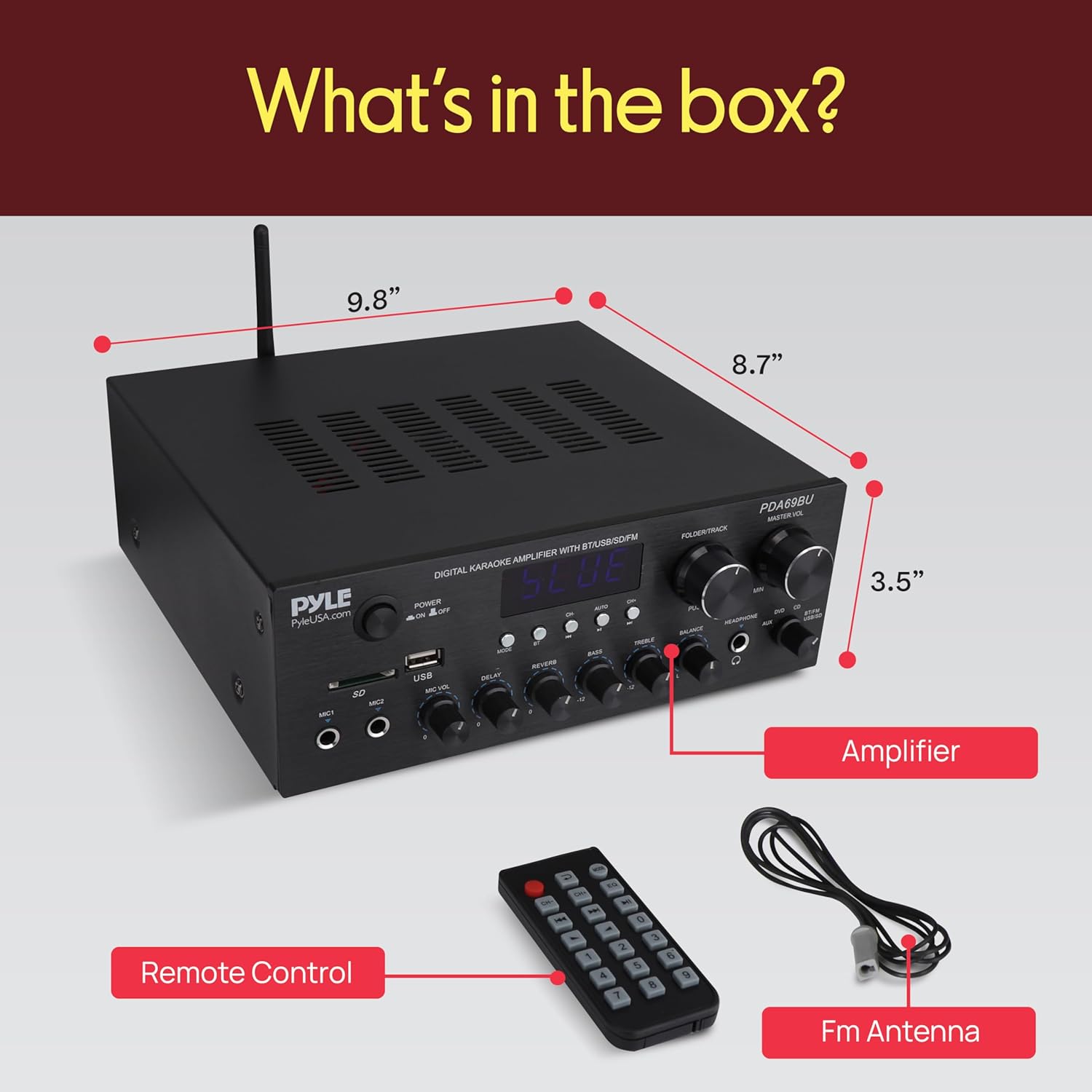
รูปที่ 6: ส่วนประกอบที่รวมอยู่
This image displays the contents of the Pyle PDA69BU package, including the amplifier unit, remote control, and FM antenna.
- ไพล์ PDA69BU สเตอริโอ Ampตัวรับ lifier
- รีโมทคอนโทรล
- เสาอากาศเอฟเอ็ม
การรับประกันและการสนับสนุน
Pyle products typically come with a manufacturer's warranty. For specific warranty details, registration, or technical support, please visit the official Pyle webเว็บไซต์หรือติดต่อฝ่ายบริการลูกค้าของพวกเขา
การสนับสนุนทางออนไลน์: www.pyleusa.com


