1. บทนำ
This manual provides detailed instructions for the installation, operation, and maintenance of your NVX XLOC44X 4-Channel High Voltage Active Line Output Converter. The XLOC44X is designed to integrate aftermarket amplifiers with factory audio systems that lack RCA outputs, converting high-level speaker signals into low-level RCA signals. It features impedance matching, auto turn-on capabilities, and remote level control for enhanced audio system flexibility.
2. ข้อมูลด้านความปลอดภัย
- ควรตัดการเชื่อมต่อขั้วลบของแบตเตอรี่รถยนต์ทุกครั้งก่อนเริ่มการติดตั้ง
- Ensure all wiring is properly routed and secured to prevent damage or interference.
- ห้ามติดตั้งเครื่องในสถานที่ที่มีความร้อนสูง ความชื้น หรือแสงแดดโดยตรง
- ควรใช้สายไฟที่มีขนาดเหมาะสมสำหรับการเชื่อมต่อไฟและสายดินเพื่อป้องกันความร้อนสูงเกินไป
- ปรึกษาผู้ติดตั้งมืออาชีพหากคุณไม่แน่ใจเกี่ยวกับส่วนใดส่วนหนึ่งของกระบวนการติดตั้ง
- ผลิตภัณฑ์นี้ประกอบด้วยสารเคมีที่รัฐแคลิฟอร์เนียทราบว่าก่อให้เกิดมะเร็งและข้อบกพร่องทางการเกิดหรืออันตรายต่อการสืบพันธุ์อื่น ๆ
3. สินค้าหมดview
3.1 คุณสมบัติหลัก
- 4-Channel Speaker Level Inputs | 4-Channel RCA Outputs
- Handles up to 40V (400 watts RMS) input
- Provides up to 9.5 Volts of output
- Auto turn-on via DC offset or Audio detection
- Load selection switch (20, 60, or 20K ohms) to prevent factory stereo shut-down
- Built-in Low Pass Filter (LPF)
- Adjustable Bass Boost (0dB to 12dB)
- Ground Isolation switch (GND, ISO, 200Ω)
- Remote Level Control included
3.2 ส่วนประกอบและการควบคุม
The NVX XLOC44X unit and its included accessories are designed for seamless integration into your vehicle's audio system.

รูปที่ 3.2.1: The NVX XLOC44X Line Output Converter shown with its included remote bass level control. The main unit features various input/output terminals and control switches on its top panel.
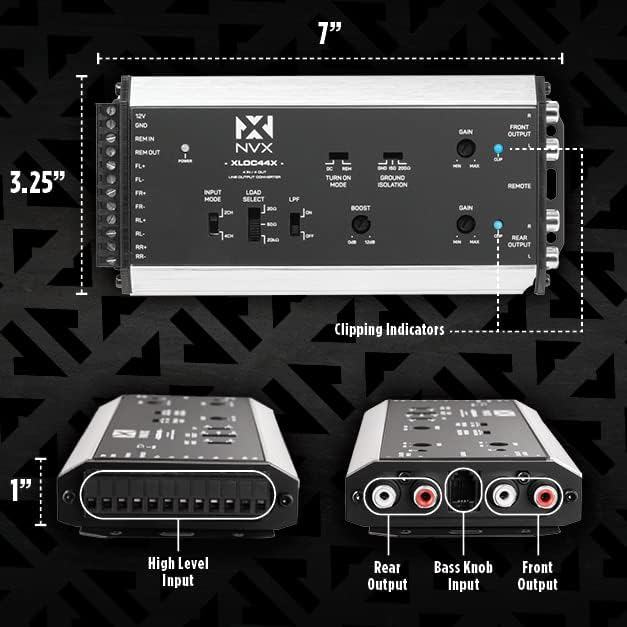
รูปที่ 3.2.2: รายละเอียด view of the NVX XLOC44X showing its dimensions (7 inches long, 3.25 inches wide, 1 inch high) and key labeled components. These include High Level Input terminals, Rear Output RCA jacks, Bass Knob Input, Front Output RCA jacks, and Clipping Indicators.

รูปที่ 3.2.3: The included remote level control knob and its connecting cable. This allows for convenient adjustment of the output level from the driver's seat.

รูปที่ 3.2.4: Mounting screws and a small screwdriver are provided for installation of the XLOC44X unit and the remote level control.
เค้าโครงแผงควบคุม:
- 12V/GND/REM IN/REM OUT: Power and remote turn-on connections.
- FL+/FL-/FR+/FR-/RL+/RL-/RR+/RR-: High-level speaker inputs.
- โหมดอินพุต: Switch for 2CH or 4CH input configuration.
- LOAD SELECT: Switch for 20Ω, 60Ω, or 20KΩ impedance matching.
- กบข.: Low Pass Filter switch (ON/OFF).
- บูสต์: Bass Boost adjustment knob (0dB to 12dB).
- TURN ON MODE: Switch for DC offset or REM (remote) turn-on.
- การแยกพื้นดิน: Switch for GND, ISO, or 200Ω ground isolation.
- GAIN (FRONT/REAR): Output level adjustment knobs.
- CLIP (FRONT/REAR): Clipping indicator LEDs.
- FRONT OUTPUT/REAR OUTPUT: RCA low-level outputs.
- ระยะไกล: Port for the remote level control.
4. การติดตั้ง
การติดตั้งอย่างถูกต้องเป็นสิ่งสำคัญอย่างยิ่งต่อประสิทธิภาพและความปลอดภัยสูงสุด โปรดปฏิบัติตามขั้นตอนเหล่านี้อย่างระมัดระวัง
4.1 Mounting the XLOC44X
- Choose a dry, secure location for the XLOC44X unit, away from direct heat sources or moving parts. Ensure adequate ventilation.
- Use the provided mounting screws to secure the unit to a flat surface.
- Mount the remote level control in an easily accessible location for the driver, using the provided bracket and screws.
4.2 การเชื่อมต่อสายไฟ
All wiring should be done with the vehicle's battery disconnected.
- กำลังไฟ (12V): Connect the 12V terminal of the XLOC44X to a constant +12V power source from the vehicle's battery. Use an appropriate fuse (not included) as close to the battery as possible.
- กราวด์ (GND): Connect the GND terminal to a solid chassis ground point in the vehicle. Ensure a clean, paint-free metal-to-metal connection.
- อินพุตระยะไกล (REM IN): If using the remote turn-on feature from your head unit, connect the REM IN terminal to the head unit's remote output wire. If using DC offset or audio detection, this connection may not be necessary.
- เอาต์พุตระยะไกล (REM OUT): Connect the REM OUT terminal to the remote turn-on input of your aftermarket amplifier(s). This provides a turn-on signal to the amplifier when the XLOC44X powers on.
- High-Level Speaker Inputs (FL+/FL-, FR+/FR-, RL+/RL-, RR+/RR-): Connect the vehicle's factory speaker wires to the corresponding high-level input terminals on the XLOC44X. Ensure correct polarity.
- RCA Outputs (FRONT OUTPUT, REAR OUTPUT): Connect RCA cables from the XLOC44X's FRONT OUTPUT and REAR OUTPUT jacks to the corresponding RCA inputs on your aftermarket ampเครื่องขยายเสียง
- การควบคุมระดับระยะไกล: Connect the remote level control cable to the "REMOTE" port on the XLOC44X.
After all connections are made, reconnect the vehicle's battery and proceed to initial setup.
5. Operation and Initial Setup
Once installed, configure the XLOC44X settings for optimal audio performance.
5.1 Turn-On Mode Selection

รูปที่ 5.1.1: The "TURN ON MODE" switch allows selection between DC offset detection (DC) or remote wire input (REM) for automatic power-on.
- ดีซี: Select this mode if your factory head unit provides a DC offset on the speaker outputs when turned on. The XLOC44X will detect this voltage and turn on automatically.
- เรม: Select this mode if you have connected a dedicated remote turn-on wire from your head unit to the REM IN terminal.
- การตรวจจับเสียง: The XLOC44X can also turn on by detecting an audio signal on the high-level inputs. This is often used when neither DC offset nor a remote wire is available.
5.2 Input Mode and Load Select
- INPUT MODE (2CH/4CH): Set this switch based on the number of high-level input channels you are using. If connecting only front speaker signals to drive all four outputs, select 2CH. If connecting both front and rear speaker signals, select 4CH.
- LOAD SELECT (20Ω, 60Ω, 20KΩ): This switch adjusts the impedance presented to the factory head unit. Experiment with these settings if your factory stereo shuts down or exhibits unusual behavior. Start with 20KΩ, then try 60Ω, and finally 20Ω if necessary. This helps prevent the factory system from detecting an incorrect load and shutting off.
5.3 Ground Isolation
- GROUND ISOLATION (GND, ISO, 200Ω): This switch helps eliminate ground loop noise.
- จีเอ็นดี: Direct ground connection.
- ไอเอสโอ: Isolated ground.
- 200Ω: Ground through a 200-ohm resistor.
5.4 การปรับค่าเกน
- GAIN (FRONT/REAR): These knobs adjust the output level of the RCA signals. Set them to match the input sensitivity of your aftermarket amplifier(s). Start with the gain at minimum, then slowly increase it until the amplifier's input is properly driven without clipping. The CLIP indicators on the XLOC44X will illuminate if the signal is clipping, indicating that the gain is set too high.
5.5 Low Pass Filter (LPF) and Bass Boost

รูปที่ 5.5.1: The LPF switch and BOOST knob. The LPF can be turned ON or OFF, and the Bass Boost can be adjusted from 0dB to 12dB.
- LPF (ON/OFF): If you are sending the output to a subwoofer amplifier, you may want to engage the Low Pass Filter to only pass low frequencies. For full-range speakers, turn the LPF OFF.
- BOOST (0dB-12dB): This knob adjusts the amount of bass boost applied to the signal. Use sparingly and adjust to taste, ensuring the signal does not clip.
5.6 การควบคุมระดับจากระยะไกล

รูปที่ 5.6.1: The RCA output jacks and the dedicated port for the remote bass level control. The remote control allows for convenient adjustment of the output level.
The included remote level control allows you to adjust the output level of the XLOC44X from your listening position. This is particularly useful for controlling subwoofer levels independently.
6. การบำรุงรักษา
The NVX XLOC44X requires minimal maintenance. Keep the unit clean and free from dust and debris. Periodically check all wiring connections to ensure they are secure. Do not use harsh chemicals or abrasive cleaners on the unit.
7 การแก้ไขปัญหา
| ปัญหา | สาเหตุที่เป็นไปได้ | สารละลาย |
|---|---|---|
| No power to XLOC44X or ampชีวิต. | Blown fuse, loose power/ground connection, incorrect turn-on mode. | Check fuse on 12V line. Verify 12V and GND connections are secure. Ensure TURN ON MODE switch is set correctly (DC/REM) or that audio detection is working. |
| ไม่มีเอาต์พุตเสียง | Incorrect input/output connections, amplifier gain too low, XLOC44X gain too low, LPF engaged incorrectly. | Verify all high-level and RCA connections. Adjust XLOC44X and amplifier gain settings. Ensure LPF is OFF for full-range signals. |
| Engine whine or other noise. | ปัญหาลูปกราวด์ | Adjust the GROUND ISOLATION switch (GND, ISO, 200Ω) to find the setting that eliminates the noise. Ensure a good chassis ground connection. |
| Factory stereo shuts down or distorts. | Incorrect load presented to factory head unit. | Adjust the LOAD SELECT switch (20Ω, 60Ω, 20KΩ) to a setting that is compatible with your factory system. |
| เสียงผิดเพี้ยนหรือขาดหาย | Gain set too high, excessive bass boost. | Reduce the GAIN settings on the XLOC44X and/or the amplifier. Reduce the BOOST level. Observe the CLIP indicators on the XLOC44X. |
8. ข้อมูลจำเพาะ
| คุณสมบัติ | ข้อมูลจำเพาะ |
|---|---|
| ช่องใส่ | 4 (High-Level Speaker Inputs) |
| ช่องสัญญาณขาออก | 4 (RCA Low-Level Outputs) |
| อินพุตสูงสุดVoltage | 40 Volts (equivalent to 400 watts RMS) |
| ปริมาณการส่งออกสูงสุดtage | 9.5 โวลต์ |
| Turn-On Modes | DC Offset, Audio Detection, Remote (REM) |
| Load Select Impedance | 20Ω, 60Ω, 20KΩ |
| เพิ่มเสียงเบส | 0dB ถึง 12dB |
| ตัวกรองความถี่ต่ำ (LPF) | สลับเปิด/ปิดได้ |
| การแยกพื้นดิน | GND, ISO, 200Ω |
| ขนาด (กว้าง x ยาว x สูง) | ขนาด 7 x 3.25 x 1 นิ้ว (โดยประมาณ) |
| น้ำหนักสินค้า | 1.08 ปอนด์ |
| ผู้ผลิต | เอ็นวีเอ็กซ์ |
| หมายเลขรุ่น | xloc44x |
9. การรับประกันและการสนับสนุน
For specific warranty information, please refer to the warranty card included with your product or visit the official NVX website. For technical support or further assistance, please contact NVX customer service or visit the NVX Store on Amazon.


