1. บทนำ
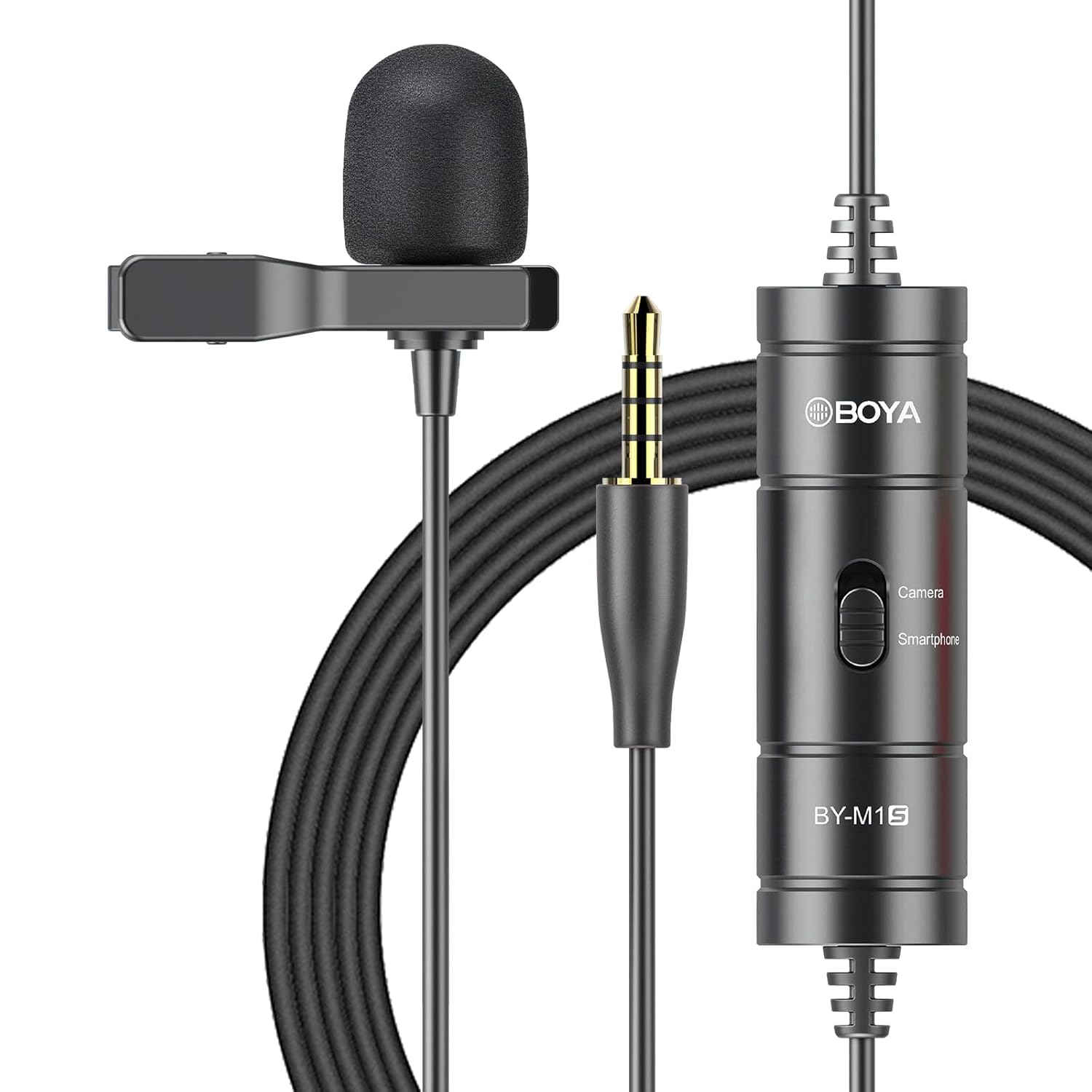
The BOYA BY-M1S is a professional omnidirectional lavalier condenser microphone designed for high-quality audio recording. It is compatible with a wide range of devices, including smartphones, DSLR cameras, camcorders, audio recorders, and personal computers. This manual provides detailed instructions for setting up, operating, and maintaining your BY-M1S microphone.
2. คุณสมบัติของผลิตภัณฑ์
- แคปซูลแบบรอบทิศทาง: Captures broadcast-quality sound from a 360-degree range.
- ปลั๊กแอนด์เพลย์: No batteries or drivers required for most smartphone applications.
- สายยาว: Features a 6-meter (20-foot) cable for extended reach.
- ความเข้ากันได้กว้าง: Supports smartphones, DSLR cameras, camcorders, audio recorders, tablets, and laptops.
- Device Mode Switch: Easily switch between "Smartphone" and "Camera" modes.
- อุปกรณ์เสริมที่รวมอยู่: Comes with a metal clip for secure attachment and a foam windscreen to reduce wind noise.

3. เนื้อหาบรรจุภัณฑ์
The BOYA BY-M1S package includes the following items:
- BY-M1S Lavalier Microphone
- คลิปหนีบปก
- โฟมกระจกบังลม
- กระเป๋าสำหรับพกพา (อาจแตกต่างกันไปตามภูมิภาค)
4. คำแนะนำในการตั้งค่า
4.1 การติดตั้งไมโครโฟน
- Attach the metal clip to the microphone body.
- Securely clip the microphone to your clothing, approximately 15-20 cm (6-8 inches) from your mouth, for optimal sound capture.
- Place the foam windscreen over the microphone capsule to reduce plosives and wind noise.

4.2 การเชื่อมต่อกับอุปกรณ์
The BY-M1S features a 3.5mm TRRS connector for broad compatibility.
- สำหรับสมาร์ทโฟน/แท็บเล็ต:
Plug the 3.5mm connector directly into your device's headphone/microphone jack. Ensure the switch on the microphone's control module is set to "Smartphone" mode. For iOS devices without a 3.5mm jack, a 3.5mm to Lightning adapter (not included) is required.
- For DSLR Cameras/Camcorders/Audio Recorders/PCs:
Plug the 3.5mm connector into the microphone input jack of your device. Set the switch on the microphone's control module to "Camera" mode. For PCs with separate headphone and microphone jacks, you may need a 3.5mm TRRS to TRS adapter (not included).

5. คู่มือการใช้งาน
การเลือกโหมด 5.1
The control module on the microphone cable features a switch to select the appropriate operating mode:
- Smartphone Mode: Use this setting when connecting to smartphones, tablets, or other devices that use a TRRS input.
- โหมดกล้อง: Use this setting when connecting to DSLR cameras, camcorders, audio recorders, or other devices that use a TRS input.
Always ensure the switch is set to the correct mode for your recording device to prevent audio issues.
5.2 Recording Tips
- ตำแหน่งการวางไมโครโฟน: For clear audio, position the microphone approximately 6-8 inches (15-20 cm) from the sound source.
- สิ่งแวดล้อม: Record in a quiet environment to minimize background noise. The omnidirectional pattern picks up sound from all directions, including ambient noise.
- การจัดการสายเคเบิล: Use the included cable tie to manage the extra-long cable and prevent tangles or accidental disconnections.
- การติดตาม: If your recording device allows, monitor your audio with headphones during recording to ensure optimal sound levels and quality.
6. การบำรุงรักษา
- การทำความสะอาด: ใช้ผ้าแห้งเนื้อนุ่มเช็ดทำความสะอาดตัวไมโครโฟนและสายไมโครโฟน ห้ามใช้น้ำยาทำความสะอาดหรือสารละลายใดๆ
- พื้นที่จัดเก็บ: Store the microphone in its carrying pouch when not in use to protect it from dust and physical damage. Avoid extreme temperatures and humidity.
- การดูแลสายเคเบิล: Do not sharply bend or pull the cable. Coil it loosely for storage.
7 การแก้ไขปัญหา
| ปัญหา | สาเหตุที่เป็นไปได้ | สารละลาย |
|---|---|---|
| ไม่มีเสียงหรือเสียงเบา |
|
|
| คุณภาพเสียงไม่ดี (เช่น เสียงอ muffled, เสียงผิดเพี้ยน) |
|
|
| Microphone not recognized by iOS device. |
|
|
8. ข้อมูลจำเพาะ
| ข้อมูลจำเพาะ | รายละเอียด |
|---|---|
| รูปแบบขั้ว | รอบทิศทาง |
| การตอบสนองความถี่ | ความถี่ 18 กิโลเฮิรตซ์ |
| ความไวเสียง | 30 เดซิเบล |
| อัตราส่วนสัญญาณต่อเสียงรบกวน | 78 เดซิเบล |
| อิมพีแดนซ์ | 1000 โอห์ม |
| ความยาวสายเคเบิล | 6 เมตร (20 ฟุต) |
| ประเภทขั้วต่อ | 3.5 mm TRRS Jack |
| แหล่งพลังงาน | Battery Powered (no internal battery, powered by device in smartphone mode, or external battery for camera mode if applicable) |
| น้ำหนักสินค้า | 68 กรัม |
| ขนาด (กว้าง x ยาว x สูง) | 12 x 6 x 15 Centimeters (Product Dimensions) |
9. การรับประกันและการสนับสนุน
BOYA provides a รับประกันหนึ่งปี for the BY-M1S microphone. This warranty covers manufacturing defects and ensures product quality.
For technical support, warranty claims, or any questions regarding your BOYA BY-M1S microphone, please contact BOYA customer service through their official website or the retailer where the product was purchased. Please have your purchase receipt and product model number (BY-M1S) available when contacting support.