1. บทนำ
Thank you for choosing the Jadfezy WiFi Action Camera. This camera is designed to capture high-quality videos and photos of your adventures, whether on land or underwater. With its compact design, 1080P video recording, 12MP photo capabilities, and built-in WiFi, it is an ideal companion for sports enthusiasts and travelers. Please read this manual carefully before use to ensure proper operation and to maximize the camera's performance.
2. ข้อมูลด้านความปลอดภัย
- อย่าตั้งกล้องไว้ในที่ที่มีอุณหภูมิสูงหรือต่ำเกินไป หรือโดนแสงแดดโดยตรงเป็นเวลานาน
- ตรวจสอบให้แน่ใจว่าเคสกันน้ำได้รับการปิดผนึกอย่างถูกต้องก่อนที่จะจุ่มกล้องลงในน้ำ
- Use only specified batteries and chargers. Improper use may lead to fire, explosion, or other hazards.
- เก็บกล้องและอุปกรณ์เสริมให้พ้นมือเด็ก
- หลีกเลี่ยงการทำตกหรือให้กล้องได้รับแรงกระแทกรุนแรง
- อย่าพยายามถอดประกอบหรือดัดแปลงกล้อง
3. เนื้อหาบรรจุภัณฑ์
แพ็คเกจมาตรฐานประกอบด้วยรายการต่อไปนี้:
- Jadfezy 1080P Action Camera
- เคสกันน้ำ
- 2 x 1050mAh Rechargeable Lithium-Ion Batteries
- Helmet Mounting Kit
- Bicycle Mounting Kit
- สายชาร์จ USB
- Various Mounting Accessories and Straps

Image: Contents of the Jadfezy Action Camera accessories kit, including the camera, waterproof housing, two batteries, various mounts, and a USB cable.
4. สินค้าหมดview
The Jadfezy Action Camera features a compact design with a 2-inch LCD screen for easy viewing and navigation. It is capable of recording Ultra HD 1080P video at 30 frames per second and capturing 12-megapixel still photos. The camera comes with a durable waterproof case, allowing for underwater use up to 30 meters (98 feet).

Image: The Jadfezy WiFi Action Camera shown with its transparent waterproof case, two rechargeable batteries, and a display screen illustrating a skydiving scene.

ภาพ: โอเวอร์view of the Jadfezy Action Camera highlighting its key features: FHD 1080P/30FPS video, Wi-Fi connectivity, Time-lapse/Loop video modes, 2x 1050mAh batteries, 30m/98ft waterproof capability, and a wide-angle lens.
5. การตั้งค่า
5.1. การติดตั้งและการชาร์จแบตเตอรี่
The camera uses 1050mAh rechargeable Lithium-Ion batteries. Ensure batteries are fully charged before first use.
- เปิดฝาช่องใส่แบตเตอรี่ที่ด้านล่างของกล้อง
- Insert the battery according to the polarity indicators.
- ปิดฝาช่องใส่แบตเตอรี่ให้แน่น
- Connect the camera to a USB power source using the provided USB cable to charge. The charging indicator will show the charging status.

Image: Two Jadfezy rechargeable Lithium-Ion batteries, highlighting their compact size and design.
5.2. การใส่การ์ด Micro SD
A Micro SD card (not included) is required for storing videos and photos. The camera supports Micro SD cards up to 32GB (though some users report success with 64GB cards, 32GB is officially supported).
- หาช่องเสียบการ์ด Micro SD ที่ด้านข้างของกล้อง
- ใส่การ์ด Micro SD โดยให้หน้าสัมผัสสีทองหันไปทางด้านหลังของกล้องจนกระทั่งล็อคเข้าที่
- ในการถอด ให้ดันการ์ดเข้าไปเบาๆ จนกระทั่งการ์ดเด้งออกมา
5.3 การใช้งานเคสกันน้ำ
The waterproof case allows the camera to be used underwater up to 30 meters (98 feet).
- ตรวจสอบให้แน่ใจว่ากล้องแห้งสนิทก่อนใส่ลงในเคสกันน้ำ
- Place the camera firmly into the case.
- Close the latch securely to ensure a watertight seal.
- Before first use in water, it is recommended to test the waterproof case without the camera inside to ensure no leaks are present.

Image: The Jadfezy Action Camera enclosed in its waterproof case, submerged in clear blue water with colorful fish and coral, demonstrating its 30m/98ft waterproof capability.
5.4. การติดตั้งอุปกรณ์ยึด
The camera comes with various mounts for different activities, including helmet and bicycle mounting kits.
- Identify the appropriate mount for your intended use (e.g., helmet mount, bicycle mount).
- Attach the camera (with or without the waterproof case, depending on the activity) to the chosen mount using the provided screws and adapters.
- Securely fasten the mount to your helmet, bicycle, or other desired surface. Ensure all connections are tight to prevent the camera from falling during activity.
6. การใช้งานกล้อง
6.1. เปิด/ปิดเครื่อง
- To power on: Press and hold the Power/Mode button for a few seconds.
- วิธีปิดเครื่อง: กดปุ่มเปิด/ปิดค้างไว้จนกว่าหน้าจอจะดับลง
6.2. การเลือกโหมด
Press the Power/Mode button repeatedly to cycle through different modes: Video Recording, Photo Mode, Playback Mode, and Settings.
6.3. การบันทึกวิดีโอ
- In Video Recording mode, press the OK button to start recording. A red indicator light will flash, and a timer will appear on the screen.
- กดปุ่ม OK อีกครั้งเพื่อหยุดการบันทึก
6.4. การจับภาพ
- In Photo Mode, press the OK button to take a photo.
6.5. การเล่น
- In Playback Mode, use the Up/Down buttons to navigate through your recorded videos and photos.
- Press the OK button to play a video or view ภาพถ่ายแบบเต็มหน้าจอ
6.6. WiFi Connection and App Control
The built-in WiFi allows you to connect the camera to your smartphone for remote control, live view, และ file โอน.
- Download the designated app (refer to the camera's screen or packaging for the app name) from your smartphone's app store.
- On the camera, enter WiFi mode (usually by pressing a dedicated WiFi button or cycling through modes). The WiFi icon will appear on the screen.
- On your smartphone, go to WiFi settings and connect to the camera's WiFi network (SSID and password will be displayed on the camera screen).
- Open the app on your smartphone. You can now control the camera, view อยู่ footagและดาวน์โหลด files. The WiFi signal range is up to 33 feet.

ภาพ: สมาร์ทโฟนที่แสดงภาพสด view from the Jadfezy Action Camera, with a skier in the background, illustrating the camera's WiFi connectivity feature for remote control and sharing.
6.7. Special Features: Time-Lapse, Dash Cam, Burst Photo
The camera supports various shooting modes to enhance your recording experience.
- เวลาที่ล่วงเลย: ถ่ายภาพต่อเนื่องเป็นชุดในช่วงเวลาที่กำหนด เพื่อสร้างวิดีโอแบบไทม์แลปส์
- กล้องติดรถยนต์: Functions as a car dashboard camera, often with loop recording.
- ถ่ายภาพรัวๆ: Take multiple photos in quick succession, ideal for fast-moving action.
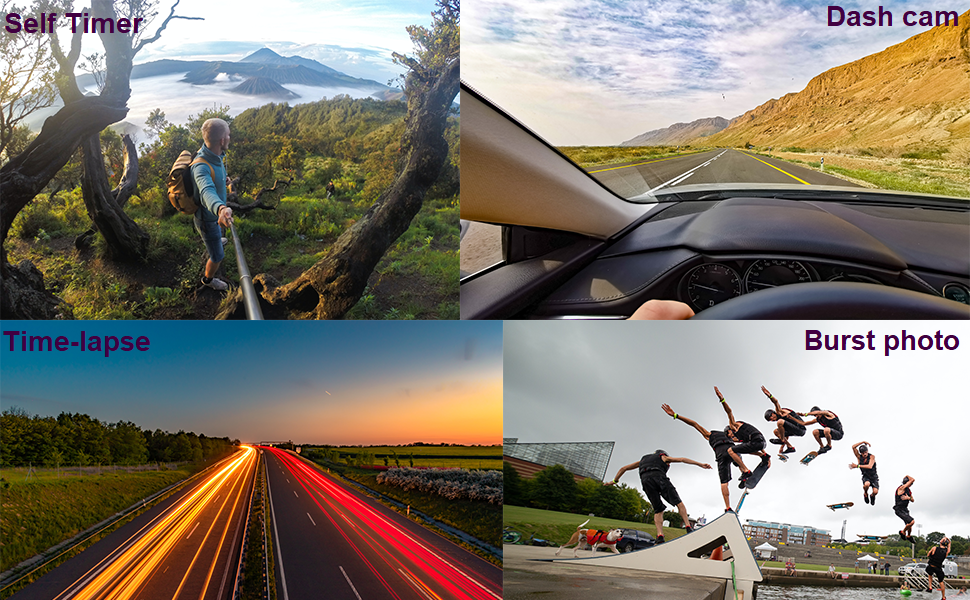
Image: Four panels demonstrating the camera's versatile features: a self-timer shot of a person on a mountain, a dash cam view from inside a car, a time-lapse image of city lights at night, and a burst photo sequence of a skateboarder.
7. การบำรุงรักษา
- การทำความสะอาด: ใช้ผ้าเนื้อนุ่มที่ไม่เป็นขุยเช็ดทำความสะอาดเลนส์กล้องและหน้าจอ สำหรับเคสกันน้ำ ให้ล้างด้วยน้ำจืดหลังการใช้งานในน้ำเค็ม และปล่อยให้แห้งเองตามธรรมชาติ
- การดูแลแบตเตอรี่ Store batteries in a cool, dry place. If not using the camera for an extended period, remove the batteries.
- พื้นที่จัดเก็บ: เก็บกล้องไว้ในที่แห้ง ปราศจากฝุ่น และหลีกเลี่ยงแสงแดดโดยตรงและอุณหภูมิที่สูงหรือต่ำเกินไป
8 การแก้ไขปัญหา
If you encounter issues with your Jadfezy Action Camera, please refer to the following common solutions:
| ปัญหา | วิธีแก้ปัญหาที่เป็นไปได้ |
|---|---|
| กล้องไม่สามารถเปิดได้ | ตรวจสอบให้แน่ใจว่าแบตเตอรี่ชาร์จเต็มแล้วและใส่ถูกต้อง ลองใช้แบตเตอรี่ที่ชาร์จเต็มแล้วก้อนอื่นดู |
| ไม่สามารถบันทึกวิดีโอหรือถ่ายภาพได้ | Check if a Micro SD card is inserted and has sufficient free space. Ensure the card is formatted correctly (FAT32 recommended). The camera may stop recording after 15-minute segments; ensure loop recording is enabled if continuous recording is desired. |
| คุณภาพวิดีโอ/ภาพถ่ายต่ำ | Ensure the lens is clean. Check the selected resolution settings in the camera menu. Ensure adequate lighting conditions. |
| ปัญหาการเชื่อมต่อ WiFi | Ensure the camera's WiFi is enabled. Restart both the camera and your smartphone. Ensure you are within the 33-foot WiFi range. Check that the correct app is installed and updated. |
| น้ำรั่วในเคสกันน้ำ | Ensure the case is properly sealed and the latch is fully closed. Check the rubber gasket for any debris or damage. Replace the gasket if necessary. |
9. ข้อมูลจำเพาะ
| คุณสมบัติ | รายละเอียด |
|---|---|
| ยี่ห้อ | จาดเฟซี |
| หมายเลขรุ่น | J-03series |
| ความละเอียดวิดีโอ | Up to 1080P / 30fps |
| ความละเอียดของภาพ | 12MP |
| ขนาดหน้าจอ | 2 นิ้ว |
| ความลึกของน้ำ | Up to 30m (98ft) with waterproof case |
| ประเภทแบตเตอรี่ | แบตเตอรี่ลิเธียมไอออน 2 x 1050mAh (รวมอยู่ในชุด) |
| พื้นที่จัดเก็บ | Micro SD (up to 32GB recommended) |
| การเชื่อมต่อ | ไวไฟ, ยูเอสบี |
| ขนาด | 2.35 x 1.55 x 1.2 นิ้ว |
| น้ำหนักสินค้า | 12.3 ออนซ์ |
10. การรับประกันและการสนับสนุน
สำหรับข้อมูลการรับประกันและการสนับสนุนทางเทคนิค โปรดดูเอกสารที่แนบมาพร้อมกับสินค้าที่ซื้อ หรือติดต่อผู้ขายโดยตรง โปรดเก็บหลักฐานการซื้อไว้เพื่อใช้ในการเคลมประกัน


