การแนะนำ
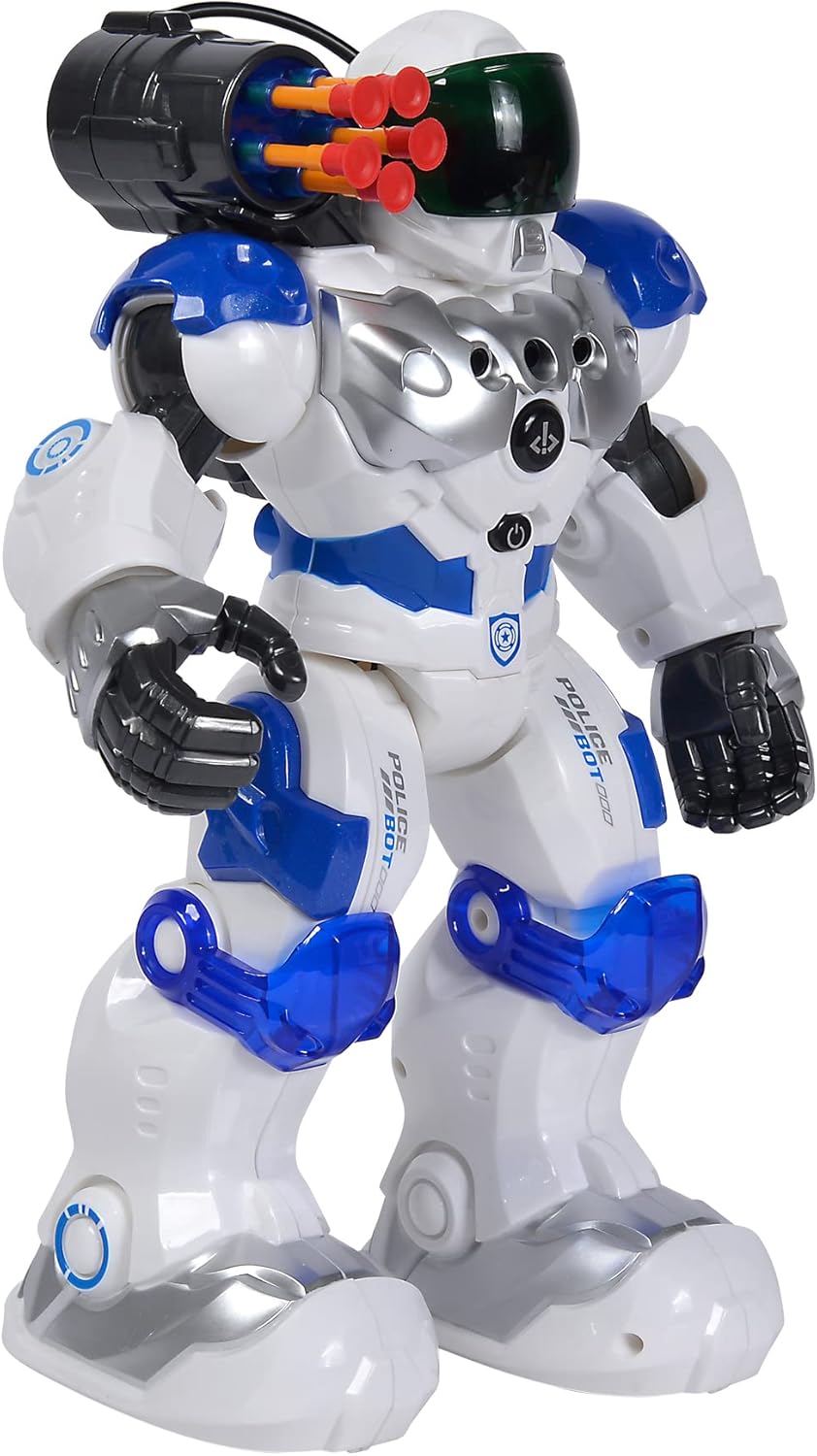
This manual provides comprehensive instructions for the safe and effective operation of your Simba Planet Fighter Robot, Model 108042509. Please read this manual thoroughly before use and retain it for future reference. This robot features infrared remote control, gesture control, light and sound effects, and a shooting function.
ข้อมูลด้านความปลอดภัยที่สำคัญ
WARNING: Not suitable for children under 3 years due to small parts. Choking hazard.
- ควรดูแลเด็กๆ ตลอดเวลาในระหว่างการเล่น
- Do not aim the shooting mechanism at eyes or face.
- เก็บให้ห่างจากน้ำและความชื้น
- Do not attempt to disassemble or modify the robot or remote control.
- ตรวจสอบให้แน่ใจว่าใส่แบตเตอรี่ในขั้วที่ถูกต้อง
- ถอดแบตเตอรี่ออกหากไม่ได้ใช้งานผลิตภัณฑ์เป็นเวลานาน
เนื้อหาแพ็คเกจ
ตรวจสอบว่ามีสินค้าทั้งหมดที่ระบุไว้ด้านล่างอยู่ในแพ็คเกจของคุณ:
- Simba Planet Fighter Robot (Model 108042509)
- รีโมทคอนโทรลแบบอินฟราเรด
- USB Cable (for potential charging or data, specific function not detailed in specifications)
- Soft Darts/Arrows (for shooting function)
- คู่มือการใช้งาน (เอกสารนี้)

การตั้งค่า
1. Battery Installation (Robot)
The robot requires 3 AAA batteries (not included).
- Locate the battery compartment on the back or bottom of the robot.
- Open the battery compartment cover using a screwdriver if necessary.
- Insert 3 AAA batteries according to the polarity markings (+/-).
- ปิดฝาช่องใส่แบตเตอรี่ให้แน่น

2. การติดตั้งแบตเตอรี่ (รีโมทคอนโทรล)
The remote control typically requires 2 AA batteries (not included). Please check the remote control's battery compartment for specific requirements.
- ค้นหาช่องใส่แบตเตอรี่ที่ด้านหลังของรีโมทคอนโทรล
- เปิดฝาช่องใส่แบตเตอรี่
- Insert the required batteries according to the polarity markings (+/-).
- ปิดฝาช่องใส่แบตเตอรี่ให้แน่น
3. เปิดเครื่อง
After installing batteries, turn on the robot using the power switch, usually located on its back or chest. Turn on the remote control using its power switch.
คำแนะนำการใช้งาน
ฟังก์ชั่นการควบคุมระยะไกล
The infrared remote control allows you to command the robot's movements and actions. Ensure the remote is pointed towards the robot for optimal signal transmission.
- การควบคุมการเคลื่อนไหว: Use the directional buttons (Forward, Backward, Turn Left, Turn Right) to navigate the robot.
- Slide Movement: Specific buttons may allow the robot to slide forward or backward.
- Run/Dance: Activate pre-programmed running or dancing sequences.
- ฟังก์ชั่นการถ่ายภาพ: Press the "SHOOT" button to fire the soft darts from the robot's shoulder-mounted launcher. Ensure darts are loaded correctly.
- แสงและเสียง: Buttons for activating or deactivating the robot's visor light and various sound effects.
- ฟังก์ชั่นโปรแกรม: Some models allow programming a sequence of movements. Refer to the remote's specific button layout for programming instructions.
- การควบคุมระดับเสียง: Adjust the robot's sound volume.
การควบคุมด้วยท่าทาง
The robot can respond to hand gestures. Specific sensors on the robot detect hand movements to initiate actions such as moving forward or turning. Experiment with different hand motions in front of the robot's sensors to discover its gesture-controlled responses.
คุณสมบัติหลัก
- รีโมทคอนโทรลอินฟราเรด: Full control over movement and actions.
- การควบคุมด้วยท่าทาง: Responds to hand movements for interactive play.
- ฟังก์ชั่นการถ่ายภาพ: Fires soft darts from a shoulder-mounted launcher.
- เอฟเฟกต์แสงและเสียง: Features a light-up visor and various robotic sounds.
- Multiple Movement Modes: Capable of driving, running, and dancing.
- โครงสร้างทนทาน: Made from plastic, designed for active play.

การซ่อมบำรุง
- การทำความสะอาด: เช็ดทำความสะอาดหุ่นยนต์และรีโมทคอนโทรลด้วยผ้าแห้งเนื้อนุ่ม ห้ามใช้สารเคมีรุนแรงหรือน้ำยาทำความสะอาดที่มีฤทธิ์กัดกร่อน
- การดูแลแบตเตอรี่ Remove batteries from both the robot and remote control if they will not be used for an extended period to prevent leakage.
- พื้นที่จัดเก็บ: Store the robot and its accessories in a cool, dry place, away from direct sunlight and extreme temperatures.
การแก้ไขปัญหา
| ปัญหา | สาเหตุที่เป็นไปได้ | สารละลาย |
|---|---|---|
| หุ่นยนต์ไม่เปิด | แบตเตอรี่หมดหรือติดตั้งไม่ถูกต้อง | ตรวจสอบขั้วแบตเตอรี่และเปลี่ยนแบตเตอรี่ใหม่ |
| รีโมทคอนโทรลไม่ตอบสนอง | Remote batteries are dead or robot is out of range/line of sight. | Replace remote batteries. Ensure remote is pointed at the robot within effective range. |
| Shooting function not working. | Darts not loaded correctly or mechanism jammed. | Ensure darts are fully inserted. Check for any obstructions in the launcher. |
| Robot moves erratically or not as expected. | แบตเตอรี่อ่อนหรือมีสัญญาณรบกวน | Replace batteries. Move away from other infrared or radio-controlled devices. |
ข้อมูลจำเพาะ
| คุณสมบัติ | รายละเอียด |
|---|---|
| หมายเลขรุ่น | 108042509 |
| ยี่ห้อ | ซิมบ้า |
| ขนาด (กว้าง x ยาว x สูง) | 11 x 21 x 31.5 ซม. |
| น้ำหนัก | 1.34 กก. |
| อายุที่แนะนำ | 5 ปีขึ้นไป |
| ประเภทแบตเตอรี่หุ่นยนต์ | แบตเตอรี่ AAA 3 ก้อน (ไม่รวม) |
| ประเภทแบตเตอรี่รีโมทคอนโทรล | 2 x AA batteries (not included, typical for similar remotes) |
| วัสดุหลัก | พลาสติก |
| วิธีการควบคุม | Infrared Remote Control, Gesture Control |
| คุณสมบัติ | Light, Sound, Shooting Function, Various Movement Functions |
การรับประกันและการสนับสนุน
For warranty information and customer support, please refer to the documentation provided at the time of purchase or contact your retailer. Simba products are designed for quality and durability, and support is available for manufacturing defects.
For further assistance, please visit the official Simba webเว็บไซต์หรือติดต่อฝ่ายบริการลูกค้าของพวกเขา


