สินค้าเกินview
The blurams A31 Indoor Wi-Fi Camera is a versatile security solution designed for indoor monitoring. It offers high-resolution video, comprehensive coverage, and smart detection features to keep your home secure and connected.

The blurams A31 camera, shown next to a smartphone displaying its live feed, highlights its compact design and monitoring capabilities.

โอเวอร์view of the blurams Wi-Fi Camera's key features, including dual-band Wi-Fi, AI detection, 2K resolution, pan/tilt functionality, and various security options.
คุณสมบัติหลัก:
- 360 °พาโนรามา View & 2K High-Quality Video: Captures clear video day and night with up to 7 meters night vision. Offers 360° horizontal and 95° vertical rotation for full room coverage.
- Intelligent AI Detection & Instant Alerts: Automatically tracks movement and sends instant alerts for human, motion, or abnormal sound detection. Records alert videos to the cloud.
- การบูรณาการอัจฉริยะ: Compatible with Amazon Alexa, Google Assistant, and IFTTT for voice control and smart home automation.
- Enhanced blurams App: อนุญาตให้ถ่ายทอดสด viewing of up to four cameras simultaneously, video sharing with family members, and two-way audio communication.
- Flexible Storage & Privacy Protection: Supports 24/7 CVR cloud recording and up to 128 GB local storage via microSD card (not included). Features a privacy mode to disable recording.
เนื้อหาแพ็คเกจ
โปรดตรวจสอบว่าบรรจุภัณฑ์มีส่วนประกอบทั้งหมด:
- blurams A31 Indoor Wi-Fi Camera
- สายไฟ
- Charging Head (Power Adapter)
- คู่มือการใช้งาน (เอกสารนี้)
- ชุดติดตั้ง
คู่มือการติดตั้ง
1. การเปิดกล้อง
- Connect the provided power cable to the camera's power port.
- Plug the charging head into a standard electrical outlet.
- Wait for the camera's indicator light to show a stable status, indicating it is ready for setup.
2. Downloading and Installing the blurams App
The blurams app is essential for controlling and managing your camera. It is available for both iOS and Android devices.


ค้นหา "blurams" in your device's app store and follow the installation prompts.
3. การเชื่อมต่อกับ Wi-Fi
- Open the blurams app and create an account or log in.
- แตะไอคอน "+" เพื่อเพิ่มอุปกรณ์ใหม่
- Follow the on-screen instructions to connect your camera to your home Wi-Fi network. The camera supports both 2.4GHz and 5GHz Wi-Fi bands.
- Ensure your Wi-Fi signal is strong in the camera's intended location for optimal performance.
คำแนะนำการใช้งาน
1. สด View และการควบคุมแพน/เอียง
Access the live video feed and control the camera's movement directly from the blurams app.
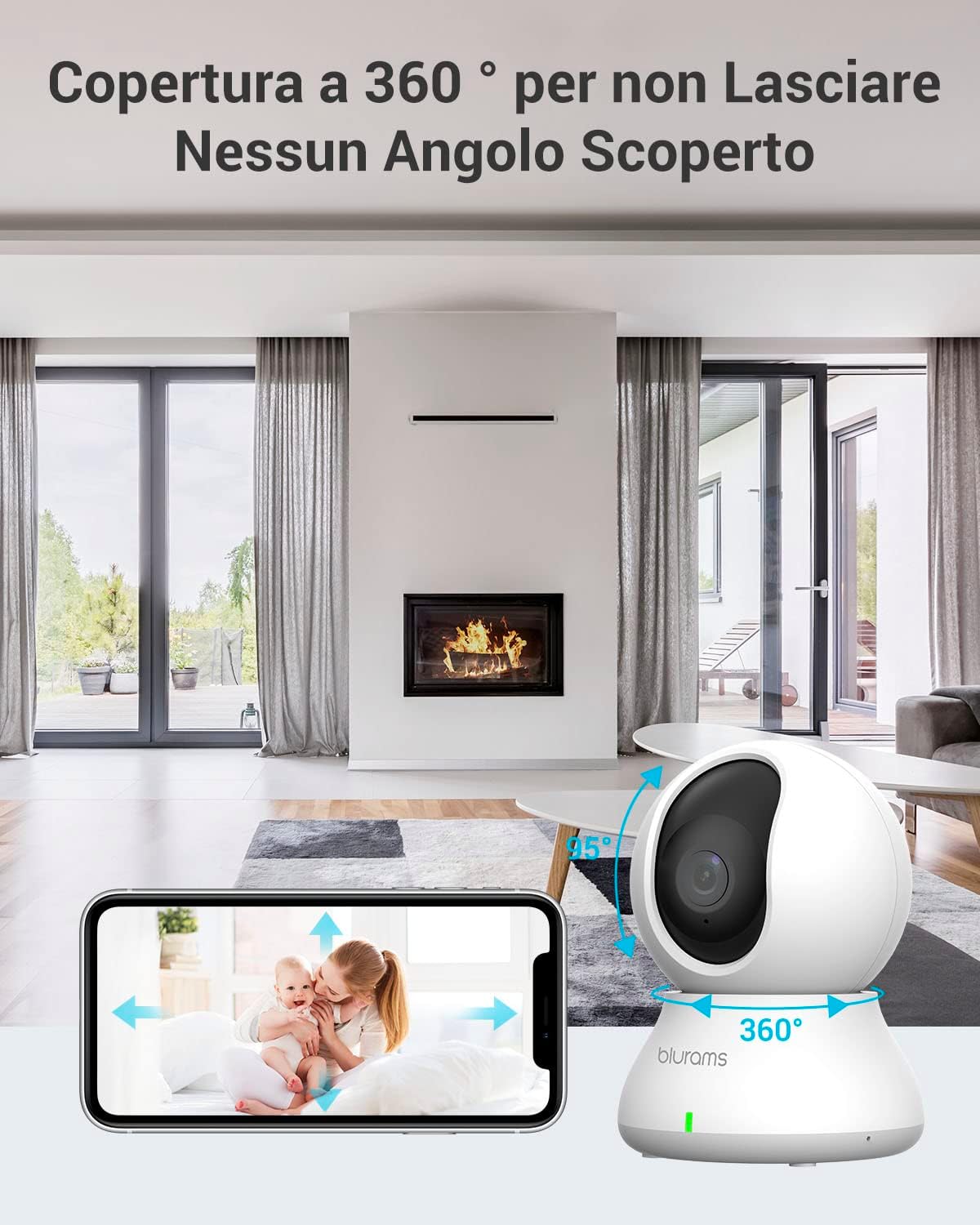
The camera offers 360° horizontal and 95° vertical rotation, allowing comprehensive coverage of your indoor space, controllable via the app.
- Open the blurams app and select your camera from the device list.
- The live feed will appear. Use the on-screen joystick or swipe gestures to pan (horizontal) and tilt (vertical) the camera lens.
- คุณสามารถทำได้ view up to 4 cameras simultaneously within the app.
2. เสียงสองทาง
Communicate with people or pets in the camera's vicinity using the two-way audio feature.

The two-way audio function allows you to speak and listen through the camera, providing real-time communication.
- ขณะถ่ายทอดสด view, tap the microphone icon to speak through the camera.
- แตะไอคอนลำโพงเพื่อฟังเสียงจากสภาพแวดล้อมของกล้อง
3. การตรวจจับการเคลื่อนไหวและการแจ้งเตือน
The camera can detect various types of motion and send instant notifications to your phone.

The camera's intelligent AI can differentiate between human and animal motion, sending specific alerts to your device.
- การตรวจจับเอไอ: The camera can identify human movement, general motion, and abnormal sounds.
- การติดตามการเคลื่อนไหว: When motion is detected, the camera can automatically track the moving object.
- แจ้งเตือนทันที: Receive push notifications on your smartphone when an event is detected.
- โซนกิจกรรมที่กำหนดเอง: กำหนดพื้นที่เฉพาะภายในกล้อง view to focus detection and reduce false alarms. Adjust sensitivity levels (Low, Normal, High) as needed.

Customize activity zones to monitor specific areas and adjust sensitivity to prevent unnecessary alerts.
4. การบันทึกและจัดเก็บข้อมูล
The blurams camera offers flexible recording and storage options.

Choose between secure cloud storage or local storage via a microSD card to keep your recordings safe.
- การเก็บข้อมูลบนคลาวด์: Supports 24/7 Continuous Video Recording (CVR) to the cloud. This prevents loss of footage due to physical damage to a memory card.
- การจัดเก็บข้อมูลภายในเครื่อง: Supports up to a 128 GB microSD card (not included) for local recording.
- Recordings can be easily searched by time, event type, or camera name within the app.
5. โหมดความเป็นส่วนตัว
Activate privacy mode to temporarily stop recording and disable the camera's lens.

The privacy mode allows you to physically retract the camera lens or disable it via the app, ensuring your privacy when needed.
- You can activate privacy mode through the blurams app.
- Alternatively, you can manually move the lens upwards to interrupt recording.
การซ่อมบำรุง
Proper maintenance ensures the longevity and optimal performance of your blurams camera.
- การทำความสะอาด: ใช้ผ้าแห้งเนื้อนุ่มเช็ดทำความสะอาดเลนส์และตัวกล้อง หลีกเลี่ยงการใช้น้ำยาทำความสะอาดหรือวัสดุที่มีฤทธิ์กัดกร่อนซึ่งอาจทำให้พื้นผิวเสียหายได้
- การจัดวาง: Ensure the camera is placed in a stable location, away from direct sunlight, excessive heat, or moisture.
- การอัปเดตซอฟต์แวร์: Regularly check the blurams app for firmware updates. Keeping your camera's software up-to-date ensures access to the latest features and security enhancements.
- การจัดการพื้นที่เก็บข้อมูล: If using a microSD card, periodically check its status and format it if necessary to maintain recording efficiency. Back up important footage ก่อนการจัดรูปแบบ
การแก้ไขปัญหา
If you encounter issues with your blurams camera, refer to the following common solutions:
| ปัญหา | สาเหตุที่เป็นไปได้ | สารละลาย |
|---|---|---|
| กล้องออฟไลน์/ไม่สามารถเชื่อมต่อ Wi-Fi ได้ | สัญญาณ Wi-Fi อ่อน, รหัสผ่าน Wi-Fi ไม่ถูกต้อง, ปัญหาเกี่ยวกับเราเตอร์, กล้องอยู่ห่างจากเราเตอร์มากเกินไป |
|
| คุณภาพวิดีโอไม่ดี | Insufficient lighting, dirty lens, weak internet connection. |
|
| ไม่มีการแจ้งเตือนการตรวจจับการเคลื่อนไหว | Detection settings disabled, sensitivity too low, activity zones not configured correctly. |
|
| เสียงสองทางไม่ทำงาน | Microphone/speaker disabled in app, volume too low, network latency. |
|
ข้อมูลจำเพาะ
| คุณสมบัติ | รายละเอียด |
|---|---|
| หมายเลขรุ่น | เอ31 |
| สภาพแวดล้อมการใช้งาน | ในร่ม |
| ความละเอียดในการจับภาพวิดีโอ | 1440p (2K) |
| ความละเอียดวิดีโอที่มีประสิทธิภาพ | 1440 |
| อัตราเฟรม | 15 เฟรมต่อวินาที |
| Viewอิงแองเกิล | 360 องศา (แพน/เอียง) |
| ช่วงการมองเห็นตอนกลางคืน | 7 เมตร |
| โปรโตคอลการเชื่อมต่อ | ไวไฟ (2.4GHz/5GHz) |
| แหล่งพลังงาน | เครื่องใช้ไฟฟ้าแบบมีสาย (5 โวลต์, 7 วัตต์) |
| อุปกรณ์ที่รองรับ | Tablets, Smartphones, Laptops, Televisions |
| ประเภทตัวควบคุม | IFTTT, อเมซอน อเล็กซา |
| ประเภทการติดตั้ง | Ceiling, Freestanding |
| สี | สีขาว |
| วัสดุ | พลาสติก |
| ขนาดรายการ (LxWxH) | 22.4 x 22.4 x 41.1 cm (Product: 22.35 x 22.35 x 41.15 cm) |
| น้ำหนักสินค้า | 340 กรัม |
การรับประกันและการสนับสนุน
ข้อมูลการรับประกัน
Specific warranty details for the blurams A31 Indoor Wi-Fi Camera are typically provided with your purchase documentation. Please refer to the warranty card or information included in your product packaging for terms and conditions.
การสนับสนุนลูกค้า
For technical assistance, troubleshooting, or any product-related inquiries, please contact blurams customer support. You can find contact information on the official blurams website or through the blurams app.
blurams is committed to providing high-quality products and attentive service, and they are pleased to resolve any issues you may encounter.


