1. บทนำ
Thank you for choosing the BONTEC Dual Monitor Desk Mount. This manual provides detailed instructions for the safe and efficient installation, operation, and maintenance of your new monitor mount. Please read this manual thoroughly before beginning installation and retain it for future reference.
This desk mount is designed to support two monitors ranging from 13 to 27 inches, with VESA mounting patterns of 75x75mm or 100x100mm. Each arm can hold up to 22 lbs (10 kg). It offers full motion adjustability, including tilt, swivel, and rotation, to optimize your viewing experience and workspace ergonomics.
2. ข้อมูลด้านความปลอดภัย
- อ่านคำแนะนำทั้งหมด: Ensure you understand all instructions and warnings before installation.
- ความจุน้ำหนัก: Do not exceed the maximum weight capacity of 22 lbs (10 kg) per arm. Overloading can result in serious injury or product damage.
- ขนาดจอภาพ: This mount is suitable for monitors between 13 and 27 inches.
- ความเข้ากันได้ของ VESA: Ensure your monitors have VESA 75x75mm or 100x100mm mounting holes.
- Desk Material: Do not install on desks made of particle board (PB), medium-density fiberboard (MDF), or glass, as these materials may not provide sufficient stability.
- การติดตั้งที่ปลอดภัย: Verify that the mount is securely fastened to the desk before attaching monitors.
- การประกอบ: Assemble the product according to the instructions. Improper assembly may cause damage or serious personal injury.
- เด็ก: เก็บชิ้นส่วนเล็ก ๆ ให้ห่างจากมือเด็ก
3. เนื้อหาบรรจุภัณฑ์
Verify that all components are present and undamaged before proceeding with installation. If any parts are missing or damaged, please contact BONTEC customer support.

รูปที่ 3.1: เกินview of BONTEC Dual Monitor Desk Mount components.
- Central Pole (1)
- Monitor Arms (2)
- VESA Plates (2)
- ซี-ซีแอลamp ฐาน (1)
- Grommet Base (1)
- Cable Management Clips (Set)
- Hardware Kit (Screws, Washers, Allen Keys)
4. การตั้งค่าและการติดตั้ง
The BONTEC Dual Monitor Desk Mount offers two installation methods: C-Clamp and Grommet Mounting. Choose the method best suited for your desk.
4.1. เลือกวิธีการติดตั้ง

Figure 4.1: C-Clamp and Grommet Mounting Options.
- ซี-ซีแอลamp การติดตั้ง: Ideal for desks with a thickness between 0.39 inches (10mm) and 3.35 inches (85mm).
- การติดตั้ง Grommet: Requires a desk hole with a diameter between 0.39 inches (10mm) and 3.35 inches (85mm), and a desk thickness between 0.39 inches (10mm) and 3.15 inches (80mm).
4.2. ประกอบฐานและเสา
- Attach the chosen base (C-Clamp or Grommet) to the central pole.
- Securely fasten the assembled base and pole to your desk. Ensure it is stable and does not wobble.
4.3. Attach VESA Plates to Monitors

Figure 4.2: Attaching VESA Plate to Monitor.
- วางจอภาพคว่ำหน้าลงบนพื้นผิวที่นุ่มและสะอาดอย่างระมัดระวัง
- Align the VESA plate with the mounting holes on the back of your monitor.
- Secure the VESA plate using the provided screws. Hand screws are included for easy, tool-free attachment.
4.4. Mount Monitors to Arms
- Slide the monitor arms onto the central pole at your desired height. Tighten the collar to secure.
- Carefully slide the VESA plate with the attached monitor onto the arm's mounting head until it clicks into place.
- ทำซ้ำขั้นตอนเดียวกันสำหรับจอภาพที่สอง
4.5. การจัดการสายเคเบิล

Figure 4.3: Integrated Cable Management.
Utilize the integrated cable management clips along the arms and the central pole to route your monitor cables neatly. This helps maintain a clean and organized workspace.
5. การใช้งานและการปรับแต่ง
The BONTEC Dual Monitor Desk Mount offers extensive adjustability to achieve optimal viewมุมและการวางตำแหน่งตามหลักสรีรศาสตร์

Figure 5.1: Full Motion Adjustability.
5.1. การปรับความสูง
To adjust the height of the monitors, loosen the collar on the central pole, slide the arms to the desired height, and then re-tighten the collar securely. The maximum height adjustment is approximately 17 inches (430mm).
5.2. การปรับเอียง

Figure 5.2: Monitor Tilt Adjustment.
The monitor can be tilted +90 degrees (up) and -90 degrees (down) to reduce glare and optimize viewing comfort. Gently push or pull the top or bottom of your monitor to achieve the desired tilt angle.
5.3. การปรับหมุน
The monitor arms can swivel 180 degrees at the pole connection and at the monitor mounting point, allowing you to position your screens for collaborative work or individual viewing. Simply rotate the monitor or arm to the desired angle.
5.4. Rotation Adjustment

Figure 5.3: Monitor Rotation for Landscape or Portrait Viewการไอเอ็นจี
Each monitor can be rotated 360 degrees, allowing for quick and easy switching between landscape and portrait orientations without removing the monitor.
6. การบำรุงรักษา
- การทำความสะอาด: ทำความสะอาดฐานยึดด้วยวัสดุที่อ่อนนุ่มและแห้งamp ผ้า หลีกเลี่ยงน้ำยาทำความสะอาดหรือตัวทำละลายที่มีฤทธิ์กัดกร่อน
- การตรวจสอบตามระยะเวลา: ตรวจสอบสกรูและข้อต่อทั้งหมดเป็นระยะเพื่อให้แน่ใจว่าขันแน่นและแน่นหนาดี ขันให้แน่นอีกครั้งหากจำเป็น
- การหล่อลื่น: ไม่จำเป็นต้องใช้สารหล่อลื่นสำหรับชิ้นส่วนที่เคลื่อนไหว
7 การแก้ไขปัญหา
| ปัญหา | สาเหตุที่เป็นไปได้ | สารละลาย |
|---|---|---|
| Monitors are not stable or wobble. | Mount not securely fastened to desk; VESA screws loose; monitor weight exceeds capacity. | ตรวจสอบให้แน่ใจว่า C-clamp or grommet base is tightened. Check VESA screws on monitors. Verify monitor weight is within 22 lbs (10 kg) per arm. |
| Difficulty adjusting monitor position (too stiff). | ข้อต่อแน่นเกินไป | Loosen the adjustment screws on the arm joints slightly using the provided Allen keys. |
| สังเกตการหย่อนหรือการเอียงลงด้านล่าง | Tilt mechanism is loose. | Tighten the tilt adjustment screw located on the VESA plate connection point. |
| Cannot install mount on desk. | Desk thickness or material incompatible. | Check desk thickness against specifications (C-clamp: 0.39-3.35 inches; Grommet: 0.39-3.15 inches). Ensure desk is not made of PB, MDF, or glass. |
8. ข้อมูลจำเพาะ
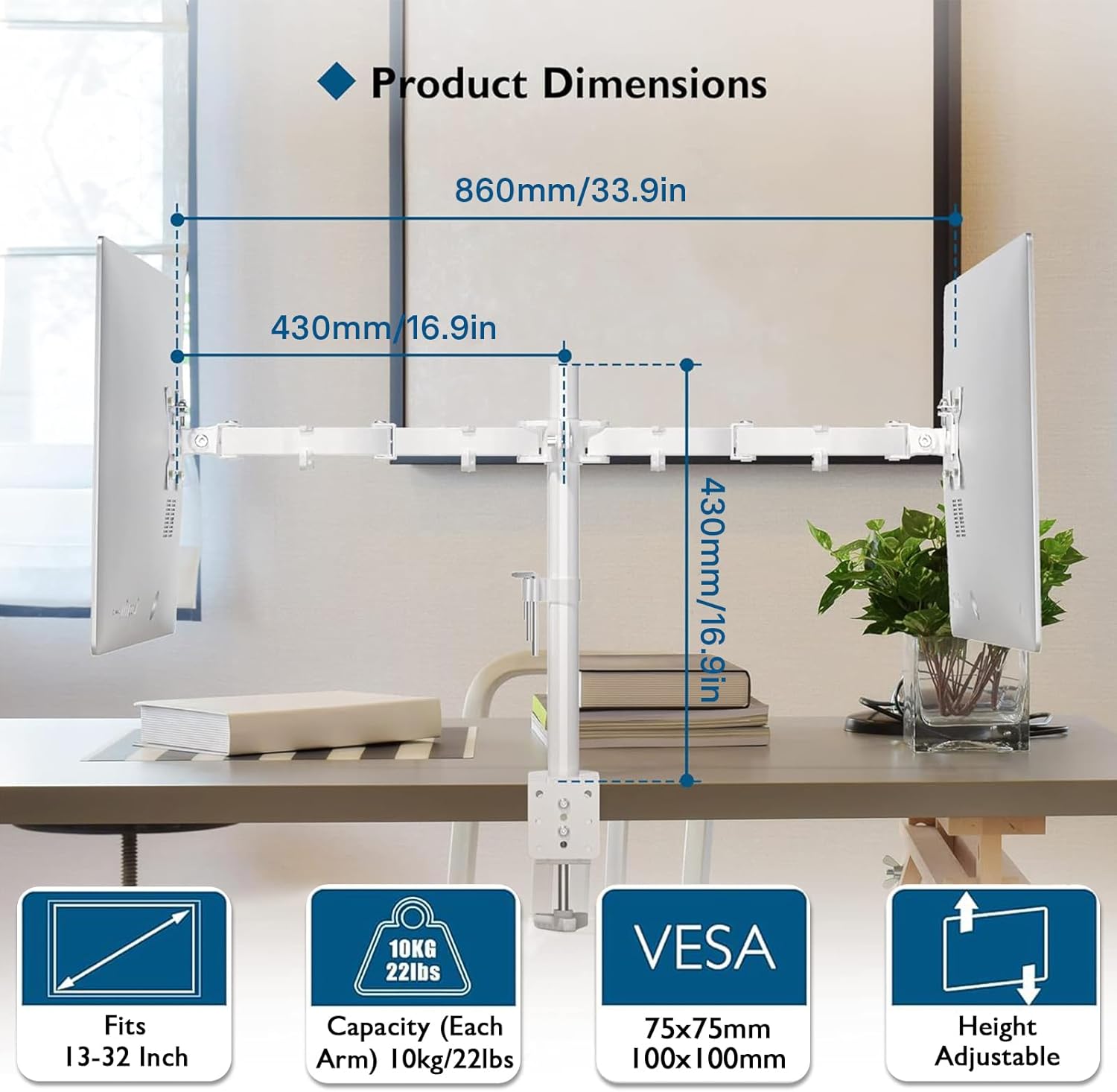
รูปที่ 8.1: ขนาดผลิตภัณฑ์และข้อมูลจำเพาะหลัก
- แบบอย่าง: MDM002-WH
- วัสดุ: เหล็กอัลลอยด์
- สี: สีขาว
- ความเข้ากันได้ของขนาดหน้าจอ: 13 - 27 นิ้ว
- Weight Capacity (Each Arm): 22 ปอนด์ (10 กก.)
- ความเข้ากันได้ของ VESA: 75x75มม., 100x100มม.
- เอียง Range: +90° ถึง -90°
- ช่วงการหมุน: 180°
- การหมุน: 360°
- Maximum Arm Extension: 17 นิ้ว (430 มม.)
- ซี-ซีแอลamp ความหนาของโต๊ะ: 0.39 - 3.35 นิ้ว (10 - 85 มม.)
- Grommet Desk Thickness: 0.39 - 3.15 นิ้ว (10 - 80 มม.)
- เส้นผ่านศูนย์กลางรูสำหรับใส่แหวนยาง: 0.39 - 3.35 นิ้ว (10 - 85 มม.)
- ขนาดสินค้า : 33.86 x 16.93 x 0.02 inches (860 x 430 x 0.5 mm) (approximate, as per image)
- น้ำหนักสินค้า: 5.5 ปอนด์ (2.5 กก.)
9. การรับประกันและการสนับสนุน
BONTEC products are manufactured with high-quality materials and undergo strict quality control. This product is covered by a limited warranty against manufacturing defects. For detailed warranty information, please refer to the warranty card included with your purchase or visit the official BONTEC webเว็บไซต์.
If you encounter any issues during installation or operation, or if you have any questions, please do not hesitate to contact BONTEC customer support. Our team is available to assist you.
ติดต่อฝ่ายสนับสนุนลูกค้า:
Webเว็บไซต์: www.bontec.com (อดีตample URL, please refer to actual product documentation for correct contact information)
Email: support@bontec.com (Examp(อีเมล)


