1. บทนำ
Thank you for choosing the Joliker 32GB Bluetooth 5.0 MP3 Player. This device is designed to provide a high-quality portable music experience with versatile features including Bluetooth connectivity, FM radio, voice recording, and e-book functionality. This manual will guide you through the setup, operation, and maintenance of your new MP3 player to ensure optimal performance and longevity.
2. ข้อมูลด้านความปลอดภัย
- อย่าให้เครื่องสัมผัสกับอุณหภูมิที่สูงหรือต่ำเกินไป แสงแดดโดยตรง หรือความชื้นสูง
- หลีกเลี่ยงการทำอุปกรณ์หล่นหรือกระแทกอย่างรุนแรง
- ห้ามถอดประกอบหรือพยายามซ่อมแซมอุปกรณ์ด้วยตนเอง โปรดติดต่อช่างผู้ชำนาญการ
- เก็บอุปกรณ์ให้ห่างจากน้ำและของเหลวอื่นๆ
- ใช้เฉพาะสายชาร์จและอุปกรณ์เสริมที่ให้มาเท่านั้น
- การฟังเสียงดังเป็นเวลานานอาจทำให้เกิดความเสียหายต่อการได้ยิน โปรดปรับระดับเสียงให้อยู่ในระดับที่ปลอดภัย
3. เนื้อหาบรรจุภัณฑ์
กรุณาตรวจสอบเนื้อหาในแพ็คเกจเพื่อให้แน่ใจว่ามีสินค้าครบทั้งหมด:
- 1 x Joliker MP3 Player
- สายชาร์จ Micro USB 1 เส้น
- 1 x หูฟังแบบมีสาย
- 1 x เคสป้องกัน
- 1 x Anti-loss Lanyard
- 1 x คู่มือผู้ใช้ (เอกสารนี้)

Figure 3.1: Included accessories with the Joliker MP3 Player.
4. สินค้าหมดview
The Joliker MP3 Player features a compact design with a full touch screen for intuitive navigation. Familiarize yourself with the device's components:

รูปที่ 4.1 : ด้านหน้า view of the Joliker MP3 Player.
4.1. Full Touch Screen Interface
The device is equipped with a 1.8-inch IPS full touch screen, allowing for smartphone-like control and navigation through menus and functions.

Figure 4.2: Interacting with the full touch screen.
5. การตั้งค่า
5.1. การชาร์จอุปกรณ์
Before first use, fully charge the MP3 player. Connect the micro USB charging cable to the device's charging port and the other end to a USB power adapter (not included) or a computer's USB port. The battery indicator on the screen will show charging status.
5.2. การเปิด/ปิดเครื่อง
- วิธีเปิดเครื่อง: กดปุ่มเปิด/ปิดค้างไว้จนกว่าหน้าจอจะสว่างขึ้น
- To power off: Press and hold the Power button, then select 'Power Off' on the screen.
5.3. การใส่/ถอดการ์ด TF (การ์ด Micro SD)
The device comes with 32GB of internal memory and supports expansion up to 128GB via a TF (Micro SD) card. Locate the TF card slot on the side of the device.
- To insert: Gently push the TF card into the slot until it clicks into place.
- To remove: Push the TF card inward slightly until it pops out, then pull it out.

Figure 5.1: Memory capacity and TF card slot.
5.4. การถ่ายโอนเพลงและ Files
Connect the MP3 player to your computer using the provided USB cable. The device will appear as a removable disk. You can then drag and drop music files (MP3, WMA, APE, FLAC, WAV, AAC-LC, ACELP) and other supported files (TXT for e-books, JPG, BMP, GIF for photos) directly into the device's internal storage or the inserted TF card.
6. คู่มือการใช้งาน
6.1. การนำทางพื้นฐาน
Tap the icons on the touch screen to access different functions. Swipe left/right or up/down to navigate through menus and lists. Use the back arrow icon to return to the previous screen.
6.2. การเล่นเพลง
- จากเมนูหลัก ให้แตะที่ไอคอน 'เพลง'
- เรียกดูเพลงของคุณตามศิลปิน อัลบั้ม เพลง เพลย์ลิสต์ หรือโฟลเดอร์
- Tap a song to start playback.
- Use the on-screen controls (Play/Pause, Next/Previous, Volume) to manage playback.
6.3. การเชื่อมต่อบลูทู ธ
The MP3 player features Bluetooth 5.0 for stable and fast wireless connections to headphones or speakers.
- จากเมนูหลัก ให้แตะไอคอน 'บลูทูธ'
- Turn on Bluetooth. The device will automatically search for nearby Bluetooth devices.
- เลือกหูฟังหรือลำโพงบลูทูธที่ต้องการจากรายการเพื่อทำการจับคู่
- เมื่อจับคู่เสร็จแล้ว เสียงจะถูกส่งผ่านอุปกรณ์บลูทูธที่เชื่อมต่ออยู่

รูปที่ 6.1: การเชื่อมต่อบลูทูธ 5.0
6.4. วิทยุ FM
The built-in FM tuner allows you to listen to your favorite radio stations. Wired earphones must be connected as they act as the antenna.
- Connect the wired earphones to the 3.5mm audio jack.
- From the main menu, tap the 'FM Radio' icon.
- Use the on-screen controls to scan for stations, save presets, or manually tune.

Figure 6.2: FM Radio function with wired earphones.
6.5. การบันทึกเสียง
The MP3 player can function as a voice recorder. It also supports line-in recording, allowing you to record audio from external sources.
- From the main menu, tap the 'Recorder' icon.
- To start a new voice recording, tap the record button.
- For line-in recording, connect the MP3 player to an audio output device (e.g., phone, CD player) using an AUX cable (not included), then select the line-in recording option.
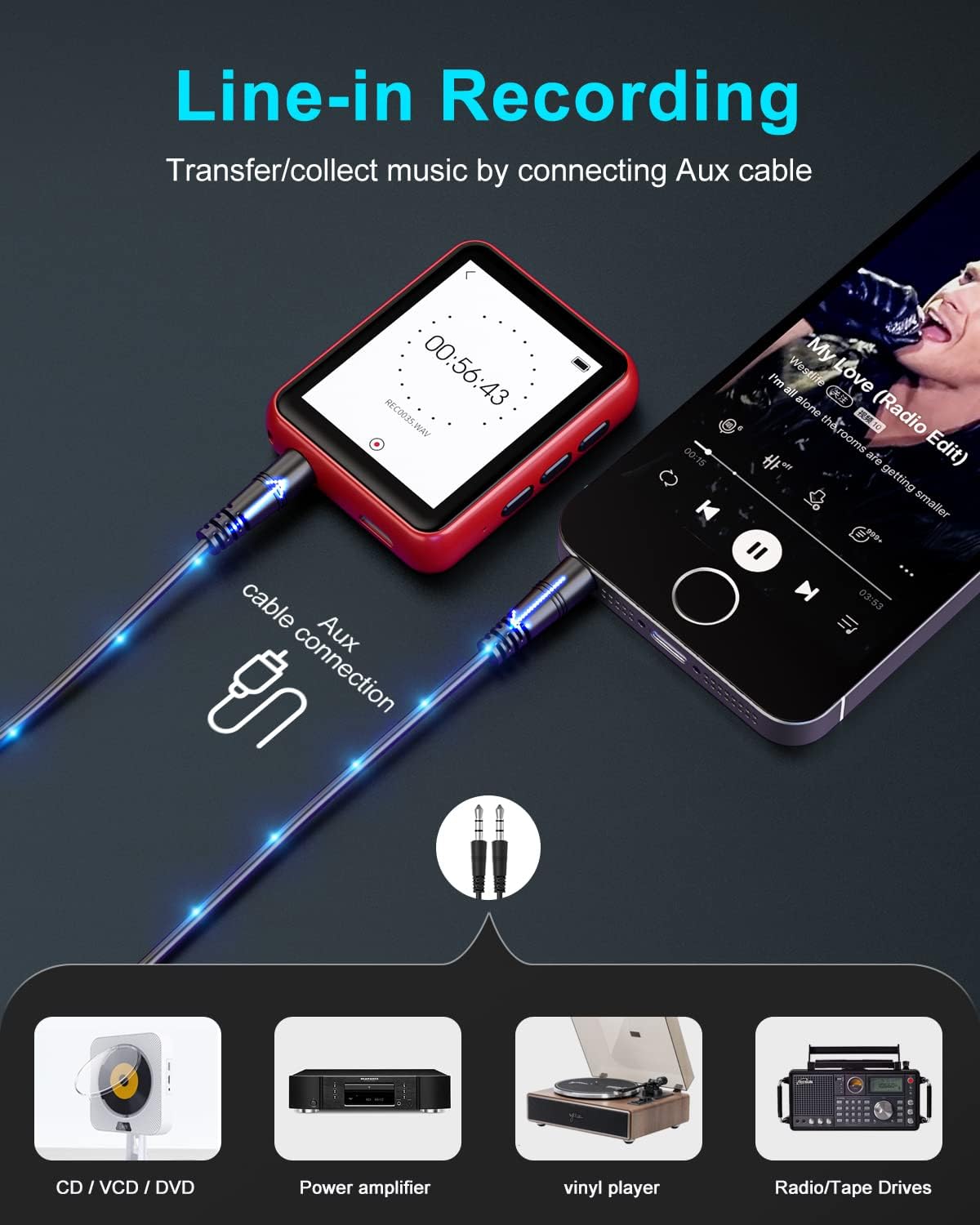
Figure 6.3: Line-in recording capability.
6.6. ฟังก์ชั่นอื่นๆ
The Joliker MP3 player offers several other useful features:
- หนังสืออิเล็กทรอนิกส์: Read TXT format e-books directly on the device.
- pedometer: นับจำนวนก้าวของคุณขณะเดินหรือวิ่ง
- นาฬิกาปลุก: ตั้งปลุกเพื่อเตือนความจำ
- รูปถ่าย Viewเอ่อ: View JPG, BMP, GIF images.
- Folder Browsing: เข้าถึง files organized in folders.

Figure 6.4: Multi-function overview.
7. การบำรุงรักษา
7.1. การทำความสะอาด
เช็ดอุปกรณ์ด้วยผ้านุ่มและแห้ง ห้ามใช้น้ำยาทำความสะอาดที่มีฤทธิ์กัดกร่อนหรือตัวทำละลาย
7.2. การจัดเก็บ
เก็บอุปกรณ์ไว้ในที่แห้งและเย็น หลีกเลี่ยงแสงแดดโดยตรงและอุณหภูมิที่สูงหรือต่ำมากเมื่อไม่ได้ใช้งานเป็นเวลานาน
7.3. การดูแลแบตเตอรี่
เพื่อยืดอายุการใช้งานแบตเตอรี่ ควรหลีกเลี่ยงการปล่อยให้แบตเตอรี่หมดจนเกลี้ยงบ่อยๆ ชาร์จอุปกรณ์เป็นประจำ แม้ว่าจะไม่ได้ใช้งาน เพื่อรักษาสุขภาพของแบตเตอรี่
8 การแก้ไขปัญหา
| ปัญหา | สาเหตุที่เป็นไปได้ | สารละลาย |
|---|---|---|
| อุปกรณ์ไม่เปิดเครื่อง | แบตเตอรี่อ่อน | ชาร์จอุปกรณ์อย่างน้อย 30 นาที |
| ไม่มีเสียงจากหูฟัง | Earphones not properly connected or faulty. Volume too low. | Ensure earphones are fully plugged in. Increase volume. Try different earphones. |
| ไม่สามารถเชื่อมต่อกับอุปกรณ์บลูทูธได้ | Bluetooth not enabled. Device out of range. Pairing issue. | Ensure Bluetooth is on for both devices. Move closer. Delete previous pairing and re-pair. |
| Fileไม่รู้จัก | ไม่ได้รับการสนับสนุน file รูปแบบเสียหาย file. | ทำให้มั่นใจ files are in supported formats (MP3, WMA, etc.). Try transferring the file อีกครั้ง. |
| หน้าจอไม่ตอบสนอง | ซอฟต์แวร์มีปัญหาชั่วคราว | กดปุ่มเปิด/ปิดค้างไว้ 10-15 วินาทีเพื่อบังคับให้รีสตาร์ท |
9. ข้อมูลจำเพาะ
| คุณสมบัติ | ข้อมูลจำเพาะ |
|---|---|
| ยี่ห้อ | โจลิเกอร์ |
| หมายเลขรุ่น | MY532GRedEU |
| หน่วยความจำภายใน | 32GB |
| หน่วยความจำที่ขยายได้ | Up to 128 GB (via TF/Micro SD card) |
| เวอร์ชันบลูทูธ | 5.0 |
| ขนาดหน้าจอ | 1.8 นิ้ว |
| เทคโนโลยีการแสดงผล | จอ LCD ไอพีเอส |
| ประเภทแบตเตอรี่ | ลิเธียมโพลิเมอร์ |
| รูปแบบเสียงที่รองรับ | MP3, WMA, APE, FLAC, WAV, AAC-LC, ACELP |
| รูปแบบ E-book ที่รองรับ | ข้อความ |
| รูปแบบภาพที่รองรับ | JPG, BMP, GIF |
| คุณสมบัติพิเศษ | FM Radio, Voice Recorder, Equalizer, Pedometer, Alarm Clock |
| การเชื่อมต่อ | Bluetooth, Micro USB, 3.5mm Audio Jack |
10. การรับประกันและการสนับสนุน
Joliker products are designed for reliability and performance. For any issues or inquiries not covered in this manual, please contact Joliker customer support through your purchase platform or the official Joliker webไซต์ โปรดเก็บหลักฐานการซื้อไว้เพื่อใช้ในการเรียกร้องการรับประกัน