1. บทนำและข้อมูลด้านความปลอดภัย
ขอบคุณสำหรับการซื้อasing the SMART TECH 32HN10T2 32" HD LED Television. This manual provides important instructions for the safe and efficient operation of your new television. Please read it thoroughly before use and retain it for future reference.
คำแนะนำด้านความปลอดภัยที่สำคัญ:
- อ่านคำแนะนำเหล่านี้
- เก็บคำแนะนำเหล่านี้ไว้
- จงใส่ใจคำเตือนทั้งหมด
- ปฏิบัติตามคำแนะนำทั้งหมด
- ห้ามใช้อุปกรณ์นี้ใกล้น้ำ
- ทำความสะอาดด้วยผ้าแห้งเท่านั้น
- อย่าปิดกั้นช่องระบายอากาศใดๆ ติดตั้งตามคำแนะนำของผู้ผลิต
- ห้ามติดตั้งใกล้แหล่งความร้อน เช่น หม้อน้ำ เครื่องทำความร้อน เตา หรืออุปกรณ์อื่น ๆ (รวมถึง ampเครื่องให้ความร้อน) ที่ผลิตความร้อน
- ปกป้องสายไฟไม่ให้ถูกเหยียบหรือถูกหนีบ โดยเฉพาะที่ปลั๊ก เต้ารับไฟฟ้า และจุดที่สายไฟออกจากเครื่อง
- ใช้เฉพาะอุปกรณ์เสริม/สิ่งที่แนบตามที่ผู้ผลิตกำหนดเท่านั้น
- ถอดปลั๊กอุปกรณ์นี้ในระหว่างพายุฝนฟ้าคะนองหรือเมื่อไม่ได้ใช้งานเป็นเวลานาน
- แจ้งบริการทั้งหมดให้ช่างที่ผ่านการรับรองทราบ จำเป็นต้องให้บริการเมื่ออุปกรณ์ได้รับความเสียหายในลักษณะใดก็ตาม เช่น สายไฟหรือปลั๊กชำรุด ของเหลวหกหรือมีวัตถุตกลงไปในอุปกรณ์ อุปกรณ์โดนฝนหรือความชื้น ไม่สามารถทำงานได้ตามปกติ หรือตกหล่น

รูปที่ 1.1: ด้านหน้า view of the SMART TECH 32HN10T2 32-inch HD LED Television. This image displays the television's screen, the "SMART TECH" logo at the bottom center, and various feature icons on the top left, including "32"", "HD ready", "DVB T2/S2/C", "CI+", "Dolby Audio", and "HDMI".
2. เนื้อหาบรรจุภัณฑ์
Please check that all items are present and in good condition upon unpacking your television.
- SMART TECH 32HN10T2 32" HD LED Television
- รีโมทคอนโทรล (RC)
- TV Stand (Feet)
- แบตเตอรี่ AAA (2 ก้อน) สำหรับรีโมทคอนโทรล
3. การตั้งค่า
3.1 การติดตั้งขาตั้งทีวี
To install the TV stand, carefully place the television face down on a soft, flat surface to prevent screen damage. Align the stand feet with the corresponding slots on the bottom of the TV and secure them with the provided screws.

รูปที่ 3.1: The SMART TECH 32HN10T2 television positioned on its stand on a media console, demonstrating a typical setup.
3.2 การติดตั้งบนผนัง (ทางเลือก)
The television supports VESA wall mounts. The VESA mounting pattern for this model is 100mm x 100mm. Ensure you use a compatible wall mount bracket and follow the instructions provided with the wall mount. Professional installation is recommended for wall mounting.

รูปที่ 3.2: หลัง view of the television, highlighting the VESA mounting points (100mm x 100mm) and various input/output ports. These ports include USB 2, USB 1, DVB-T/T2, DVB-S/S2, HDMI 1, HDMI 2, HDMI 3, AV IN, and COAXIAL.

รูปที่ 3.3: The television wall-mounted above a media console, illustrating an alternative installation method.
3.3 การเชื่อมต่ออุปกรณ์ภายนอก
The SMART TECH 32HN10T2 TV offers multiple connectivity options:
- ช่องต่อ HDMI: Connect Blu-ray players, game consoles, or other HDMI-enabled devices to HDMI 1, HDMI 2, or HDMI 3 ports.
- ยูเอสบี: Insert USB drives into USB 1 or USB 2 ports for media playback.
- DVB-T/T2 (Antenna): Connect a terrestrial antenna for digital broadcast reception.
- DVB-S/S2 (Satellite): Connect a satellite dish for satellite broadcast reception.
- AV ใน: ใช้สำหรับอุปกรณ์รุ่นเก่าที่มีเอาต์พุตวิดีโอแบบคอมโพสิตและเอาต์พุตเสียงสเตอริโอ
- โคแอกเซียล: สำหรับการส่งสัญญาณเสียงดิจิทัลไปยังระบบเสียง
3.4 การเชื่อมต่อสายไฟ
After connecting all necessary cables, plug the power cord into the TV's power input and then into a suitable wall outlet.
4. คู่มือการใช้งาน
4.1 การควบคุมระยะไกลจบลงview
The remote control allows you to access all functions of your television. Insert the two AAA batteries into the remote control, ensuring correct polarity.

รูปที่ 4.1: This image displays the overall dimensions of the television (732mm width, 483mm height, 180mm depth) and an illustration of the remote control with its various buttons.
4.2 การตั้งค่าเริ่มต้นและการสแกนช่องสัญญาณ
Upon first power-on, the TV will guide you through the initial setup process, including language selection, country, and channel scanning for DVB-T2/S2 signals. Follow the on-screen prompts.
4.3 ฟังก์ชั่นพื้นฐาน
- เปิด/ปิดเครื่อง: กดปุ่ม พลัง ปุ่มบนรีโมทคอนโทรล
- การเลือกช่อง: ใช้ ช+/- buttons or numeric buttons to change channels.
- การควบคุมระดับเสียง: ใช้ ฉบับ+/- ปุ่มปรับระดับเสียง
- แหล่งสัญญาณเข้า: กดปุ่ม แหล่งที่มา button to select between HDMI, USB, DVB-T/T2, DVB-S/S2, or AV inputs.
- การนำทางเมนู: ใช้ เมนู button to access settings, and the arrow keys (ขึ้นลงซ้ายขวา) และ OK ปุ่มเพื่อนำทาง
5. การบำรุงรักษา
5.1 การทำความสะอาดทีวี
- ควรถอดปลั๊กทีวีออกจากเต้ารับไฟฟ้าทุกครั้งก่อนทำความสะอาด
- ใช้ผ้าแห้งนุ่มเช็ดหน้าจอและตู้
- สำหรับรอยฝังแน่น ให้เช็ดเบาๆampชุบผ้าด้วยน้ำหรือน้ำยาทำความสะอาดหน้าจอสูตรอ่อนโยนที่ไม่กัดกร่อน ห้ามฉีดน้ำยาลงบนหน้าจอโดยตรง
- หลีกเลี่ยงการใช้สารทำความสะอาดที่มีฤทธิ์กัดกร่อน ขี้ผึ้ง หรือตัวทำละลาย เพราะอาจทำให้พื้นผิวของทีวีเสียหายได้
5.2 การเปลี่ยนแบตเตอรี่รีโมทคอนโทรล
If the remote control's response becomes sluggish, replace the two AAA batteries with new ones. Ensure correct polarity when inserting the new batteries.
6 การแก้ไขปัญหา
ก่อนที่จะติดต่อฝ่ายสนับสนุนลูกค้า โปรดดูปัญหาทั่วไปและวิธีแก้ไขต่อไปนี้:
| ปัญหา | สาเหตุที่เป็นไปได้ / วิธีแก้ไข |
|---|---|
| ไม่มีไฟฟ้า |
|
| ไม่มีภาพแต่มีเสียง |
|
| ไม่มีเสียงแต่มีภาพ |
|
| รีโมตคอนโทรลไม่ทำงาน |
|
| ข้อความ "ไม่มีสัญญาณ" |
|
7. ข้อมูลจำเพาะ
| คุณสมบัติ | รายละเอียด |
|---|---|
| ยี่ห้อ | สมาร์ทเทค |
| หมายเลขรุ่น | 32HN10T2 |
| ขนาดหน้าจอ | 32 นิ้ว (เส้นทแยงมุม 80 ซม.) |
| เทคโนโลยีการแสดงผล | นำ |
| ปณิธาน | 720p (1366 x 768 พิกเซล) |
| อัตราการรีเฟรช | 60 เฮิรตซ์ |
| เทคโนโลยีการเชื่อมต่อ | HDMI, ยูเอสบี |
| จำนวนพอร์ต USB | 2 |
| พอร์ต HDMI | 3 |
| ประเภทจูนเนอร์ | DVB-T2/S2 (Triple Tuner) |
| คุณสมบัติด้านเสียง | ระบบเสียงดอลบี้ |
| คุณสมบัติพิเศษ | จอแบน |
| สี | สีดำ |
| การใช้พลังงาน (SDR) | 26.0 วัตต์ |
| ระดับประสิทธิภาพพลังงาน (SDR) | E |
| การใช้พลังงานขณะสแตนด์บาย | 0.5 วัตต์ |
| การใช้พลังงานสแตนด์บายแบบเครือข่าย | 2.0 วัตต์ |
| รูปแบบการติดตั้ง VESA | 100มม. x 100มม. |
| ส่วนประกอบที่รวมอยู่ | TV, Remote Control, Stand Feet |
| ประเภทแบตเตอรี่ (รีโมท) | 2 AAA (รวม) |
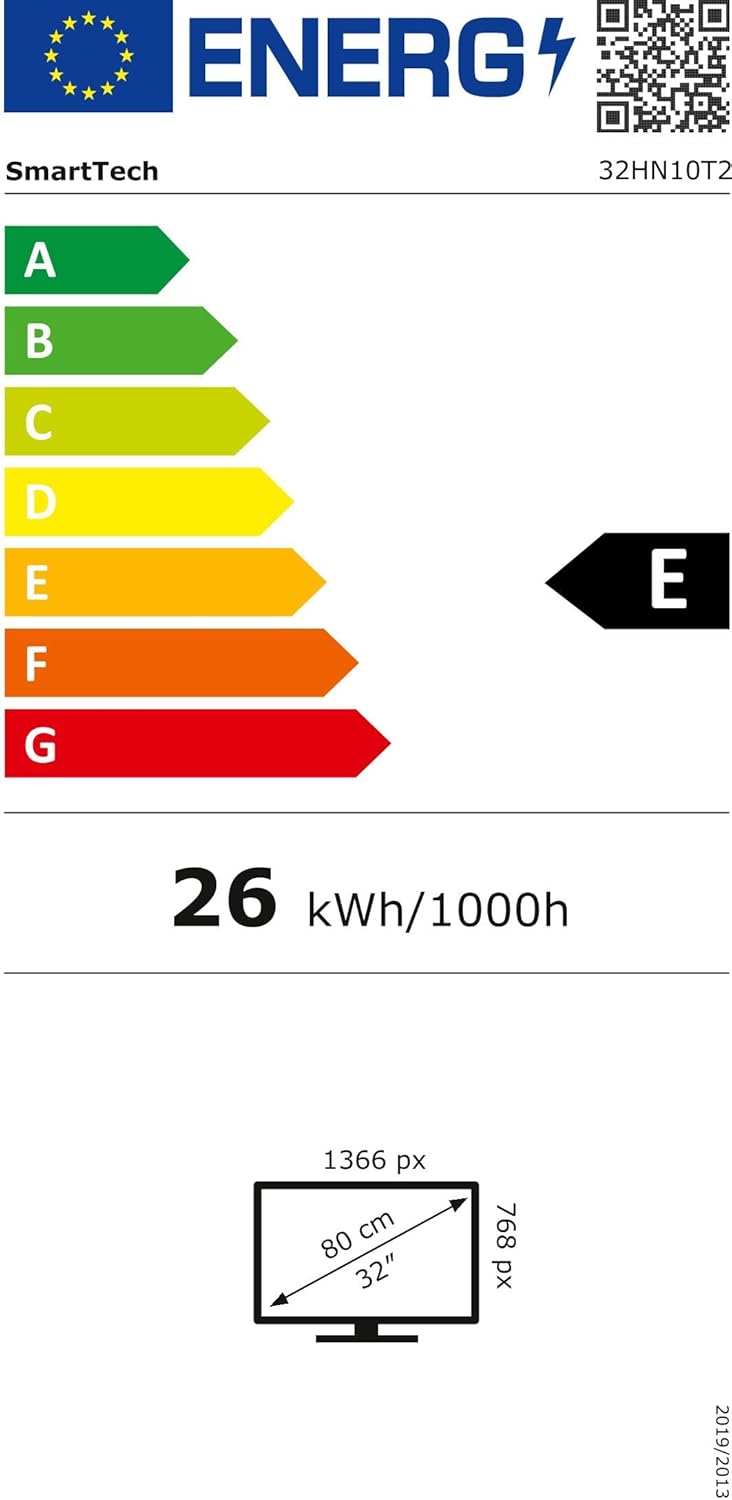
รูปที่ 7.1: Energy efficiency label for the SMART TECH 32HN10T2, indicating an 'E' class rating and 26 kWh per 1000 hours of operation.
สำหรับข้อมูลผลิตภัณฑ์โดยละเอียดและข้อมูลประสิทธิภาพการใช้พลังงาน โปรดดูที่ฐานข้อมูล EPREL: https://eprel.ec.europa.eu/qr/964700
8. การรับประกันและการสนับสนุน
SMART TECH products are designed and manufactured to the highest quality standards. For warranty information, please refer to the warranty card included with your product or contact your retailer.
การสนับสนุนลูกค้า:
- ผู้ผลิต: Express LUCK Europe Electric Kft.
- Webเว็บไซต์: www.smarttech-tv.com
- อีเมล: csilla.simita-tompa@expressluck.hu
- โทรศัพท์: +3624889353
- ที่อยู่: Sales, Leshegy út 2., 2310 Szigetszentmiklós, Pest, HU
Please note that spare parts availability and software updates are not explicitly guaranteed beyond initial purchase, as per available product information.


