1. สินค้าหมดview
The Bluedio S6 Wireless Earbuds are designed for an immersive audio experience, featuring advanced Bluetooth 5.1 technology, extended battery life, and a secure fit ideal for sports and active lifestyles. The included charging case with dual LED displays provides convenient power management.

Image: Bluedio S6 Wireless Earbuds and their charging case, showcasing. จอแสดงผลแบตเตอรี่ LED
2. เนื้อหาบรรจุภัณฑ์
โปรดตรวจสอบว่าสินค้าทั้งหมดมีอยู่ในแพ็คเกจของคุณ:
- Bluedio S6 Wireless Earbuds (Left and Right)
- เคสชาร์จพร้อมจอแสดงผล LED
- สายชาร์จแบบ USB Type-C
- จุกหูฟังมีหลายขนาด (S, M, L)
- คู่มือการใช้งาน (เอกสารนี้)

Image: The complete package contents of the Bluedio S6 earbuds.
3. คู่มือการติดตั้ง
3.1 การชาร์จเริ่มต้น
Before first use, fully charge the earbuds and the charging case. Connect the provided USB Type-C cable to the charging case and a compatible USB power source. The LED display on the case will indicate the charging status and battery level.

Image: Visual representation of the Bluedio S6 earbuds and charging case, highlighting battery life and charging duration.
3.2 การจับคู่กับอุปกรณ์ของคุณ
- เปิดเครื่องและจับคู่โดยอัตโนมัติ: Open the charging case and remove both S6 earbuds. They will automatically power on and attempt to pair with each other.
- เปิดใช้งานบลูทูธ: On your mobile phone or other Bluetooth-enabled device, go to the Bluetooth settings and turn on Bluetooth.
- เลือก "S6": In the list of available Bluetooth devices, search for and select "S6" to connect.
- การยืนยัน: เมื่อเชื่อมต่อแล้ว คุณจะได้ยินเสียงยืนยัน และหูฟังจะพร้อมใช้งาน
- การเชื่อมต่อใหม่อัตโนมัติ: After the initial successful connection, the S6 earbuds will automatically connect to the last paired device when removed from the charging case.

Image: The Bluedio S6 earbuds automatically pairing with a mobile device upon removal from the charging case.

Image: An earbud illustrating the advanced Bluetooth 5.1 chip for stable signal transmission.
4. คู่มือการใช้งาน
4.1 การสวมหูฟัง
The Bluedio S6 earbuds feature earhooks for a secure and comfortable fit, especially during physical activities. Gently place the earbud into your ear canal and adjust the earhook over your ear until it feels stable and comfortable.

Image: A user wearing the Bluedio S6 earbuds, highlighting their design for sports and secure fit.
4.2 ระบบควบคุมแบบสัมผัส
The S6 earbuds are equipped with smart touch controls on each earbud for easy management of music and calls. Refer to the following table for common operations:
| การกระทำ | การทำงาน |
|---|---|
| แตะครั้งเดียว (L/R) | เล่น/หยุดเพลง, รับ/วางสาย |
| แตะสองครั้ง (หูฟังข้างขวา) | เพิ่มระดับเสียง |
| แตะสองครั้ง (หูฟังข้างซ้าย) | ลดระดับเสียง |
| แตะสามครั้ง (หูฟังข้างขวา) | เพลงถัดไป |
| แตะสามครั้ง (หูฟังข้างซ้าย) | เพลงก่อนหน้า |
| กดค้างไว้ (2 วินาที) | ปฏิเสธการรับสาย |
| กดค้างไว้ (5 วินาที) | เปิด/ปิดเครื่อง |
| กดค้างไว้ (1 วินาที) | เปิดใช้งานผู้ช่วยเสียง |

Image: Visual guide to the touch control functions on the Bluedio S6 earbuds.
4.3 การจัดการการโทร
With the built-in microphone, you can easily manage calls directly from your earbuds without needing to access your phone.
- รับสาย: แตะเพียงครั้งเดียวที่หูฟังข้างใดข้างหนึ่ง
- วางสาย: แตะเพียงครั้งเดียวที่หูฟังข้างใดข้างหนึ่งในระหว่างการโทร
- ปฏิเสธสาย: กดเอียร์บัดข้างใดข้างหนึ่งค้างไว้ 2 วินาที

Image: A user demonstrating the convenience of answering calls directly with the Bluedio S6 earbuds.
5. การบำรุงรักษา
5.1 การชาร์จหูฟังและเคส
To charge the earbuds, place them back into the charging case. The earbuds will automatically begin charging. The LED display on the case shows the individual battery levels of the left and right earbuds, as well as the case's remaining power. To charge the case, connect it to a USB power source using the provided Type-C cable.
- Earbuds playtime on a single charge: Approximately 9 hours.
- Total playtime with charging case: Up to 42 hours.
- ระยะเวลาในการชาร์จเคส: ประมาณ 2 ชั่วโมง


Image: Icons illustrating key features: LED battery display, 600mAh charging case, and Type-C charging port.
5.2 การทำความสะอาดและการเก็บรักษา
To ensure longevity and optimal performance, regularly clean your earbuds and charging case. Use a soft, dry, lint-free cloth to wipe down the surfaces. For the eartips, you may remove them and clean with a damp cloth, ensuring they are completely dry before reattaching. Store the earbuds in their charging case when not in use to protect them from dust and damage.
- หลีกเลี่ยงการใช้น้ำยาทำความสะอาดหรือตัวทำละลายที่มีฤทธิ์กัดกร่อน
- Do not submerge the earbuds or case in water. While water-resistant, they are not designed for submersion.
- หลีกเลี่ยงอุณหภูมิที่สูงหรือสูงเกินไป
6 การแก้ไขปัญหา
If you encounter any issues with your Bluedio S6 earbuds, please refer to the following common solutions:
6.1 Earbuds Not Pairing with Each Other or Device
- ตรวจสอบให้แน่ใจว่าชาร์จหูฟังทั้งสองข้างจนเต็ม
- Place both earbuds back into the charging case, close the lid, wait a few seconds, then open the lid and remove them again. This often resets the pairing.
- On your device, forget or delete "S6" from your Bluetooth device list. Then, repeat the pairing process from Section 3.2.
- ตรวจสอบให้แน่ใจว่าอุปกรณ์ของคุณเปิดใช้งานบลูทูธแล้วและอยู่ในระยะ (โดยทั่วไปคือ 10 เมตร/33 ฟุต)
6.2 ไม่มีเสียงหรือเสียงเบา
- Check the volume level on both your earbuds (using touch controls) and your connected device.
- Ensure the earbuds are properly seated in your ears and the eartips provide a good seal.
- Try playing different audio sources to rule out an issue with the specific media.
- Reconnect the earbuds by placing them in the case and taking them out again.
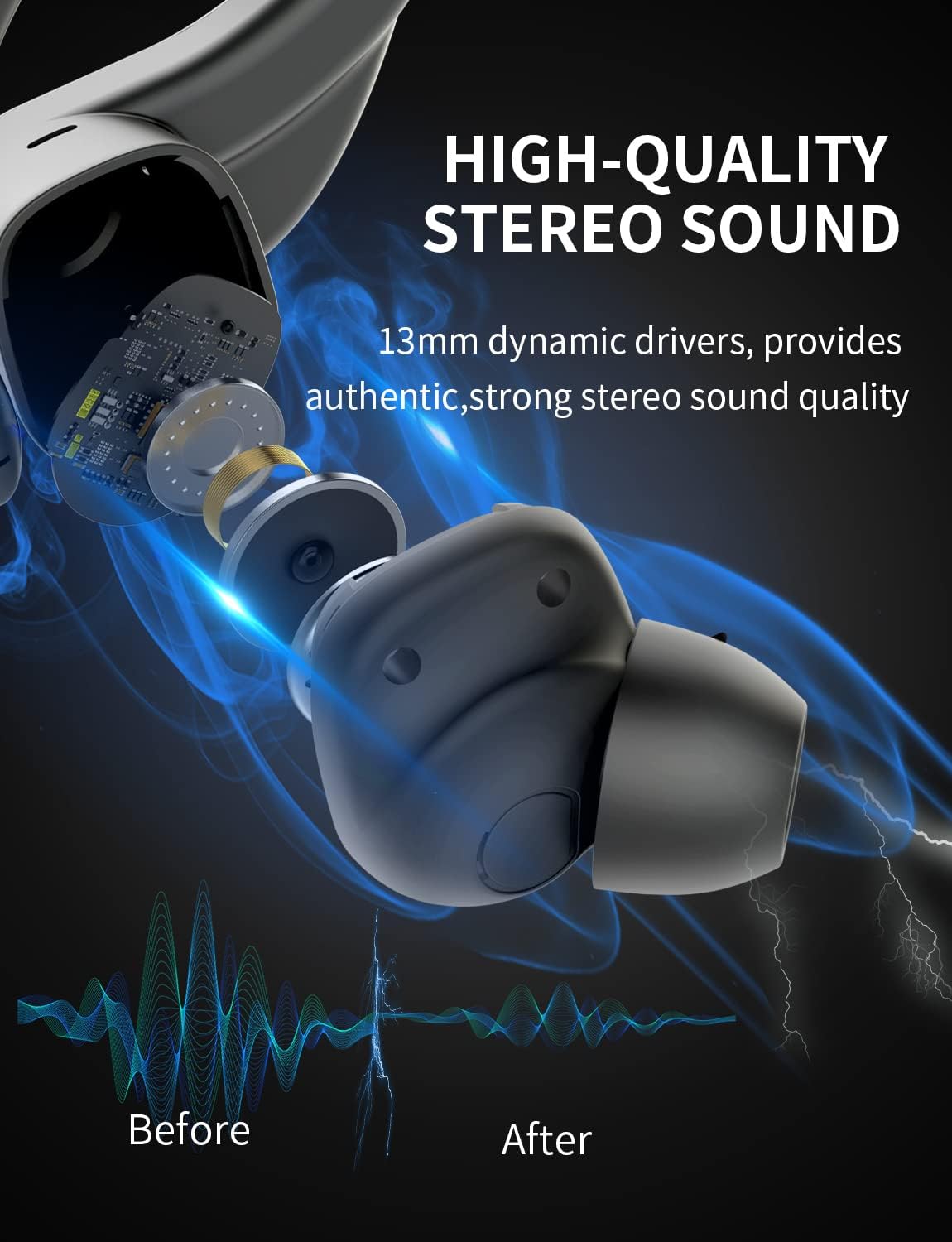
ภาพ: ภายใน view of the earbud, highlighting the 13mm dynamic drivers responsible for high-quality stereo sound.
6.3 เคสชาร์จไม่ชาร์จ
- ตรวจสอบว่าสาย USB Type-C เชื่อมต่อกับเคสและแหล่งจ่ายไฟอย่างแน่นหนาแล้ว
- ลองใช้พอร์ต USB หรืออะแดปเตอร์จ่ายไฟอื่น
- ตรวจสอบให้แน่ใจว่าสายชาร์จไม่ได้รับความเสียหาย
7. ข้อมูลจำเพาะ
Detailed technical specifications for the Bluedio S6 Wireless Earbuds:
| คุณสมบัติ | รายละเอียด |
|---|---|
| ชื่อรุ่น | S6 |
| เทคโนโลยีการเชื่อมต่อ | ไร้สาย (บลูทูธ 5.1) |
| เทคโนโลยีการสื่อสารไร้สาย | บลูทูธ |
| ส่วนประกอบที่รวมอยู่ | เคสชาร์จแบบไร้สาย |
| วัสดุ | พลาสติก |
| การใช้งานเฉพาะของผลิตภัณฑ์ | กีฬา |
| อุปกรณ์ที่รองรับ | โทรศัพท์มือถือ แท็บเล็ต แล็ปท็อป |
| น้ำหนักสินค้า | 117 กรัม |
| ระดับความต้านทานต่อน้ำ | Waterproof (Note: typically means splash/sweat resistant, not submersible) |
| ช่วงความถี่ | 20Hz-20000Hz |
| รูปแบบไมโครโฟน | บิวท์อิน |
| อายุการใช้งานแบตเตอรี่โดยเฉลี่ย (หูฟัง) | 9 ชั่วโมง (ชาร์จครั้งเดียว) |
| เวลาเล่นทั้งหมดกับเคส | นานถึง 42 ชั่วโมง |
| ความจุแบตเตอรี่ของเคสชาร์จ | 600mAh (from A+ content image) |
| การวางตำแหน่งหู | In Ear (with earhooks) |
| สี | สีดำ |
8. การรับประกันและการสนับสนุน
Bluedio products are manufactured to high quality standards. For warranty information and customer support, please refer to the warranty card included in your product packaging or visit the official Bluedio webไซต์ โปรดเก็บใบเสร็จรับเงินของคุณไว้เป็นหลักฐานการซื้อสำหรับการเรียกร้องการรับประกันใดๆ
For further assistance, you may also contact Bluedio customer service through their official channels.


