การแนะนำ
This instruction manual provides comprehensive guidance for the assembly, operation, and maintenance of your SmallRig A7 IV Cage with Top Handle and HDMI Cable Clamp. This basic kit is designed to enhance the functionality and protection of your Sony Alpha 7R V, Alpha 7 IV, and Alpha 7 S III cameras.
Please read this manual thoroughly before use to ensure proper installation and to maximize the benefits of your new camera accessory.
มีอะไรอยู่ในกล่อง

The SmallRig 3668 Basic Kit includes the following components:
- 1 x เคสสำหรับกล้อง
- 2 x Locking Side Plate
- 1 x คลamp for HDMI Cable 3000
- 1 x Locating Handle for ARRI 2165
- 1 x Hex Spanner (for installation)
The image above illustrates the components included in the package, along with the product parameters.
คุณสมบัติหลักของผลิตภัณฑ์
- ความเข้ากันได้: Designed for Sony Alpha 7R V, Alpha 7 IV, and Alpha 7 S III cameras. The kit includes a cage, an HDMI cable clamp, and a top handle for low-angle shots and camera protection.
- Two-point Locking: Securely mounts the camera with an integrated 1/4"-20 screw and two side locking plates (one for Sony Alpha7S III/Alpha 1, one for Alpha 7 IV) to prevent twisting. Note: The camera strap eyelet is occupied when using the side locking plate.
- การป้องกันรอบด้าน: Constructed from aviation aluminum with a formfitting design for security and durability. Built-in protective pads prevent camera scratches. Maintains access to camera controls and hot shoe.
- จุดยึดหลายจุด: Features an integrated shoe mount, multiple 1/4"-20 threads, and 3/8"-16 locating holes for ARRI accessories. Includes a built-in NATO rail and strap slots. A magnetic flat-head screwdriver & Allen wrench are stored on the bottom of the cage.
- Ergonomic Top Handle: Provides a comfortable grip for easy carrying and low-angle shooting. Features 1/4"-20 threaded holes, 3/8"-16 locating for ARRI holes, and built-in cold shoes for accessories like monitor mounts.
- สาย HDMI Clamp: Mounts to the left side of the cage via a 1/4"-20 screw and two locating pins. Prevents cable deflection and secures cables with a thumbscrew, protecting interfaces and ensuring stable signal transmission. Note: Not compatible with Sony Alpha 1. Interferes with the synchroterminal interface on Alpha 7R V.

Figure 1: Three-Point Locking Mechanism
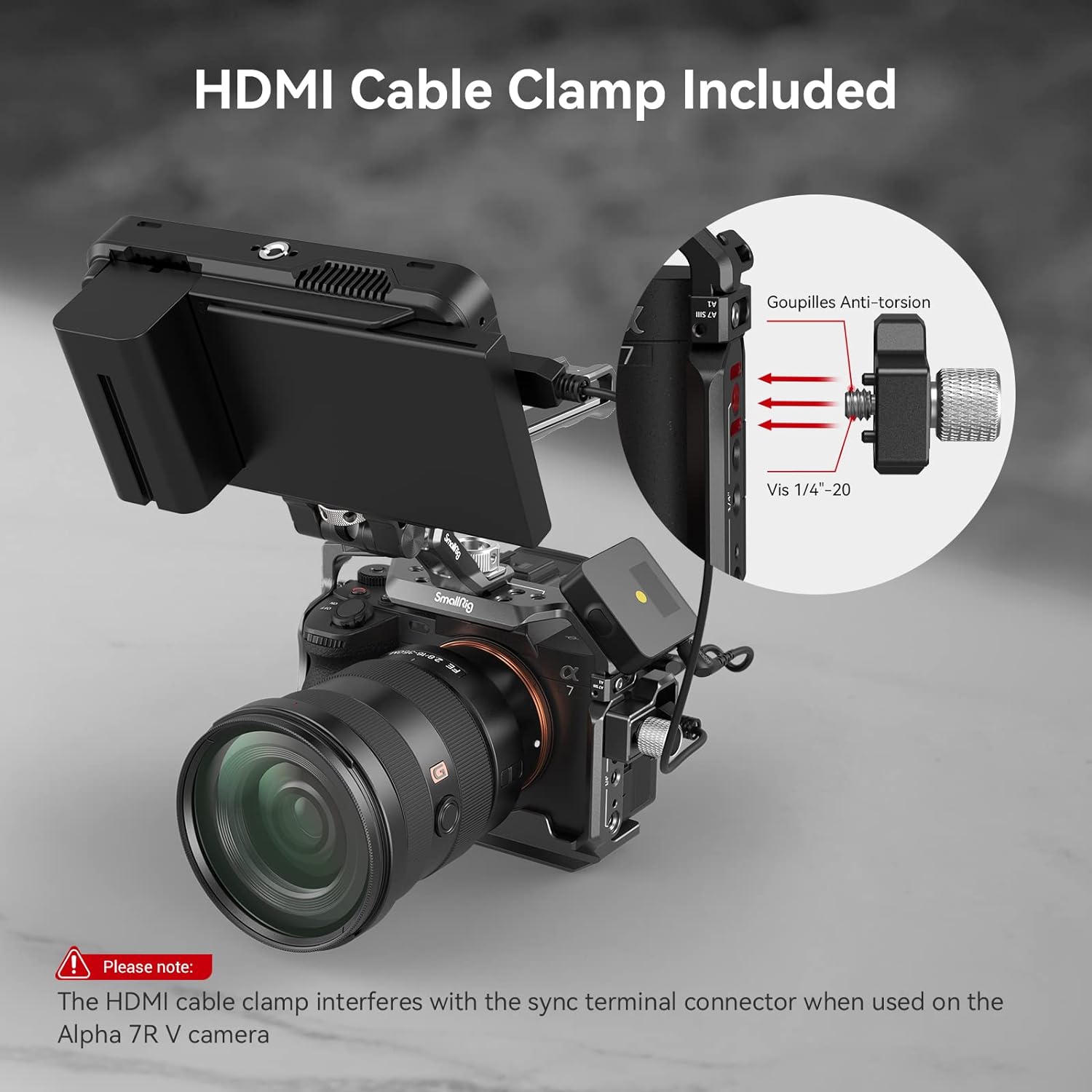
Figure 2: HDMI Cable Clamp รายละเอียด
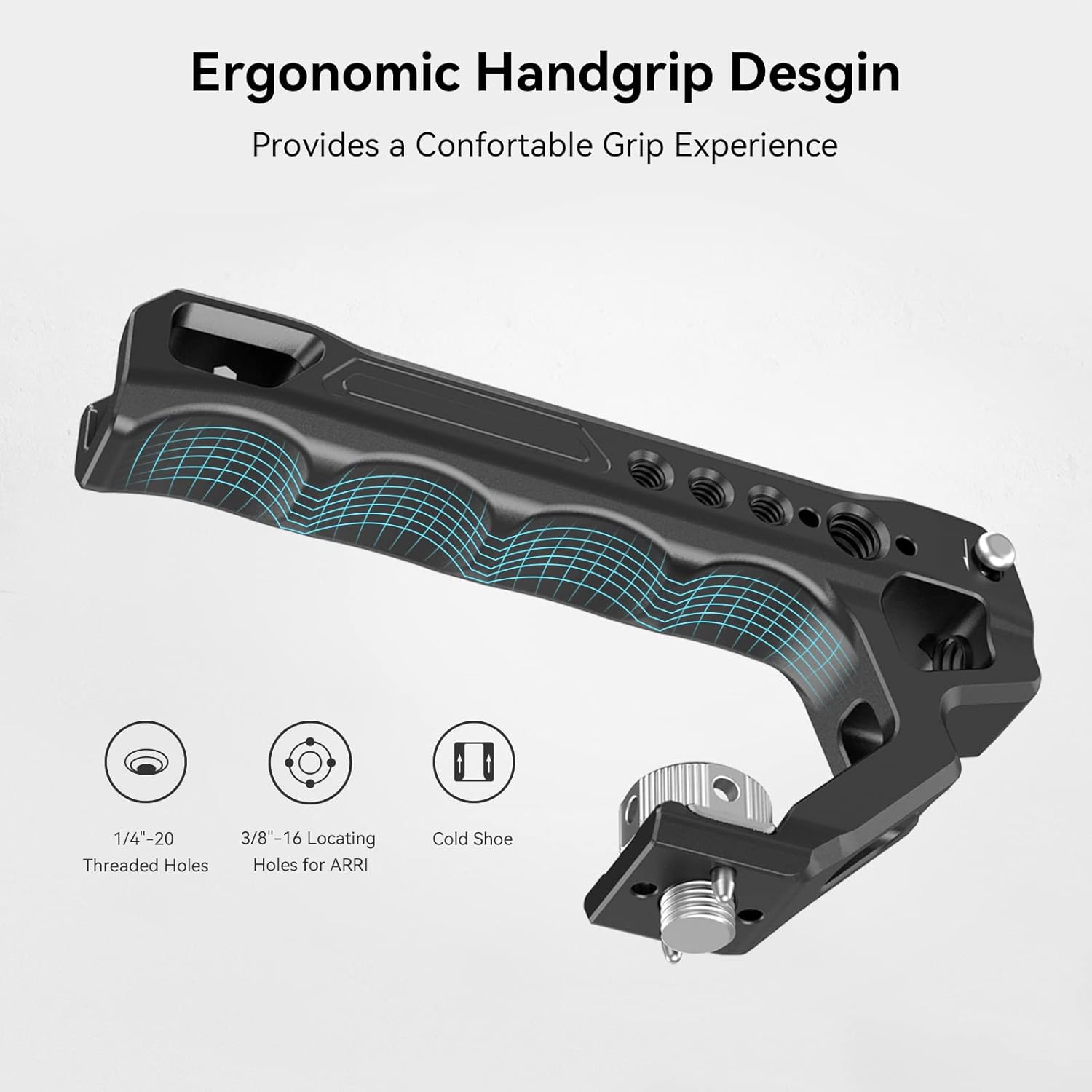
Figure 3: Ergonomic Top Handle

Figure 4: Multiple Mounting Points
การติดตั้งและการตั้งค่า
Follow these steps to properly install your camera into the SmallRig cage:
- เตรียมกล้อง: Ensure your camera's lens is removed or is a small enough lens that can pass through the cage opening.

Figure 5: Camera prepared for cage installation.
- Remove Side Locking Pin: Locate the small screw/pin on the side of the cage. Depending on your camera model (Alpha 7 IV or Alpha 7S III/Alpha 1), you may need to switch the position of this pin. Remove it for now.
Figure 6: Detaching the side locking pin from the cage.
- Insert Camera into Cage: Carefully slide your camera into the cage.
- Secure Bottom Screw: Use the integrated 1/4"-20 screw at the bottom of the cage to secure the camera. Tighten it firmly using the magnetic flat-head screwdriver/Allen wrench stored on the bottom of the cage.
- Install Side Locking Plate: Re-insert the small pin (removed in step 2) into the camera's strap eyelet on the left side. This pin, along with the side locking plate, prevents the camera from twisting within the cage. Tighten the corresponding screw on the cage to secure it.
Note: The camera strap eyelet will be occupied when this side locking plate is in use.
- Verify Battery Access: Ensure that the battery compartment door can still be opened and closed freely with the cage installed. The cage is designed to allow full access.
- Attach Top Handle: Align the top handle with the mounting points on the top of the cage and secure it using the provided screws.
Figure 7: Fully assembled cage with top handle.
- Attach HDMI Cable Clamp: If desired, attach the HDMI cable clamp to the left side of the cage using the 1/4"-20 screw and two locating pins. This helps prevent accidental disconnections and protects the HDMI port.
Note: This cable clamp is not compatible with Sony Alpha 1 and interferes with the synchroterminal interface when used on the Alpha 7R V camera.
Figure 8: HDMI Cable Clamp การติดตั้ง
คำแนะนำการใช้งาน
The SmallRig camera cage provides numerous options for expanding your camera setup:
- Utilizing Mounting Points: Attach external monitors, microphones, LED lights, or other accessories to the various 1/4"-20 threaded holes, 3/8"-16 ARRI locating holes, and cold shoes located around the cage.
- ทางรถไฟนาโต้: The built-in NATO rail on the side allows for quick attachment and detachment of NATO-compatible accessories, such as side handles.
- Top Handle Use: The ergonomic top handle is ideal for stable low-angle shooting and provides a secure grip for carrying your camera rig.
- แผ่นปลดเร็ว: The integrated Arca-Swiss quick release plate on the bottom allows for rapid transitions between tripods, stabilizers, and handheld shooting.

Figure 9: Quick Release Plate for versatile mounting.
การซ่อมบำรุง
เพื่อให้มั่นใจได้ว่าเคสกล้อง SmallRig ของคุณจะมีอายุการใช้งานยาวนานและทำงานได้อย่างมีประสิทธิภาพสูงสุด โปรดปฏิบัติตามคำแนะนำในการบำรุงรักษาเหล่านี้:
- การทำความสะอาด: Wipe the cage regularly with a soft, dry cloth to remove dust and fingerprints. For stubborn dirt, a slightly damp สามารถใช้ผ้าเช็ดทำความสะอาดได้ แล้วเช็ดให้แห้งทันที หลีกเลี่ยงการใช้สารทำความสะอาดที่มีฤทธิ์กัดกร่อนหรือตัวทำละลาย
- ความแน่นของสกรู: Periodically check all screws and connections to ensure they remain tight. Re-tighten as necessary using the provided hex spanner or a suitable screwdriver.
- พื้นที่จัดเก็บ: When not in use, store the cage in a clean, dry environment, away from extreme temperatures and humidity.
- การตรวจสอบ: Regularly inspect the cage for any signs of wear, damage, or deformation. If any issues are found, discontinue use and contact SmallRig support.
การแก้ไขปัญหา
If you encounter any issues with your SmallRig camera cage, refer to the following common troubleshooting tips:
| ปัญหา | สาเหตุที่เป็นไปได้ | สารละลาย |
|---|---|---|
| Camera is loose within the cage. | Bottom screw or side locking plate not tightened sufficiently. | Ensure the 1/4"-20 bottom screw is fully tightened. Verify the side locking plate is correctly positioned in the camera's strap eyelet and its screw is tight. |
| Battery door cannot open. | Camera not correctly seated or cage misaligned. | Re-seat the camera in the cage, ensuring it aligns perfectly with the cage's cutouts. Re-tighten the bottom screw. |
| สาย HDMIamp interferes with camera port. | Compatibility issue with specific camera model. | Note that the HDMI cable clamp is not compatible with Sony Alpha 1 and may interfere with the synchroterminal interface on Alpha 7R V. If interference occurs, remove the clamp. |
| Accessories do not mount securely. | Incorrect screw size or accessory type. | Ensure you are using the correct 1/4"-20 or 3/8"-16 screws for your accessories. Verify accessory compatibility with cold shoe or NATO rail. |
หากปัญหายังคงอยู่หลังจากลองวิธีแก้ปัญหาเหล่านี้แล้ว โปรดติดต่อฝ่ายบริการลูกค้าของ SmallRig เพื่อขอความช่วยเหลือเพิ่มเติม
ข้อมูลจำเพาะ
| คุณลักษณะ | รายละเอียด |
|---|---|
| หมายเลขรุ่นผลิตภัณฑ์ | 3668-ส.ร. |
| กล้องที่รองรับ | Sony Alpha 7R V, Alpha 7 IV, Alpha 7 S III |
| วัสดุ | อลูมิเนียมอัลลอยด์, สแตนเลส, ซิลิโคน |
| ขนาดสินค้า | 6.69 x 5.31 x 6.97 นิ้ว (170 x 176.5 x 135 มม.) |
| น้ำหนักสินค้า | 12.7 ounces (361g ± 5g) |
| ขนาดแพ็คเกจ | 165 x 155 x 85มม. |
| น้ำหนักแพ็คเกจ | 474g ± 5g |
หมายเหตุ: ข้อมูลจำเพาะอาจเปลี่ยนแปลงได้โดยไม่ต้องแจ้งให้ทราบล่วงหน้า
การรับประกันและการสนับสนุน
For warranty information, product support, or technical assistance, please visit the official SmallRig webหรือติดต่อฝ่ายบริการลูกค้าโดยตรง โปรดเก็บใบเสร็จรับเงินไว้เป็นหลักฐานการซื้อสำหรับการเรียกร้องการรับประกันใดๆ
ร้านค้าอย่างเป็นทางการของ SmallRig: เยี่ยมชมร้านค้าบน Amazon


