1. สินค้าหมดview
The LENRUE TouchGo F4 is a compact, portable Bluetooth speaker designed for clear audio and ease of use. It features touch controls, Bluetooth 5.0 connectivity, and supports TWS (True Wireless Stereo) pairing for an enhanced audio experience. The speaker comes with a hard EVA travel case for protection and portability.

Figure 1: LENRUE TouchGo F4 Bluetooth Speaker.
2. เนื้อหาบรรจุภัณฑ์
กรุณาตรวจสอบแพ็คเกจสำหรับรายการต่อไปนี้:
- LENRUE TouchGo F4 Bluetooth Speaker
- Hard EVA Travel Case
- สายชาร์จ TYPE-C
- คู่มือการใช้งาน
3. การตั้งค่า
3.1 การชาร์จเริ่มต้น
Before first use, fully charge the speaker. Connect the provided TYPE-C charging cable to the speaker's charging port and a compatible USB power adapter (not included). The charging indicator light will show the charging status. A full charge typically takes approximately 4 hours.
3.2 การเปิด/ปิดเครื่อง
- การเปิดเครื่อง: Press and hold the power button (usually the central play/pause button) for a few seconds until you hear an audible prompt and the indicator light illuminates.
- วิธีปิดเครื่อง: กดปุ่มเปิด/ปิดค้างไว้สักสองสามวินาทีจนกว่าจะได้ยินเสียงแจ้งเตือนและไฟแสดงสถานะดับลง
3.3 การจับคู่บลูทูธ
To connect the speaker to your device:
- ตรวจสอบให้แน่ใจว่าลำโพงเปิดอยู่และอยู่ในโหมดจับคู่ (โดยปกติไฟแสดงสถานะจะกะพริบเป็นสีน้ำเงิน)
- บนอุปกรณ์ของคุณ (สมาร์ทโฟน แท็บเล็ต ฯลฯ) เปิดใช้งานบลูทูธและค้นหาอุปกรณ์ที่มีอยู่
- Select "ToughGo" or "LENRUE TouchGo" from the list of devices.
- เมื่อเชื่อมต่อเสร็จแล้ว คุณจะได้ยินเสียงยืนยัน และไฟแสดงสถานะจะเปลี่ยนเป็นสีน้ำเงินค้าง
ลำโพงจะเชื่อมต่อกับอุปกรณ์ที่จับคู่ไว้ล่าสุดโดยอัตโนมัติเมื่อเปิดเครื่อง หากอุปกรณ์อยู่ในระยะและเปิดใช้งาน Bluetooth ไว้

Figure 2: Speaker with touch controls for sensitive and elegant operation.
3.4 TWS Wireless Pairing (Connect Two Speakers)
To achieve dual-channel stereo sound, you can pair two TouchGo F4 speakers together:
- Power on both TouchGo F4 speakers.
- โปรดตรวจสอบให้แน่ใจว่าลำโพงทั้งสองตัวไม่ได้เชื่อมต่อกับอุปกรณ์บลูทูธอื่นๆ แล้ว
- On หนึ่ง of the speakers, press and hold the "+" button until you hear a prompt indicating TWS pairing mode.
- The two speakers will automatically pair with each other. You will hear a "beep" sound upon successful TWS pairing.
- Now, connect your device's Bluetooth to the device name "ToughGo". Both speakers will play audio in stereo.
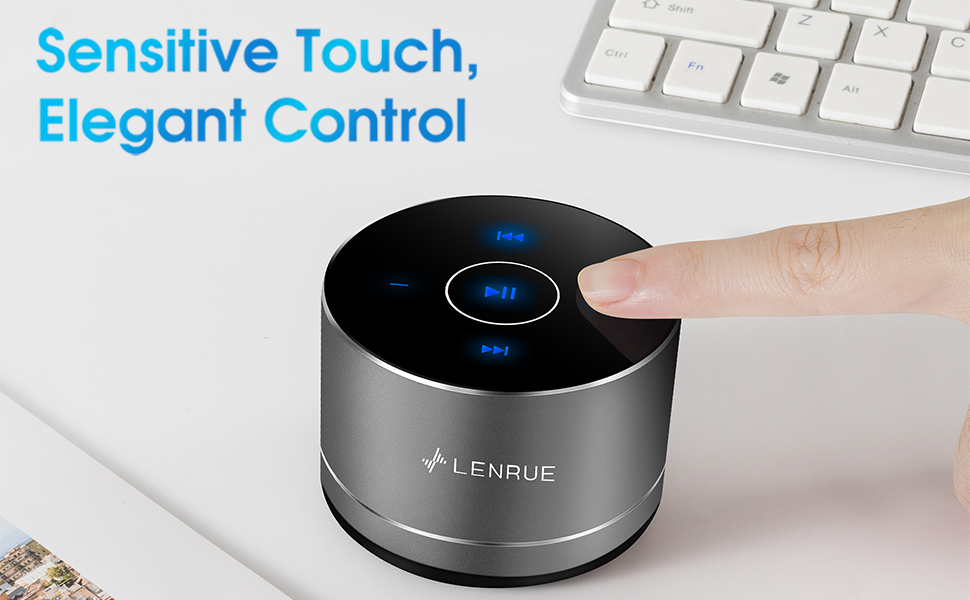
Figure 3: Two speakers connected for TWS wireless stereo pairing.
4. คู่มือการใช้งาน
4.1 ระบบควบคุมแบบสัมผัส
The speaker features intuitive touch controls located on the top surface:
- เล่น/หยุดชั่วคราว: Tap the central button once to play or pause music.
- ปรับระดับเสียงขึ้น: Tap the "+" button to increase volume.
- ลดเสียงลง: Tap the "-" button to decrease volume.
- เพลงถัดไป: Tap the ">>" button to skip to the next song.
- แทร็กก่อนหน้า: Tap the "<<" button to go to the previous song.
4.2 การโทรแบบแฮนด์ฟรี
The speaker includes a built-in microphone for hands-free calls:
- รับสาย: When a call comes in, tap the central button once to answer.
- วางสาย: During a call, tap the central button once to end the call.
- ปฏิเสธสาย: กดปุ่มตรงกลางค้างไว้ประมาณ 2 วินาทีเพื่อปฏิเสธสายเรียกเข้า

Figure 4: Speaker with hands-free calling capability.
4.3 อายุการใช้งานแบตเตอรี่และการประหยัดพลังงาน
The speaker is equipped with a 1200mAh lithium-ion battery, providing 6-15 hours of music playback at 2/3 volume. To conserve power, the speaker will automatically shut down if Bluetooth is disconnected for 30 minutes.
5. การบำรุงรักษา
5.1 การทำความสะอาด
To clean the speaker, use a soft, dry cloth. Do not use abrasive cleaners, solvents, or immerse the speaker in water.
5.2 พื้นที่จัดเก็บ
When not in use for extended periods, store the speaker in its hard EVA travel case in a cool, dry place. Avoid extreme temperatures and direct sunlight.
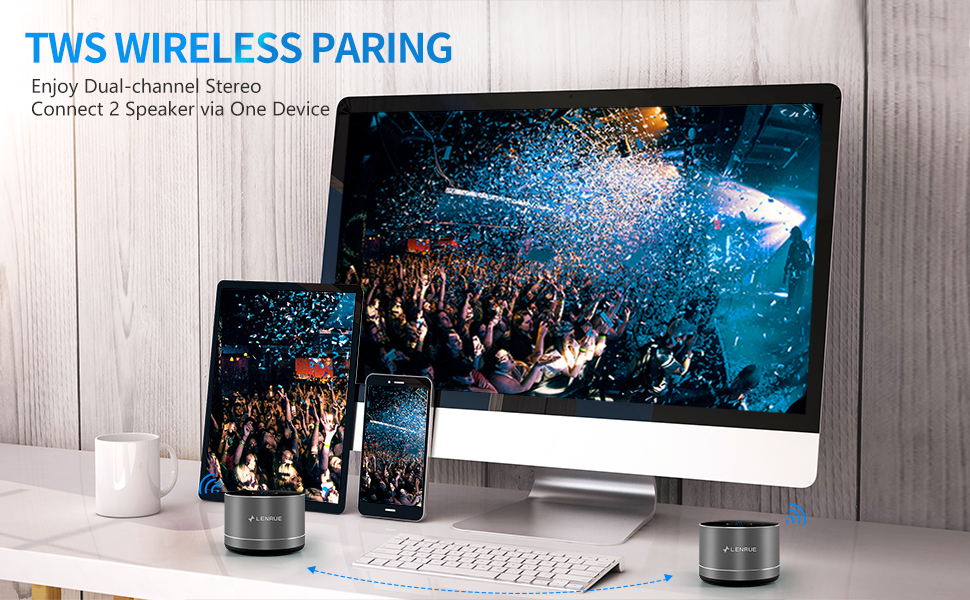
Figure 5: Speaker with its protective hard EVA travel case.
6 การแก้ไขปัญหา
| ปัญหา | สาเหตุที่เป็นไปได้ | สารละลาย |
|---|---|---|
| ลําโพงไม่เปิดขึ้น | แบตเตอรี่อ่อน; กดปุ่มเปิด/ปิดไม่ถูกต้อง | ชาร์จลำโพงให้เต็ม โดยกดปุ่มเปิด/ปิดค้างไว้สองสามวินาที |
| ไม่สามารถจับคู่กับอุปกรณ์บลูทูธได้ | ลำโพงไม่อยู่ในโหมดจับคู่; บลูทูธของอุปกรณ์ปิดอยู่; ลำโพงเชื่อมต่อกับอุปกรณ์อื่นอยู่แล้ว | Ensure speaker is in pairing mode (flashing blue light); Turn on Bluetooth on your device; Disconnect from other devices and try again. |
| Poor sound quality / Muffled sound. | Speaker placement; Obstructions; Low volume. | Ensure the speaker is placed on a flat, open surface, ideally not directly on its bottom where the speaker grille is located. Try placing it on its side for clearer sound. Remove any obstructions; Adjust volume on both speaker and device. |
| การจับคู่ TWS ล้มเหลว | ลำโพงเชื่อมต่อกับอุปกรณ์แล้ว; ขั้นตอนการจับคู่ไม่ถูกต้อง | Ensure both speakers are disconnected from any Bluetooth devices before initiating TWS pairing. Follow the TWS pairing steps precisely. |
| ไม่มีเสียง. | Volume too low; Paused playback; Device not connected. | Increase volume on both speaker and device; Press play; Verify Bluetooth connection. |
7. ข้อมูลจำเพาะ
| คุณสมบัติ | รายละเอียด |
|---|---|
| หมายเลขรุ่น | F4 |
| เทคโนโลยีการเชื่อมต่อ | บลูทูธ 5.0 |
| กำลังขับสูงสุดของลำโพง | 5 วัตต์ |
| แหล่งพลังงาน | ใช้พลังงานจากแบตเตอรี่ (รวมแบตเตอรี่ลิเธียมไอออน 1 ก้อน) |
| ความจุของแบตเตอรี่ | 1200mAh |
| เวลาเล่น | 6-15 ชั่วโมง (ที่ระดับเสียง 2/3) |
| เวลาในการชาร์จ | ประมาณ 4 ชั่วโมง |
| วิธีการควบคุม | สัมผัส |
| ขนาดสินค้า | 3.15 x 3.15 x 1.18 นิ้ว |
| น้ำหนักสินค้า | 9 ออนซ์ |
| คุณสมบัติพิเศษ | Portable, Hands-Free Calling, TWS Pairing |
8. การรับประกันและการสนับสนุน
For warranty information and customer support, please refer to the documentation included with your purchase or contact LENRUE customer service directly. Contact details can typically be found on the official LENRUE webเว็บไซต์หรือผ่านผู้ค้าปลีกของคุณ


