1. บทนำ
This manual provides comprehensive instructions for installing and operating your BRIKSMAX LED Lighting Kit, specifically designed to enhance the LEGO 10281 Bonsai Tree model. This lighting kit is intended to bring your LEGO creation to life with vibrant illumination. Please note that the LEGO building set is not included with this lighting kit.
2. เนื้อหาบรรจุภัณฑ์
Before beginning installation, please verify that all components listed below are present in your package. If any items are missing or damaged, please contact customer support.
- LED Light Set (various dot lights, adhesive light strips)
- Expansion Boards (e.g., 12-port expansion board)
- Connecting Cables (various lengths, e.g., 5cm, 15cm)
- Battery Holder (requires AA batteries, not included)
- สายไฟ USB
- สี่เหลี่ยมกาว
- Block Parts (random color)
- คู่มือการใช้งาน
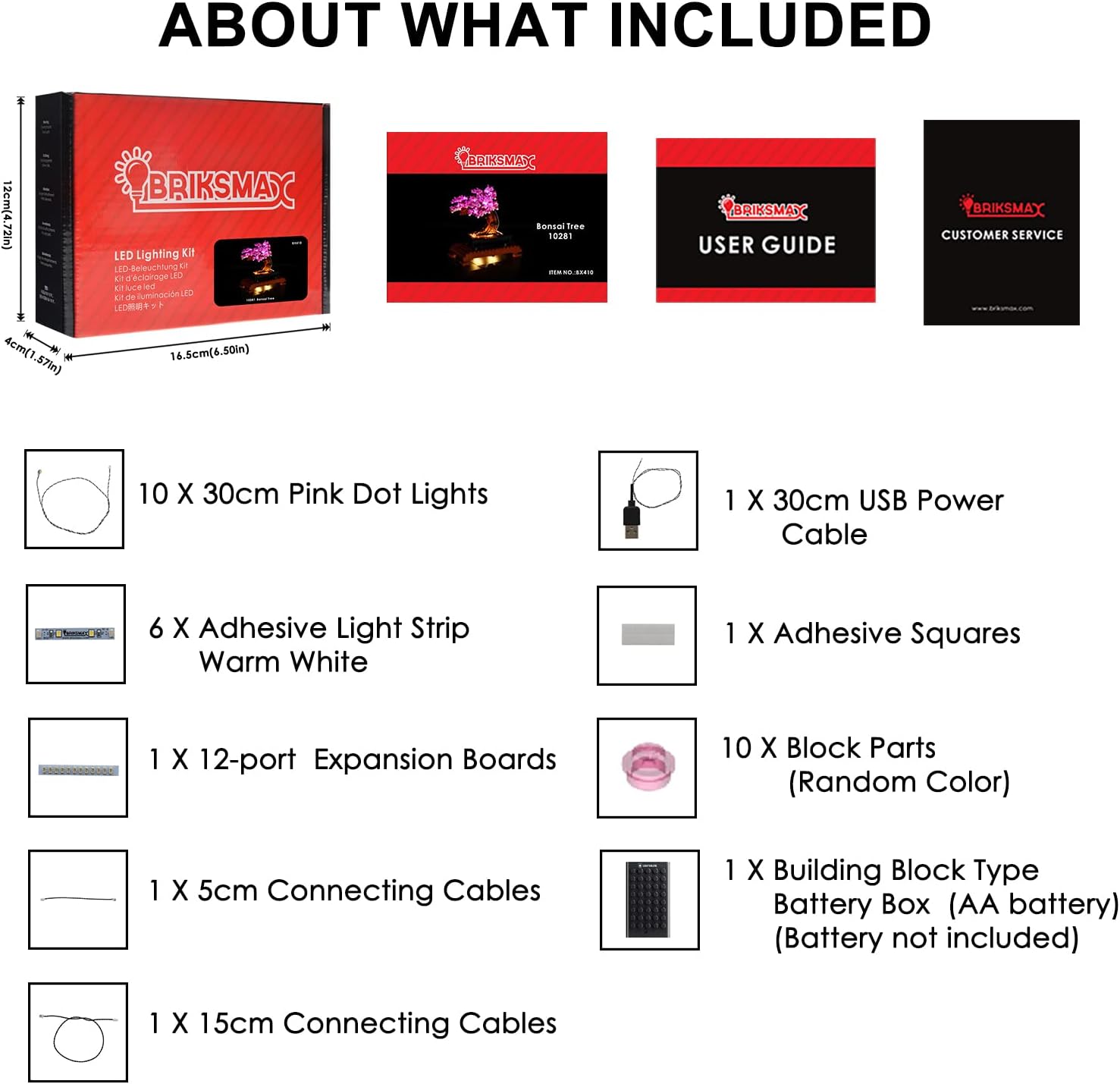
ภาพ: เหนือview of the BRIKSMAX LED Lighting Kit package contents, including lights, cables, and power accessories.
3. การตั้งค่าและการติดตั้ง
Careful installation is crucial for optimal performance and to avoid damage to the lighting kit or your LEGO model. Refer to the included step-by-step instruction manual for detailed diagrams and placement guidance. It is often easier to integrate the lighting kit during the initial construction of the LEGO model or by carefully disassembling relevant sections.
3.1 General Installation Tips
- จัดการสายไฟอย่างระมัดระวัง: Avoid pinching or sharply bending wires, as this can cause damage.
- ส่วนประกอบการทดสอบ: It is recommended to test lights and connections periodically during installation to ensure functionality.
- ซ่อนสายไฟ: Route wires discreetly between LEGO bricks and plates to maintain the aesthetic integrity of your model.
- การเชื่อมต่อที่ปลอดภัย: Ensure all connectors are firmly seated into the expansion boards.
3.2 คู่มือการติดตั้งแบบภาพ
The following video demonstrates key aspects of the installation process for the BRIKSMAX LED Lighting Kit for the LEGO 10281 Bonsai Tree.
Video: Installation guide for the BRIKSMAX LED Lighting Kit on the LEGO 10281 Bonsai Tree, focusing on part 3 of the process.
3.3 Completed Model Exampเลส
Observe the illuminated LEGO 10281 Bonsai Tree with the BRIKSMAX LED Lighting Kit installed, showcasing the final effect.

ภาพ: ด้านหน้า view of the LEGO Bonsai Tree with the lighting kit activated, highlighting the pink blossoms and warm white base lights.

ภาพ: ด้านข้าง view of the illuminated LEGO Bonsai Tree, showing the light distribution across the branches and base.

ภาพ: รายละเอียด view of the pink LED lights integrated into the LEGO Bonsai Tree's blossoms.
4. คู่มือการใช้งาน
Once the BRIKSMAX LED Lighting Kit is fully installed, you can power it using either the included battery holder or a USB power source.
4.1 การจ่ายไฟให้ไฟส่องสว่าง
- พลังงานแบตเตอรี่: Insert the required AA batteries (not included) into the battery holder. Connect the battery holder to the main expansion board.
- พลังงาน USB: Connect the provided USB power cable to the main expansion board and plug the other end into a compatible USB power adapter (e.g., phone charger, power bank, computer USB port).
4.2 การเปิด/ปิด
The lights will activate automatically once a stable power source is connected. Disconnect the power source to turn off the lights.
4.3 ผลิตภัณฑ์เกินview วีดีโอ
รับชมวิดีโอนี้เพื่อดูภาพรวมโดยทั่วไปview of the BRIKSMAX LED Lighting Kit for the Bonsai Tree.
วิดีโอ: จบแล้วview of the BRIKSMAX LED Lighting Kit for the LEGO 10281 Bonsai Tree, demonstrating its illuminated appearance.
5. การบำรุงรักษา
การบำรุงรักษาอย่างเหมาะสมจะช่วยให้ชุดไฟของคุณมีอายุการใช้งานยาวนานและทำงานได้อย่างมีประสิทธิภาพสูงสุด
- การทำความสะอาด: Use a soft, dry cloth to gently wipe dust from the lights and wires. Avoid using liquid cleaners directly on electrical components.
- การเปลี่ยนแบตเตอรี่: If using battery power, replace all AA batteries simultaneously when lights dim or cease to function. Ensure correct polarity.
- พื้นที่จัดเก็บ: If storing the LEGO model with the lighting kit for an extended period, disconnect the power source (remove batteries or unplug USB) to prevent battery leakage or unnecessary power drain.
6 การแก้ไขปัญหา
If you encounter issues with your BRIKSMAX LED Lighting Kit, refer to the following common troubleshooting steps:
| ปัญหา | สาเหตุที่เป็นไปได้ | สารละลาย |
|---|---|---|
| ไฟไม่เปิด | ไม่มีไฟเข้า, การเชื่อมต่อหลวม, ชิ้นส่วนชำรุด | Check battery installation (polarity, charge) or USB connection. Ensure all wires are securely connected to expansion boards. Inspect wires for visible damage. |
| ไฟบางดวงไม่ทำงาน | Loose connection, damaged wire/LED. | Verify connections for the specific non-working lights. Gently check wires for kinks or breaks. If a single LED is faulty, it may need replacement (contact support). |
| ไฟสลัวๆ | พลังงานแบตเตอรี่ต่ำ | Replace batteries with fresh ones or switch to USB power. |
| Wires are visible or difficult to hide. | การวางเส้นทางการติดตั้งไม่ถูกต้อง | Carefully re-route wires through gaps in LEGO bricks or under plates. Refer to the detailed instruction manual for suggested routing paths. |
หากขั้นตอนเหล่านี้ไม่สามารถแก้ไขปัญหาได้ โปรดติดต่อฝ่ายบริการลูกค้าของ BRIKSMAX เพื่อขอความช่วยเหลือเพิ่มเติม
7. ข้อมูลจำเพาะ
Key technical details for the BRIKSMAX LED Lighting Kit (Model BX410):
- หมายเลขรุ่น: บีเอ็กซ์410
- Compatible LEGO Set: 10281 Bonsai Tree
- ประเภทแหล่งกำเนิดแสง: LED (Dot Lights, Adhesive Light Strips)
- สีอ่อน: Pink and Warm White
- แหล่งพลังงาน: Battery Powered (AA batteries, not included) or USB Powered
- เล่มที่tage: 1.5 โวลต์ (สำหรับใช้งานกับแบตเตอรี่)
- วัดแหล่งกำเนิดแสงที่เข้ากันได้สูงสุดtage: 5 วัตต์
- วัสดุ: พลาสติก
- น้ำหนักสินค้า: ประมาณ 207 กรัม (7.3 ออนซ์)
- อายุที่แนะนำ: 8 ปีขึ้นไป
8. การรับประกันและการสนับสนุน
BRIKSMAX is committed to providing high-quality products and customer satisfaction. If you encounter any issues or have questions regarding your lighting kit, please do not hesitate to contact our customer support team.
For assistance, please refer to the contact information provided in your product packaging or visit the official BRIKSMAX webเว็บไซต์.


