1. บทนำ
This manual provides essential instructions for the safe and efficient operation of your Crosley CR6252A-YS Portfolio 3-Speed Bluetooth Turntable. Please read this manual thoroughly before using the product and retain it for future reference.
The Crosley Portfolio turntable is designed to play vinyl records at three speeds and features built-in speakers, Bluetooth connectivity for wireless audio streaming, and a moving magnetic cartridge for audio reproduction.

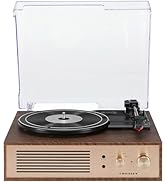
Figure 1.1: Crosley CR6252A-YS Portfolio Turntable (Open View)
2. คำแนะนำด้านความปลอดภัย
- อ่านคำแนะนำทั้งหมดก่อนใช้งาน
- เก็บผลิตภัณฑ์ให้ห่างจากน้ำหรือความชื้น
- อย่าวางไว้ใกล้แหล่งความร้อน เช่น เครื่องทำความร้อน ช่องระบายความร้อน เตา หรืออุปกรณ์อื่นๆ ที่ให้ความร้อน
- ทำความสะอาดด้วยผ้าแห้งเท่านั้น
- ใช้เฉพาะอุปกรณ์เสริม/สิ่งที่แนบตามที่ผู้ผลิตกำหนดเท่านั้น
- ถอดปลั๊กอุปกรณ์นี้ในระหว่างพายุฝนฟ้าคะนองหรือเมื่อไม่ได้ใช้งานเป็นเวลานาน
- แจ้งบริการทั้งหมดให้ช่างที่ผ่านการรับรองทราบ จำเป็นต้องให้บริการเมื่ออุปกรณ์ได้รับความเสียหายในลักษณะใดก็ตาม เช่น สายไฟหรือปลั๊กชำรุด ของเหลวหกหรือมีวัตถุตกลงไปในอุปกรณ์ อุปกรณ์โดนฝนหรือความชื้น ไม่สามารถทำงานได้ตามปกติ หรือตกหล่น
3. เนื้อหาบรรจุภัณฑ์
ตรวจสอบว่ารายการทั้งหมดที่ระบุไว้ด้านล่างนี้รวมอยู่ในแพ็คเกจของคุณ:
- Crosley CR6252A-YS Portfolio Turntable
- อะแดปเตอร์แปลงไฟ
- คู่มือการใช้งาน (เอกสารนี้)
4. คุณสมบัติและส่วนประกอบของผลิตภัณฑ์
The Crosley CR6252A-YS Portfolio Turntable includes the following key features and components:
- เครื่องเล่นแผ่นเสียงแบบ 3 ความเร็ว: รองรับแผ่นเสียงความเร็ว 33 1/3, 45 และ 78 รอบต่อนาที
- ตัวรับสัญญาณบลูทูธในตัว: รองรับการสตรีมแบบไร้สายจากอุปกรณ์ที่ใช้งานร่วมกันได้
- การควบคุมระดับเสียงที่ปรับได้: Fine-tune record speed.
- Moving Magnetic Cartridge: Pre-mounted for optimal sound.
- อินพุตเสริม: เชื่อมต่อแหล่งสัญญาณเสียงภายนอก
- USB Enabled: สำหรับการเชื่อมต่อกับคอมพิวเตอร์
- ลำโพงในตัว: เอาต์พุตเสียงในตัว

Figure 4.1: Turntable Mechanism and Controls
รูปที่ 4.2: รายละเอียดแผงควบคุม

รูปที่ 4.3: การเชื่อมต่อแผงด้านหลัง
5. การตั้งค่า
5.1 การจัดวางเริ่มต้น
Place the turntable on a flat, stable surface away from direct sunlight, heat sources, and excessive dust or vibrations.
5.2 การเชื่อมต่อสายไฟ
- Connect the power adapter to the DC 12V input jack on the rear of the turntable.
- เสียบอะแดปเตอร์ไฟฟ้าเข้ากับเต้ารับไฟฟ้าที่เหมาะสม
5.3 Turntable Preparation
- Carefully remove any protective packaging materials from the turntable platter and tonearm.
- ตรวจสอบให้แน่ใจว่าแขนของเครื่องเล่นแผ่นเสียงไม่ได้ล็อกอยู่กับที่
6. คู่มือการใช้งาน
6.1 การเล่นแผ่นเสียง
- หมุน เปิด/ปิด knob clockwise to power on the unit.
- Select the desired speed (33 1/3, 45, or 78 RPM) using the speed selector switch. Note: A 78 RPM stylus (not included) is required for 78 RPM records.
- Place a record on the turntable platter. If playing a 45 RPM single, place the 45 RPM adapter (if included) over the spindle.
- Lift the tonearm using the cueing lever and position it over the desired track on the record.
- ค่อยๆ ลดแขนโทนอาร์มลงบนแผ่นเสียงโดยใช้คันโยก แผ่นเสียงจะเริ่มเล่น
- ปรับระดับเสียงโดยใช้ปุ่ม ปริมาณ ลูกบิด
- ใช้ ขว้าง control knob to fine-tune the playback speed if necessary.
- To stop playing, lift the tonearm, return it to its rest, and turn the เปิด/ปิด ลูกบิดทวนเข็มนาฬิกา
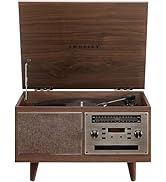
Figure 6.1: Stylus on Record
6.2 การทำงานของบลูทูธ
- หมุน เปิด/ปิด knob clockwise to power on the unit.
- Slide the function switch to the บลูทูธ position. The indicator light will flash, indicating pairing mode.
- Enable Bluetooth on your external device (e.g., smartphone, tablet) and search for "Crosley Portfolio".
- Select "Crosley Portfolio" from the list of available devices to pair. Once paired, the indicator light will stop flashing and remain solid.
- You can now stream audio wirelessly from your device to the turntable's built-in speakers.
- ปรับระดับเสียงโดยใช้ปุ่ม ปริมาณ knob on the turntable and/or your external device.
6.3 ช่องเสียบอินพุตเสริม (AUX IN)
- หมุน เปิด/ปิด knob clockwise to power on the unit.
- เชื่อมต่ออุปกรณ์เสียงภายนอก (เช่น เครื่องเล่น MP3, เครื่องเล่นซีดี) เข้ากับ AUX IN port using a 3.5mm audio cable (not included).
- เครื่องเล่นแผ่นเสียงจะสลับไปที่โหมด AUX IN โดยอัตโนมัติ
- ปรับระดับเสียงโดยใช้ปุ่ม ปริมาณ knob on the turntable and/or your external device.
การเชื่อมต่อ USB 6.4
The turntable features a PC-USB port for connecting to a computer. This allows for digital conversion of your vinyl records using appropriate software (not included). Refer to your chosen software's instructions for recording procedures.
7. การบำรุงรักษา
7.1 การทำความสะอาดเครื่องเล่นแผ่นเสียง
- ควรดึงปลั๊กเครื่องเล่นแผ่นเสียงออกจากเต้ารับไฟฟ้าทุกครั้งก่อนทำความสะอาด
- ใช้ผ้าแห้งนุ่มเช็ดทำความสะอาดพื้นผิวด้านนอก ห้ามใช้สารทำความสะอาดที่มีฤทธิ์กัดกร่อนหรือตัวทำละลาย
- ใช้แปรงขนนุ่มที่ออกแบบมาสำหรับทำความสะอาดปากกาสไตลัสอย่างเบามือ โดยปัดจากด้านหลังไปด้านหน้า
7.2 การเปลี่ยนสไตลัส
The stylus (needle) is a consumable part and will wear out over time. A worn stylus can damage your records and degrade sound quality. Replace the stylus after approximately 200-300 hours of playback. Consult your retailer or Crosley support for compatible replacement styli.
8 การแก้ไขปัญหา
| ปัญหา | สาเหตุที่เป็นไปได้ | สารละลาย |
|---|---|---|
| ไม่มีไฟฟ้า | ไม่ได้เชื่อมต่ออะแดปเตอร์ไฟหรือเต้ารับไฟฟ้าชำรุด | ตรวจสอบให้แน่ใจว่าอะแดปเตอร์ไฟฟ้าเชื่อมต่ออย่างแน่นหนาและเต้ารับใช้งานได้ |
| ไม่มีเสียงออกจากลำโพง | Volume too low; function switch in wrong position; Bluetooth not paired. | Increase volume; ensure function switch is set to PHONO or Bluetooth is correctly paired. |
| การข้ามการบันทึก | Record is dirty or damaged; stylus is worn; turntable not level. | Clean record; replace stylus; ensure turntable is on a level surface. |
| อุปกรณ์บลูทูธไม่จับคู่ | Turntable not in pairing mode; device too far; device already paired to another unit. | Ensure turntable is in Bluetooth pairing mode; move device closer; disconnect from other Bluetooth devices. |
9. ข้อมูลจำเพาะ
- ขนาดสินค้า : 12.4 x 15.28 x 6.5 นิ้ว
- น้ำหนักสินค้า: 13 ปอนด์
- หมายเลขรุ่นสินค้า: CR6252A-YS
- ยี่ห้อ: ครอสลีย์
- ส่วนประกอบที่รวมอยู่: CR6252A-YS Portfolio Turntable
- สไตล์: วินtage
- สี: Yellow Submarine
- รูปแบบสัญญาณ: อนาล็อก
- แหล่งพลังงาน: สายไฟ
- ยูพีซี: 710244246569
10. การรับประกันและการสนับสนุน
For warranty information and technical support, please refer to the warranty card included with your product or visit the official Crosley webไซต์ โปรดเก็บใบเสร็จรับเงินของคุณไว้เป็นหลักฐานการซื้อสำหรับการเรียกร้องการรับประกันใดๆ
ผู้ผลิต: ครอสลีย์
วันที่เข้าใช้งานครั้งแรก: 30 พฤศจิกายน 2021


