1. บทนำ
Thank you for choosing the Arboleaf Smart Kitchen Scale, Model CK10G. This advanced kitchen scale is designed to provide precise measurements for your culinary needs and assist with nutritional tracking through its smart connectivity features. With a maximum capacity of 10kg and an accuracy of 0.5g, it is an ideal tool for cooking, baking, pet food portioning, and managing dietary intake.
This manual provides detailed instructions on how to set up, operate, and maintain your Arboleaf Smart Kitchen Scale to ensure optimal performance and longevity.
2. คู่มือการติดตั้ง
2.1 การแกะกล่องและการตรวจสอบเบื้องต้น
นำชิ้นส่วนทั้งหมดออกจากบรรจุภัณฑ์อย่างระมัดระวัง ตรวจสอบว่าชิ้นส่วนทั้งหมดครบถ้วนและไม่เสียหาย บรรจุภัณฑ์ควรประกอบด้วย:
- Arboleaf Smart Kitchen Scale (Model CK10G)
- สายชาร์จ USB
- คู่มือการใช้งาน (เอกสารนี้)
2.2 การชาร์จเครื่องชั่ง
The Arboleaf Smart Kitchen Scale features a built-in rechargeable battery. Before first use, fully charge the device.
- Locate the USB charging port on the side or back of the scale.
- Connect the provided USB charging cable to the scale and plug the other end into a standard USB power adapter (not included) or a computer USB port.
- The LED display will indicate charging status. The scale can be used while charging.
- A full charge typically provides up to two months of use, depending on frequency.

Figure 2.1: Arboleaf Smart Kitchen Scale with USB charging cables and app interface.
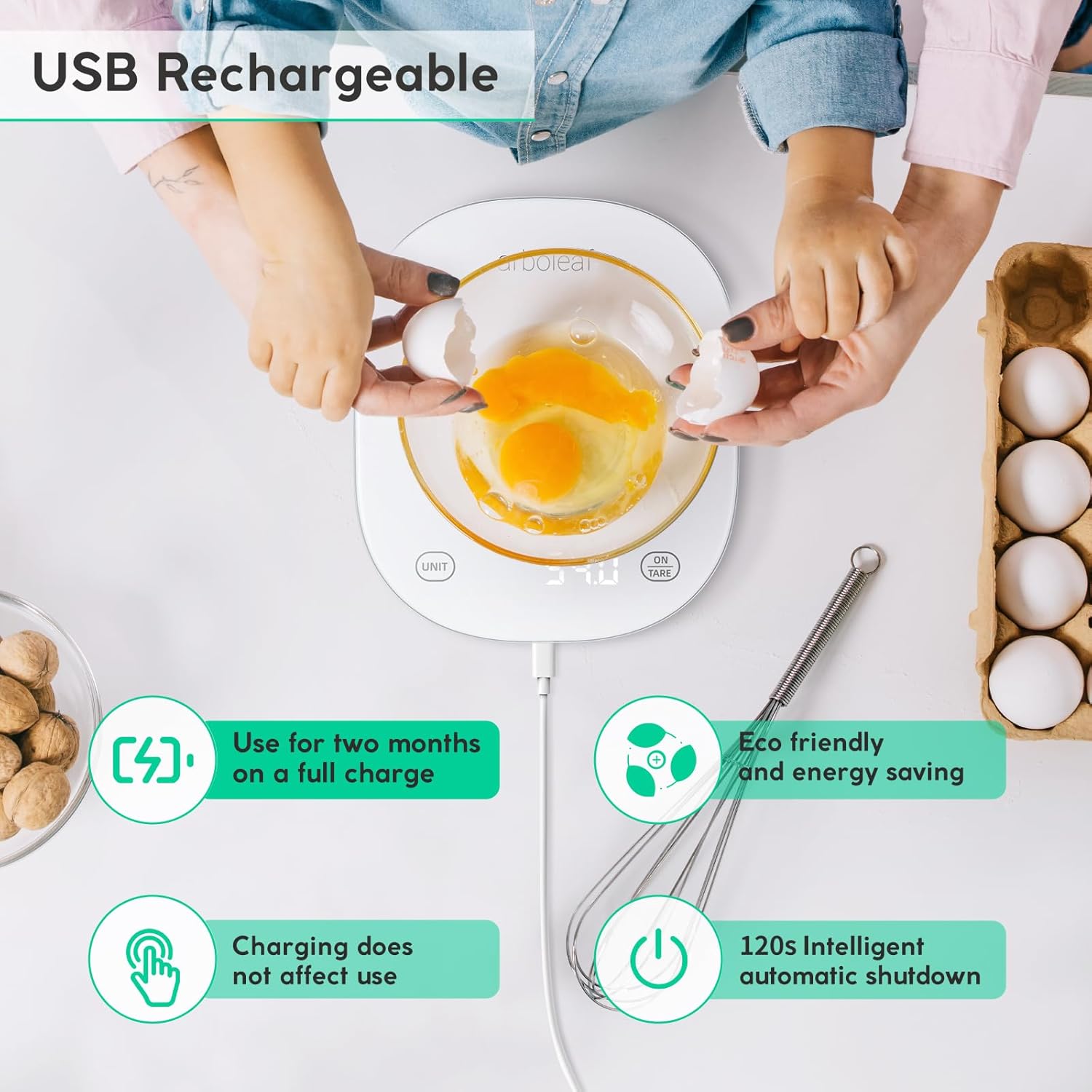
Figure 2.2: USB Rechargeable feature of the scale, highlighting its long battery life and eco-friendliness.
2.3 Installing the Foodiet App
To unlock the full potential of your smart kitchen scale, download and install the "Foodiet" application on your smartphone or tablet.
- Scan the QR code provided in the packaging or search for "Foodiet" in your device's app store (App Store for iOS, Google Play Store for Android).
- ดาวน์โหลดและติดตั้งแอปพลิเคชัน
- เปิดใช้งานบลูทูธบนสมาร์ทโฟน/แท็บเล็ตของคุณ
- Open the Foodiet app and follow the on-screen instructions to pair your scale. Ensure the scale is turned on.
3. คู่มือการใช้งาน
3.1 การชั่งน้ำหนักพื้นฐาน
- วางเครื่องชั่งบนพื้นผิวที่เรียบและมั่นคง
- Press the "ON/TARE" button to turn on the scale. The display will show "0.0g" when ready.
- Place the item you wish to weigh directly onto the center of the scale platform.
- The weight will be displayed on the LED screen.

Figure 3.1: Easy-to-read display and app integration for weighing ingredients.
3.2 การแปลงหน่วย
The scale supports multiple units of measurement. You can switch between units using the "UNIT" button on the scale or through the Foodiet app.
- Press the "UNIT" button repeatedly to cycle through available units: grams (g), pounds:ounces (lb:oz), fluid ounces (fl:oz), milliliters (ml), and milk milliliters (ml with milk icon).
- Alternatively, open the Foodiet app and select your desired unit from the interface. The app also allows you to view the weight even if a large plate obstructs the scale's display.

Figure 3.2: Multiple unit options and sensor technology.

Figure 3.3: Scale displaying weight in grams with unit options.

Figure 3.4: Using the Foodiet app to select units and view measurements when the scale display is obstructed.
3.3 ฟังก์ชันทดน้ำหนัก
ฟังก์ชันการหักน้ำหนักภาชนะ (tare) ช่วยให้คุณสามารถชั่งส่วนผสมหลายอย่างในภาชนะเดียวกัน หรือหักน้ำหนักของภาชนะออกได้
- วางภาชนะเปล่าลงบนเครื่องชั่ง หน้าจอจะแสดงน้ำหนักของภาชนะนั้น
- Press the "ON/TARE" button. The display will reset to "0.0g".
- ใส่ส่วนผสมแรกลงในภาชนะ หน้าจอจะแสดงน้ำหนักของส่วนผสมนั้นเท่านั้น
- To add another ingredient, press "ON/TARE" again to reset the display to "0.0g", then add the next ingredient. Repeat as needed.

Figure 3.5: Step-by-step guide for using the Tare Function.

Figure 3.6: Scale display after applying the tare function.
3.4 Using the Foodiet App for Nutritional Tracking
The Foodiet app is a powerful tool for managing your dietary intake and tracking nutritional information.
- Ingredient Analysis: Weigh your food on the scale, and the app will display detailed nutritional facts (calories, fat, protein, carbs, etc.) for over 19 food elements.
- Daily Intake Tracking: Record and track your daily, weekly, monthly, and annual consumption.
- การซิงโครไนซ์ข้อมูล: Sync your data with popular health management software like Fitbit and Apple Health.
- Customizable Auto-Shutdown: Adjust the auto-shutdown time (120 seconds, 3.5 minutes, 5 minutes) via the app to conserve battery life.

Figure 3.7: Managing ingredients and tracking nutrition with the Foodiet app.

Figure 3.8: Obtaining ingredient and food content details from the Foodiet App.

Figure 3.9: Various options for Auto Shutdown time settings in the Foodiet app.
4. การบำรุงรักษา
4.1 การทำความสะอาด
The scale features a waterproof surface for easy cleaning.
- เช็ดพื้นผิวของเกล็ดด้วยผ้าเนื้อนุ่มและแห้งamp ผ้า.
- ห้ามใช้น้ำยาทำความสะอาดที่มีฤทธิ์กัดกร่อน หรือแช่คราบตะกรันในน้ำ
- Ensure the scale is dry before storage.

Figure 4.1: Easy to Clean Waterproof Surface.
4.2 พื้นที่จัดเก็บ
เก็บเครื่องชั่งไว้ในที่แห้งและเย็น หลีกเลี่ยงแสงแดดโดยตรงและอุณหภูมิที่สูงหรือต่ำเกินไป หลีกเลี่ยงการวางของหนักบนเครื่องชั่งเมื่อไม่ได้ใช้งาน
5 การแก้ไขปัญหา
| ปัญหา | สาเหตุที่เป็นไปได้ | สารละลาย |
|---|---|---|
| เครื่องชั่งน้ำหนักไม่เปิด | แบตเตอรี่อ่อนหรือไม่มีการชาร์จ | ชาร์จเครื่องชั่งโดยใช้สาย USB ที่ให้มา |
| การอ่านที่ไม่ถูกต้อง | Scale not on a flat surface; overloaded; dirty sensors. | Place on a stable, flat surface. Do not exceed 10kg. Clean the scale. Recalibrate if necessary (refer to app instructions). |
| แสดงข้อความ "Err" | Overload error (weight exceeds 10kg). | Remove items from the scale immediately. Do not exceed maximum capacity. |
| แสดง "Lo" | แบตเตอรี่อ่อน | Recharge the scale. |
| Cannot connect to Foodiet app. | Bluetooth off; scale not on; app issue. | Ensure Bluetooth is enabled on your device. Turn the scale off and on again. Restart the app. Re-pair the device in the app settings. |

Figure 5.1: Scale display showing 'CHAR' during charging.

Figure 5.2: 'Err' display indicating overload.

Figure 5.3: 'Lo' display indicating low battery.
6. ข้อมูลจำเพาะ
| คุณสมบัติ | รายละเอียด |
|---|---|
| หมายเลขรุ่น | CK10G |
| ยี่ห้อ | ต้นอาร์โบลีฟ |
| ความจุสูงสุด | 10 กก. (22 ปอนด์) |
| Accuracy / Increment | 0.5 กรัม |
| น้ำหนักขั้นต่ำที่แนะนำ | 2 กรัม |
| หน่วยวัด | g, lb:oz, fl:oz, ml, milk ml |
| ประเภทจอภาพ | ไฟ LED ด้านหลัง |
| แหล่งพลังงาน | Rechargeable Lithium-polymer battery (included) |
| การเชื่อมต่อ | Bluetooth (Foodiet App) |
| วัสดุ | Acrylonitrile Butadiene Styrene Glass |
| ขนาด (กว้าง x ยาว x สูง) | 21 x 18.2 x 2.07 ซม. (ประมาณ 8.27 x 7.17 x 0.81 นิ้ว) |
| น้ำหนักสินค้า | 530 กรัม (ประมาณ 1.17 ปอนด์) |
| สี | สีขาว |
| ประเทศต้นกำเนิด | จีน |
7. การรับประกันและการสนับสนุน
7.1 ข้อมูลการรับประกัน
Arboleaf products are manufactured with high-quality materials and are thoroughly tested before shipment. This product comes with a standard manufacturer's warranty against defects in materials and workmanship from the date of purchase. Please retain your proof of purchase for warranty claims.
The warranty does not cover damage caused by misuse, accident, unauthorized modification, or failure to follow the instructions in this manual. For specific warranty terms and conditions, please refer to the documentation included with your purchase or contact Arboleaf customer support.
7.2 การสนับสนุนลูกค้า
If you encounter any issues or have questions regarding your Arboleaf Smart Kitchen Scale, please contact our customer support team. For the most up-to-date contact information, please visit the official Arboleaf webดูรายละเอียดเพิ่มเติมได้ที่เว็บไซต์หรือบรรจุภัณฑ์ของผลิตภัณฑ์
แหล่งข้อมูลออนไลน์: For FAQs, troubleshooting guides, and app updates, please visit the Arboleaf official webเว็บไซต์.
การสนับสนุนทางอีเมล์: อ้างถึง webเว็บไซต์
การสนับสนุนทางโทรศัพท์: อ้างถึง webเว็บไซต์
When contacting support, please have your product model number (CK10G) and purchase details ready.


