1. บทนำ
This manual provides detailed instructions for the setup, operation, and maintenance of your Loluka Smart Watch JYAW12PROLA. Please read this manual thoroughly to ensure proper use and to maximize the functionality of your device.
1.1 เนื้อหาบรรจุภัณฑ์
เมื่อแกะกล่องแล้วโปรดตรวจสอบว่ามีสิ่งของทั้งหมดที่ระบุไว้ด้านล่างนี้อยู่:
- 1x Loluka Smart Watch
- 1x Watch Box
- 1x คู่มือผู้ใช้ (เอกสารนี้)
- สายชาร์จแม่เหล็ก 1 เส้น
2. การตั้งค่า
2.1 การชาร์จสมาร์ทวอทช์
Before first use, fully charge your smart watch. Use the provided magnetic charging cable.
- Connect the magnetic end of the charging cable to the charging contacts on the back of the watch. Ensure a secure connection.
- เสียบปลาย USB ของสายชาร์จเข้ากับอะแดปเตอร์แปลงไฟ USB มาตรฐาน (ไม่ได้รวมอยู่ในชุด) หรือพอร์ต USB ของคอมพิวเตอร์
- The watch screen will indicate charging status. A full charge typically takes approximately 2-3 hours.
บันทึก: A full charge provides approximately 2-5 days of working time and up to 15 days of standby time, depending on usage.
2.2 การเปิด/ปิดเครื่อง
- การเปิดเครื่อง: กดปุ่มด้านข้างค้างไว้จนกว่าหน้าจอจะสว่างขึ้น
- วิธีปิดเครื่อง: Navigate to the 'Settings' menu on the watch, then select 'Power Off' or press and hold the side button and confirm power off.
2.3 การติดตั้งแอปและการจับคู่อุปกรณ์
To unlock the full features of your Loluka Smart Watch, you need to install the companion application on your smartphone and pair the devices.
- ดาวน์โหลดแอป: Scan the QR code provided in the watch's quick start guide or search for the designated app (e.g., 'SZOS' or similar, as mentioned in some product descriptions) in your smartphone's app store (Apple App Store for iOS, Google Play Store for Android).
- ติดตั้งและเปิดใช้งาน: ติดตั้งแอปพลิเคชันและเปิดใช้งานบนสมาร์ทโฟนของคุณ
- เปิดใช้งานบลูทูธ: ตรวจสอบให้แน่ใจว่าได้เปิดใช้งาน Bluetooth บนสมาร์ทโฟนของคุณแล้ว
- จับคู่อุปกรณ์: Within the app, navigate to the 'Device' or 'Add Device' section. The app will search for available devices. Select 'JYAW12PROLA' or the corresponding device name when it appears.
- ยืนยันการจับคู่: Follow the on-screen prompts on both your phone and watch to confirm the pairing.
ความเข้ากันได้: The smart watch supports iOS 10.0 or above and Android 5.0 or above smartphones. It is not compatible with PCs, iPads, or tablets.
3. คู่มือการใช้งาน
The Loluka Smart Watch features a 1.3-inch full touch screen for navigation and interaction.
3.1 การนำทางพื้นฐาน
- ปัดขึ้น/ลง: เลื่อนดูเมนูหรือการแจ้งเตือน
- ปัดไปทางซ้าย/ขวา: เข้าถึงวิดเจ็ตต่างๆ หรือการตั้งค่าด่วน
- แตะ: เลือกสินค้าหรือยืนยันการดำเนินการ
- ปุ่มด้านข้าง: Typically used to return to the home screen or access the main menu.
3.2 ฟังก์ชันการโทรผ่านบลูทูธ
เมื่อเชื่อมต่อกับสมาร์ทโฟนแล้ว คุณสามารถโทรออกและรับสายได้โดยตรงจากนาฬิกาของคุณ
- โทรออก: Access the 'Dialer' or 'Contacts' function on your watch to initiate a call.
- การรับสาย: When a call comes in, the watch will display the caller ID. You can answer or reject the call directly from the watch screen.
3.3 การแจ้งเตือนข้อความ
The watch can display notifications from your smartphone, including SMS, social media alerts, and other app notifications.
- โปรดตรวจสอบให้แน่ใจว่าได้เปิดใช้งานการอนุญาตการแจ้งเตือนสำหรับแอปพลิเคชันคู่หูบนสมาร์ทโฟนของคุณแล้ว
- Notifications will appear on the watch screen and the watch will vibrate.
3.4 Multi-Sports Modes
The watch includes multiple built-in exercise modes to track your physical activity.
- Access the 'Sports' or 'Workout' menu on your watch.
- Select the desired exercise mode (e.g., running, walking, cycling).
- The watch will track metrics such as steps, calories burned, and distance during your workout.
3.5 การติดตามการนอนหลับ
The watch monitors your sleep patterns to help you understand and improve your sleep quality.
- Wear the watch while sleeping. It will automatically detect and record different sleep stages, including deep sleep and periods of wakefulness.
- View detailed sleep data in the companion app, which provides a scientific evaluation of your sleep quality over a 7-day period.

Image: The smart watch screen showing sleep monitoring data, including sleep duration and quality metrics. A person is shown sleeping in the background.
3.6 หน้าปัดแบบกำหนดเอง
Personalize your watch face with various pre-installed dials or create custom ones.
- Long-press the watch face on the home screen to access dial options.
- Swipe left or right to browse available dials and tap to select.
- The companion app may offer additional custom dial options, allowing you to upload personal images or designs.
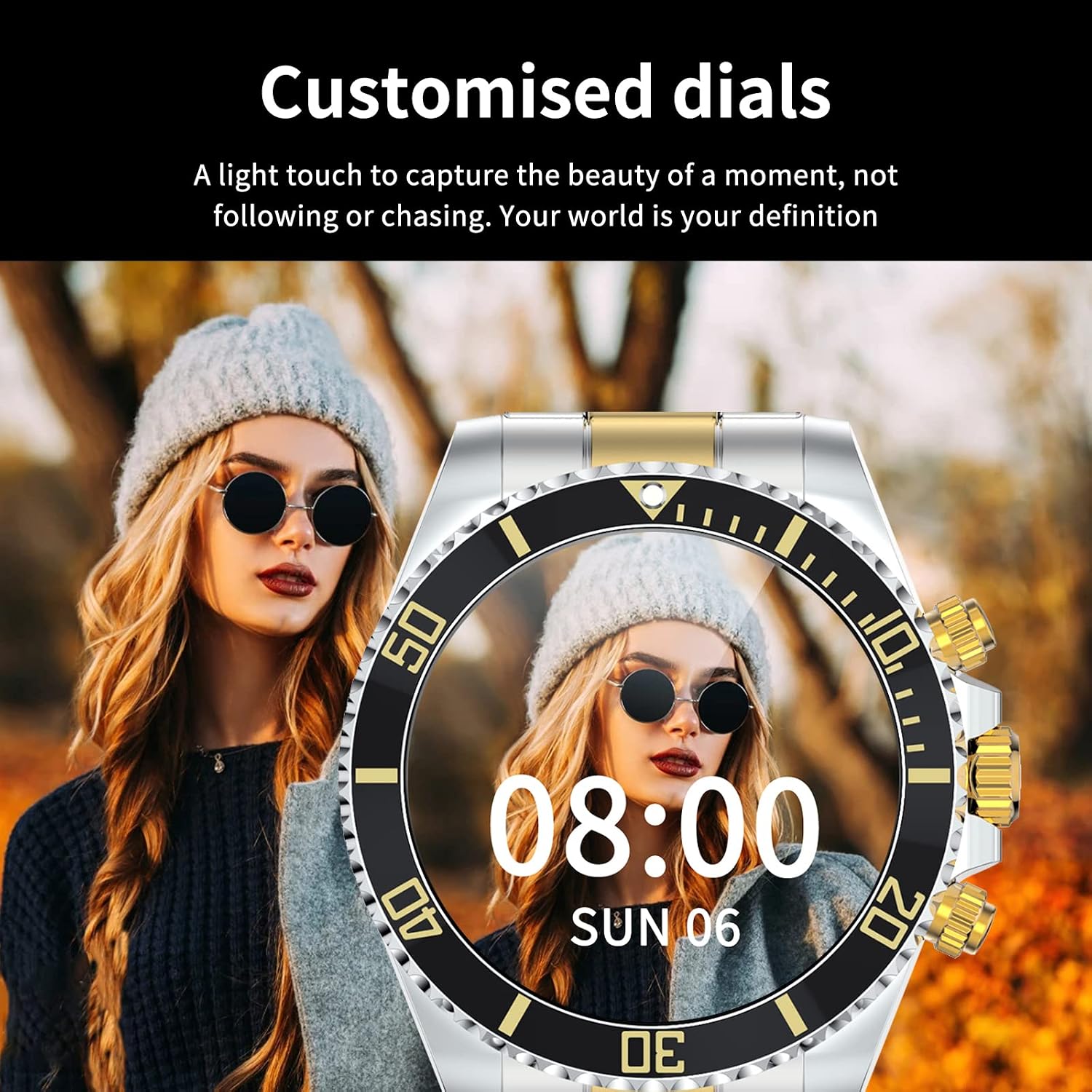
Image: A Loluka Smart Watch displaying a customized digital watch face with time and date, worn by a person.
3.7 คุณสมบัติเพิ่มเติม
- pedometer: แอปนี้จะบันทึกจำนวนก้าว แคลอรีที่เผาผลาญ และระยะทางตลอดทั้งวัน
- Alarm/Sedentary Reminder: Set alarms and receive reminders to move after periods of inactivity via the companion app.
- การควบคุมกล้องระยะไกล: ใช้นาฬิกาของคุณเป็นชัตเตอร์ระยะไกลสำหรับกล้องสมาร์ทโฟนของคุณ
- การควบคุมเพลง: Control music playback on your smartphone (play, pause, skip tracks, adjust volume) directly from the watch.

Image: The smart watch displaying music control options, with a smartphone showing a music playlist in the background.
4. การบำรุงรักษา
4.1 ความต้านทานต่อน้ำ
The Loluka Smart Watch is rated IP67 waterproof.
- It can withstand splashes, hand washing, and rain.
- สำคัญ: นาฬิกานั้นเป็น ไม่ suitable for hot water bathing, diving, swimming, or water-related work where it would be submerged for extended periods or exposed to high-pressure water.

Image: A Loluka Smart Watch partially submerged in water, with text indicating 'IP67 life waterproof' and warnings about unsuitable activities.
4.2 การทำความสะอาด
เพื่อรักษารูปลักษณ์และฟังก์ชันการทำงานของนาฬิกาของคุณ:
- Wipe the watch and band regularly with a soft, dry, lint-free cloth.
- หากจำเป็น ให้ใช้ง. เล็กน้อยamp ผ้าสำหรับขจัดคราบฝังแน่นแล้วเช็ดให้แห้งสนิท
- หลีกเลี่ยงการใช้สารเคมีรุนแรง น้ำยาทำความสะอาด หรือผงซักฟอกที่มีฤทธิ์กัดกร่อน เพราะอาจทำให้พื้นผิวและซีลของนาฬิกาเสียหายได้
4.3 การดูแลแบตเตอรี่
- หลีกเลี่ยงการปล่อยแบตเตอรี่จนหมดบ่อยครั้ง
- เก็บนาฬิกาไว้ในที่แห้งและเย็นเมื่อไม่ได้ใช้งานเป็นเวลานาน
- ใช้เฉพาะสายชาร์จที่ให้มาเท่านั้น
5 การแก้ไขปัญหา
If you encounter issues with your Loluka Smart Watch, refer to the following common solutions:
- นาฬิกาไม่เปิด: ตรวจสอบให้แน่ใจว่านาฬิกาชาร์จเต็มแล้ว เสียบนาฬิกาเข้ากับเครื่องชาร์จอย่างน้อย 30 นาที
- ไม่สามารถจับคู่กับสมาร์ทโฟนได้:
- ตรวจสอบให้แน่ใจว่าได้เปิดใช้งานบลูทูธบนโทรศัพท์และนาฬิกาของคุณแล้ว
- ตรวจสอบให้แน่ใจว่านาฬิกาอยู่ในระยะบลูทูธของโทรศัพท์ของคุณ
- รีสตาร์ททั้งโทรศัพท์และนาฬิกาของคุณ
- ตรวจสอบให้แน่ใจว่าแอปคู่หูได้รับการอัปเดตเป็นเวอร์ชันล่าสุด
- ลืมอุปกรณ์ในการตั้งค่าบลูทูธของโทรศัพท์ของคุณและลองจับคู่ผ่านแอปอีกครั้ง
- การแจ้งเตือนไม่ปรากฏ:
- Check app notification settings on your phone and within the companion app.
- ตรวจสอบให้แน่ใจว่านาฬิกาเชื่อมต่อผ่านบลูทูธ
- การติดตามกิจกรรมที่ไม่ถูกต้อง: ตรวจสอบให้แน่ใจว่านาฬิกากระชับพอดีกับข้อมือของคุณ ปรับเทียบนาฬิกาผ่านแอปพลิเคชันหากมีให้บริการ
- อายุการใช้งานแบตเตอรี่สั้น: Reduce screen brightness, disable unnecessary features, and ensure the watch is not constantly searching for Bluetooth connections.
หากขั้นตอนเหล่านี้ไม่สามารถแก้ไขปัญหาของคุณได้ โปรดติดต่อฝ่ายสนับสนุนลูกค้า
6. ข้อมูลจำเพาะ
| หมายเลขรุ่น | JYAW12PROLA |
| ขนาดหน้าจอ | 1.3-inch full color screen |
| ปณิธาน | 240*240 พิกเซล |
| บลูทูธ | Dual Bluetooth 3.0/4.0 |
| ความจุของแบตเตอรี่ | 380mAh (1 Lithium Metal battery required) |
| ประเภทการดำเนินงาน | หน้าจอสัมผัสเต็มรูปแบบ |
| ประเภทการชาร์จ | การชาร์จด้วยแม่เหล็ก |
| เวลาชาร์จเต็ม | ประมาณ 2-3 ชั่วโมง |
| เวลาทำงาน | 2-5 วัน (ระยะเวลาใช้งานโดยทั่วไป) |
| เวลาสแตนด์บาย | นานถึง 15 วัน |
| ระดับการกันน้ำ | IP67 |
| วัสดุตัวเรือน | โลหะผสม |
| วัสดุของวงดนตรี | สแตนเลส |
| ประเภทตัวล็อค | Fold Clasp |
| เส้นผ่านศูนย์กลางตัวเรือนหน้าปัด | 46 มม. (1.81") |
| ความหนาของตัวเรือนหน้าปัด | 13 มม. (0.51") |
| ความกว้างของแถบ | 22 มม. (0.86") |
| ความยาวสาย | 230 มม. (9.05") |
| ภาษาที่รองรับ | English, French, Italian, Spanish, Arabic, German, Polish, Portuguese, Malay, Czech, Turkish, Russian, Greek, Persia, Hebrew |
| ความเข้ากันได้ของระบบปฏิบัติการ | iOS 10.0 + / Android 5.0 + |
7. การรับประกันและการสนับสนุน
Your Loluka Smart Watch is designed for reliability and performance. While specific warranty details are not provided in this manual, we are committed to customer satisfaction.
If you have any questions, encounter issues, or require assistance with your product, please do not hesitate to contact our customer support team. We are dedicated to offering the best possible solution to you.
โปรดดูเอกสารการซื้อหรือข้อมูลจากผู้ค้าปลีก website for contact information and any applicable warranty terms.