
1. บทนำ
Thank you for choosing the SJOYBRING Double Din Car Stereo. This manual provides comprehensive instructions for the installation, operation, and maintenance of your new car stereo system. Please read this manual thoroughly before using the product to ensure proper functionality and to maximize your user experience. Keep this manual for future reference.
2. ข้อมูลด้านความปลอดภัย
- ความปลอดภัยในการขับขี่: Always prioritize driving safety. Do not operate the system in a way that distracts you from the road. Adjust settings only when the vehicle is stationary and safe to do so.
- การติดตั้ง: Incorrect installation can lead to malfunction or damage. If you are unsure about the installation process, seek professional assistance. Ensure all wiring is correctly connected and insulated to prevent short circuits.
- แหล่งจ่ายไฟ: เชื่อมต่ออุปกรณ์เข้ากับแหล่งจ่ายไฟ DC 12V ที่มีขั้วลบเป็นกราวด์เท่านั้น
- อุณหภูมิ: ควรหลีกเลี่ยงการวางเครื่องไว้ในที่ที่มีอุณหภูมิสูงหรือต่ำเกินไป แสงแดดส่องโดยตรงเป็นเวลานาน หรือความชื้นสูงเกินไป
- การทำความสะอาด: ใช้ผ้าแห้งนุ่มๆ เช็ดทำความสะอาด ห้ามใช้สารทำความสะอาดที่มีฤทธิ์กัดกร่อนหรือตัวทำละลาย
3. เนื้อหาบรรจุภัณฑ์
โปรดตรวจสอบว่ารายการทั้งหมดที่ระบุไว้ด้านล่างมีอยู่ในแพ็คเกจของคุณหรือไม่:
- SJOYBRING Double Din Car Stereo Unit
- Original Data Cable
- รีโมทคอนโทรล
- Dash Cam and Cable (MicroSD card not included)
- หลัง View กล้องและสายเคเบิล
- กรอบการติดตั้ง
- ชุดสายไฟ
- ขายึด
- สกรู
- คู่มือการใช้งาน (เอกสารนี้)

Figure 3.1: Included components and fitment guide.
4. สินค้าหมดview
The SJOYBRING Double Din Car Stereo features a 7-inch full HD capacitive touchscreen and intuitive physical buttons for easy operation. It integrates multiple functions including Apple CarPlay, Android Auto, Bluetooth, Mirror Link, AM/FM radio, and supports both dash cam and backup camera inputs.

รูปที่ 4.1 : ด้านหน้า view of the car stereo unit with integrated dash cam display.
4.1. ปุ่มควบคุมและพอร์ตต่างๆ บนแผงด้านหน้า
- หน้าจอสัมผัสแบบ Capacitive HD ขนาด 7 นิ้ว: หน้าจอหลักสำหรับใช้งานทุกฟังก์ชัน
- ปุ่มปรับระดับเสียง: Rotary control for audio volume.
- ปุ่มทางกายภาพ: Dedicated buttons for common functions like Home, Reset, AUX, etc.
- ไมโครโฟนในตัว: สำหรับการโทรแบบแฮนด์ฟรีและการสั่งการด้วยเสียง
- พอร์ต USB: For media playback, phone charging, and CarPlay/Android Auto connection.
- ช่องเสียบการ์ด TF: For media playback and dash cam recording storage.
4.2. Rear Panel Ports
The rear panel includes various input/output ports for power, speakers, cameras, and external audio/video devices. Refer to the wiring diagram in Section 5.2 for detailed connections.
5. การตั้งค่าและการติดตั้ง
5.1. การตรวจสอบก่อนการติดตั้ง
- Dashboard Opening Size: Before ordering and installation, measure your dashboard opening size. This unit supports common sizes: 173×98mm (6.81×3.85inch), 178×100mm (7×4inch), or 190×116mm (7.48×4.56inch). A suitable dash kit may be required for a perfect fit.
- ความเข้ากันได้ของยานพาหนะ: Some vehicles may require additional accessories (e.g., wiring harness adapter, antenna adapter) for installation.
- ถอดแบตเตอรี่: ควรตัดการเชื่อมต่อขั้วลบของแบตเตอรี่รถยนต์ทุกครั้งก่อนเริ่มงานเกี่ยวกับระบบไฟฟ้า เพื่อป้องกันการลัดวงจรและความเสียหาย
5.2. แผนภาพการเดินสายไฟ
Follow the wiring diagram carefully for correct connections. Improper wiring can damage the unit or your vehicle's electrical system.

Figure 5.1: Detailed wiring diagram and product dimensions for installation.
- การเชื่อมต่อสายไฟ:
- Yellow (B+): เชื่อมต่อกับแหล่งจ่ายไฟ 12V ที่คงที่
- สีแดง (ACC): เชื่อมต่อกับแหล่งจ่ายไฟ 12V ที่มีสวิตช์ (สวิตช์กุญแจ)
- สีดำ (GND): เชื่อมต่อกับกราวด์ของแชสซีรถยนต์
- การเชื่อมต่อลำโพง: Connect to vehicle speakers. Ensure correct polarity.
- White/White-Black: Front Left Speaker
- Gray/Gray-Black: Front Right Speaker
- Green/Green-Black: Rear Left Speaker
- Purple/Purple-Black: Rear Right Speaker
- การเชื่อมต่อกล้อง:
- อินพุตกล้องด้านหลัง: เชื่อมต่อสัญญาณวิดีโอจากกล้องสำรอง
- Reverse Light Trigger (Brown wire): Connect to the vehicle's reverse light positive wire for automatic camera activation when shifting into reverse.
- Dash Cam Input: Connect the video signal from the dash cam.
- ระบบควบคุมพวงมาลัย (SWC): Connect SWC wires (Key1, Key2) to your vehicle's steering wheel control wires. Refer to your vehicle's wiring diagram for specific connections.
- เสาอากาศ: เชื่อมต่อเสาอากาศวิทยุของรถของคุณ
- External MIC: Connect the provided external microphone for improved call quality.
- ซับวูฟเฟอร์/Amplifier เอาท์พุท: RCA outputs for connecting an external subwoofer or ampชีวิต.
5.3. การติดตั้งตัวเครื่อง
Secure the unit into the dashboard opening using the provided mounting brackets and screws. Ensure it is firmly in place to prevent vibrations and movement.
6. คู่มือการใช้งาน
6.1. Apple CarPlay and Android Auto
Connect your iPhone or Android smartphone via a USB cable to access CarPlay or Android Auto. This allows you to use phone functions like navigation, music, calls, and messages directly on the stereo's display.
- การเชื่อมต่อ: Plug your phone into the USB port of the stereo. The system will automatically detect and launch CarPlay or Android Auto.
- การควบคุมด้วยเสียง: Utilize voice assistants (Siri for CarPlay, Google Assistant for Android Auto) for hands-free operation, enhancing driving safety.

Figure 6.1: Apple CarPlay and Android Auto interfaces displayed on the stereo.

Figure 6.2: Voice control integration with CarPlay and Android Auto.
6.2. Dash Cam and Backup Camera
The system supports both a front dash camera and a rear backup camera, providing enhanced visibility and recording capabilities.
- กล้องติดรถยนต์: Features a 150° ultra-wide-angle lens, HD 720P resolution, night vision, and loop recording. The camera can be rotated 360° for optimal viewการไอเอ็นจี
- กล้องสำรอง: ด้านหลัง AHD view camera offers a 170° ultra-wide viewing angle, is fully waterproof, and provides HD 1080P video quality. It automatically displays the rear view เมื่อรถเข้าเกียร์ถอยหลัง

Figure 6.3: Key features of the integrated dash cam and backup camera.

รูปที่ 6.4: เกินview of dash cam and rear view camera coverage.


Figure 6.5: Dash cam rotation and backup camera wiring illustration.
6.3.บลูทูธ 5.2
Connect your smartphone wirelessly via Bluetooth 5.2 for hands-free calling and audio streaming.
- การจับคู่: Enable Bluetooth on your phone and search for the stereo (e.g., "SJOYBRING"). Select it to pair.
- การโทรแบบแฮนด์ฟรี: Make and receive calls directly through the stereo. The built-in and external microphones ensure clear sound.
- การสตรีมเสียง: Play music from your phone wirelessly through the car speakers.

Figure 6.6: Bluetooth 5.2 connectivity and microphone features.

Figure 6.7: Bluetooth 5.2 usage in a vehicle.
6.4. การเชื่อมต่อมิเรอร์โทรศัพท์
Mirror Link allows you to display your smartphone's screen directly onto the car stereo's display, supporting both iOS and Android devices.
- การเชื่อมต่อ: Connect your phone via USB cable. Follow the on-screen prompts to activate Mirror Link.
- ฟังก์ชันการทำงาน: View apps, videos, and navigation from your phone on the larger stereo screen.

Figure 6.8: Mirror Link displaying phone content on the stereo.

Figure 6.9: Mirror Link compatibility with Android and iOS phones.
6.5. HD Capacitive Touchscreen
The 1024 x 600 resolution HD capacitive touch screen provides smooth and accurate operation with support for 1920 x 1080P video playback.

Figure 6.10: Comparison of HD capacitive screen resolution.
6.6. Audio Settings (16-Band EQ)
Customize your audio experience with the built-in HIFI audio chip and 16-band equalizer settings. Adjust frequencies to match your preferences and vehicle acoustics.
- ที่ตั้งไว้ล่วงหน้า EQ: Choose from various preset modes like Pop, Classic, Rock, Jazz, or create custom settings.
- เฟดเดอร์ / ยอดคงเหลือ: Adjust audio distribution between front/rear and left/right speakers.
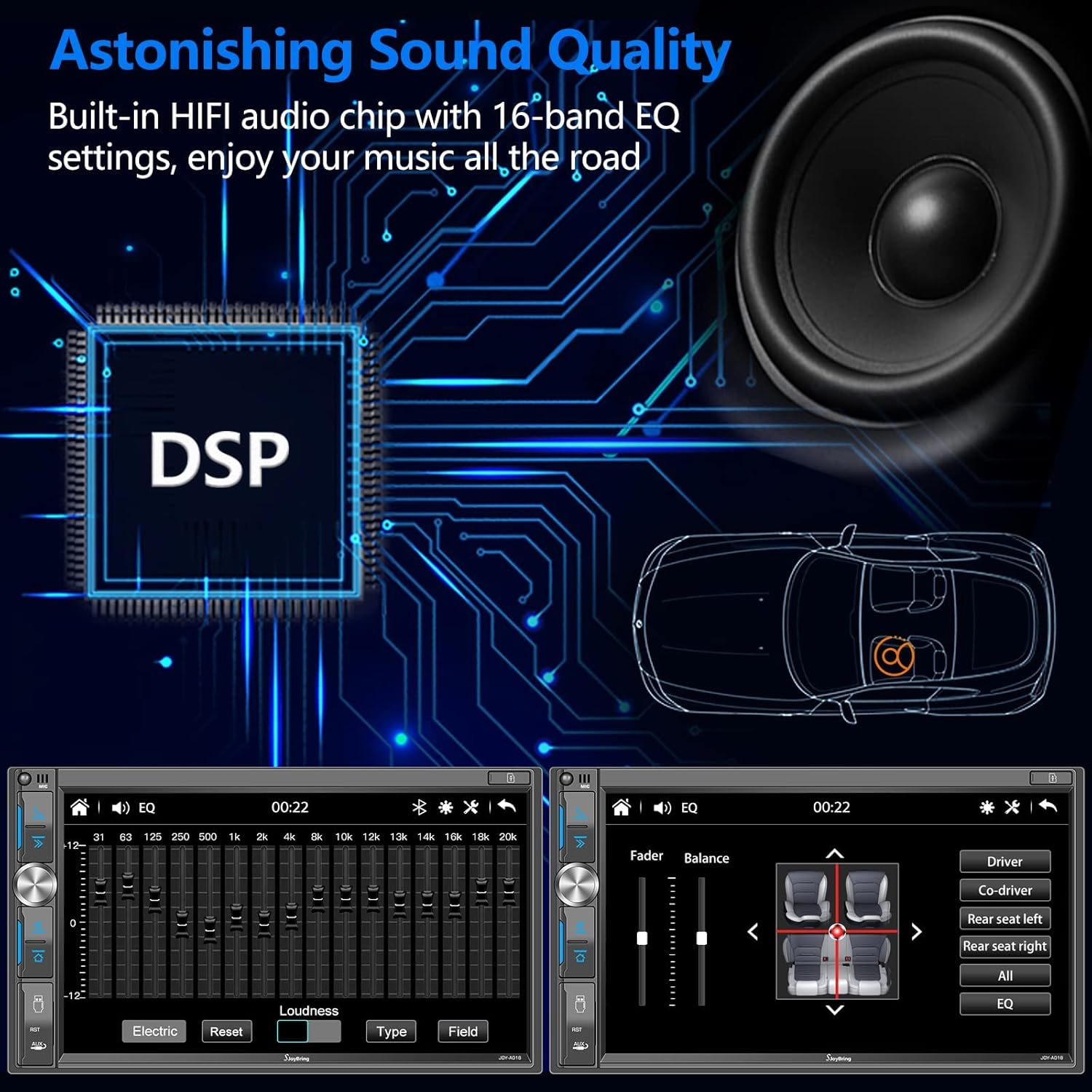
Figure 6.11: Digital Sound Processor (DSP) and Equalizer interface.

Figure 6.12: 16-Band Equalizer adjustment screen.
6.7. AM/FM Radio
Tune into your favorite AM and FM radio stations.
- ช่วงความถี่: AM (530-1710KHz), FM (87.5-107.9 MHz).
- สถานีที่ตั้งไว้ล่วงหน้า: บันทึกสถานีที่คุณชื่นชอบไว้เพื่อการเข้าถึงที่รวดเร็ว

Figure 6.13: FM/AM Radio tuning interface.
6.8. ระบบควบคุมพวงมาลัย (SWC)
Program your vehicle's steering wheel controls to operate the stereo, allowing for convenient and safe control of functions like volume, track skipping, and mode switching.
- การตั้งค่า: Access the SWC settings in the stereo menu. Follow the instructions to map your steering wheel buttons to the desired functions.

Figure 6.14: Steering Wheel Control programming interface.
6.9. 7 Color LED Key Light
Customize the color of the physical key backlighting to match your vehicle's interior or your personal preference.

Figure 6.15: Available LED key light color options.
7. การบำรุงรักษา
- การทำความสะอาดหน้าจอ: ใช้ผ้าเนื้อนุ่มที่ไม่เป็นขุยเช็ดหน้าจอสัมผัส สำหรับคราบสกปรกที่ล้างออกยาก ให้ใช้ผ้าชุบน้ำหมาดๆ เช็ดเบาๆampชุบผ้าด้วยน้ำหรือน้ำยาทำความสะอาดที่ปลอดภัยต่อหน้าจอ หลีกเลี่ยงสารเคมีรุนแรง
- การทำความสะอาดทั่วไป: รักษาตัวเครื่องให้สะอาดปราศจากฝุ่นและเศษผง ใช้แปรงขนนุ่มหรือลมอัดทำความสะอาดบริเวณปุ่มและพอร์ตต่างๆ
- การอัปเดตซอฟต์แวร์: Periodically check the SJOYBRING official website for any available software updates. Updates can improve performance, add features, or fix bugs. Follow the instructions provided with the update file อย่างระมัดระวัง.
8 การแก้ไขปัญหา
If you encounter issues with your SJOYBRING car stereo, refer to the following common problems and solutions:
| ปัญหา | สาเหตุที่เป็นไปได้ | สารละลาย |
|---|---|---|
| เครื่องไม่เปิด | การเดินสายไฟไม่ถูกต้อง; ฟิวส์ขาด; ไม่มีไฟเลี้ยง | Check power connections (B+, ACC, GND). Verify vehicle fuses and the unit's fuse. Ensure constant and switched 12V power are present. |
| ไม่มีเสียงหรือเสียงเพี้ยน | Incorrect speaker wiring; Volume too low; EQ settings. | Check all speaker wire connections for correct polarity and shorts. Increase volume. Adjust EQ and fader/balance settings. |
| Touchscreen unresponsive or dim. | System error; Overheating; Brightness setting. | Perform a system reset (locate the RST button, usually a small pinhole). Allow unit to cool down if overheating. Adjust screen brightness in settings. |
| CarPlay/Android Auto ไม่สามารถเชื่อมต่อได้ | Faulty USB cable; Phone settings; App issues. | Try a different, high-quality USB cable. Ensure CarPlay/Android Auto is enabled on your phone. Restart both phone and stereo. |
| กล้องสำรองไม่แสดงผล | Incorrect camera wiring; Faulty camera; Reverse trigger issue. | Check camera video input connection. Verify the brown reverse trigger wire is correctly connected to the reverse light. Test camera power supply. |
| ปัญหาการจับคู่บลูทูธ | Bluetooth not enabled; Incorrect pairing procedure. | Ensure Bluetooth is enabled on both devices. Delete previous pairings and try pairing again. Keep devices close during pairing. |
If the problem persists after trying these solutions, please contact SJOYBRING customer support for further assistance.
9. ข้อมูลจำเพาะ
| คุณสมบัติ | ข้อมูลจำเพาะ |
|---|---|
| ยี่ห้อ | สจอยบริง |
| ชื่อรุ่น | A018 (JOY-A018) |
| แสดง | 7-inch HD Capacitive Touch Screen |
| ความละเอียดการแสดงผล | 1024 x 600 พิกเซล |
| Video Playback Resolution | ความละเอียดสูงสุด 1920 x 1080 พิกเซล |
| การเชื่อมต่อ | Bluetooth 5.2, USB, AUX, TF-card |
| คุณสมบัติพิเศษ | Apple CarPlay, Android Auto, Mirror Link, Dash Cam Input, Backup Camera Input, 16-Band Equalizer, Steering Wheel Control, 7-Color LED Key Light |
| Dash Cam Angle | มุมกว้างพิเศษ 150° |
| Backup Camera Angle | มุมกว้างพิเศษ 170° |
| แหล่งจ่ายไฟ | 12V DC (กราวด์เชิงลบ) |
| น้ำหนักสินค้า | 2.75 ปอนด์ (ประมาณ 1.25 กก.) |
| ขนาดสินค้า | 3.26 x 7 x 3.93 นิ้ว (82 x 178 x 100 มม.) |
| Supported Dash Sizes | 173×98mm, 178×100mm, 190×116mm |
10. การรับประกันและการสนับสนุน
SJOYBRING is committed to providing high-quality products and excellent customer service. For any questions, technical support, or warranty inquiries, please contact our customer service team.
- บริการลูกค้า: Refer to your purchase platform or the SJOYBRING official webเว็บไซต์สำหรับข้อมูลการติดต่อ
- แหล่งข้อมูลออนไลน์: Additional support, FAQs, and software updates may be available on the SJOYBRING webเว็บไซต์.
- คู่มือผู้ใช้ (PDF): คู่มือผู้ใช้สามารถดาวน์โหลดในรูปแบบ PDF ได้เพื่อความสะดวกของคุณ: ดาวน์โหลดคู่มือ PDF.


