1. คำแนะนำด้านความปลอดภัยที่สำคัญ
Please read all instructions carefully before using this fan heater. Failure to follow these instructions may result in electric shock, fire, or serious injury.
- Always plug heaters directly into a wall outlet. Never use with an extension cord or relocatable power tap.
- ห้ามใช้เครื่องทำความร้อนนี้ในห้องน้ำ ห้องซักผ้า หรือสถานที่ในร่มที่มีน้ำอยู่
- Do not cover the heater. Covering the heater can cause overheating and fire. Keep flammable materials at least 1 meter (3 feet) away from the heater.
- ถอดปลั๊กฮีตเตอร์เมื่อไม่ใช้งาน
- ห้ามใส่หรือให้สิ่งแปลกปลอมเข้าไปในช่องระบายอากาศหรือช่องระบายอากาศ เนื่องจากอาจทำให้เกิดไฟฟ้าช็อต ไฟไหม้ หรือทำให้เครื่องทำความร้อนเสียหายได้
- เครื่องทำความร้อนนี้จะร้อนเมื่อใช้งาน เพื่อหลีกเลี่ยงการถูกไฟไหม้ อย่าให้ผิวหนังที่เปลือยเปล่าสัมผัสพื้นผิวที่ร้อน
- ให้แน่ใจว่าปริมาตรtage ที่ระบุบนฉลากค่าพิกัดสอดคล้องกับปริมาณไฟหลักtagอีอยู่ในบ้านของคุณ
- เครื่องใช้ไฟฟ้าตัวนี้ไม่ได้มีวัตถุประสงค์เพื่อให้บุคคล (รวมทั้งเด็ก) ที่มีความบกพร่องทางร่างกาย ทางประสาทสัมผัส หรือทางจิตใจ หรือขาดประสบการณ์และความรู้ ใช้งาน เว้นแต่จะมีการดูแลหรือคำแนะนำเกี่ยวกับการใช้เครื่องใช้ไฟฟ้าโดยบุคคลที่รับผิดชอบด้านความปลอดภัยของบุคคลดังกล่าว
2. สินค้าหมดview
The SATURN ST-HT7645K is a floor-standing fan heater designed for indoor use, providing efficient heating with a metal heating element and multiple power settings. It features a built-in thermostat and overheat protection for safety.
ส่วนประกอบ:
- Main Unit (Fan Heater)
- สายไฟ
- Control Knobs (Thermostat, Power/Mode Selector)
- ตะแกรงช่องลมเข้า/ออก
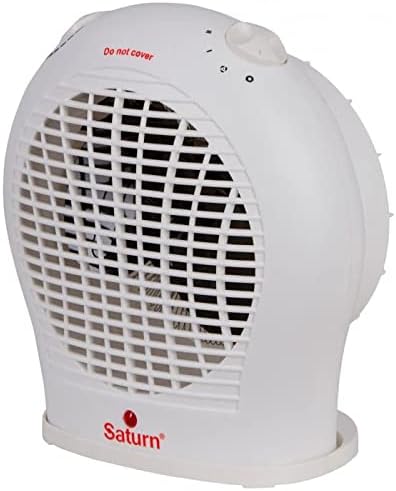
รูปที่ 2.1 : ด้านหน้า view of the SATURN ST-HT7645K fan heater, displaying the main body, front grille, and the 'Saturn' logo at the base.

รูปที่ 2.2: ด้านบน view of the fan heater, highlighting the two rotary control knobs for temperature and power settings, along with a visible 'Do not cover' safety warning.

รูปที่ 2.3: ด้านหลัง view of the fan heater, illustrating the back air intake grille and the attached power cord extending from the lower right side.
3. การตั้งค่า
- การแกะกล่อง: นำเครื่องทำความร้อนออกจากบรรจุภัณฑ์อย่างระมัดระวัง เก็บรักษาบรรจุภัณฑ์ไว้เพื่อการจัดเก็บหรือขนส่งในอนาคต
- การจัดวาง: Place the heater on a firm, level surface. Ensure there is at least 1 meter (3 feet) of clear space around the heater from walls, furniture, curtains, and other flammable materials. Do not place it directly under a power outlet.
- การเชื่อมต่อไฟฟ้า: Ensure the heater is switched off (mode selector set to '0'). Plug the power cord directly into a suitable 220-240V AC, 50Hz wall outlet. Do not use extension cords or multi-plugs.
4. คู่มือการใช้งาน
The SATURN ST-HT7645K fan heater features two control knobs: one for the thermostat and one for power/mode selection.
ปุ่มหมุนเลือกโหมด/กำลังไฟ:
- 0 (ปิด): ปิดเครื่องทำความร้อน
- พัดลมเท่านั้น: Activates the fan without heat, providing cool air circulation.
- I (ความร้อนต่ำ): Provides low heat output (e.g., 1000W).
- II (ความร้อนสูง): Provides high heat output (e.g., 2000W).
ปุ่มควบคุมเทอร์โมสตัท:
This knob allows you to set the desired room temperature. The heater will cycle on and off to maintain this temperature.
- Turn the thermostat knob to its maximum setting.
- Select the desired heat setting (I or II) using the power/mode selector knob.
- Once the room reaches your desired temperature, slowly turn the thermostat knob counter-clockwise until the heater switches off. The heater will now automatically maintain this temperature.
5. การบำรุงรักษา
การบำรุงรักษาอย่างสม่ำเสมอจะช่วยให้เครื่องทำความร้อนทำงานได้อย่างมีประสิทธิภาพสูงสุดและยืดอายุการใช้งาน
การทำความสะอาด:
- ควรถอดปลั๊กเครื่องทำความร้อนออกและปล่อยให้เย็นลงสนิทก่อนทำความสะอาด
- เช็ดพื้นผิวภายนอกด้วยผ้านุ่ม damp ผ้า ห้ามใช้สารทำความสะอาดที่มีฤทธิ์กัดกร่อนหรือตัวทำละลาย
- ใช้เครื่องดูดฝุ่นที่มีหัวแปรงเพื่อกำจัดฝุ่นออกจากช่องลมเข้าและช่องลมออก
- ห้ามจุ่มเครื่องทำน้ำอุ่นลงในน้ำหรือของเหลวอื่น ๆ
พื้นที่จัดเก็บ:
- หากจะเก็บเครื่องทำความร้อนไว้เป็นเวลานาน ควรทำความสะอาดอย่างทั่วถึง
- Store the heater in its original packaging in a cool, dry place.
6 การแก้ไขปัญหา
| ปัญหา | สาเหตุที่เป็นไปได้ | สารละลาย |
|---|---|---|
| เครื่องทำความร้อนไม่เปิด | ไม่มีแหล่งจ่ายไฟ ตัวควบคุมอุณหภูมิตั้งไว้ต่ำเกินไป เปิดใช้งานการป้องกันความร้อนสูงเกินไป |
Check power outlet and plug. หมุนปุ่มเทอร์โมสตัทไปที่การตั้งค่าที่สูงขึ้น Unplug, let cool for 10-15 minutes, then plug back in. |
| เครื่องทำความร้อนผลิตความร้อนไม่เพียงพอ | เลือกการตั้งค่าความร้อนต่ำ Room too large for heater. ช่องรับอากาศเข้า-ออกถูกปิดกั้น |
Select 'II' (High Heat) setting. Ensure heater is appropriate for room size (up to 20m²). Clean grilles and ensure no obstructions. |
| เครื่องทำความร้อนเปิดและปิดบ่อยครั้ง | การตั้งค่าเทอร์โมสตัทใกล้เคียงกับอุณหภูมิห้องมากเกินไป Overheat protection activating. |
Adjust thermostat to a slightly higher or lower setting. Ensure proper ventilation and no obstructions. |
หากปัญหายังคงมีอยู่หลังจากลองวิธีแก้ไขเหล่านี้แล้ว โปรดติดต่อฝ่ายสนับสนุนลูกค้า
7. ข้อมูลจำเพาะ
- แบบอย่าง: ST-HT7645K
- ยี่ห้อ: SATURN (Generic)
- พิมพ์: พัดลมฮีตเตอร์
- ประเภทที่ตั้ง: ชั้นเมา
- องค์ประกอบความร้อน: โลหะ
- พลัง: 2000 วัตต์ (สูงสุด)
- การควบคุมพลังงาน: 3 Modes (Fan Only, Low Heat, High Heat)
- ความคุ้มครองความร้อน: สูงสุดถึง 20ตรม.
- คุณสมบัติพิเศษ: Thermostat, Overheat Protection
- สี: สีขาว
- ฟอร์มแฟกเตอร์: แท่น
- การใช้งานในร่ม/กลางแจ้ง: ในร่ม
- แหล่งพลังงาน: สายไฟ
- น้ำหนักสินค้า: ประมาณ 2 กิโลกรัม
- ขนาดแพ็คเกจ: ขนาดประมาณ 30 x 30 x 30 ซม
8. การรับประกันและการสนับสนุน
This product is covered by a standard manufacturer's warranty against defects in materials and workmanship. Please refer to the warranty card included with your purchase for specific terms and conditions, including the warranty period and claim procedures.
For technical support, troubleshooting assistance, or warranty claims, please contact the retailer where the product was purchased or refer to the contact information provided in your product documentation.
โปรดเก็บหลักฐานการซื้อไว้เพื่อวัตถุประสงค์การรับประกัน


