1. บทนำ
ขอบคุณสำหรับการซื้อasing the Douk Audio H2 HiFi Vacuum Tube Headphone Ampคู่มือนี้ให้ข้อมูลที่จำเป็นสำหรับการใช้งานอุปกรณ์ของคุณอย่างปลอดภัยและมีประสิทธิภาพ โปรดอ่านอย่างละเอียดก่อนใช้งานและเก็บไว้เพื่อใช้อ้างอิงในอนาคต
The Douk Audio H2 is designed to deliver a high-fidelity audio experience with its balanced XLR input and classic vacuum tube sound. It features powerful amplification, independent L/R balance adjustment, and adjustable gain settings to optimize performance for various headphones and audio sources.
2. คำแนะนำด้านความปลอดภัย
- Do not expose this device to rain, moisture, or extreme temperatures.
- ตรวจสอบให้แน่ใจว่ามีการระบายอากาศที่เหมาะสมรอบ ๆ amplifier เพื่อป้องกันความร้อนสูงเกินไป
- อย่าเปิดcasinก. ส่งต่อการบริการทั้งหมดให้กับบุคลากรที่มีคุณสมบัติเหมาะสม
- Use only the provided DC 12V power adapter. Using an incorrect adapter may damage the device and void the warranty.
- หลีกเลี่ยงการวาง amplifier near strong magnetic fields.
- ปิดเครื่องเสมอ amplifier and disconnect the power before cleaning or moving it.
- เก็บให้พ้นจากมือเด็ก
3. เนื้อหาบรรจุภัณฑ์
ตรวจสอบว่ามีรายการทั้งหมดอยู่ในแพ็คเกจ:
- 1x Douk Audio H2 Headphone Ampชีวิต
- 2x 6N3 Vacuum Tubes
- อะแดปเตอร์ไฟ DC 1V 12x
- 1x 6.35mm to 3.5mm Headphone Adapter
- 1x คู่มือผู้ใช้ (เอกสารนี้)

Image: Contents of the Douk Audio H2 package, showing the amplifier, two 6N3 vacuum tubes, a DC 12V power adapter, and a 6.35mm to 3.5mm headphone adapter.
4. สินค้าหมดview
4.1 แผงด้านหน้า

Image: Detailed diagram of the H2 amplifier's front panel, highlighting the 6.35mm and Balanced XLR headphone outputs, the LED display showing input and volume, and the multi-function volume/mode knob.
- เอาต์พุตหูฟัง 6.35 มม.: ช่องเสียบหูฟังแบบมาตรฐาน (Single-ended)
- Balanced XLR Headphone Output: For balanced headphones, offering superior audio quality.
- จอแสดงผล LED: Shows current input channel, volume level, gain setting, and channel balance.
- Power Switch / Volume Knob / Filter Selector / Input Channel Select: Multi-function knob for power, volume adjustment, and navigating settings.
4.2 แผงด้านหลัง
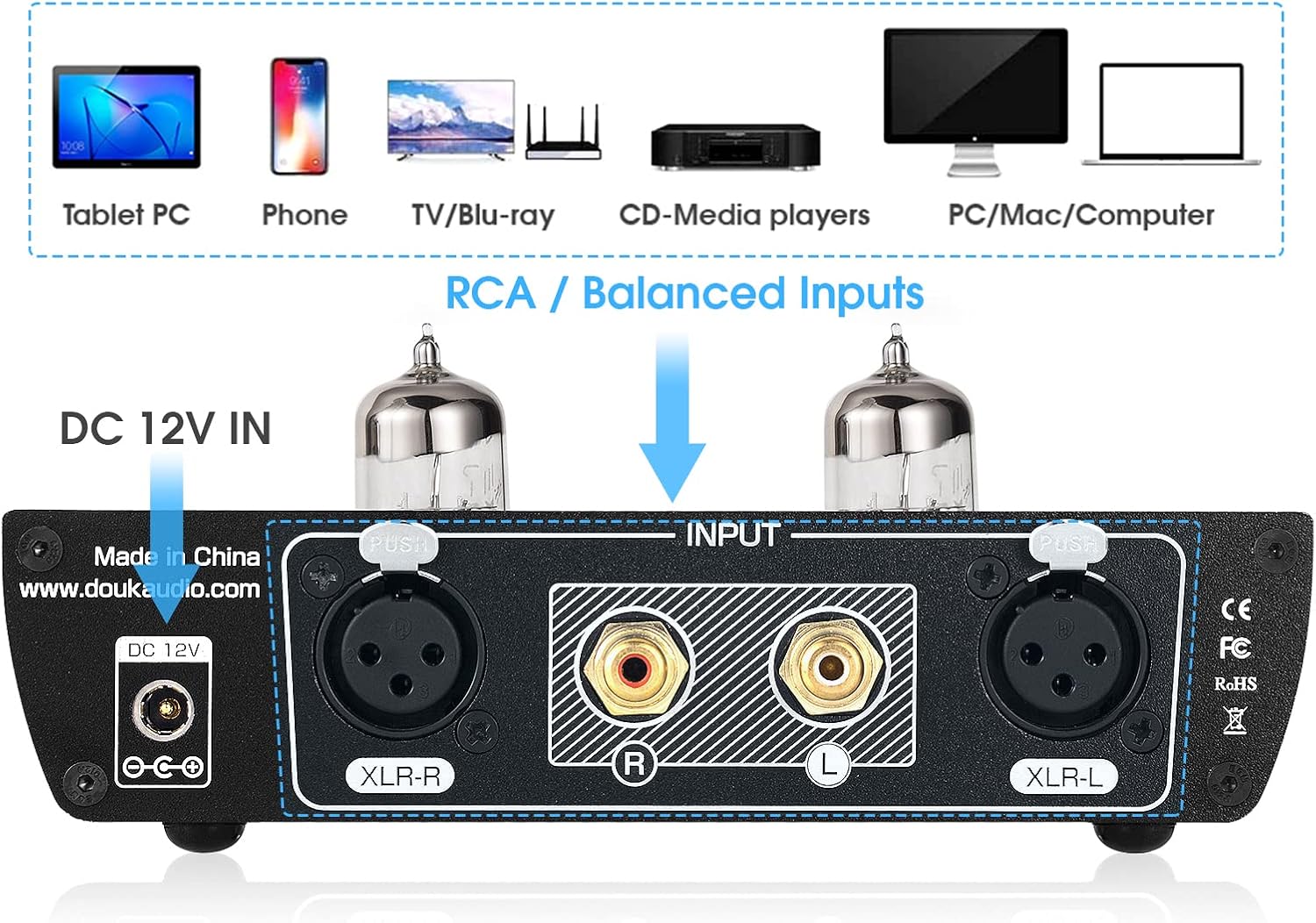
Image: Detailed diagram of the H2 amplifier's rear panel, indicating the RCA (L/R) inputs, Balanced XLR (L/R) inputs, and the DC 12V power input.
- ช่องต่อ RCA (ซ้าย/ขวา): For connecting audio sources via RCA cables.
- Balanced XLR Inputs (L/R): For connecting audio sources via balanced XLR cables.
- DC 12V ใน: Power input for the provided DC 12V adapter.
4.3 คุณสมบัติหลัก
- High-Fidelity Balanced XLR Connectivity: Real balanced XLR input for high-quality audio reproduction with excellent sound separation and resolution.
- Classic Tube Sound: Features a pluggable 6N3 vacuum tube for a warm, sweet, and dynamic sound signature.
- Powerful and Efficient Circuit Design: Dual TPA6120 headphone amp chips provide ample power for headphones from 16 to 600 ohms.
- การตั้งค่าที่ปรับได้: Independent L/R balance adjustment and adjustable gain settings (low/medium/high) for optimal performance.
- สุนทรียภาพอันซับซ้อน: Black aluminum alloy chassis with vintage tube lighting and an LED display for real-time status feedback.
5. การตั้งค่า
- การติดตั้งท่อ: Carefully insert the two 6N3 vacuum tubes into their sockets on the top of the ampเครื่องขยายเสียง ตรวจสอบให้แน่ใจว่าเสียบแน่นดีแล้ว แต่อย่าฝืนเสียบมากเกินไป
- เชื่อมต่อแหล่งเสียง:
- สำหรับ อินพุตที่สมดุล: Connect your audio source (e.g., DAC, CD player with XLR output) to the XLR-L and XLR-R inputs on the rear panel using XLR cables.
- สำหรับ อินพุต RCA: Connect your audio source (e.g., computer, DAC, CD player with RCA output) to the RCA L and R inputs on the rear panel using RCA cables.

Image: The Douk Audio H2 amplifier with RCA cables connected to the input, demonstrating a typical audio source connection. A close-up of an illuminated vacuum tube is also shown.
- เชื่อมต่อหูฟัง: Plug your headphones into either the 6.35mm or Balanced XLR headphone output on the front panel. If your headphones have a 3.5mm jack, use the provided 6.35mm to 3.5mm adapter.
- เชื่อมต่อพลังงาน: Connect the DC 12V power adapter to the 'DC 12V IN' port on the rear panel, then plug the adapter into a power outlet.
6. คู่มือการใช้งาน
- เปิด/ปิดเครื่อง: Press the multi-function knob (volume knob) once to turn the amplifier on or off. The LED display will illuminate upon power-on.
- การปรับระดับเสียง: Rotate the multi-function knob clockwise to increase volume and counter-clockwise to decrease volume. The volume level will be displayed on the LED screen.
- การเลือกอินพุต: Double-press the multi-function knob to enter the menu. Rotate the knob to select between 'BAL Input' (Balanced XLR) and 'RCA Input'. Press the knob again to confirm your selection.
- ได้รับการคัดเลือก: In the menu, navigate to 'Gain Select'. Rotate the knob to choose between 'Low', 'Medium', and 'High' gain settings. Select the appropriate gain based on your headphones' impedance and sensitivity. Lower impedance/higher sensitivity headphones generally require lower gain.
- Channel Balance Adjustment: In the menu, navigate to 'Channel Bal'. Rotate the knob to adjust the left/right channel balance (up to 2.5dB either way) to compensate for any hearing imbalances or source issues.

Image: A musician using the Douk Audio H2 amplifier with headphones and a microphone. The image highlights the amplifier's LED display showing various settings like 'BAL Input', 'Volume 64', 'Gain Select Medium', and 'Channel Bal L 0.5dB R'.
7. การบำรุงรักษา
- การทำความสะอาด: ใช้ผ้าแห้งเนื้อนุ่มทำความสะอาดด้านนอกของตัวเครื่อง ampห้ามใช้น้ำยาทำความสะอาดหรือตัวทำละลายชนิดเหลว
- การเปลี่ยนท่อ: The 6N3 vacuum tubes have a finite lifespan. If you notice a degradation in sound quality or if a tube fails, they can be replaced. Ensure the amplifier is powered off and unplugged before attempting to replace tubes. Gently pull the old tubes straight up from their sockets and carefully insert new ones, aligning the pins correctly. Compatible tube models include 6A8Q / 2C51 / 5670 / 5185 / 6385 / 6185 / WE396 (US), 6N3 (Soviet Union), 6H3N / 6H3II (Soviet Union), ECF82 (Germany), 6CC42 (Czech).
- พื้นที่จัดเก็บ: หากมีการเก็บข้อมูล amplifier for an extended period, disconnect it from power and store it in a cool, dry place away from direct sunlight.
8 การแก้ไขปัญหา
| ปัญหา | สาเหตุที่เป็นไปได้ | สารละลาย |
|---|---|---|
| ไม่มีเสียงออก |
|
|
| เสียงเพี้ยน |
|
|
| เสียงฮัมหรือเสียงหวีด |
|
|
9. ข้อมูลจำเพาะ
- แบบอย่าง: H2
- ป้อนข้อมูล: XLR แบบบาลานซ์, RCA
- เอาท์พุต: 6.35mm Headphone, Balanced XLR Headphone
- ท่อ: 6N3 (pluggable)
- ความต้านทานของหูฟัง: 16-600 โอห์ม
- แหล่งจ่ายไฟ: DC 12V (included adapter)
- ขนาด (ยาว x กว้าง x สูง): Approximately 155mm x 128mm x 45mm (6.10in x 5.04in x 1.77in)
- น้ำหนักสุทธิ: Approximately 658g (1.45lb)
- น้ำหนักแพ็คเกจ: Approximately 900g (1.98lb)
Image: Diagram showing the physical dimensions (length, width, height) and weight specifications of the Douk Audio H2 amplifier and its package.
10. การรับประกันและการสนับสนุน
Douk Audio is committed to customer satisfaction. Your Douk Audio H2 amplifier comes with a standard manufacturer's warranty. Please refer to the warranty card included in your package or visit the official Douk Audio webเว็บไซต์สำหรับข้อกำหนดและเงื่อนไขการรับประกันโดยละเอียด
For technical support, troubleshooting assistance, or any inquiries regarding your product, please contact Douk Audio customer service through the retailer where you purchased the product or visit the official Douk Audio webเว็บไซต์สำหรับข้อมูลการติดต่อ
Official Douk Audio Webเว็บไซต์: www.doukaudio.com


