1. บทนำ
This user manual provides detailed instructions for the installation, operation, and maintenance of your Ctronics 5MP 30X Optical Zoom Security Camera. Please read this manual thoroughly before using the product to ensure proper functionality and safety. This camera is designed for outdoor surveillance, offering advanced features such as high-resolution video, extensive night vision, and intelligent detection capabilities.
2. ข้อมูลด้านความปลอดภัย
- Ensure the power supply matches the camera's specifications (12 Volts DC, 12 watts).
- อย่านำกล้องไปวางในอุณหภูมิที่สูงเกินช่วงการทำงานปกติ (-10°C ถึง 50°C)
- Avoid direct exposure of the lens to strong light sources, as this may damage the sensor.
- Install the camera securely to prevent accidental falls.
- อย่าพยายามถอดประกอบหรือดัดแปลงกล้อง เพราะจะทำให้การรับประกันเป็นโมฆะ
- Keep the camera away from corrosive chemicals.
3. เนื้อหาบรรจุภัณฑ์
ตรวจสอบว่ารายการทั้งหมดที่ระบุไว้ด้านล่างนี้รวมอยู่ในแพ็คเกจของคุณ:
- Ctronics 5MP 30X Optical Zoom Security Camera
- อะแดปเตอร์ไฟฟ้า (เครื่องชาร์จ)
- สกรูยึดและปลั๊กผนัง
- ชุดกันน้ำสำหรับสายเคเบิลเครือข่าย
- คู่มือเริ่มต้นอย่างรวดเร็ว

Figure 3.1: Main product image of the Ctronics 5MP 30X Optical Zoom Security Camera, showing its dome shape, antenna, and mounting bracket.
4. สินค้าหมดview
4.1 คุณสมบัติหลัก
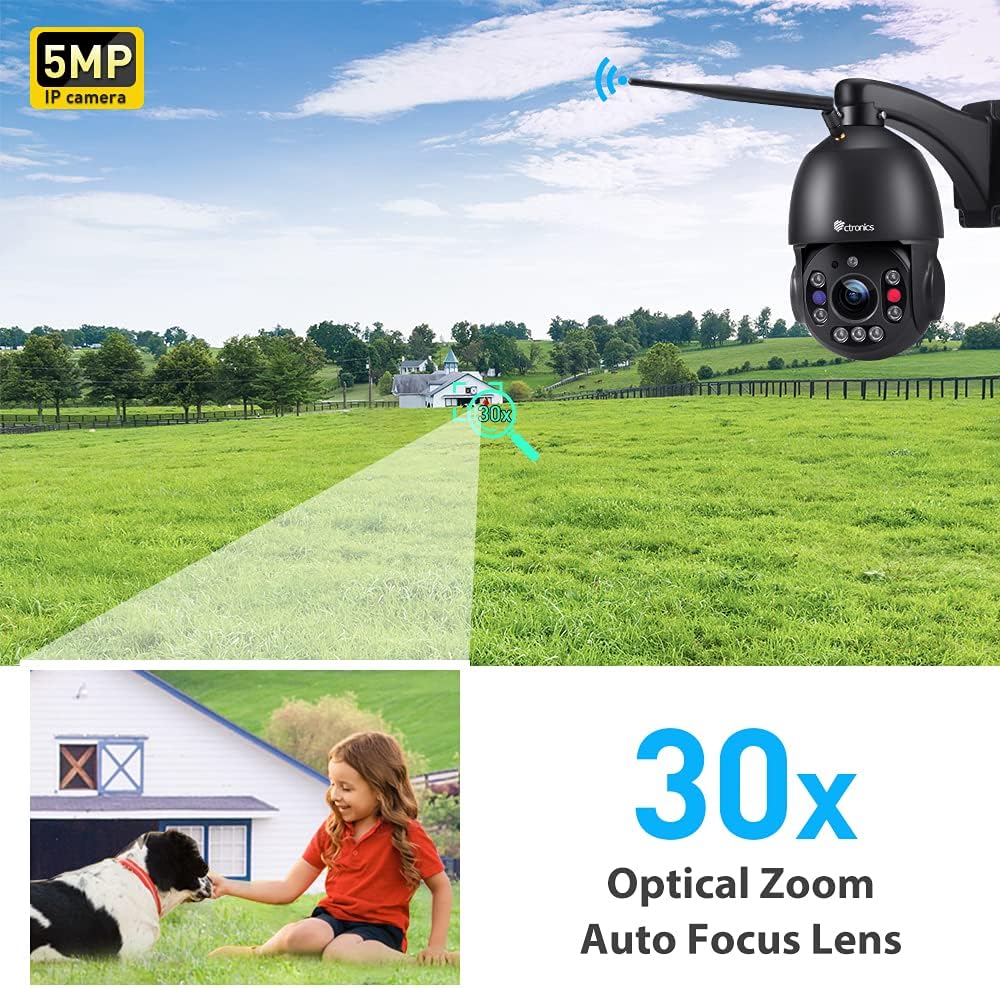
- ความละเอียด HD 5 ล้านพิกเซล และซูมออปติคอล 30 เท่า: Features a Sony IMX335 5MP CMOS sensor (2560x1920 resolution) and 30X optical zoom for sharp, vivid images and detailed long-distance viewการไอเอ็นจี
- 492ft Night Vision & Smart PTZ: Equipped with 7 high-performance infrared array LED lights (including 2 laser infrared lights) for up to 492 feet (150 meters) night vision. Offers 355° pan and 90° tilt for comprehensive coverage.
- Human Detection & Auto Tracking: Intelligently detects human shapes, reducing false alarms by 95%. Automatically tracks suspicious persons within the monitoring range.
- Sound Light Alarm & Two-way Audio: Triggers audible and red/blue light alarms upon intrusion. Built-in speaker and microphone enable real-time two-way communication.
- Support All Platforms & IP66 Waterproof: Compatible with iOS and Android systems, FTP server, and HIP2P Client. Connects via 2.4Ghz WiFi or network cable. Supports TF cards up to 128GB (not included). IP66 rated for outdoor use.
4.2 ส่วนประกอบของกล้อง
รูปที่ 4.1: ระยะใกล้ view of the camera's lens and infrared LEDs, highlighting the optical zoom capability.

Figure 4.2: Illustration showing the Micro SD card slot, supporting up to 128GB for local storage.
5. การตั้งค่า
5.1 การเปิดเครื่อง
Connect the provided power adapter to the camera's power input. The camera will perform a self-check, rotating its lens for calibration. This process indicates the camera is powering on correctly.
Video 5.1: Demonstrates the initial power-up sequence and self-check rotation of the camera, followed by the Wi-Fi connection process via the mobile app.
5.2 การติดตั้งแอปพลิเคชันบนมือถือ
Download the Ctronics APP from your device's app store (iOS App Store or Google Play Store). Alternatively, scan the QR code provided in the Quick Start Guide to directly download the app.

Figure 5.1: Image illustrating the broad compatibility of the Ctronics camera with various operating systems and platforms, including iOS, Android, Mac OS, and Windows.
5.3 Initial Setup & Wi-Fi Connection
Follow the in-app instructions to add your camera. For Wi-Fi connection, ensure your mobile device is connected to a 2.4Ghz or 5Ghz Wi-Fi network. The camera supports both frequencies. You may need to reset the camera by pressing the reset button (usually located near the cables) until you hear a chime, indicating it's ready for network configuration.
Video 5.2: Guide on how to add the camera to the HiP2P Client End software on a PC, including logging in and inputting the camera's UID.
6. การใช้งานกล้องของคุณ
6.1 สด View และการควบคุม PTZ
Once connected, open the Ctronics app to access the live video feed. Use the on-screen controls to pan (355° horizontally) and tilt (90° vertically) the camera, allowing you to monitor a wide area without blind spots.
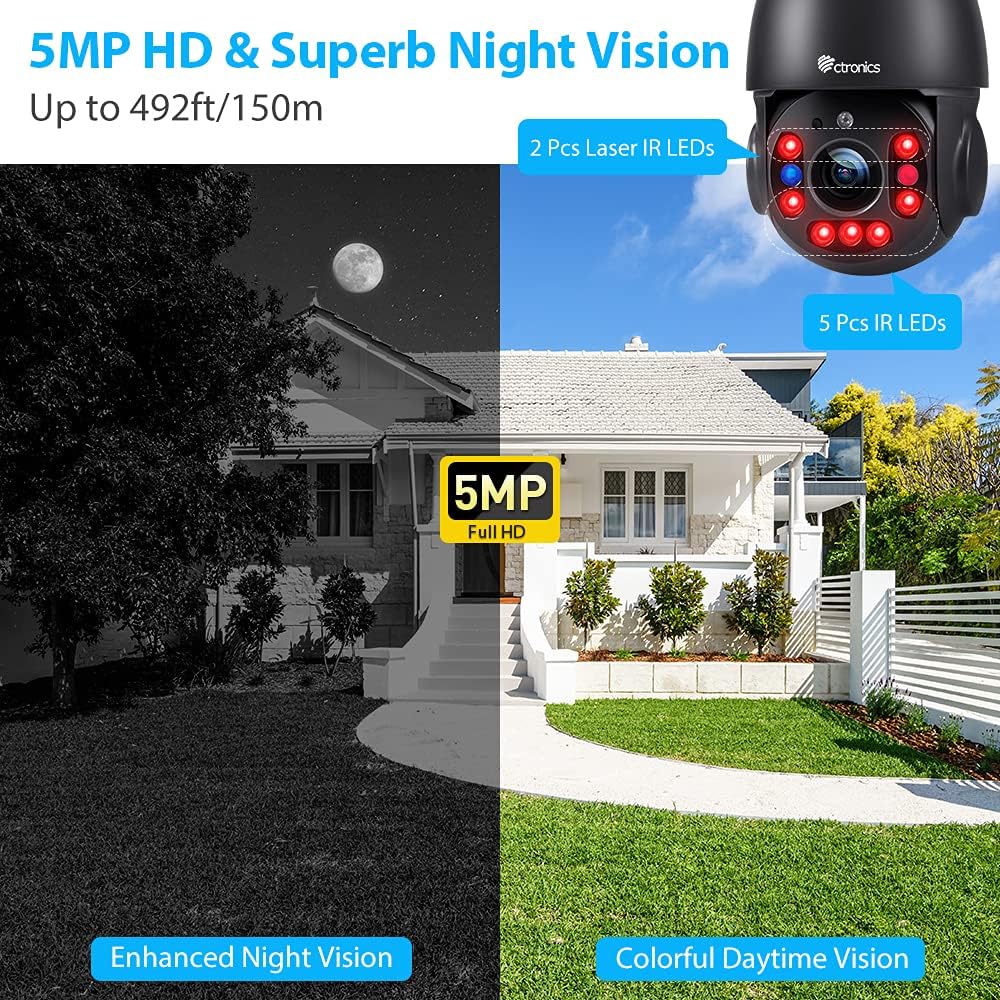
Figure 6.1: A smartphone displaying the live view from the Ctronics camera, with controls for 355° pan and 90° tilt, providing comprehensive coverage of the monitored area.
6.2 Optical Zoom
The camera features a powerful 30X optical zoom. Use the zoom controls within the app to magnify distant objects without losing image clarity, allowing you to capture important details like faces or license plates.
วิดีโอ 6.1: จบview of the Ctronics 5MP PTZ camera, showcasing its 30X optical zoom and pan-tilt capabilities for outdoor security.
6.3 การมองเห็นตอนกลางคืน
The camera automatically switches to night vision mode in low-light conditions, providing clear black-and-white images up to 492 feet (150 meters). The laser infrared lights enhance visibility over long distances.

Figure 6.2: Depiction of the camera's enhanced night vision, showing a clear black-and-white view of a house at night, with visible IR LEDs on the camera.
6.4 Human Detection & Auto Tracking
Enable human detection in the app settings to receive real-time alerts when a person is detected. The auto-tracking feature will automatically follow the detected human, ensuring continuous monitoring of their movement.

Figure 6.3: An illustration showing the camera's auto-tracking and smart alarm features, with a phone receiving an alert message when human motion is detected.

Figure 6.4: Visual representation of the sound and light alarm feature, showing the camera activating red and blue flashing lights to deter intruders.
6.5 เสียงสองทาง
Utilize the two-way audio function to communicate with individuals near the camera. This feature is useful for greeting visitors or deterring unwanted guests.
Figure 6.5: A person speaking into a smartphone, demonstrating the two-way audio feature to communicate with someone near the camera.
7. การบำรุงรักษา
7.1 การทำความสะอาด
ควรทำความสะอาดเลนส์กล้องเป็นประจำด้วยผ้าแห้งเนื้อนุ่ม เพื่อให้ได้ภาพที่คมชัด ห้ามใช้สารเคมีรุนแรงหรือวัสดุที่มีฤทธิ์กัดกร่อน
การอัปเดตเฟิร์มแวร์ 7.2 รายการ
Check the Ctronics app periodically for firmware updates. Keeping your camera's firmware up-to-date ensures optimal performance and access to new features.
7.3 การจัดการการจัดเก็บข้อมูล
If using a TF card for local storage, regularly back up important recordings and format the card as needed to maintain recording efficiency. The camera supports TF cards up to 128GB.
8 การแก้ไขปัญหา
| ปัญหา | สาเหตุที่เป็นไปได้ | สารละลาย |
|---|---|---|
| กล้องออฟไลน์ | No power, Wi-Fi signal weak, incorrect Wi-Fi password. | Check power connection. Ensure strong Wi-Fi signal. Re-enter Wi-Fi password in app. Reset camera if necessary. |
| คุณภาพของภาพไม่ดี | เลนส์สกปรก แสงสว่างไม่เพียงพอ ปัญหาเรื่องแบนด์วิดท์เครือข่าย | Clean the lens. Ensure adequate lighting for optimal daytime performance. Check network speed. |
| สัญญาณเตือนที่ผิดพลาด | Environmental factors (e.g., trees, rain, insects). | Adjust human detection sensitivity in the app. Reposition camera to minimize environmental triggers. |
| No two-way audio | ไมโครโฟน/ลำโพงถูกบล็อก, สิทธิ์การเข้าถึงแอป, การตั้งค่าระดับเสียง | Ensure nothing is obstructing the microphone or speaker. Check app permissions for audio. Adjust volume in app and on device. |
| Cannot connect to 5Ghz Wi-Fi | Camera is not compatible with 5Ghz (Note: This model supports both 2.4Ghz and 5Ghz). | Ensure your router is broadcasting a 5Ghz signal. If issues persist, try connecting to a 2.4Ghz network. |
9. ข้อมูลจำเพาะทางเทคนิค
| ข้อมูลจำเพาะ | ค่า |
|---|---|
| ชื่อรุ่น | CTIPC-295C-B |
| ความละเอียดในการจับภาพวิดีโอ | 5 ล้านพิกเซล (2560x1920) |
| ซูมออปติคอล | 30X |
| ช่วงแพน | 355° |
| ช่วงความเอียง | 90° |
| ช่วงการมองเห็นตอนกลางคืน | 492 ฟุต (150 เมตร) |
| เทคโนโลยีการเชื่อมต่อ | Wireless (2.4Ghz/5Ghz Wi-Fi) & Wired (Network Cable) |
| การให้คะแนนการคุ้มครองระหว่างประเทศ | IP66 |
| แหล่งพลังงาน | Corded Electric (12V DC, 12W) |
| พื้นที่จัดเก็บ | Supports TF cards up to 128GB (not included) |
| วัสดุ | โลหะ |
| น้ำหนักสินค้า | 4.6 ปอนด์ |
10. การรับประกันและการสนับสนุน
Ctronics products typically come with a manufacturer's warranty. For specific warranty details, please refer to the documentation included with your product or visit the official Ctronics website. For technical support, troubleshooting assistance, or any inquiries, please contact Ctronics customer service through their official channels.
คุณสามารถค้นหาแหล่งข้อมูลเพิ่มเติมและดาวน์โหลดคู่มือผู้ใช้ในรูปแบบ PDF ได้ที่: Ctronics User Manual (PDF)
Figure 10.1: The camera is shown outdoors in rainy conditions, illustrating its IP66 waterproof and weather-resistant design, suitable for various climates.


