1. บทนำ
This manual provides essential information for the safe and efficient use of your EMOOR TV Stand. Please read these instructions carefully before assembly and operation, and retain them for future reference. This self-standing television stand is designed for TVs between 32V and 60V, with a maximum weight of 40kg. It features adjustable height and angle, a movable shelf, and integrated cord management for a clean setup.

Image: The EMOOR TV Stand in white, supporting a television. The stand features a minimalist design with a base and a central column.
2. ข้อมูลด้านความปลอดภัย
- ตรวจสอบให้แน่ใจว่าขาตั้งทีวีวางอยู่บนพื้นผิวที่มั่นคงและเรียบเสมอกัน เพื่อป้องกันการล้ม
- Do not exceed the maximum load capacity of 40kg for the main unit and 5kg for the shelf.
- Always use the included anti-tip parts to secure the stand and prevent accidental falls.
- Keep children and pets away from the stand during assembly and adjustment.
- Verify that your television meets all compatibility requirements before attempting installation.
3. คำแนะนำในการตั้งค่า
3.1 การแกะกล่องและการตรวจสอบส่วนประกอบ
Carefully unpack all components and verify against the parts list (not provided in this document, refer to packaging). Ensure no parts are missing or damaged. Assembly time is approximately 30 minutes.
3.2 TV Compatibility Requirements
Before assembly, confirm your television meets the following conditions:
- น้ำหนัก: Under 40kg.
- พิมพ์: Wall-mount compatible model.
- รูสกรู: Has four screw holes on the back.
- Screw Hole Distance: The distance from the display surface to all screw holes must be equal.
- Original Stand: The TV's original stand must be removable.
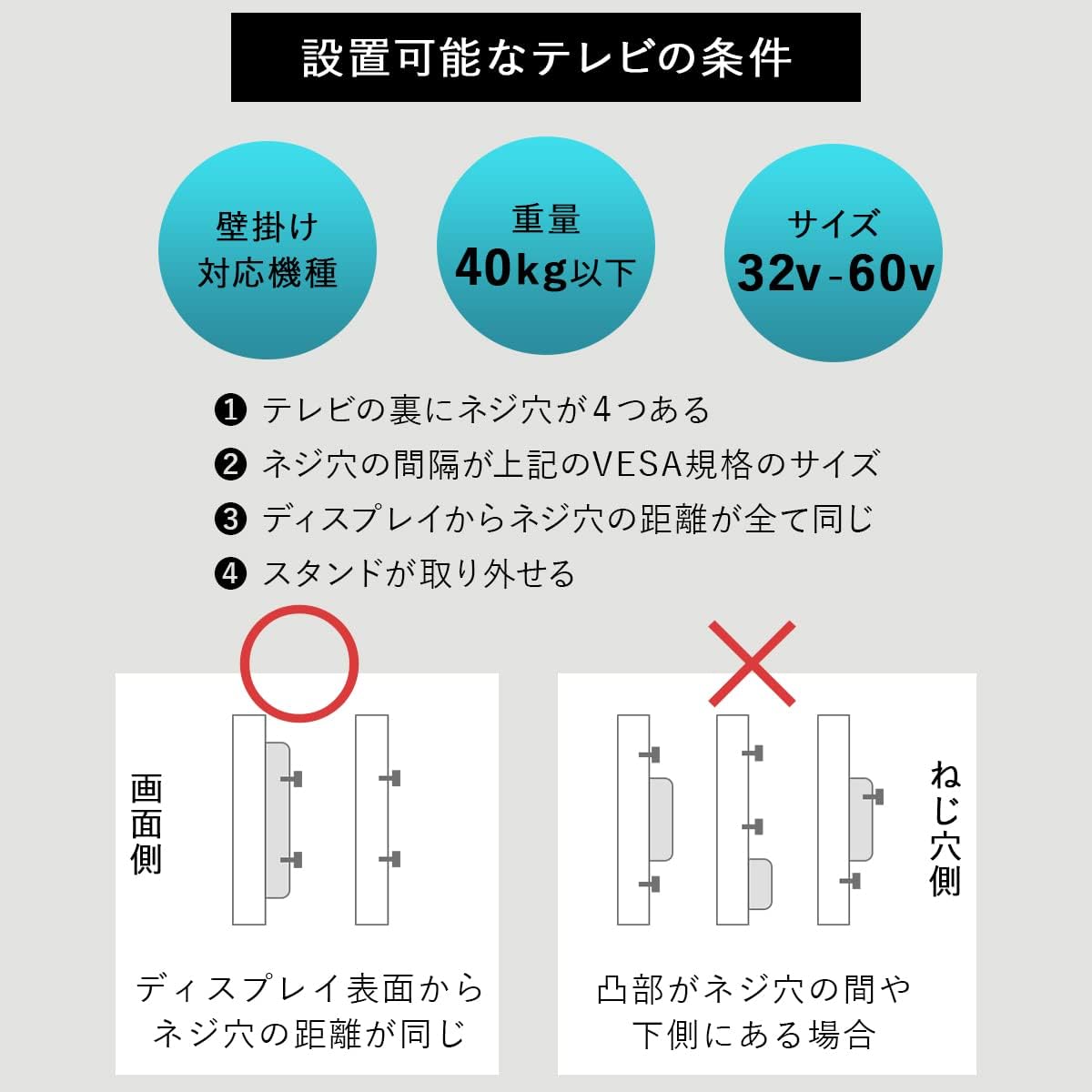
Image: A visual guide showing the conditions for TV installation, including weight, wall-mount compatibility, and screw hole requirements.
3.3 VESA Standard Compatibility
The stand supports VESA mounting patterns (Width x Height in mm):
- ขนาด 200x200
- ขนาด 300x200
- ขนาด 300x300
- ขนาด 400x200
- ขนาด 400x300
- ขนาด 400x400

Image: A diagram illustrating various VESA mounting hole patterns and their corresponding dimensions.
3.4 Included Bolts
The following bolt sizes are included for TV attachment:
- M5x14
- M6x14
- M6x30
- M8x30
- M8x50
- M8x80
If these bolts are not suitable for your television, please consult your TV manufacturer for the correct specifications and purchase the appropriate bolts separately from a hardware store.




Image: Various bolt sizes (M5x14, M6x14, M6x30, M8x30, M8x50, M8x80) included for TV mounting.
4. คู่มือการใช้งาน
4.1 การปรับความสูง
The TV stand offers 8 stages of height adjustment, allowing you to position your television at an optimal viewing level. The height can be adjusted between approximately 96.8cm and 121.8cm.

Image: A visual representation of the TV stand's height adjustment range, from 968mm to 1218mm, with 8 distinct settings.
4.2 การปรับมุม
The television's vertical angle can be adjusted to suit your viewing preference, with a range of +7 degrees to -10 degrees. This allows for comfortable viewมองจากหลายมุมในห้อง

Image: A diagram illustrating the TV stand's ability to tilt the television screen vertically, showing a range from +7 degrees to -10 degrees.
4.3 Movable Shelf
The stand includes a movable shelf that can be adjusted to any desired height. This shelf has a load capacity of approximately 5kg and is convenient for storing media devices such as recorders or game consoles.
4.4 การจัดการสายไฟ
To maintain a tidy appearance, the stand features integrated hooks on the back for organizing power cords and other cables. This helps to prevent clutter and keeps your entertainment area neat.

ภาพ: ภาพระยะใกล้ view of the back of the TV stand, highlighting the hooks designed for cable organization.
5. การบำรุงรักษา
To clean the TV stand, wipe it with a soft, dry cloth. For stubborn dirt, a slightly damp cloth can be used, followed by immediate drying. Avoid using abrasive cleaners, solvents, or harsh chemicals, as these may damage the finish. Regularly check all screws and connections to ensure they remain tight and secure.
6 การแก้ไขปัญหา
6.1 TV Does Not Fit
If your TV does not fit the stand, please re-verify all compatibility requirements listed in Section 3.2 and 3.3, including TV weight, size, screw hole pattern (VESA), and the distance from the display to the screw holes. Ensure the TV's original stand has been removed.
6.2 ความไม่มั่นคงของขาตั้ง
Ensure all assembly screws are tightened securely. Verify that the stand is placed on a flat, stable surface. Confirm that the anti-tip parts are correctly installed and utilized.
7. ข้อมูลจำเพาะ
| คุณสมบัติ | รายละเอียด |
|---|---|
| หมายเลขรุ่น | bh-llc-tv501--wh |
| ขนาด (กว้าง x ลึก x สูง) | ขนาดโดยประมาณ 60 x 40 x 96.8-121.8 ซม. |
| ขนาดทีวีที่เข้ากันได้ | 32V - 60V |
| สี | สีขาว |
| วัสดุ | Frame: Steel (powder coating) |
| น้ำหนักผลิตภัณฑ์ | ประมาณ 15 กก. |
| Load Capacity (Main Unit) | ประมาณ 40 กก. |
| Load Capacity (Shelf) | ประมาณ 5 กก. |
| การปรับความสูง | 8 วินาทีtages |
| การปรับมุมแนวตั้ง | Yes (+7 to -10 degrees) |
| ชั้นวางเคลื่อนย้ายได้ | Yes (height adjustable) |
| การจัดการสายไฟ | Hooks included |
| Anti-Tip Parts | รวมอยู่ด้วย |
| VESA Compatibility (WxH mm) | 200x200, 300x200, 300x300, 400x200, 400x300, 400x400 |
| เวลาประกอบ | ประมาณ 30 นาที |
8. การรับประกันและการสนับสนุน
For warranty information or product support, please contact EMOOR customer service. Details can typically be found on the product packaging or the official EMOOR website. You may also visit the EMOOR brand store on Amazon for additional information and contact options.
EMOOR Brand Store: View EMOOR Store


