1. บทนำ
This manual provides comprehensive instructions for the installation, operation, and maintenance of your Cabletech URZ0336B DVB-T2 H.265 HEVC Digital Tuner. Please read this manual thoroughly before using the device to ensure proper functionality and to prevent damage.
2. ข้อมูลด้านความปลอดภัย
Always observe the following safety precautions to avoid electric shock, fire, or damage to the device:
- อย่าให้อุปกรณ์โดนฝนหรือความชื้น
- อย่าเปิดcasinก. ส่งต่อการบริการทั้งหมดให้กับบุคลากรที่มีคุณสมบัติเหมาะสม
- Ensure proper ventilation around the device. Do not block ventilation openings.
- ใช้เฉพาะอะแดปเตอร์แปลงไฟที่ให้มากับเครื่องเท่านั้น
- เก็บอุปกรณ์ให้ห่างจากแหล่งความร้อนและแสงแดดโดยตรง
- Disconnect the power plug from the wall outlet if the device will not be used for a long period.
3. เนื้อหาบรรจุภัณฑ์
กรุณาตรวจสอบแพ็คเกจสำหรับรายการต่อไปนี้:
- Cabletech URZ0336B DVB-T2 H.265 HEVC Digital Tuner
- รีโมทคอนโทรล
- แบตเตอรี่ AAA (2x)
- อะแดปเตอร์แปลงไฟ
- คู่มือการใช้งาน (เอกสารนี้)
4. สินค้าหมดview
Familiarize yourself with the main components and connections of your Cabletech URZ0336B tuner.
4.1. Device and Remote Control
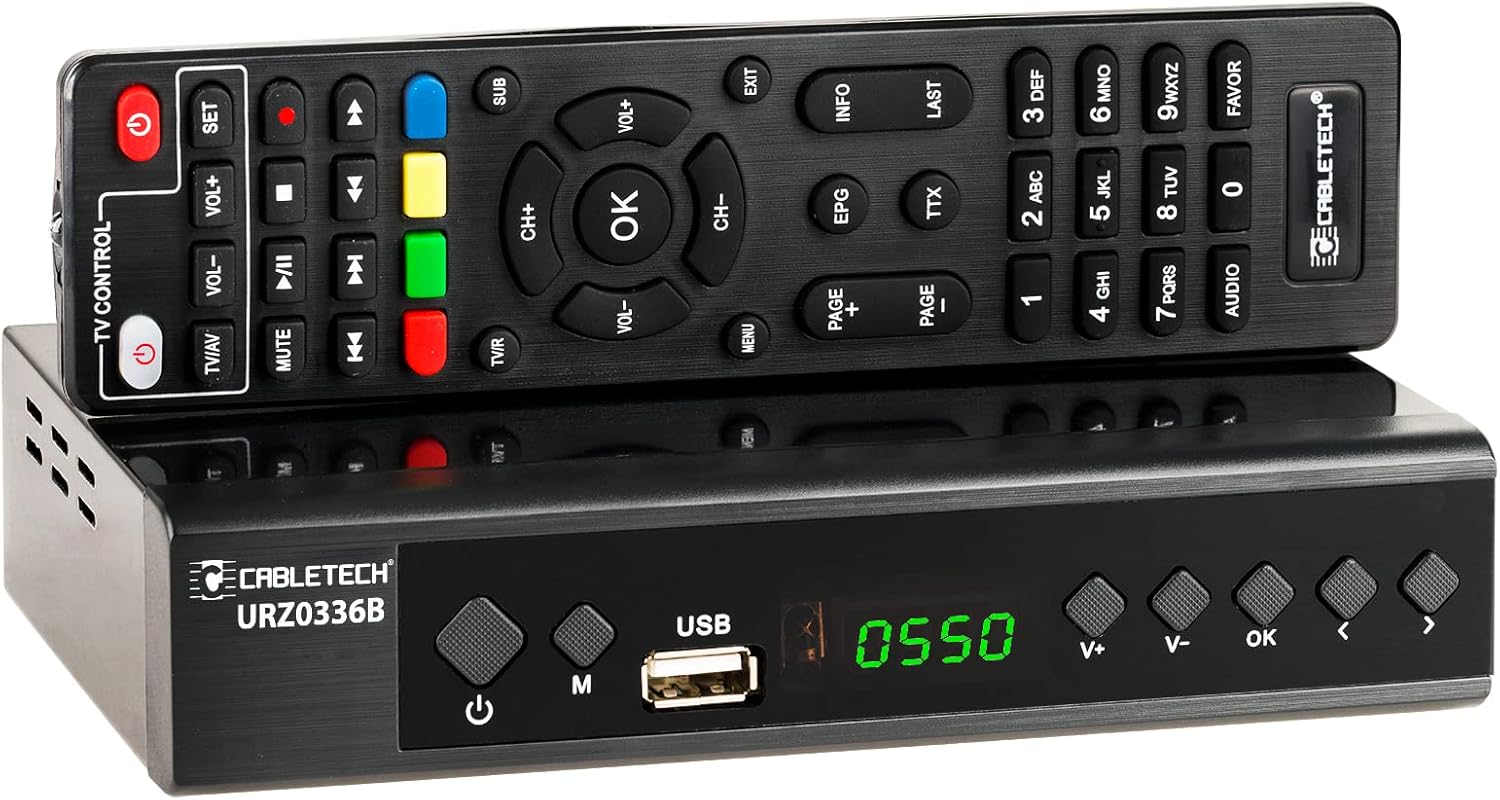
Image: The Cabletech URZ0336B DVB-T2 H.265 HEVC Digital Tuner shown with its accompanying remote control. The tuner is a compact black box, and the remote is also black with various control buttons.
4.2. แผงด้านหน้า
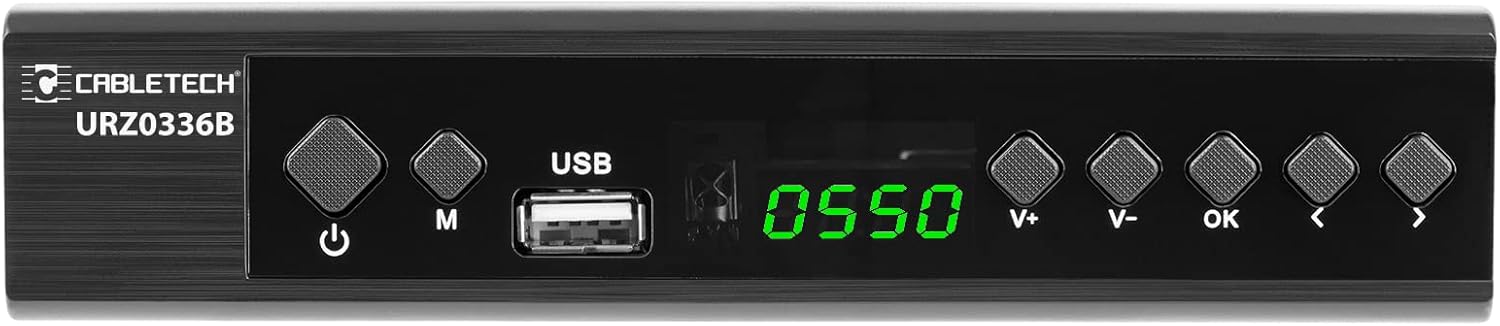
Image: Close-up of the Cabletech URZ0336B front panel, featuring a power button, menu button (M), USB 2.0 port, LED display showing "0550", and navigation/volume buttons (V+, V-, OK, <, >).
- ปุ่มเปิด/ปิด: Turns the device on/off or to standby.
- ปุ่ม M (เมนู): เข้าสู่เมนูหลัก
- พอร์ต USB 2.0: For software updates, PVR recording, and media playback.
- จอแสดงผล LED: แสดงหมายเลขช่องหรือเวลา
- V+/V- Buttons: ปรับระดับเสียง
- ปุ่มตกลง: ยืนยันการเลือก
- </> Buttons: Navigates through menus or changes channels.
4.3. การเชื่อมต่อแผงด้านหลัง

Image: The rear panel of the Cabletech URZ0336B, showing various input and output ports: ANT IN (IEC socket), COAXIAL, USB, HD OUT (HDMI), SCART, and the power input (110-240V~ 50/60Hz).
- มดใน: Connects to your DVB-T/T2 antenna.
- โคแอกเซียล: เอาต์พุตเสียงดิจิตอล
- ยูเอสบี: Additional USB 2.0 port for external devices.
- HD OUT (HDMI): เชื่อมต่อกับทีวีของคุณเพื่อรับชมภาพและเสียงความคมชัดสูง
- สการ์ต: Connects to older TVs or VCRs.
- กำลังไฟเข้า: เชื่อมต่อกับอะแดปเตอร์ไฟ
4.4. รูปแบบการจัดวางรีโมทคอนโทรล

ภาพ: รายละเอียด view of the Cabletech URZ0336B remote control, showing buttons for power, TV/AV, volume, channel, mute, playback controls, EPG, TTX, INFO, numeric keypad, and special function buttons.
The remote control provides full functionality for operating your tuner. Insert 2x AAA batteries into the battery compartment before first use.
5. การตั้งค่า
5.1. Connecting the Tuner
- เชื่อมต่อเสาอากาศ: Connect your DVB-T/T2 antenna cable to the มดใน port on the rear panel of the tuner.
- เชื่อมต่อกับทีวี:
- For HD TVs: Connect an HDMI cable from the HD OUT (HDMI) port on the tuner to an HDMI input on your TV.
- For older TVs: Connect a SCART cable from the สการ์ท port on the tuner to the SCART input on your TV.
- เชื่อมต่อพลังงาน: Connect the power adapter to the tuner's power input and then plug it into a wall outlet.
- ใส่แบตเตอรี่: Open the battery compartment on the remote control and insert 2x AAA batteries, observing polarity.
5.2. First-Time Installation and Channel Scan
- Turn on your TV and select the correct HDMI or SCART input source that the tuner is connected to.
- Power on the Cabletech URZ0336B tuner using the power button on the front panel or remote control.
- The first-time installation wizard should appear on your TV screen. Follow the on-screen prompts.
- เลือกภาษาและประเทศที่คุณต้องการ
- Initiate an ค้นหาอัตโนมัติ for channels. The tuner will scan for all available DVB-T/T2 channels in your area. This process may take several minutes.
- Once the scan is complete, the tuner will save the found channels and display the first channel.
Note: If you experience poor signal quality, adjust your antenna position or consider using a signal ampชีวิต.
6. คู่มือการใช้งาน
6.1. ฟังก์ชั่นพื้นฐาน
- เปิด/ปิดเครื่อง: กดปุ่ม พลัง ปุ่มบนรีโมทคอนโทรล
- เปลี่ยนช่อง: ใช้ CH+/CH- buttons or the numeric keypad to enter a channel number.
- การควบคุมระดับเสียง: ใช้ ฉบับ+/ฉบับ- ปุ่ม
- ปิดเสียง: กดปุ่ม MUTE ปุ่มสำหรับปิดเสียงชั่วคราว
- เมนู: กดปุ่ม เมนู ปุ่มสำหรับเข้าถึงเมนูหลักเพื่อตั้งค่าและดูฟีเจอร์ต่างๆ
- ตกลง: Confirms selections in menus or displays the channel list.
- EXIT: ออกจากเมนูหรือหน้าจอปัจจุบัน
6.2. คู่มือรายการโทรทัศน์อิเล็กทรอนิกส์ (EPG)
The 7-day EPG provides a schedule of current and upcoming programs.
- กดปุ่ม อีพีจี ปุ่มบนรีโมทคอนโทรล
- Navigate through channels and program times using the arrow buttons.
- กด OK ถึง view details about a selected program.
6.3. PVR (Program Recording) and Timeshift
Connect a USB storage device (e.g., USB flash drive or external hard drive) to one of the USB 2.0 ports to use PVR and Timeshift functions.
- การบันทึก PVR:
- กดปุ่ม บันทึก button (red circle) on the remote to start immediate recording of the current program. Press หยุด (square) to end recording.
- Schedule recordings via the EPG: Select a program in the EPG and press OK, then choose the record option.
- เปลี่ยนเวลา:
- ขณะรับชมรายการให้กดปุ่ม หยุดชั่วคราว button. The tuner will begin recording the live broadcast to the USB device.
- แล้วคุณก็สามารถทำได้ เล่น, ก้าวไปข้างหน้าอย่างรวดเร็ว, หรือ ย้อนกลับ within the buffered content.
- กด หยุด to exit Timeshift and return to live TV.
6.4. การเล่นสื่อ
The tuner supports playback of various media fileจากอุปกรณ์จัดเก็บข้อมูล USB ที่เชื่อมต่ออยู่
- Connect your USB device to a USB port on the tuner.
- Go to the main menu and select "Media" or "USB".
- นำทางไปยังที่ต้องการ file type (MP3, WMA, JPEG, BMP, AVI) and select the file ที่จะเล่น
6.5. Supported Applications
The tuner supports various online applications when connected to the internet via an external MT7601 Wi-Fi adapter (not included).
- สภาพอากาศ: View local weather forecasts.
- ไอพีทีวี: Access Internet Protocol Television streams.
- ยูทูป : Watch videos from YouTube.
- อาร์เอสเอส: Read RSS news feeds.
Note: An external MT7601 Wi-Fi adapter is required for internet connectivity and access to these applications.
6.6. การควบคุมโดยผู้ปกครอง
Set up parental control to restrict access to certain channels or programs based on age ratings.
- Access the "Parental Control" section in the main menu.
- Enter your PIN (default is usually 0000 or 1234, check your device for specifics).
- Configure age restrictions or lock specific channels.
6.7. ฟังก์ชั่นจับเวลา
The timer function allows you to schedule the tuner to turn on/off at specific times or to switch to a particular channel.
- Navigate to the "Timer" section in the main menu.
- Set the event type (e.g., Power On, Power Off, Record), time, and duration.
7. การบำรุงรักษา
7.1. การทำความสะอาด
To clean the device, disconnect it from the power supply and wipe the exterior with a soft, dry cloth. Do not use liquid or aerosol cleaners.
7.2. การอัปเดตซอฟต์แวร์
Software updates can improve performance and add new features. Updates are performed via the USB port.
- ดาวน์โหลดเฟิร์มแวร์ล่าสุด file from the official Cabletech support webเว็บไซต์ (ถ้ามี)
- คัดลอกเฟิร์มแวร์ file to the root directory of a USB flash drive.
- Connect the USB flash drive to the tuner's USB port.
- Go to the "System" or "Tools" menu, then select "Software Update" or "Upgrade by USB".
- Follow the on-screen instructions to complete the update. Do not power off the device during the update process.
8 การแก้ไขปัญหา
If you encounter issues with your tuner, refer to the following common problems and solutions:
| ปัญหา | สาเหตุที่เป็นไปได้ | สารละลาย |
|---|---|---|
| ไม่มีภาพหรือเสียง | Incorrect TV input selected; Loose cable connections; Tuner not powered on. | Select correct TV input (HDMI/SCART); Check all cable connections; Ensure tuner is powered on. |
| ข้อความ "ไม่มีสัญญาณ" | Antenna not connected; Poor antenna signal; No channels scanned. | Connect antenna properly; Adjust antenna position; Perform an automatic channel scan. |
| รีโมตคอนโทรลไม่ทำงาน | Batteries are dead or inserted incorrectly; Obstruction between remote and tuner. | Replace batteries; Check battery polarity; Remove any obstructions; Point remote directly at the tuner. |
| Cannot record to USB | USB device not connected or formatted incorrectly; Insufficient storage space. | Ensure USB device is connected; Format USB device to FAT32 or NTFS; Free up space on USB device. |
| No internet access for apps | No MT7601 Wi-Fi adapter connected; Network configuration issues. | Connect a compatible MT7601 Wi-Fi adapter; Check network settings in the tuner's menu. |
9. ข้อมูลจำเพาะ
| คุณสมบัติ | รายละเอียด |
|---|---|
| หมายเลขรุ่น | URZ0336B |
| ซีพียู | GX6702S5 |
| หน่วยความจำภายใน | 32MB |
| แรม | 512 เมกะไบต์ DDR2 |
| ขั้วต่อ ANT | ซ็อกเก็ต IEC |
| ช่วงความถี่ | VHF: 170–230 MHz, UHF: 470–862 MHz |
| การดีมอดูเลชั่น | คิวพีเอสเค, 16QAM, 64QAM, 256QAM |
| แบนด์วิธ | 7 เมกะเฮิรตซ์, 8 เมกะเฮิรตซ์ |
| การถอดรหัส | MPEG-1, MPEG-2, MPEG-4, H.264, H.265, AAC, HE-AAC, AC-3, DD+ |
| อินพุต/เอาต์พุต | 2x USB 2.0, HDMI, SCART, COAXIAL |
| อัตราส่วนภาพ | Auto, 16:9 WS, 16:9 PB, 16:9 PS; 4:3 LB, 4:3 PS, 4:3 Full |
| รูปแบบที่รองรับ | MP3, WMA, JPEG, BMP, AVI |
| ความละเอียดหน้าจอ | 480i, 480p, 576i, 576p, 720p, 1080i, 1080p |
| ความละเอียดวิดีโอ | 1920 x 1080 พิกเซล |
| การถอดรหัสเสียง | MPEG-1 LayerI/II, Dolby-Downmix 2-Channel (License), AAC LC, HE-AAC v1/V2, PCM-Downmix, IEC958 SPDIF |
| File ระบบ | FAT32, NTFS |
| ความเข้ากันได้ | Fully compatible with DVB-T2/DVB-T |
| รีโมทคอนโทรล | Requires 2x AAA batteries |
| การใช้พลังงาน | Max. 6 W (Operating), Max. 50/60 Hz (Standby) |
| ขนาด (กว้าง x สูง) | 168 มม. x 36 มม. |
| การรองรับ Wi-Fi | Requires external MT7601 chip adapter |
| Tuner Bit Depth | 10 บิต |
10. การรับประกันและการสนับสนุน
This product comes with a standard manufacturer's warranty. For specific warranty terms and conditions, please refer to the documentation included with your purchase or contact Cabletech customer support.
For technical assistance, troubleshooting beyond this manual, or warranty claims, please contact your retailer or the official Cabletech support channels.


