การแนะนำ
This manual provides essential information for the safe and efficient operation of your Winix 9800 4-Stage True HEPA Air Purifier. Please read thoroughly before use and retain for future reference.
The Winix 9800 features a comprehensive 4-stage air purification system designed to remove airborne particles as small as 0.003 microns. It incorporates PlasmaWave® Technology, Smart Sensors for air quality monitoring, Auto Mode for efficient operation, and a Sleep Mode for quiet performance. WiFi connectivity allows for remote control and monitoring via the Winix Smart App.
คุณสมบัติผลิตภัณฑ์
- 4-สtagระบบฟอกอากาศ: Effectively captures 99.99% of airborne particles as small as 0.003 microns.
- เทคโนโลยี PlasmaWave®: Assists in reducing airborne bacteria and viruses.
- เซ็นเซอร์อัจฉริยะ: Detect and monitor ambient air quality, providing visual feedback.
- โหมดอัตโนมัติ: Automatically adjusts fan speed based on detected air quality for optimal efficiency.
- โหมดสลีป: Activates automatically in darkened rooms for quiet, energy-efficient operation.
- การเชื่อมต่อ WiFi: Enables control and monitoring via the Winix Smart App.
- พื้นที่ให้บริการ: AHAM Verifide for rooms up to 500 sq ft. Cleans rooms up to 2,420 sq ft in 1 hour.
Filtration System Components
- Washable Fine Mesh Pre-Filter: The first line of defense against larger airborne particles, extending the life of subsequent filters.
- ตัวกรองถ่านกัมมันต์: Reduces Volatile Organic Compounds (VOCs) and common household odors from cooking, pets, and smoke.
- ตัวกรอง HEPA แท้: Traps 99.99% of airborne allergens including pollen, dust, smoke, pet dander, and ultrafine particles.
- PlasmaWave®: Creates hydroxyls to break down airborne pollutants at a molecular level.

คู่มือการติดตั้ง
การแกะกล่อง
Carefully remove the air purifier from its packaging. Ensure all components are present: the main unit, washable fine mesh pre-filter, activated carbon filters, and True HEPA filter.
การติดตั้งตัวกรอง
- Open the front panel of the air purifier.
- Remove any protective packaging from all filters.
- Install the True HEPA filter first, followed by the Activated Carbon filters. Ensure correct orientation as indicated on the filters.
- Place the Washable Fine Mesh Pre-Filter on top of the other filters.
- ปิดแผงด้านหน้าอย่างแน่นหนา
การจัดวาง
Place the air purifier on a flat, stable surface. Ensure there is adequate space (at least 6-12 inches) around the unit for optimal airflow.
การเชื่อมต่อไฟฟ้า
เสียบสายไฟเข้ากับเต้ารับไฟฟ้ามาตรฐาน
คำแนะนำการใช้งาน
เปิด/ปิดเครื่อง
กดปุ่มเปิด/ปิดบนแผงควบคุมเพื่อเปิดหรือปิดเครื่อง
การควบคุมความเร็วพัดลม
Use the Fan Speed button to cycle through different fan speeds: Low, Medium, High, Turbo. In Auto Mode, the unit adjusts fan speed automatically.
โหมดอัตโนมัติ
Press the Auto Mode button. The unit will automatically adjust its fan speed based on the detected air quality, indicated by the air quality sensor light.
โหมดสลีป
When in Auto Mode, the unit will automatically enter Sleep Mode in a dark room, operating at a reduced fan speed for quiet operation.

PlasmaWave® Function
The PlasmaWave® function is typically on by default. To toggle it on or off, press and hold the Fan Speed and Auto Mode buttons simultaneously for 3 seconds.
WiFi Connectivity and Winix Smart App
Download the Winix Smart App from your device's app store. Follow the in-app instructions to connect your air purifier to your home WiFi network. This allows for remote control, air quality monitoring, and filter life tracking.


การซ่อมบำรุง
ตัวระบุการเปลี่ยนตัวกรอง
The unit features a filter replacement indicator light on the control panel. When illuminated, it signifies that the filters require replacement.

การทำความสะอาดแผ่นกรองล่วงหน้า
The washable fine mesh pre-filter should be cleaned regularly (e.g., every 2-4 weeks) by vacuuming or rinsing with water. Ensure it is completely dry before reinstallation.
การเปลี่ยนไส้กรองคาร์บอนกัมมันต์
Replace the activated carbon filters approximately every 3 months, or as indicated by the filter replacement light. These filters are not washable.
การเปลี่ยนแผ่นกรอง HEPA ที่แท้จริง
Replace the True HEPA filter approximately every 12 months, or as indicated by the filter replacement light. This filter is not washable.
Resetting Filter Life Indicator
After replacing filters, press and hold the Filter Reset button (refer to specific model instructions if button is not clearly labeled) for 3-5 seconds until the indicator light turns off.
การแก้ไขปัญหา
If you encounter issues with your Winix 9800 Air Purifier, please refer to the following common solutions:
| ปัญหา | สาเหตุที่เป็นไปได้ | สารละลาย |
|---|---|---|
| เครื่องไม่เปิด | Power cord not securely plugged in; Power outage | Ensure power cord is fully inserted into outlet; Check household circuit breaker. |
| กระแสลมอ่อน | Filters are dirty or clogged; Air intake/outlet blocked | Clean or replace filters; Ensure unit is placed with adequate clearance. |
| เสียงผิดปกติ | Foreign object in fan; Filters not installed correctly | Turn off and unplug unit, check for obstructions; Reinstall filters correctly. |
| Air quality indicator always blue/green (Good) despite poor air | เซ็นเซอร์สกปรก | Clean the air quality sensor with a soft, dry cloth. |
| ปัญหาการเชื่อมต่อ WiFi | Incorrect network password; Router too far; App issues | Verify WiFi password; Move unit closer to router; Restart app or unit. |
ข้อมูลจำเพาะ
- ยี่ห้อ: วินิกซ์
- แบบอย่าง: 9800
- สี: สีดำ
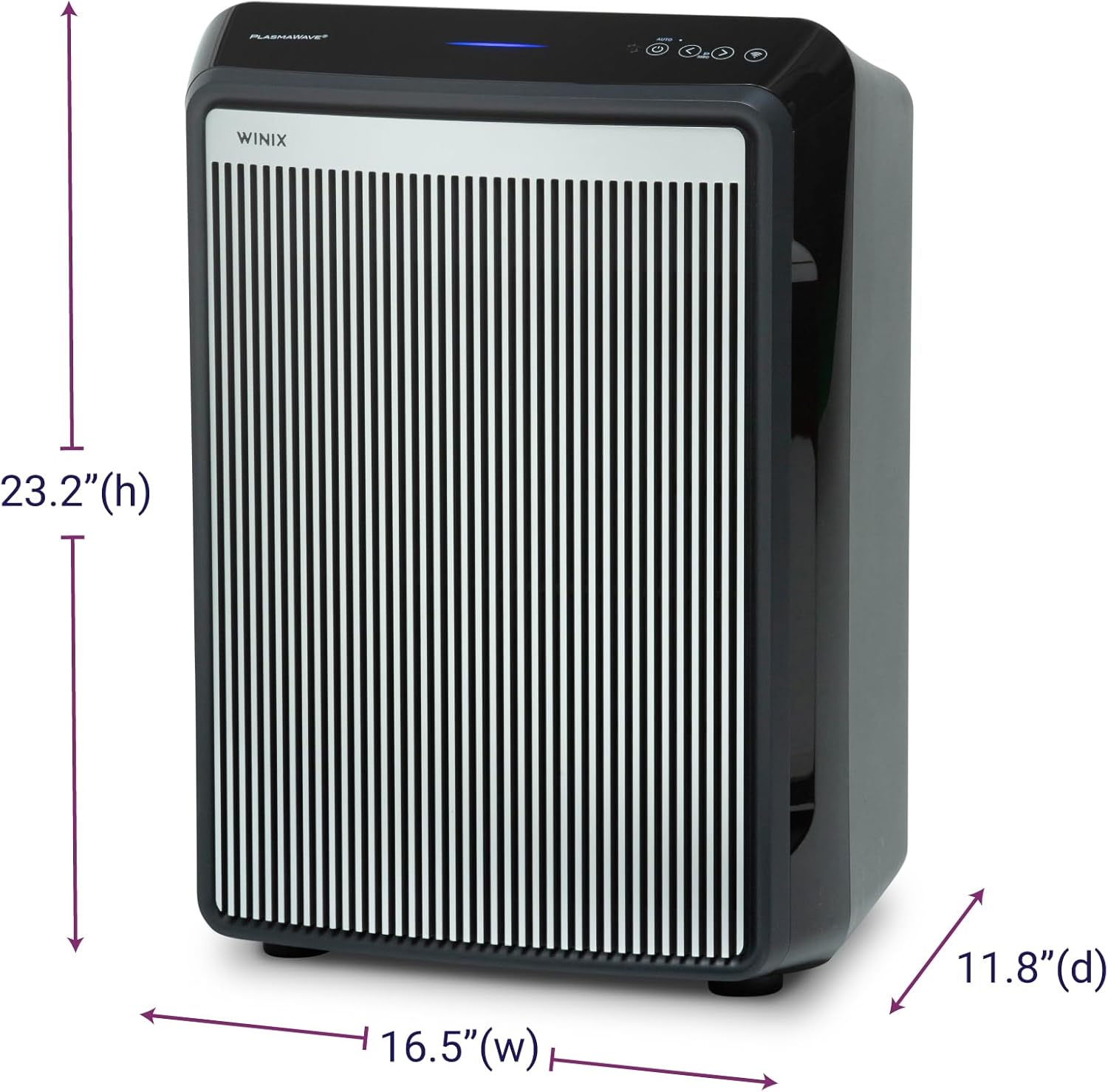
- ขนาดสินค้า (ลึก x กว้าง x สูง): 11.8" x 16.5" x 23.2"
- น้ำหนักสินค้า: 19 ปอนด์
- ครอบคลุมพื้นที่: AHAM Verifide at 500 sq ft. Cleans up to 2,420 sq ft in 1 hour.
- ระดับเสียง: 26.2 เดซิเบล (ระดับเสียงต่ำสุด)
- ขนาดการกักเก็บอนุภาค: 0.003 Micron (True HEPA)
- วัดtage: 95 วัตต์
- ประเภทตัวควบคุม: Button Control, Winix Smart App (iOS, Android), Amazon Alexa
- คุณสมบัติพิเศษ: WiFi, 4-Stage Filtration, PlasmaWave®, Smart Sensors, Auto Mode, Sleep Mode
- ใบรับรอง: AHAM Certified, CARB Certified, UL Certified
- ส่วนประกอบที่รวมอยู่: True HEPA Filter (1 year supply), Activated Carbon Filters (1 year supply)
- คำแนะนำในการดูแล: Hand Wash (Pre-filter only)
- จำเป็นต้องประกอบ: เลขที่
- จำนวนชิ้น: 1
การรับประกันและการสนับสนุน
ข้อมูลการรับประกัน
The Winix 9800 Air Purifier comes with a รับประกันจำกัด 2 ปีการรับประกันนี้ครอบคลุมข้อบกพร่องด้านวัสดุและฝีมือการผลิตภายใต้การใช้งานปกติ โปรดเก็บหลักฐานการซื้อไว้เพื่อขอรับสิทธิ์การรับประกัน
การสนับสนุนลูกค้า
For technical assistance, troubleshooting, or warranty inquiries, please visit the official Winix website or contact Winix customer service. Refer to the product packaging or official webเว็บไซต์สำหรับข้อมูลการติดต่อปัจจุบัน
นอกจากนี้ อาจมีแหล่งข้อมูลออนไลน์และคำถามที่พบบ่อย (FAQ) ให้บริการบนเว็บไซต์ด้วย Winix Store Page.


