การแนะนำ
This manual provides comprehensive instructions for the proper setup, operation, and maintenance of your SmallRig V-Mount Battery Adapter Plate, Model 3499. This adapter plate is designed to provide versatile power distribution for camera rigs, monitors, transmitters, and other accessories using a V-mount battery. Please read this manual thoroughly before use to ensure optimal performance and safety.
มีอะไรอยู่ในกล่อง
ตรวจสอบว่ามีส่วนประกอบทั้งหมดอยู่ครบเมื่อแกะกล่อง:
- 1 x V Mount Battery Adapter Plate
- 1 x 15mm Dual Rod Clamp with Extension Arm
- ประแจ 2 x Allen
- 4 x สกรู

Image: Contents of the SmallRig V-Mount Battery Adapter Plate package, including the main plate, 15mm dual rod clamp with extension arm, two Allen wrenches, and four screws.
คุณสมบัติผลิตภัณฑ์
- Universal V-Mount Compatibility: Designed to fit a wide range of standard V-mount batteries.
- กำลังขับที่หลากหลาย: Features dual D-Tap output ports and DC output ports for powering multiple devices simultaneously.
- Intuitive Power Switch: An integrated on/off switch controls all output ports for convenient power management.
- Secure 15mm Rod Clamp: Equipped with a dual rod clamp for secure attachment to 15mm rail support systems, ensuring stability.
- แขนยืดปรับระดับได้: Allows for quick repositioning of the battery plate to achieve optimal balance and angle.
- Multiple 1/4"-20 Threaded Holes: Provides attachment points for additional accessories like super clamps or magic arms.

ภาพ: เหนือview of the SmallRig V-Mount Battery Adapter Plate, highlighting the V-Lock switch, 12V DC output port, 14.8V D-TAP output port, and multiple 1/4"-20 threaded holes for accessory attachment.
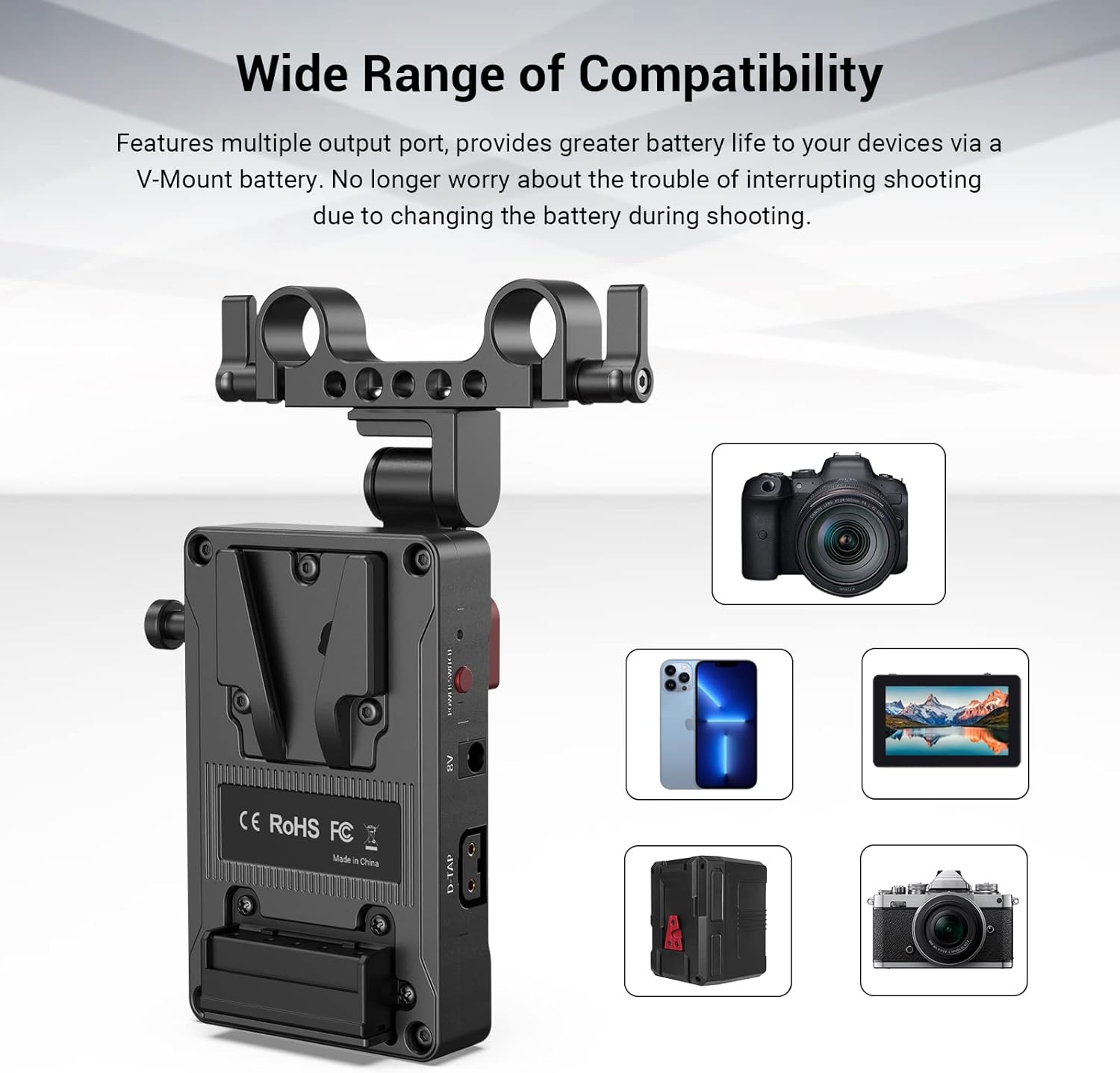
Image: The V-Mount Battery Adapter Plate shown with various compatible devices, including cameras, monitors, and smartphones, illustrating its wide range of compatibility.
การตั้งค่า
- Attach to 15mm Rod System: Secure the 15mm dual rod clamp to your camera rig's 15mm rods. Use the included Allen wrench to tighten the clamp screws until the plate is firmly in place.
- Adjust Extension Arm: Loosen the red wing nut on the adjustable extension arm to reposition the V-mount battery plate. Adjust it to your desired angle and balance, then securely tighten the wing nut.
- Mount V-Mount Battery: Align your V-mount battery with the V-lock mechanism on the adapter plate. Slide the battery down until it clicks into place, indicating a secure connection. To release, press the V-lock switch.

Image: The V-Mount Battery Adapter Plate mounted on a rod system, illustrating the flexibility of its adjustable arm to achieve various angles and positions for the battery.

ภาพ: รายละเอียด view of the V-lock mechanism on the adapter plate, demonstrating how V-mount batteries are securely attached and released. Note: Not compatible with PAGlink series V-mount batteries or Patona Premium Battery for BP-190WS.
คำแนะนำการใช้งาน
- เชื่อมต่ออุปกรณ์: Once the V-mount battery is securely attached, connect your camera, monitor, transmitter, or other accessories to the available D-Tap or DC output ports on the adapter plate. Ensure all connections are firm.
- เปิด/ปิดเครื่อง: Use the integrated power switch to turn the power output to your connected devices on or off. This switch controls all output ports simultaneously.
- ตรวจสอบระดับแบตเตอรี่: Some V-mount batteries feature their own battery level indicators. Refer to your battery's manual for specific details on monitoring its charge.

ภาพ: ภาพระยะใกล้ view of the SmallRig V-Mount Battery Adapter Plate's output ports, including an 8V DC output, a 12V DC output, two 14.8V D-TAP ports, and the main power switch for controlling all outputs.
การซ่อมบำรุง
- การทำความสะอาด: Regularly wipe the adapter plate with a soft, dry cloth to remove dust and debris. Avoid using harsh chemicals or abrasive materials.
- พื้นที่จัดเก็บ: When not in use, store the adapter plate in a cool, dry place away from direct sunlight and extreme temperatures.
- ตรวจสอบการเชื่อมต่อ: Periodically check all ports and connections for any signs of wear or damage. Ensure screws are tight and the V-lock mechanism operates smoothly.
การแก้ไขปัญหา
- ไม่มีกำลังขับ:
- Ensure the V-mount battery is fully charged and properly seated on the adapter plate.
- Verify the power switch on the adapter plate is in the 'ON' position.
- Check all cables and connections to the devices for proper insertion.
- การติดตั้งแบบหลวม:
- If the rod clamp or extension arm feels loose, use the provided Allen wrench to tighten the respective screws and the red wing nut.
- Ensure the 15mm rods are correctly sized and free from obstructions.
- Battery Not Locking:
- Confirm that your V-mount battery is compatible with the SmallRig V-lock system (refer to compatibility notes).
- Check for any debris or obstruction in the V-lock mechanism.
ข้อมูลจำเพาะ
| ยี่ห้อ | สมอลล์ริก |
| หมายเลขรุ่น | 3499 |
| ขนาดสินค้า | 2.86 x 4.25 x 4.78 นิ้ว (72.6 x 108 x 121.3 มม.) |
| น้ำหนักสินค้า | 0.176 ออนซ์ (5 กรัม) |
| วัสดุ | โลหะผสมอลูมิเนียม |
| อินพุต Voltage | 12 โวลต์ |
| วัดtage | 10 วัตต์ |
| ประเภทขั้วต่อ | Barrel Connector, D-TAP |
| อุปกรณ์ที่รองรับ | Cameras, Monitors, Smartphones (via V-mount battery) |
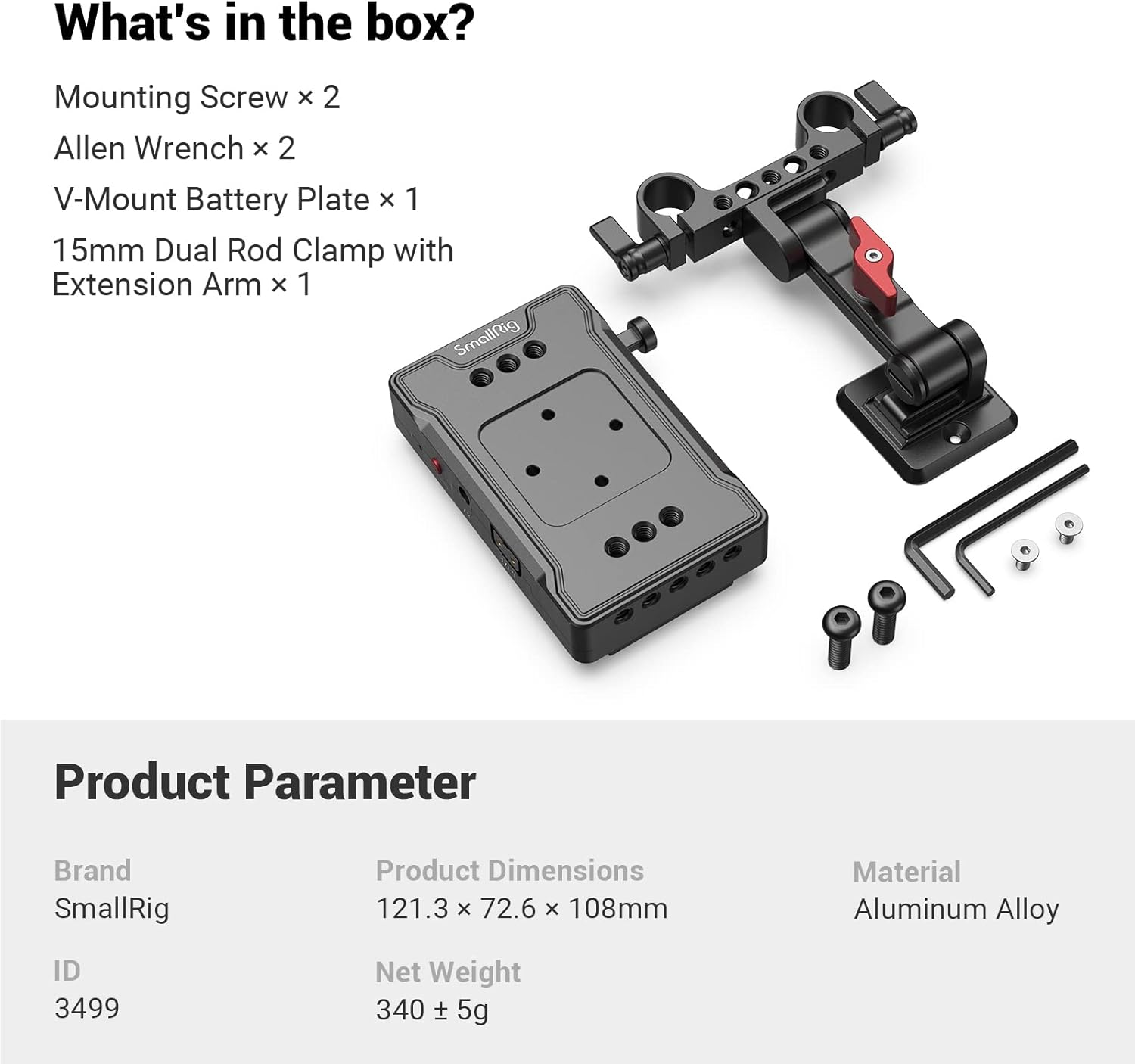
Image: Product parameter table for the SmallRig V-Mount Battery Adapter Plate, listing brand, ID (3499), product dimensions (121.3 x 72.6 x 108 mm), net weight (340 ± 5g), and material (Aluminum Alloy).
การรับประกันและการสนับสนุน
สำหรับข้อมูลการรับประกันหรือการสนับสนุนทางเทคนิค โปรดดูที่เว็บไซต์อย่างเป็นทางการของ SmallRig webหรือติดต่อฝ่ายบริการลูกค้าโดยตรง โปรดเก็บใบเสร็จรับเงินไว้เป็นหลักฐานการซื้อสำหรับการเรียกร้องการรับประกันใดๆ
SmallRig อย่างเป็นทางการ Webเว็บไซต์: www.smallrig.com


