1. บทนำ
This manual provides essential information for the setup, operation, and maintenance of your Donner DDP-100 88-Key Weighted Action Digital Piano. Please read it thoroughly to ensure proper use and to maximize your instrument's lifespan.
คุณสมบัติหลัก:
- 88 Fully-Weighted Keys: Designed to precisely match finger strength changes, restoring the feel of an acoustic piano for stable and responsive touch.
- เสียงที่สมจริง: Features a pure tone sampled from real acoustic grand pianos, utilizing AWM sampling technology for realistic and excellent sound quality.
- การเชื่อมต่อที่หลากหลาย: Supports MP3 input, external sound systems, and headphones for varied practice and performance needs.
- บูรณาการ Ampเครื่องฟอก: ในตัว amplifier for direct sound output.
- การออกแบบที่เรียบง่าย: Wooden cabinet with a sliding key cover for key protection and a modern aesthetic.
- เสียงประสาน 128 โน้ต: Ensures complex musical passages can be played without notes cutting off.

Figure 1: The Donner DDP-100 Digital Piano in white, showcasing its full 88-key keyboard, integrated music stand, and three foot pedals.
2. คำแนะนำในการตั้งค่า
2.1 การแกะกล่องและการตรวจสอบส่วนประกอบ
Carefully unpack all components from the packaging. Ensure all items listed below are present:
- Donner DDP-100 Digital Piano Unit
- ขาตั้งเฟอร์นิเจอร์
- อะแดปเตอร์แปลงไฟ
- ฝาครอบกุญแจเลื่อน
- Three-Pedal Unit
- เพลงพักผ่อน
2.2 การประกอบ
- Assemble the Furniture Stand: Follow the instructions provided with the furniture stand to securely assemble its components.
- Attach the Piano Unit: Carefully place the DDP-100 digital piano unit onto the assembled furniture stand. Secure it using the provided screws or fasteners.
- เชื่อมต่อชุดแป้นเหยียบ: Locate the pedal unit cable and connect it to the corresponding port on the underside of the piano unit.
- Install the Music Rest: เสียบที่วางโน้ตเพลงลงในช่องที่กำหนดไว้บนแผงด้านบนของเปียโน
- เชื่อมต่ออะแดปเตอร์ไฟฟ้า: Plug the power adapter into the DC IN port on the piano's rear panel, then plug the adapter into a wall outlet.

Figure 2: Dimensions of the Donner DDP-100 Digital Piano, illustrating its compact design for home integration.
3. คู่มือการใช้งาน
3.1 การเปิด/ปิดเครื่องและการควบคุมระดับเสียง
- เปิดเครื่อง: Locate the 'POWER' button on the left side of the keyboard. Press it to turn on the piano. A red indicator light will illuminate.
- การปรับระดับเสียง: Use the 'VOLUME' knob to adjust the overall sound level. Turn clockwise to increase volume, counter-clockwise to decrease.
- หมดแรง: Press the 'POWER' button again to turn off the piano.
วิดีโอ 1: จบview of the Donner DDP-100 Digital Piano, demonstrating power on, volume control, and key action.
3.2 Playing the Piano
- Weighted Keys: The 88 fully-weighted keys provide a realistic piano feel, with heavier touch in lower registers and lighter touch in higher registers.
- เหยียบ: The three pedals (soft, sostenuto, sustain) allow for expressive playing, similar to an acoustic grand piano.
- คุณภาพเสียง: The DDP-100 features a single, high-quality grand piano tone, sampled for authenticity.

Figure 3: Diagram illustrating the graded hammer action of the 88 weighted keys, providing a realistic playing experience.
3.3 โหมดหูฟัง
For private practice, connect headphones to the 3.5mm headphone jack located on the rear panel. This mutes the internal speakers, allowing you to play without disturbing others.

Figure 4: Demonstrating the headphone mode for silent practice, ideal for shared living spaces.
3.4 การเชื่อมต่ออุปกรณ์ภายนอก
The rear panel of the DDP-100 offers various ports for connecting external devices:
- อินเตอร์เฟซ MP3: Connect an MP3 player for audio playback.
- USB Transmission Interface: Connect to a computer for MIDI data transfer.
- Audio Interface (IN/OUT): Connect to external audio systems or recording devices.
- ช่องเสียบแป้นเหยียบ Sustain: For connecting the included three-pedal unit.
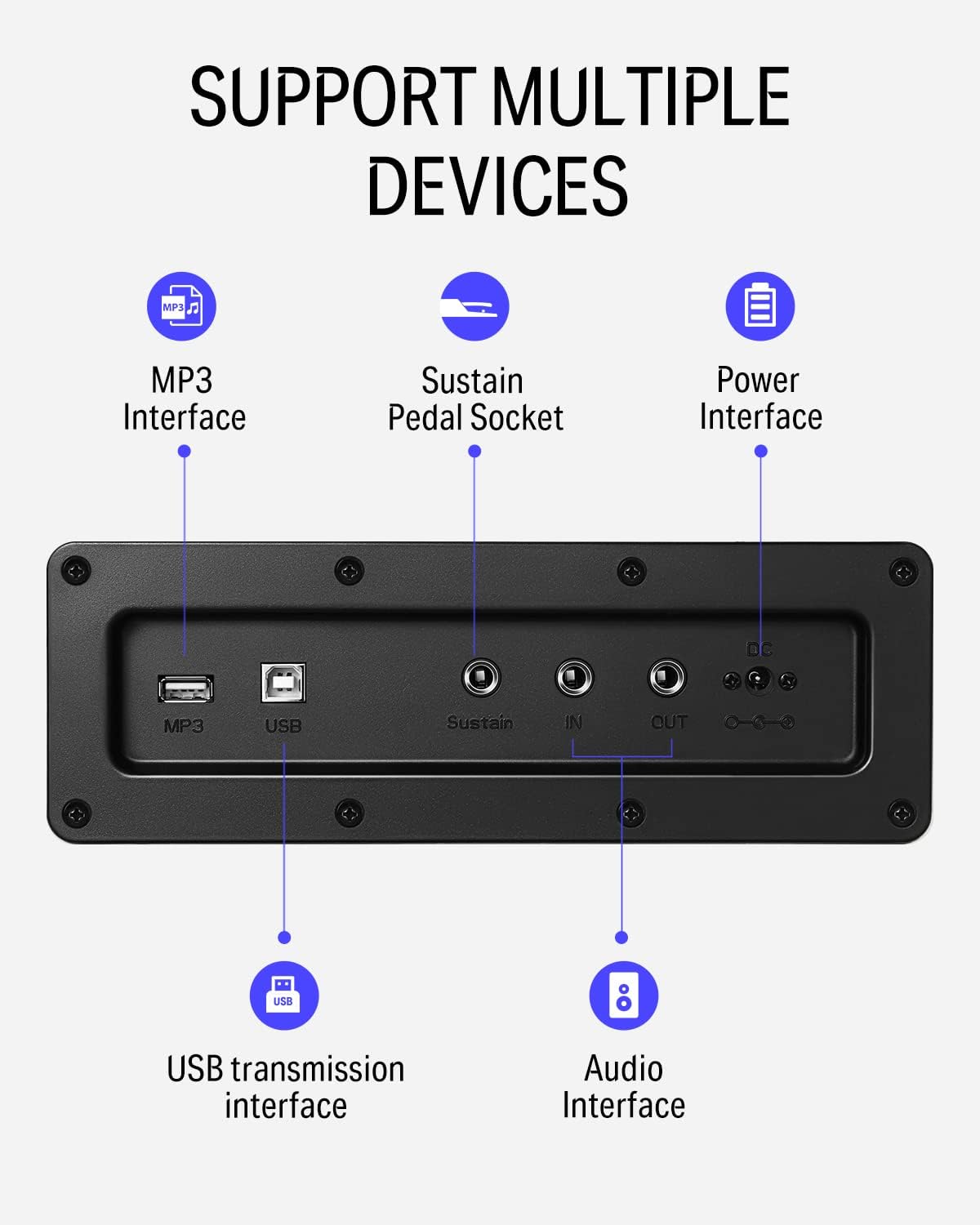
รูปที่ 5: รายละเอียด view of the rear panel connectivity options, including MP3, USB, Sustain, and Audio In/Out ports.
Video 2: Demonstrates the versatility of the DDP-100 when connected to other devices, such as DJ equipment.
4. การบำรุงรักษา
4.1 การทำความสะอาด
- ใช้ผ้าแห้งนุ่มเช็ดทำความสะอาดพื้นผิวเปียโน
- สำหรับสิ่งสกปรกฝังแน่น ให้เช็ดออกเล็กน้อยampen the cloth with water and a mild, non-abrasive cleaner. Avoid excessive moisture.
- Do not use chemical solvents, alcohol, or abrasive cleaning agents, as these can damage the finish.
4.2 การจัดเก็บและการดูแลรักษา
- Keep the piano away from direct sunlight, heat sources, and excessive humidity to prevent damage to the wood and electronic components.
- Use the sliding key cover to protect the keys from dust and spills when not in use.
- Avoid placing heavy objects on the piano.
5 การแก้ไขปัญหา
5.1 ไม่มีเสียง
- ตรวจสอบให้แน่ใจว่าได้เสียบอะแดปเตอร์แปลงไฟแน่นสนิทแล้ว และเปิดเปียโนไว้
- Check the volume knob and ensure it is turned up.
- หากเสียบหูฟังอยู่ ให้ถอดหูฟังออกเพื่อเปิดใช้งานลำโพงภายในเครื่อง
- If connected to an external sound system, check the system's volume and connections.
5.2 คีย์ไม่ตอบสนอง
- โปรดตรวจสอบให้แน่ใจว่าเปียโนเปิดใช้งานอยู่
- หากมีเพียงบางปุ่มที่ได้รับผลกระทบ โปรดติดต่อฝ่ายบริการลูกค้า
5.3 Abnormal Sound
- Check for loose connections of cables (power, pedals, audio).
- Ensure the volume is not set too high, causing distortion.
- If the issue persists, power cycle the unit (turn off, wait 10 seconds, turn on).
6. ข้อมูลจำเพาะ
| คุณสมบัติ | รายละเอียด |
|---|---|
| ยี่ห้อ | ดอนเนอร์ |
| ชื่อรุ่น | ดีดีพี-100 |
| จำนวนคีย์ | 88 |
| ประเภทกุญแจ | Fully-Weighted Action |
| โพลีโฟนี | 128-Note |
| แหล่งกำเนิดเสียง | AWM Sampling Technology (Grand Piano Tone) |
| แป้นเหยียบ | 3-Pedal Unit (Sustain, Sostenuto, Soft) |
| การเชื่อมต่อ | MP3 Interface, USB Transmission, Audio In/Out, 3.5mm Headphone Jack |
| แหล่งพลังงาน | อแดปเตอร์,ไฟฟ้า |
| ขนาดสินค้า | ลึก 54.33 นิ้ว x กว้าง 16.14 นิ้ว x สูง 33.27 นิ้ว |
| น้ำหนักสินค้า | 97.7 ปอนด์ |
| วัสดุตัวเครื่อง | ไม้ |
| สี | สีขาว |
7. การรับประกันและการสนับสนุน
For warranty information, please refer to the documentation included with your purchase or contact Donner customer support. General customer support is available for assistance with product inquiries, troubleshooting, and service requests.
For additional support, visit the official Donner webเว็บไซต์หรือติดต่อช่องทางบริการลูกค้าของเรา


