1. สินค้าหมดview
The Barkan S40 Table Top TV Stand provides a stable and secure solution for mounting flat or curved television screens ranging from 32 to 70 inches. It is designed to support TVs weighing up to 50 kg (110 lbs). This stand is particularly useful for situations where original TV legs are lost or when a TV needs to be placed on a counter or table surface, offering a robust alternative to wall mounting.
คุณสมบัติที่สำคัญ ได้แก่:
- High load capacity for various TV sizes.
- Wide VESA compatibility for diverse TV models.
- Adjustable height settings for optimal viewการไอเอ็นจี
- Anti-scratch design to protect surfaces.
- โครงสร้างเหล็กอัลลอยด์ทนทาน

Figure 1: Barkan S40 Table Top TV Stand components and packaging.
2. การตั้งค่าและการติดตั้ง
Carefully follow these instructions to ensure proper and safe installation of your Barkan S40 TV Stand.
2.1. เครื่องมือที่จำเป็น
- Wrench (13/32" - 10mm)
- Screwdriver (No. 2+3)
- Anchoring safety cable (included)

Figure 2: Tools required for assembly, including a wrench, screwdriver, and anchoring safety cable.
2.2. ขั้นตอนการประกอบ
- แกะส่วนประกอบ: นำชิ้นส่วนทั้งหมดออกจากบรรจุภัณฑ์อย่างระมัดระวัง ตรวจสอบให้แน่ใจว่ามีส่วนประกอบทั้งหมดตามที่ระบุไว้ในคำแนะนำการประกอบ
- ติดตั้งขายึดเข้ากับทีวี: Identify the correct screws and spacers from the hardware kit that match your TV's VESA mounting holes. Secure the vertical mounting brackets to the back of your television. Ensure they are firmly attached and aligned.
- Connect Stand Legs: Attach the stand legs to the vertical mounting brackets. The design allows for flexible positioning to accommodate various TV widths.
- ปรับความสูง: The stand offers multiple height adjustment points. Select the desired height for your television before tightening all fasteners.
- Secure Anchoring Safety Cable: For added stability and safety, attach the provided anchoring safety cable from the TV stand to a secure point on your furniture or wall.
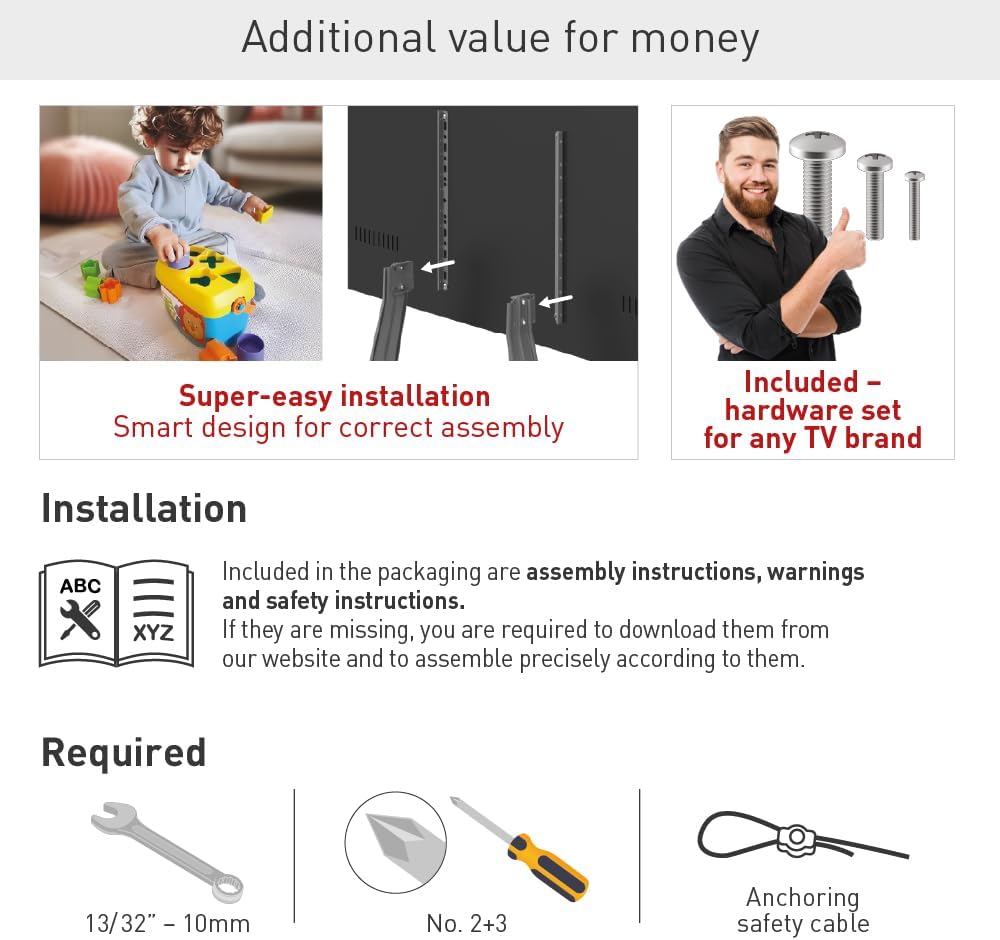
Figure 3: Visual guide for attaching the stand to the television, demonstrating the secure connection points.
สำคัญ: Always refer to the detailed assembly instructions included in your product packaging for specific diagrams and screw selection guides. If your instructions are missing, please download them from the official Barkan webเว็บไซต์.
3. คู่มือการใช้งาน
The Barkan S40 Table Top TV Stand is designed for straightforward use once assembled.
3.1. การวางตำแหน่งทีวี
Place the assembled TV and stand on a flat, stable, and level surface. Ensure the surface can safely support the combined weight of the TV and the stand. Maintain adequate clearance around the TV for ventilation and cable management.
3.2. การปรับความสูง
The stand allows for height adjustment during the initial setup phase. The TV can be positioned at various heights between 19.7 inches (50 cm) and 30.3 inches (77 cm) from the tabletop to the top of the TV. To change the height after initial assembly, you will need to partially disassemble the stand from the TV, adjust the mounting points on the vertical brackets, and then reassemble.
3.3. Movement Type
The Barkan S40 is a fixed tabletop stand. It does not offer swivel or tilt functionality once installed. Any adjustments to viewing angle or height must be made during the assembly process or by repositioning the entire stand.

Figure 4: The Barkan S40 TV Stand in use, demonstrating its compatibility with various TV sizes and its maximum load capacity.
4. การบำรุงรักษา
Proper maintenance ensures the longevity and continued safe operation of your TV stand.
- การทำความสะอาด: Use a soft, dry cloth to clean the stand. Avoid using abrasive cleaners, solvents, or chemical sprays, as these can damage the finish.
- การตรวจสอบปกติ: Periodically inspect all screws and connections to ensure they remain tight. Loose connections can compromise stability.
- การปกป้องพื้นผิว: The stand features an anti-scratch design. However, avoid dragging the stand across surfaces to prevent potential damage to both the stand and the furniture.
5 การแก้ไขปัญหา
If you encounter issues with your Barkan S40 TV Stand, refer to the following common solutions:
- ทีวีไม่เสถียร:
- ตรวจสอบให้แน่ใจว่าขันสกรูประกอบทั้งหมดให้แน่นสนิท
- Verify that the TV's weight and size are within the stand's specified limits (max 50 kg / 110 lbs, 32-70 inches).
- ตรวจสอบให้แน่ใจว่าขาตั้งวางอยู่บนพื้นผิวเรียบ ได้ระดับ และมั่นคง
- Ensure the anchoring safety cable is properly installed and secured.
- Stand Does Not Fit TV:
- Check your TV's VESA mounting pattern against the stand's compatibility list (100x100 to 800x400 mm).
- โปรดตรวจสอบให้แน่ใจว่าคุณใช้สกรูและแหวนรองที่ถูกต้องจากชุดอุปกรณ์สำหรับทีวีรุ่นของคุณ
6. ข้อมูลจำเพาะ
Detailed technical specifications for the Barkan S40 Table Top TV Stand:
- ยี่ห้อ: บาร์คาน
- แบบอย่าง: S40
- ขนาดทีวีที่รองรับ: 32 - 70 นิ้ว
- ความจุโหลดสูงสุด: 50 กก. (110 ปอนด์)
- ความเข้ากันได้ของ VESA: 100x100, 100x200, 200x100, 200x200, 300x300, 300x400, 400x200, 400x300, 400x400, 600x400, 800x400 mm, and non-VESA patterns.
- การปรับความสูง: 19.7" - 30.3" (50 - 77 ซม.)
- วัสดุ: เหล็กอัลลอยด์
- สี: สีดำ
- ประเภทการติดตั้ง: ที่วางบนโต๊ะ
- ประเภทการเคลื่อนไหว: ที่ตายตัว
- ขนาดสินค้า : 44.4 x 10.5 x 4.2 ซม. ; 2.71 กก.

Figure 5: Detailed specifications including VESA patterns and height adjustment ranges.
7. ข้อมูลการรับประกัน
The Barkan S40 Table Top TV Stand is backed by a Lifetime Warranty, reflecting the manufacturer's commitment to quality and durability. This warranty covers defects in materials and workmanship under normal use.
For specific terms and conditions of the warranty, please refer to the documentation included with your product or visit the official Barkan webเว็บไซต์.

Figure 6: Barkan's commitment to quality, highlighted by over 35 years of innovation and a Lifetime Warranty.
8. การสนับสนุน
For additional assistance, troubleshooting, or to download assembly instructions, please visit the official Barkan website or contact Barkan customer support. Contact information can typically be found on the product packaging or on the manufacturer's webเว็บไซต์.


