1. บทนำ
This manual provides detailed instructions for the operation and maintenance of your FEELWORLD F6 PLUS 5.5-inch Touch Screen DSLR Camera Field Monitor. Please read this manual thoroughly before using the device to ensure proper functionality and to prevent damage.
The FEELWORLD F6 PLUS is a compact and versatile 5.5-inch Full HD 1920x1080 monitor designed for professional videographers and photographers. It features a touch screen interface, 3D LUT support, HDR monitoring, and various professional assist functions to enhance your shooting workflow.
2. เนื้อหาบรรจุภัณฑ์
ตรวจสอบว่าสินค้าทั้งหมดที่ระบุไว้ด้านล่างนี้รวมอยู่ในบรรจุภัณฑ์ของคุณแล้ว หากมีสินค้าใดสูญหายหรือเสียหาย โปรดติดต่อผู้ค้าปลีกของคุณ
- FEELWORLD F6 PLUS Monitor
- สายไมโคร HDMI
- ร่มกันแดด
- Tilt Arm
- คู่มือการใช้งาน (เอกสารนี้)
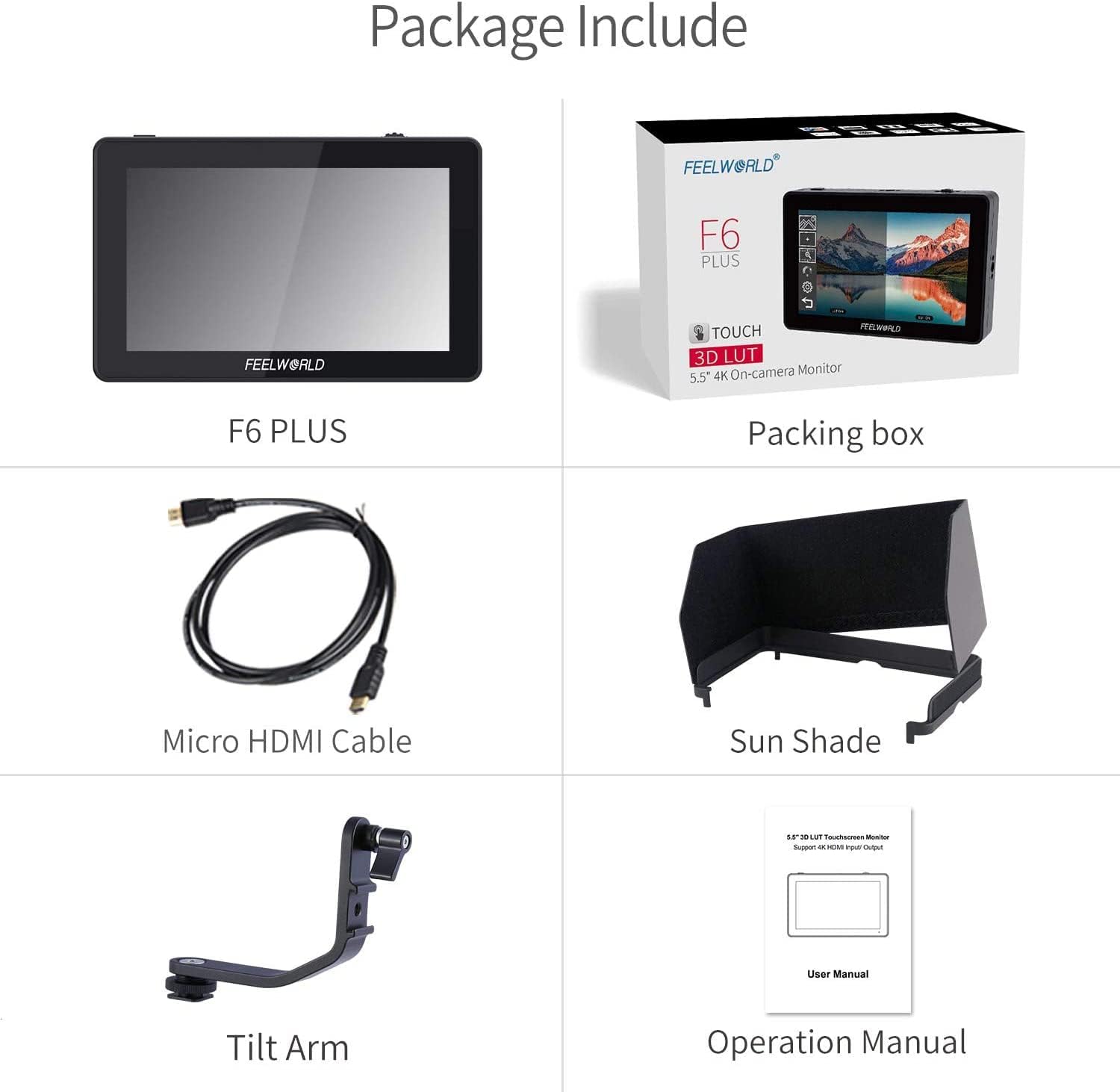
Figure 2.1: Included accessories with the FEELWORLD F6 PLUS monitor. The image displays the F6 PLUS monitor, a micro HDMI cable, a sunshade, a tilt arm, and the operation manual, alongside the product's retail packaging.
3. การตั้งค่า
3.1 การติดตั้งแขนปรับเอียง
The included tilt arm allows for flexible positioning of the monitor. Attach the tilt arm to the monitor's 1/4-20 thread point (located on the top, bottom, or right side) and then mount it to your camera's hot shoe or other compatible mounting points.
3.2 การจ่ายไฟให้จอภาพ
The F6 PLUS supports multiple power options:
- อินพุต DC: Connect a DC 7-24V power adapter to the DC IN port.
- แผ่นแบตเตอรี่: The monitor features a dual battery plate system compatible with Sony F series or Canon LP-E6 batteries. (Batteries are not included and must be purchased separately).
- อินพุตประเภท C: For power delivery via a Type-C cable.

รูปที่ 3.1: ด้านหลัง view of the FEELWORLD F6 PLUS showing the HDMI input/output ports, SD card slot, DC power input, 3.5mm headphone jack, and Type-C power input. Below, two images illustrate the dual battery plate system for Sony F series or Canon LP-E6 batteries.
3.3 การเชื่อมต่อกับกล้อง
Use the provided Micro HDMI cable or another compatible HDMI cable to connect your camera's HDMI output to the monitor's HDMI IN port. The F6 PLUS supports 4K HDMI input and loop-out.
3.4 Powering Your Camera (Optional)
The F6 PLUS can provide auxiliary power to your DSLR or mirrorless camera using a dummy battery adapter power cable (sold separately). Connect the dummy battery to your camera and the power cable to the monitor's DC OUT 8V port.
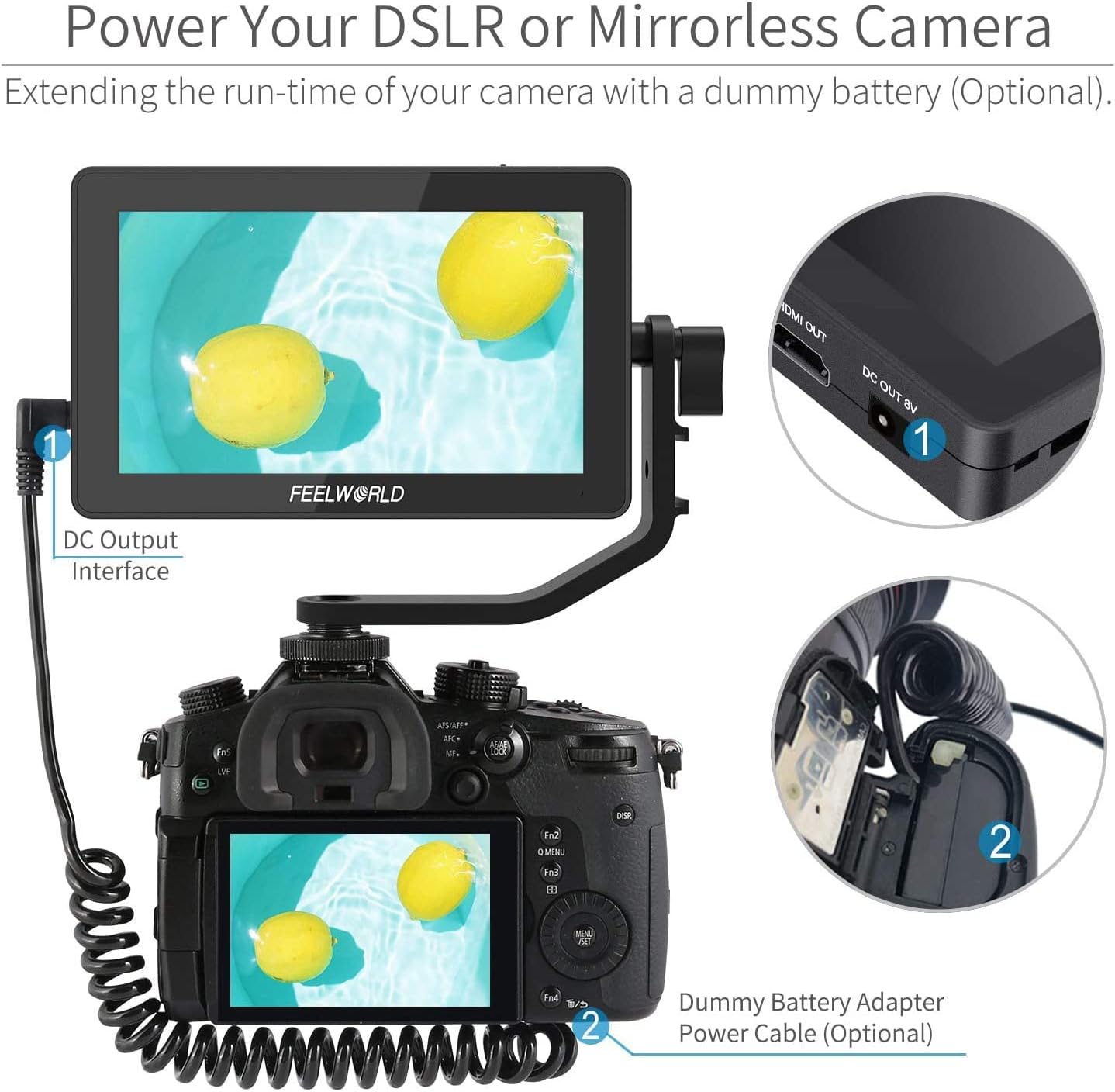
Figure 3.2: The FEELWORLD F6 PLUS monitor connected to a DSLR camera, illustrating how the monitor's DC output interface can power the camera via an optional dummy battery adapter power cable.
4. การใช้งานจอภาพ
4.1 การควบคุมขั้นพื้นฐาน
The F6 PLUS features both touch screen and physical button controls.
- ปุ่มเปิด/ปิด: Press to turn the monitor on/off. Tap to disable/enable touch function.
- Menu Wheel Button: Tap or rotate for quick selection and function settings.
4.2 การใช้งานหน้าจอสัมผัส
The touch screen allows for intuitive navigation and control.
- เมนูหลัก: Double-click on the screen to access the main menu.
- Popup Menu: Slide up from the bottom of the screen to reveal a quick access popup menu for common functions.
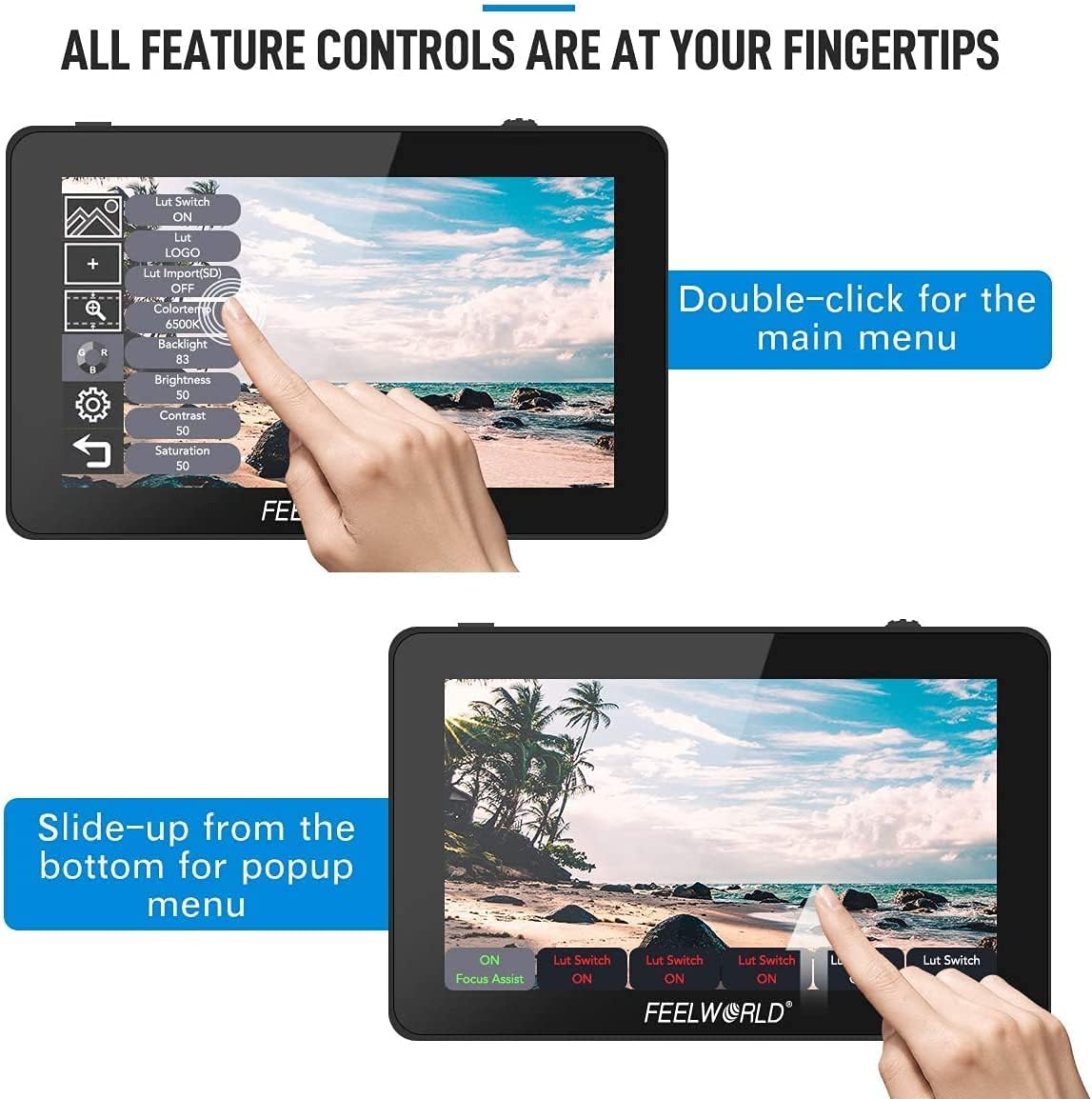
Figure 4.1: Illustration of touch screen controls on the FEELWORLD F6 PLUS. The top image shows a double-click action to access the main menu, while the bottom image demonstrates a slide-up gesture from the bottom for a popup menu.
4.3 เครื่องมือตรวจสอบระดับมืออาชีพ
The F6 PLUS integrates several professional tools to assist with accurate monitoring:
- ลูท 3D: Supports S-log2/3, V-log, Log-C, etc., for converting log mode to REC709. User 3D LUT cubes can be uploaded via SD card.
- ฮิสโตแกรม: Displays the tonal distribution of your image.
- ระบบช่วยเพิ่มสมาธิสูงสุด: Highlights in-focus areas (red, green, blue, white, yellow options; adjustable level).
- สีปลอม: Helps set proper exposure by displaying different exposure levels as distinct colors.
- การสัมผัสกับม้าลาย: Indicates overexposed areas with zebra stripes (adjustable percentagจ).
- ซูม: Magnifies a portion of the image (100%~300%).
- โหมดอนามอร์ฟิก: Corrects the aspect ratio for anamorphic lenses.
- Center Marker / Safe Frames: ช่วยในการจัดเฟรมและองค์ประกอบภาพ
- พลิกภาพ: พลิกภาพในแนวนอนหรือแนวตั้ง
- Pixel-to-Pixel: Displays the image at its native resolution.
- ตารางเก้าช่อง: Divides the screen into nine equal sections for composition.

Figure 4.2: Icons representing various auxiliary functions available on the FEELWORLD F6 PLUS monitor, including DSLR Scale, Peaking Filter, Anamorphic Mode, False Colors, Exposure, Nine Grid, Center Marker, Zoom-in, Pixel-to-Pixel, Check Field, Image Flip, and Histogram.
5. การบำรุงรักษา
- การทำความสะอาด: Use a soft, dry cloth to clean the monitor's exterior. For the screen, use a specialized screen cleaning solution and a microfiber cloth. Avoid harsh chemicals.
- พื้นที่จัดเก็บ: เมื่อไม่ใช้งาน ควรเก็บจอภาพไว้ในที่แห้งและเย็น หลีกเลี่ยงแสงแดดโดยตรงและอุณหภูมิที่สูงหรือต่ำเกินไป
- การจัดการ: ควรหลีกเลี่ยงการทำจอภาพตกหรือกระแทกอย่างแรง
6 การแก้ไขปัญหา
- ไม่มีไฟฟ้า:
- Ensure the power adapter is securely connected or batteries are correctly inserted and charged.
- ตรวจสอบปุ่มเปิด/ปิด
- ไม่มีสัญญาณ:
- Verify the HDMI cable connection between the camera and monitor.
- Confirm the camera's HDMI output is active and correctly configured.
- ลองใช้สาย HDMI เส้นอื่น
- Image Issues (e.g., flickering, incorrect colors):
- Check camera output settings (resolution, frame rate).
- Reset monitor settings to default.
- Ensure 3D LUTs are correctly applied or disabled if not needed.
- หน้าจอสัมผัสไม่ตอบสนอง:
- Ensure the touch function is not disabled by tapping the power button.
- รีสตาร์ทจอภาพ
7. ข้อมูลจำเพาะ
| คุณสมบัติ | ข้อมูลจำเพาะ |
|---|---|
| ขนาดหน้าจอ | หน้าจอสัมผัสขนาด 5.5 นิ้ว |
| ปณิธาน | 1920x1080 pixels (Full HD) |
| พิกเซลพิทช์ | 0.0639 (สูง) x 0.0213 (กว้าง) mm |
| อัตราส่วนภาพ | 16:9 น. |
| ความสว่าง | 500cd/ตรม. |
| อัตราส่วนคอนทราสต์ | 1000:1 น. |
| Viewอิงแองเกิล | 80 ° / 80 ° (L / R) 80 ° / 80 ° (U / D) |
| เอาท์พุตเสียง | หูฟังสเตอริโอ 3.5 มม. |
| HDMI Input/Output Support |
|
| อินพุต Voltage | ไฟฟ้ากระแสตรง 7~24V |
| การใช้พลังงาน | ≤9วัตต์ |
| อุณหภูมิในการทำงาน | -20°C ~ 55°C |
| อุณหภูมิในการจัดเก็บ | -30°C ~ 65°C |
| จุดยึด | ¼-20 thread points (top, bottom, right) |
| ขนาดหน่วย | 148L x 93H x 20D (mm) |
| น้ำหนักต่อหน่วย | 235กรัม |

Figure 7.1: Physical dimensions of the FEELWORLD F6 PLUS monitor, showing its length (148mm), height (93mm), and thickness (20mm), along with its light weight of 235g.
8. การรับประกันและการสนับสนุน
สำหรับข้อมูลการรับประกันและการสนับสนุนทางเทคนิค โปรดดูที่เว็บไซต์อย่างเป็นทางการของ FEELWORLD webหรือติดต่อตัวแทนจำหน่ายที่ได้รับอนุญาต เก็บใบเสร็จรับเงินไว้เป็นหลักฐานการซื้อสำหรับการเรียกร้องการรับประกัน
ผู้ผลิต: Feelworld
หมายเลขรุ่น: DL-FEL-F6+
ASIN: B09JLSCV4K


