1. บทนำ
This manual provides essential information for the safe and efficient use of your Aligator A675 Senior Double SIM 2G Mobile Phone. Please read it carefully before using the device and keep it for future reference. The Aligator A675 is designed for ease of use, featuring large buttons and a clear display, making it ideal for senior users.
2. เนื้อหาบรรจุภัณฑ์
ตรวจสอบให้แน่ใจว่ามีรายการทั้งหมดอยู่ในบรรจุภัณฑ์:
- Aligator A675 Mobile Phone
- แบตเตอรี่
- เครื่องชาร์จ
- คู่มือการใช้งาน (เอกสารนี้)
หากมีสินค้าใดขาดหายหรือเสียหาย โปรดติดต่อผู้ค้าปลีกของคุณ
3. อุปกรณ์โอเวอร์view
Familiarize yourself with the key components of your Aligator A675 phone.

ภาพที่ 3.1: ด้านหน้าและด้านหลัง view of the Aligator A675 mobile phone. The front shows the display, keypad, and navigation buttons. The back features the speaker and camera module.
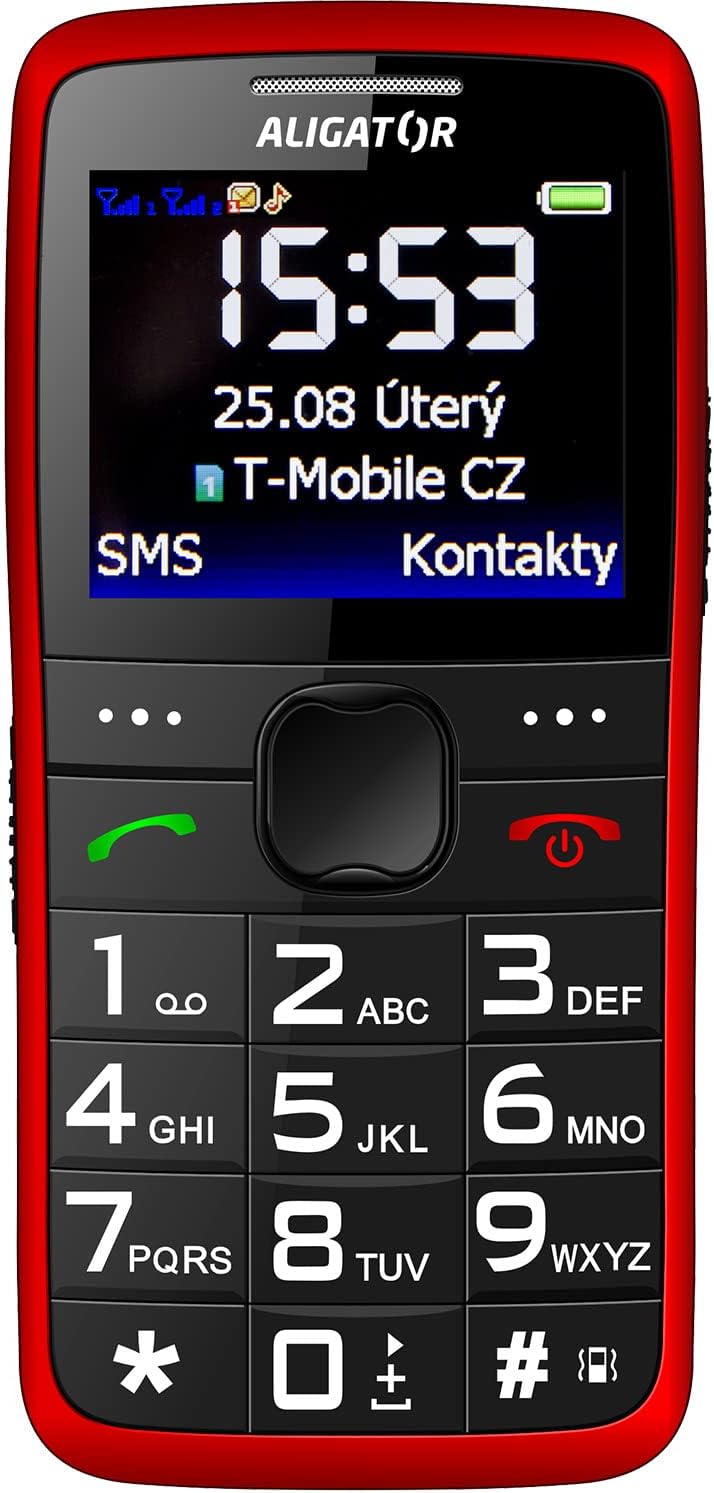
ภาพที่ 3.2: ด้านหน้าแบบละเอียด view of the Aligator A675 mobile phone, highlighting the large display, clear numeric keypad, and dedicated call/end buttons.
3.1 ด้านหน้า View
- แสดง: Shows time, date, network status, battery level, and menu options.
- ปุ่มนำทาง: ใช้สำหรับเลื่อนดูเมนูและตัวเลือกต่างๆ
- ปุ่มเรียก (สีเขียว): โทรออกและรับสายเรียกเข้า
- ปุ่มปิด/เปิด/ปิดเครื่อง (สีแดง): วางสาย กลับไปยังหน้าจอหลัก และเปิด/ปิดโทรศัพท์
- ปุ่มกด: Numeric keys (0-9), asterisk (*), and hash (#) for dialing and text input.
3.2 ย้อนกลับ View
- ลำโพง: For ringtones and hands-free calls.
- กล้อง: For basic photo capture.
- ปุ่ม SOS: A dedicated button for emergency calls/SMS (refer to section 5.4 for setup).
4. การตั้งค่า
โปรดทำตามขั้นตอนเหล่านี้เพื่อเตรียมโทรศัพท์ของคุณให้พร้อมสำหรับการใช้งานครั้งแรก
4.1 การใส่ซิมการ์ด
- ถอดฝาหลังโทรศัพท์ออกโดยงัดเบาๆ ให้เปิดออกจากรอยบาก
- หากใส่แบตเตอรี่อยู่ ให้ถอดออก
- Locate the SIM card slots. The Aligator A675 supports two SIM cards (Dual SIM).
- Carefully insert your 2G GSM SIM card(s) into the designated slot(s) with the gold contacts facing down, ensuring they are correctly oriented.
- Ensure the SIM cards are securely in place.
4.2 การใส่แบตเตอรี่
- จัดตำแหน่งขั้วแบตเตอรี่ให้ตรงกับขั้วในช่องใส่แบตเตอรี่ของโทรศัพท์
- Gently press the battery into place until it fits snugly.
- ปิดฝาหลังให้สนิท ตรวจสอบให้แน่ใจว่าล็อคเข้าที่แล้ว
4.3 การชาร์จโทรศัพท์
- Connect the charger cable to the charging port on the phone (usually located at the bottom).
- เสียบที่ชาร์จเข้ากับเต้ารับไฟฟ้า
- ไอคอนแบตเตอรี่บนหน้าจอจะแสดงสถานะการชาร์จ
- Allow the phone to charge completely before first use. This typically takes a few hours.
5. การใช้งานโทรศัพท์
Basic functions and features of your Aligator A675.
5.1 การเปิด/ปิดเครื่อง
- การเปิดเครื่อง: กดปุ่มค้างไว้ End/Power Button (red button) until the screen lights up.
- วิธีปิดเครื่อง: กดปุ่มค้างไว้ End/Power Button until the power-off options appear, then confirm.
5.2 การโทรออกและรับสาย
- ในการโทรออก: กรอกหมายเลขโทรศัพท์โดยใช้แป้นกดและกดปุ่ม ปุ่มโทรออก (ปุ่มสีเขียว)
- เพื่อรับสาย: กดปุ่ม ปุ่มโทรออก เมื่อโทรศัพท์ดังขึ้น
- วิธีวางสาย: กดปุ่ม End/Power Button.
5.3 การส่งและรับ SMS
- Navigate to the 'Messages' menu using the navigation key.
- เลือก 'เขียนข้อความ' เพื่อเขียนข้อความ SMS ใหม่
- ระบุหมายเลขผู้รับหรือเลือกจากรายชื่อติดต่อ
- พิมพ์ข้อความของคุณโดยใช้แป้นพิมพ์ กดปุ่มที่เหมาะสมหลายๆ ครั้งสำหรับตัวอักษรที่แตกต่างกัน (เช่น กด '2' สำหรับ A, B, C)
- เลือก 'ส่ง'
- Incoming messages will be displayed on the screen and stored in the 'Inbox'.
5.4 ฟังก์ชัน SOS
ฟังก์ชัน SOS ช่วยให้คุณสามารถติดต่อหมายเลขฉุกเฉินที่ตั้งไว้ล่วงหน้าได้อย่างรวดเร็ว
- การตั้งค่าหมายเลข SOS: Go to 'Settings' > 'SOS Settings'. Add up to 5 emergency contact numbers.
- การเปิดใช้งาน SOS: กดปุ่มค้างไว้ ปุ่ม SOS วางไว้ด้านหลังโทรศัพท์สักสองสามวินาที
- The phone will automatically send an emergency SMS to the pre-set numbers and then start dialing them one by one until a call is answered.
5.5 การติดต่อ
- การเพิ่มผู้ติดต่อ: Go to 'Contacts' > 'Add New'. Enter the name and phone number, then save.
- กำลังค้นหาข้อมูลติดต่อ: Go to 'Contacts' and use the navigation key to scroll or type the first letters of the name.
6. การบำรุงรักษาและการดูแล
Proper care ensures the longevity of your Aligator A675 phone.
- การทำความสะอาด: ใช้ผ้าแห้งนุ่มๆ เช็ดทำความสะอาดพื้นผิวโทรศัพท์ หลีกเลี่ยงน้ำยาทำความสะอาดหรือวัสดุที่มีฤทธิ์กัดกร่อน
- การดูแลแบตเตอรี่ อย่าให้แบตเตอรี่อยู่ในที่อุณหภูมิสูงเกินไป หลีกเลี่ยงการคายประจุแบตเตอรี่จนหมดบ่อยๆ
- พื้นที่จัดเก็บ: เก็บโทรศัพท์ไว้ในที่แห้งและเย็น ห่างจากแสงแดดโดยตรงและความชื้น
- ความต้านทานน้ำ: โทรศัพท์รุ่นนี้ไม่กันน้ำ โปรดหลีกเลี่ยงการสัมผัสกับของเหลว
7 การแก้ไขปัญหา
ปัญหาทั่วไปและวิธีแก้ไข
| ปัญหา | สาเหตุที่เป็นไปได้ | สารละลาย |
|---|---|---|
| โทรศัพท์ไม่เปิดเครื่อง | แบตเตอรี่อ่อน; ใส่แบตเตอรี่ไม่ถูกต้อง | ชาร์จแบตเตอรี่; ใส่แบตเตอรี่กลับเข้าไปให้ถูกต้อง |
| ไม่สามารถโทรออก/รับสายได้ | No network signal; SIM card not inserted; SIM card not activated | Move to an area with better signal; Reinsert SIM card; Contact your network provider |
| ไม่มีเสียงระหว่างการโทร | Volume too low; Speaker blocked | Increase call volume; Check if speaker is obstructed |
| ฟังก์ชัน SOS ใช้งานไม่ได้ | ไม่ได้ตั้งหมายเลข SOS; ไม่มีสัญญาณเครือข่าย | Set up SOS numbers in settings; Ensure network coverage |
หากปัญหายังคงมีอยู่ โปรดติดต่อฝ่ายสนับสนุนลูกค้า
8. ข้อมูลจำเพาะ
Key technical details of the Aligator A675.
- ยี่ห้อ: อะลิเกเตอร์
- แบบอย่าง: เอ675
- ผู้ให้บริการไร้สาย: ปลดล็อคแล้ว
- เทคโนโลยีเครือข่ายไร้สาย: จีเอสเอ็ม (2จี)
- ขนาดหน้าจอ: 3 นิ้ว
- อินเทอร์เฟซมนุษย์อินพุต: แป้นพิมพ์ตัวเลข
- การรองรับซิม: ซิมคู่
9. การรับประกันและการสนับสนุน
Your Aligator A675 phone is covered by a standard manufacturer's warranty. Please refer to the warranty card included in your package for specific terms and conditions, including the warranty period and coverage details.
For technical support, service, or warranty claims, please contact your retailer or the official Aligator customer service. Contact information can typically be found on the manufacturer's webไซต์หรือบนบรรจุภัณฑ์
เก็บหลักฐานการซื้อของคุณไว้ (ใบเสร็จรับเงินหรือใบแจ้งหนี้) เนื่องจากจำเป็นต้องใช้สำหรับการบริการการรับประกันใดๆ


