1. บทนำ
This user manual provides comprehensive instructions for the safe and effective operation of your Retevis RT45P Waterproof Two-Way Radio. Please read this manual thoroughly before using the device and retain it for future reference. The RT45P is designed for reliable communication in various outdoor and challenging environments, featuring IP67 waterproofing, NOAA weather alerts, and emergency functions.

Figure 1: Retevis RT45P Two-Way Radio and included accessories.
2. เนื้อหาบรรจุภัณฑ์
ตรวจสอบว่ามีรายการทั้งหมดอยู่ในแพ็คเกจของคุณ:
- 2 x RT45P IP67 Waterproof Walkie Talkies
- 6 x 1000mAh AA Rechargeable NiMH Batteries
- สาย USB-C 2-in-1 จำนวน 1 เส้น
- 2 x เข็มขัดคลิป
- 1 x คู่มือผู้ใช้
3. สินค้าหมดview
The Retevis RT45P is built for durability and ease of use, featuring a robust design and essential communication functions.
3.1 คุณสมบัติหลัก
- IP67 Waterproof and Dust-proof: Designed to withstand immersion in water up to 1 meter for 30 minutes, suitable for marine and wet environments.
- ช่อง FRS จำนวน 22 ช่อง: Standard Family Radio Service channels for general use.
- การแจ้งเตือนสภาพอากาศของ NOAA: Access to 11 NOAA channels for real-time weather updates and alerts.
- สัญญาณเตือนภัยฉุกเฉิน SOS: Local and remote alarm with an integrated LED flashlight for emergency situations.
- ระบบแฮนด์ฟรี VOX: Voice-activated transmission with adjustable sensitivity (0-5 levels).
- รหัส CTCSS/DCS: Sub-codes for enhanced privacy and reduced interference.
- อายุการใช้งานแบตเตอรี่ยาวนาน: Powered by 3 AA 1000mAh rechargeable NiMH batteries, offering up to 60 hours standby time.
- การชาร์จ USB-C: Convenient charging via a USB Type-C port.
- ปริมาณที่ปรับได้: 0 to 7 levels, with real-time display.
3.2 การระบุส่วนประกอบ

รูปที่ 2: ด้านหน้าและด้านข้าง view of the RT45P with labeled components.
- เสาอากาศ: สำหรับการส่งและรับสัญญาณ
- แจ็คหูฟัง: For connecting an external headset (not included).
- ไฟ LED: ไฟฉายในตัว
- ปุ่ม PTT (กดเพื่อพูด): กดค้างเพื่อส่งเสียงของคุณ
- MENU/Power Button: Press to access menu, hold to power on/off.
- ปุ่มล็อค: ล็อกแป้นพิมพ์เพื่อป้องกันการเปลี่ยนแปลงโดยไม่ตั้งใจ
- Volume/Channel Up/Down Buttons: Adjust volume or navigate channels/menu options.
- ไมโครโฟน: Captures your voice during transmission.
- MON Button (Monitor): Temporarily disables squelch to listen for weak signals.
- ปุ่มสแกน: เริ่มการสแกนช่องสัญญาณ
- LED Torch Button: เปิดใช้งานไฟฉายในตัว
- พอร์ตชาร์จ USB-C: สำหรับการชาร์จอุปกรณ์
4. การตั้งค่า
4.1 การติดตั้งแบตเตอรี่
- ตรวจสอบให้แน่ใจว่าวิทยุปิดอยู่
- ค้นหาฝาปิดช่องใส่แบตเตอรี่ที่ด้านหลังวิทยุ
- เปิดฝาครอบ
- Insert the 3 AA 1000mAh rechargeable NiMH batteries, observing the correct polarity (+/-) as indicated inside the compartment.
- Close the battery compartment cover securely to maintain IP67 water resistance.

รูปที่ 3: การติดตั้งแบตเตอรี่และพอร์ตชาร์จ USB-C
4.2 การชาร์จแบตเตอรี่
- Connect the provided 2-in-1 USB-C cable to the USB-C charging port on the side of the radio.
- เชื่อมต่อปลายอีกด้านหนึ่งของสาย USB-C เข้ากับอะแดปเตอร์ไฟ USB ที่ใช้งานร่วมกันได้ (ไม่รวมอยู่ด้วย) หรือพอร์ต USB ของคอมพิวเตอร์
- ไอคอนแบตเตอรี่บนหน้าจอจะแสดงสถานะการชาร์จ
- Charging typically takes several hours. Disconnect the cable once charging is complete.
4.3 การติดคลิปหนีบเข็มขัด
Align the belt clip with the designated slots on the back of the radio and slide it down until it clicks securely into place.
5. คู่มือการใช้งาน
5.1 เปิด/ปิดเครื่อง
เพื่อเปิดวิทยุ ให้กดปุ่มค้างไว้ เมนู/พาวเวอร์ กดปุ่มค้างไว้จนกว่าหน้าจอจะสว่างขึ้น หากต้องการปิดเครื่อง ให้กดปุ่มค้างไว้ เมนู/พาวเวอร์ กดปุ่มอีกครั้งจนกระทั่งจอแสดงผลดับลง
5.2 การปรับระดับเสียง
กดปุ่ม UP or ลง arrow buttons to adjust the listening volume from level 0 to 7. The current volume level will be displayed on the screen.
5.3 การเลือกช่องสัญญาณ
- เมื่อวิทยุเปิดอยู่ ให้กดปุ่ม เมนู กดปุ่มหนึ่งครั้ง หมายเลขช่องจะกะพริบบนหน้าจอ
- ใช้ UP or ลง ปุ่มลูกศรเพื่อเลือกช่องที่คุณต้องการ (1-22)
- กดปุ่ม เมนู กดปุ่มอีกครั้งเพื่อยืนยันการเลือกของคุณและออกจากโหมดการตั้งค่าช่อง
5.4 การส่งและรับ
To communicate, ensure all radios are set to the same channel. The maximum talking range is approximately 1.5 km (1 mile) in open environments.
- การส่ง: กดปุ่มค้างไว้ ปตท. กดปุ่มด้านข้างวิทยุ พูดให้ชัดเจนใส่ไมโครโฟน ปล่อยมือ ปตท. button to stop transmitting.
- เพื่อรับ: ให้แน่ใจว่า ปตท. button is not pressed. The radio will automatically receive transmissions on the selected channel.

Figure 4: Clear sound and squelch system for effective communication.
5.5 การใช้งานแบบแฮนด์ฟรี VOX
VOX (Voice Operated Exchange) allows you to transmit without pressing the PTT button. This feature is adjustable from 0 (off) to 5 (most sensitive) levels.
- กดปุ่ม เมนู button multiple times until the VOX icon appears on the display.
- ใช้ UP or ลง arrow buttons to select the desired VOX sensitivity level.
- กดปุ่ม เมนู ปุ่มเพื่อยืนยันและออก
รหัส CTCSS/DCS 5.6 รหัส
CTCSS (Continuous Tone-Coded Squelch System) and DCS (Digitally Coded Squelch) codes help filter out unwanted transmissions from other users on the same channel. To communicate, both radios must have the same channel and CTCSS/DCS code selected.
- กดปุ่ม เมนู button multiple times until the CTCSS or DCS icon appears on the display.
- ใช้ UP or ลง arrow buttons to select the desired code.
- กดปุ่ม เมนู ปุ่มเพื่อยืนยันและออก
5.7 การแจ้งเตือนสภาพอากาศของ NOAA
The RT45P can receive NOAA Weather Alerts on 11 dedicated channels, keeping you informed of severe weather conditions.
- กดปุ่มค้างไว้ จันทร์ button to enter the weather forecast receiving mode.
- ใช้ UP or ลง arrow buttons to adjust the volume.
- กดปุ่ม เมนู key to select NOAA channel CH1-CH11.
- กดปุ่ม เมนู key again, then use UP or ลง to turn on/off the automatic receiving function.

Figure 5: NOAA Weather Alert system for safety.
5.8 Emergency Alarm and LED Flashlight
In an emergency, the radio offers a local and remote alarm function along with a built-in LED flashlight.
- สัญญาณเตือนฉุกเฉิน: กดปุ่มเฉพาะ สัญญาณขอความช่วยเหลือ button (often located on the side or front, refer to Figure 2) to activate the alarm. This will alert other radios within range.
- ไฟฉาย LED: กดปุ่ม ไฟฉาย LED button (refer to Figure 2) to turn the flashlight on or off.
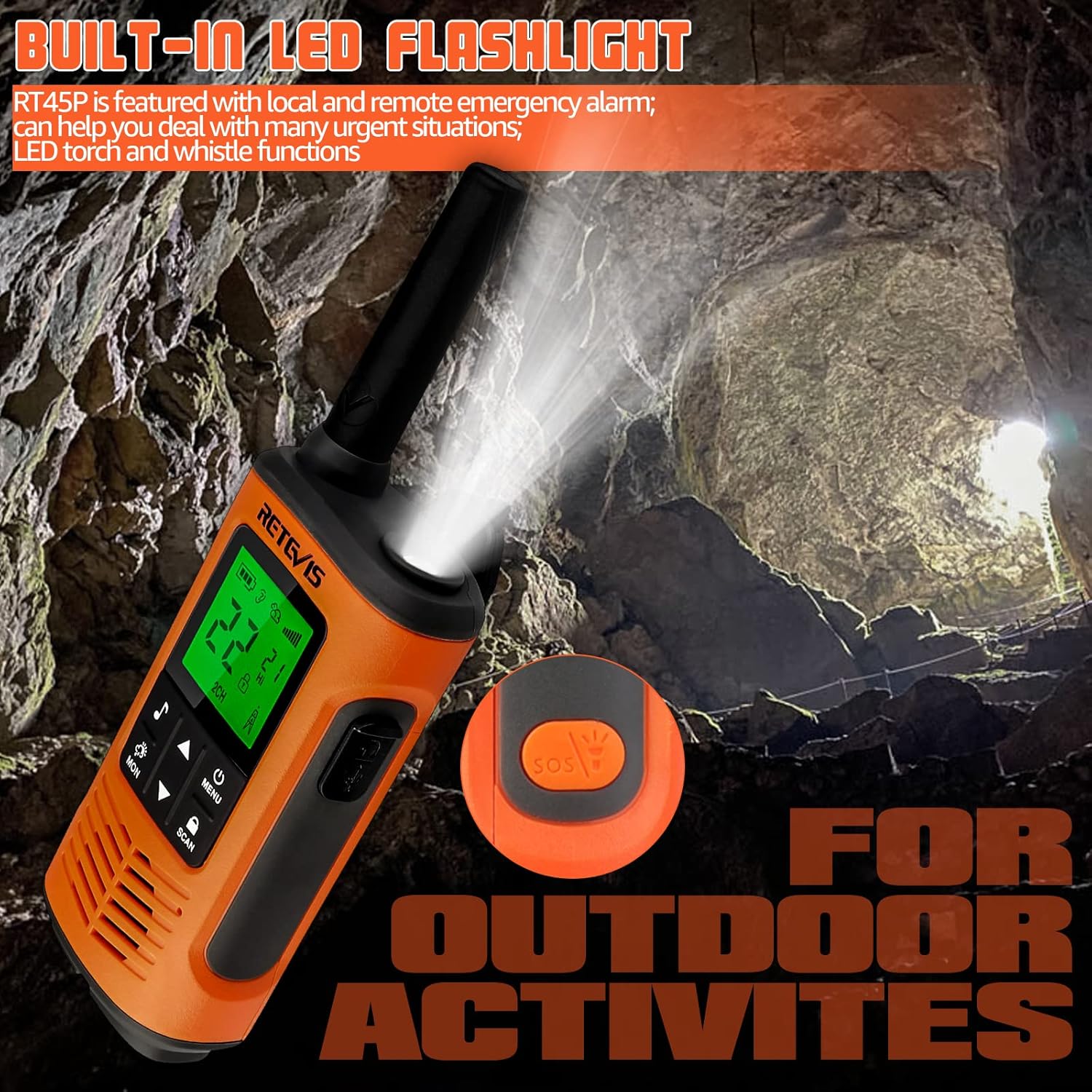
Figure 6: Built-in LED flashlight for visibility in low-light conditions.

Figure 7: SOS Emergency function for urgent situations.
6. การบำรุงรักษา
6.1 การทำความสะอาด
ทำความสะอาดภายนอกวิทยุด้วยผ้านุ่มๆamp cloth. Do not use harsh chemicals or abrasive cleaners. Ensure the USB-C port cover is securely closed after cleaning to maintain water resistance.
6.2 การดูแลแบตเตอรี่
To maximize battery life, fully charge the batteries before first use and after extended periods of non-use. Avoid overcharging or completely draining the batteries regularly. Store the radio and batteries in a cool, dry place.
6.3 ความต้านทานน้ำ (IP67)
The RT45P is rated IP67, meaning it is protected from dust and can withstand immersion in 1 meter of water for up to 30 minutes. Ensure the battery compartment cover and USB-C port cover are properly sealed before exposing the radio to water.

Figure 8: IP67 Waterproof feature in action.
7 การแก้ไขปัญหา
- ไม่มีไฟฟ้า: ตรวจสอบการติดตั้งแบตเตอรี่และระดับการชาร์จ ตรวจสอบให้แน่ใจว่าใส่แบตเตอรี่ถูกต้องและชาร์จเต็มแล้ว
- ไม่สามารถส่งหรือรับ: Verify both radios are on the same channel and CTCSS/DCS code. Ensure the PTT button is fully pressed when transmitting and released when receiving. Check for obstructions or excessive distance.
- คุณภาพเสียงไม่ดี: Adjust volume. Check for interference from other electronic devices. Ensure microphone and speaker are clear of debris.
- NOAA Weather Alert Not Working: Ensure you are in an area with NOAA signal coverage. Try switching between the 11 NOAA channels manually.
- ระยะสั้น: Range is affected by terrain, buildings, and other obstructions. For optimal range, use in open areas with clear line of sight.
8. ข้อมูลจำเพาะ
| คุณสมบัติ | ข้อมูลจำเพาะ |
|---|---|
| หมายเลขรุ่น | RT45P |
| น้ำหนักสินค้า | 7.8 ออนซ์ (220 กรัม) |
| ขนาดสินค้า | 2.36 x 1.34 x 7.24 นิ้ว |
| แบตเตอรี่ | 6 AA batteries required (included) - 1000mAh NiMH rechargeable |
| ประเภทจอภาพ | จอแอลซีดี |
| จำนวนช่องสัญญาณ | 22 |
| ระดับความต้านทานต่อน้ำ | กันน้ำระดับ IP67 |
| ช่วงความถี่ | 462.5500 - 467.7125 เมกะเฮิรตซ์ |
| ระยะการสนทนาสูงสุด | 1.5 Kilometer (approx. 1 mile) |
| เล่มที่tage | 3.6 โวลต์ |
| คุณสมบัติพิเศษ | Emergency Alarm, Integrated Flashlight, Rechargeable, Weather Alert |
9. วิดีโอผลิตภัณฑ์อย่างเป็นทางการ
Retevis RT45P MUST KNOW for kitesurfing and beach!
วิดีโอนี้จะให้ข้อมูลสรุปสั้นๆview of the Retevis RT45P's features, specifically highlighting its suitability for water sports like kitesurfing and beach activities due to its waterproof design. (Duration: 0:25)
How about Retevis RT45P walkie talkies?
This video offers a general review and demonstration of the Retevis RT45P walkie-talkies, showcasing their design and basic functionality. (Duration: 2:11)
10. การรับประกันและการสนับสนุน
Retevis provides a 2-year warranty for the radio body and a 1-year warranty for accessories. A 30-day no-reason return policy is also offered. For service beyond the warranty period, corresponding costs may apply.
หากมีข้อสงสัยหรือต้องการความช่วยเหลือ โปรดติดต่อฝ่ายบริการลูกค้าของ Retevis บน Amazon พวกเขาจะตอบกลับภายใน 12 ชั่วโมง


