การแนะนำ
Thank you for choosing the Volkano 10W Rupture VK-3308-BK Bluetooth Speaker. This manual provides essential information for the safe and efficient operation of your device. Please read it thoroughly before use and retain it for future reference.
เนื้อหาแพ็คเกจ
- Volkano Rupture Bluetooth Speaker
- Auxiliary P2 Cable
- สายชาร์จ USB
- คู่มือการใช้งาน
สินค้าเกินview
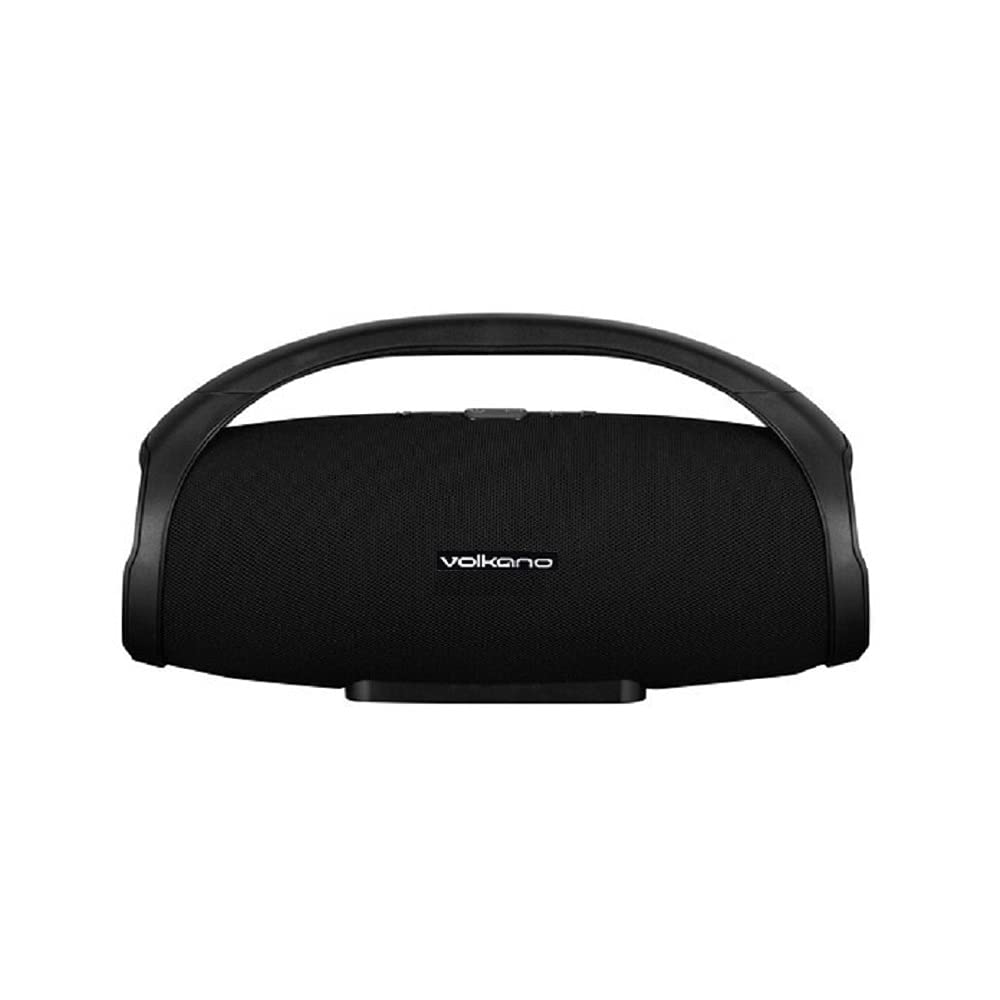
รูปที่ 1: ด้านหน้า view of the Volkano Rupture VK-3308-BK Bluetooth Speaker. The speaker features a black mesh grille, the Volkano logo, and a sturdy integrated handle for portability.
The Volkano Rupture is a portable Bluetooth speaker designed for robust audio performance. It features multiple connectivity options including Bluetooth, FM radio, USB, Micro SD, and auxiliary input, making it versatile for various audio sources. Its integrated handle ensures easy transport.
การตั้งค่า
- การชาร์จลำโพง: Before first use, fully charge the speaker. Connect the supplied USB charging cable to the speaker's charging port and to a standard USB power adapter (not included). The charging indicator will illuminate. Charging time is approximately 3 hours.
- การเปิด/ปิดเครื่อง: Press and hold the Power button (usually marked with ● or ไอ/โอ symbol) for a few seconds to turn the speaker on or off.
คำแนะนำการใช้งาน
โหมดบลูทู ธ
- Ensure the speaker is powered on and in Bluetooth mode. If not, press the Mode button to switch to Bluetooth. The speaker will indicate it's ready for pairing (e.g., a flashing LED or an audible prompt).
- บนอุปกรณ์พกพาของคุณ (สมาร์ทโฟน แท็บเล็ต แล็ปท็อป) เปิดใช้งานบลูทูธและค้นหาอุปกรณ์ที่ใช้งานได้
- Select "Volkano Rupture" from the list of found devices.
- Once paired, the speaker will confirm the connection, and you can begin playing audio from your device. The effective Bluetooth range is up to 10 meters.
โหมดวิทยุ FM
- กดปุ่ม Mode เพื่อเปลี่ยนเป็นโหมดวิทยุ FM
- กดปุ่มเล่น/หยุดชั่วคราวเพื่อสแกนและบันทึกสถานีวิทยุ FM ที่ใช้งานได้โดยอัตโนมัติ
- ใช้ปุ่ม "ก่อนหน้า" และ "ถัดไป" เพื่อเลื่อนดูสถานีที่บันทึกไว้
USB / Micro SD Card Playback
- Insert a USB flash drive (up to 64GB) or a Micro SD card (up to 32GB) containing MP3 audio fileเสียบเข้ากับพอร์ตที่เกี่ยวข้อง
- The speaker will automatically switch to USB or Micro SD mode and begin playing audio. If not, press the Mode button to select the correct source.
- ใช้ปุ่มเล่น/หยุดชั่วคราว และปุ่มเพลงก่อนหน้า/ถัดไป เพื่อควบคุมการเล่น
Auxiliary Input (AUX) Mode
- Connect one end of the supplied Auxiliary P2 cable to the AUX input port on the speaker.
- Connect the other end of the cable to the audio output (headphone jack) of your external audio device.
- Press the Mode button to switch to AUX mode.
- ควบคุมการเล่นเสียงจากอุปกรณ์ภายนอกของคุณ
ข้อมูลจำเพาะ
| เวอร์ชันบลูทูธ: | 5.0 |
| ช่วงบลูทู ธ : | สูงสุด 10 เมตร |
| ความจุแบตเตอรี่: | 2000 มิลลิแอมป์ |
| เวลาเล่น: | 3-6 ชั่วโมง (ขึ้นอยู่กับปริมาณ) |
| เวลาในการชาร์จ: | ประมาณ 3 ชั่วโมง |
| ความไว: | 86 เดซิเบล |
| อิมพีแดนซ์: | 4 โอห์ม |
| กำลังขับ: | กำลังไฟ 10 วัตต์ RMS |
| การตอบสนองความถี่: | 50เฮิรตซ์-20กิโลเฮิรตซ์ |
| ขนาดไดร์เวอร์: | ขนาด 2 x 3.5 นิ้ว |
| ขนาด (สูง x กว้าง x ลึก): | 18.5 ซม. x 37 ซม. x 14 ซม. |
| รองรับ USB: | สูงสุด 64GB |
| รองรับการ์ด Micro SD: | สูงสุด 32GB |
| อุปกรณ์ที่รองรับ: | Notebook, Smartphone, Tablet |
การซ่อมบำรุง
- ควรเก็บลำโพงให้ห่างจากน้ำ ความชื้น และอุณหภูมิที่สูงหรือต่ำเกินไป
- ทำความสะอาดลำโพงด้วยผ้านุ่มและแห้ง ห้ามใช้น้ำยาทำความสะอาดหรือสารละลายที่มีฤทธิ์กัดกร่อน
- ควรหลีกเลี่ยงการทำลำโพงตกหรือการกระแทกอย่างแรง
- เมื่อไม่ได้ใช้งานเป็นเวลานาน ควรเก็บลำโพงไว้ในที่แห้งและเย็น และชาร์จแบตเตอรี่เป็นระยะเพื่อรักษาอายุการใช้งานของแบตเตอรี่
การแก้ไขปัญหา
- ไม่มีไฟฟ้า:
- ตรวจสอบให้แน่ใจว่าลำโพงชาร์จเต็มแล้ว
- ตรวจสอบสายชาร์จและอะแดปเตอร์ว่ามีรอยชำรุดหรือไม่
- ไม่สามารถจับคู่ผ่านบลูทูธ:
- ตรวจสอบให้แน่ใจว่าลำโพงอยู่ในโหมดจับคู่บลูทูธ
- โปรดตรวจสอบให้แน่ใจว่าอุปกรณ์ของคุณเปิดใช้งานบลูทูธแล้ว และอยู่ห่างจากลำโพงไม่เกิน 10 เมตร
- ลองยกเลิกการจับคู่และจับคู่ลำโพงอีกครั้งจากเมนูการตั้งค่าบลูทูธของอุปกรณ์ของคุณ
- รีสตาร์ททั้งลำโพงและอุปกรณ์ของคุณ
- ไม่มีเสียง:
- ตรวจสอบระดับเสียงทั้งบนลำโพงและอุปกรณ์ที่เชื่อมต่อของคุณ
- Ensure the correct input mode (Bluetooth, FM, USB, SD, AUX) is selected.
- หากใช้ช่องต่อ AUX โปรดตรวจสอบให้แน่ใจว่าสายเชื่อมต่อแน่นสนิทและไม่ชำรุดเสียหาย
- การรับสัญญาณวิทยุ FM ไม่ดี:
- ย้ายลำโพงไปยังบริเวณที่มีสัญญาณรับดีกว่า
- Perform an automatic station scan again.
การรับประกันและการสนับสนุน
This Volkano Rupture VK-3308-BK Bluetooth Speaker comes with a รับประกัน 3 เดือน นับจากวันที่ซื้อ การรับประกันนี้ครอบคลุมถึงข้อบกพร่องจากการผลิต โปรดเก็บหลักฐานการซื้อไว้เพื่อใช้ในการเรียกร้องการรับประกัน
For technical support or warranty inquiries, please contact your retailer or the Volkano customer service department.


