1. บทนำ
This manual provides essential information for the safe and efficient operation of your RCF Art 945-A Powered Speaker. Please read this manual thoroughly before using the product and retain it for future reference. The RCF Art 945-A is a high-performance, bi-amplified active speaker designed for professional audio applications, featuring a 15-inch neodymium woofer and a 4-inch titanium/neodymium compression driver, delivering 2,100W of power.
2. ข้อมูลด้านความปลอดภัย
คำแนะนำด้านความปลอดภัยที่สำคัญ:
- อ่านคำแนะนำเหล่านี้
- เก็บคำแนะนำเหล่านี้ไว้
- จงใส่ใจคำเตือนทั้งหมด
- ปฏิบัติตามคำแนะนำทั้งหมด
- ห้ามใช้อุปกรณ์นี้ใกล้น้ำ
- ทำความสะอาดด้วยผ้าแห้งเท่านั้น
- ห้ามปิดกั้นช่องระบายอากาศ ควรติดตั้งตามคำแนะนำของผู้ผลิต
- ห้ามติดตั้งใกล้แหล่งความร้อน เช่น หม้อน้ำ เครื่องทำความร้อน เตา หรืออุปกรณ์อื่น ๆ (รวมถึง ampเครื่องให้ความร้อน) ที่ผลิตความร้อน
- อย่าละเลยจุดประสงค์ด้านความปลอดภัยของปลั๊กแบบมีขั้วหรือแบบมีสายดิน ปลั๊กแบบมีขั้วจะมีใบมีด 2 ใบ โดยใบหนึ่งจะกว้างกว่าอีกใบ ปลั๊กแบบมีสายดินจะมีใบมีด 2 ใบและขาต่อสายดินที่สาม ขาที่กว้างหรือขาต่อสายดินที่สามนั้นมีไว้เพื่อความปลอดภัยของคุณ หากปลั๊กที่ให้มาไม่พอดีกับเต้ารับของคุณ ให้ปรึกษาช่างไฟฟ้าเพื่อขอเปลี่ยนเต้ารับที่ล้าสมัย
- ปกป้องสายไฟไม่ให้ถูกเหยียบหรือถูกหนีบ โดยเฉพาะที่ปลั๊ก เต้ารับไฟฟ้า และจุดที่สายไฟออกจากเครื่อง
- ใช้เฉพาะอุปกรณ์เสริม/สิ่งที่แนบตามที่ผู้ผลิตกำหนดเท่านั้น
- ถอดปลั๊กอุปกรณ์นี้ในระหว่างพายุฝนฟ้าคะนองหรือเมื่อไม่ได้ใช้งานเป็นเวลานาน
- แจ้งบริการทั้งหมดให้ช่างที่ผ่านการรับรองทราบ จำเป็นต้องให้บริการเมื่ออุปกรณ์ได้รับความเสียหายในลักษณะใดก็ตาม เช่น สายไฟหรือปลั๊กชำรุด ของเหลวหกหรือมีวัตถุตกลงไปในอุปกรณ์ อุปกรณ์โดนฝนหรือความชื้น ไม่สามารถทำงานได้ตามปกติ หรือตกหล่น
คำเตือน: To prevent electrical shock, do not remove the cover. No user-serviceable parts inside. Refer servicing to qualified personnel.
3. เนื้อหาบรรจุภัณฑ์
ตรวจสอบว่ารายการทั้งหมดที่ระบุไว้ด้านล่างนี้รวมอยู่ในแพ็คเกจของคุณ:
- RCF Art 945-A Powered Speaker
- สายไฟ
- Vertical mount bracket
- ติดเสา
- การป้องกันฝน
- คู่มือการใช้งาน (เอกสารนี้)
4. สินค้าหมดview

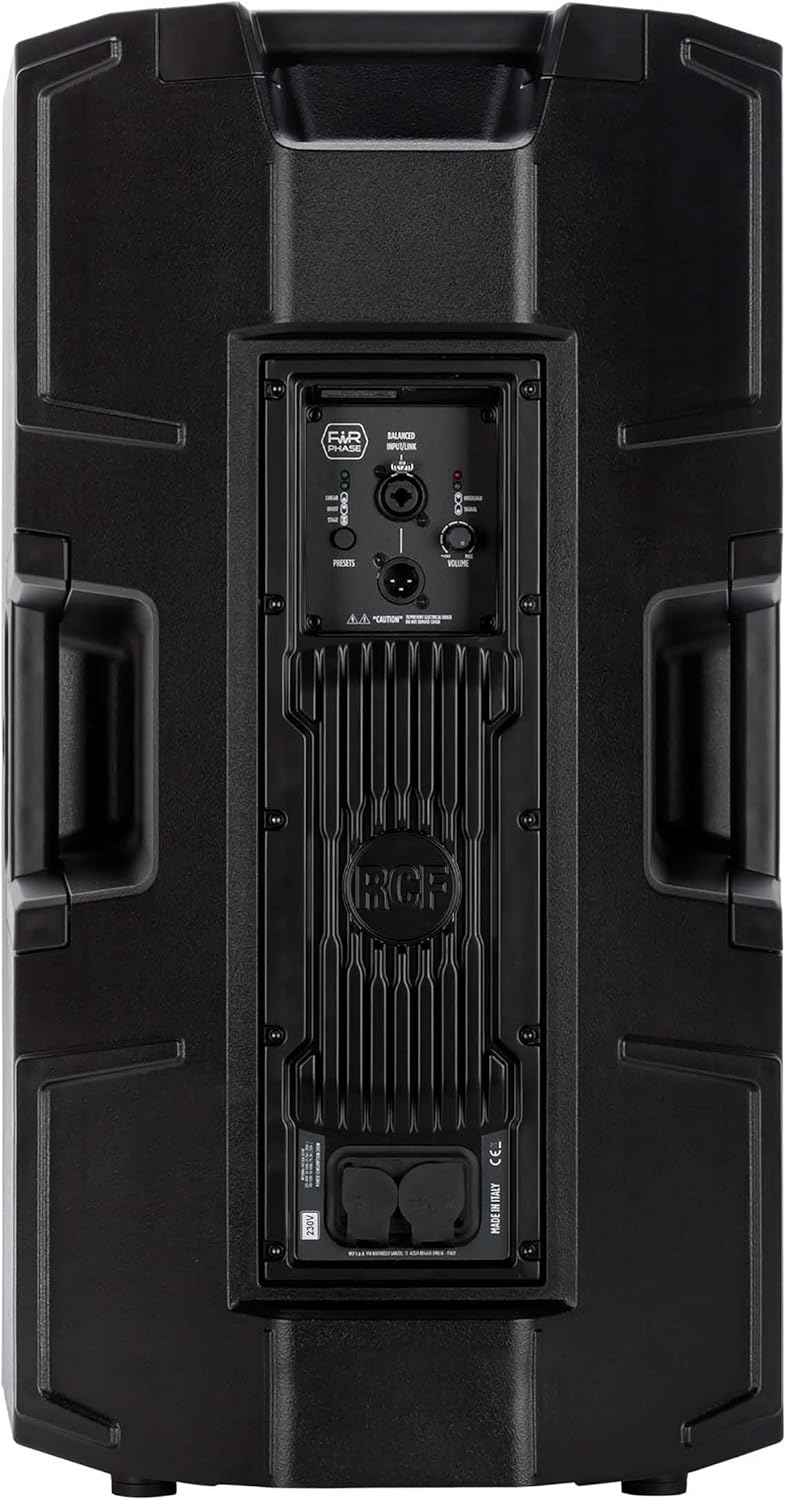


4.1. Rear Panel Controls and Connections
- BALANCED INPUT/LINK (XLR): XLR input for audio signal and XLR link output to connect to another speaker.
- ปุ่มตั้งค่าล่วงหน้า: Cycles through different DSP presets (LINEAR, BOOST, STAGE) to optimize sound for various applications.
- LINEAR LED: Indicates the 'Linear' preset is active, providing a flat frequency response.
- BOOST LED: Indicates the 'Boost' preset is active, enhancing bass and treble frequencies.
- STAGอี LED: Indicates the 'Stage' preset is active, optimized for stage การตรวจสอบแอปพลิเคชัน
- ปุ่มปรับระดับเสียง: Adjusts the overall output level of the speaker.
- ไฟ LED แสดงสถานะโอเวอร์โหลด: Illuminates when the input signal is too high, indicating potential clipping. Reduce input level if this LED lights up consistently.
- สัญญาณไฟ LED: จะสว่างขึ้นเมื่อมีสัญญาณเสียงที่อินพุต
- POWERCON TRUE1 Input: Secure power connector for AC mains input.
- POWERCON TRUE1 Link: Power output to link power to another speaker.
5. การตั้งค่า
5.1 การวาง
The RCF Art 945-A speaker can be used in various configurations:
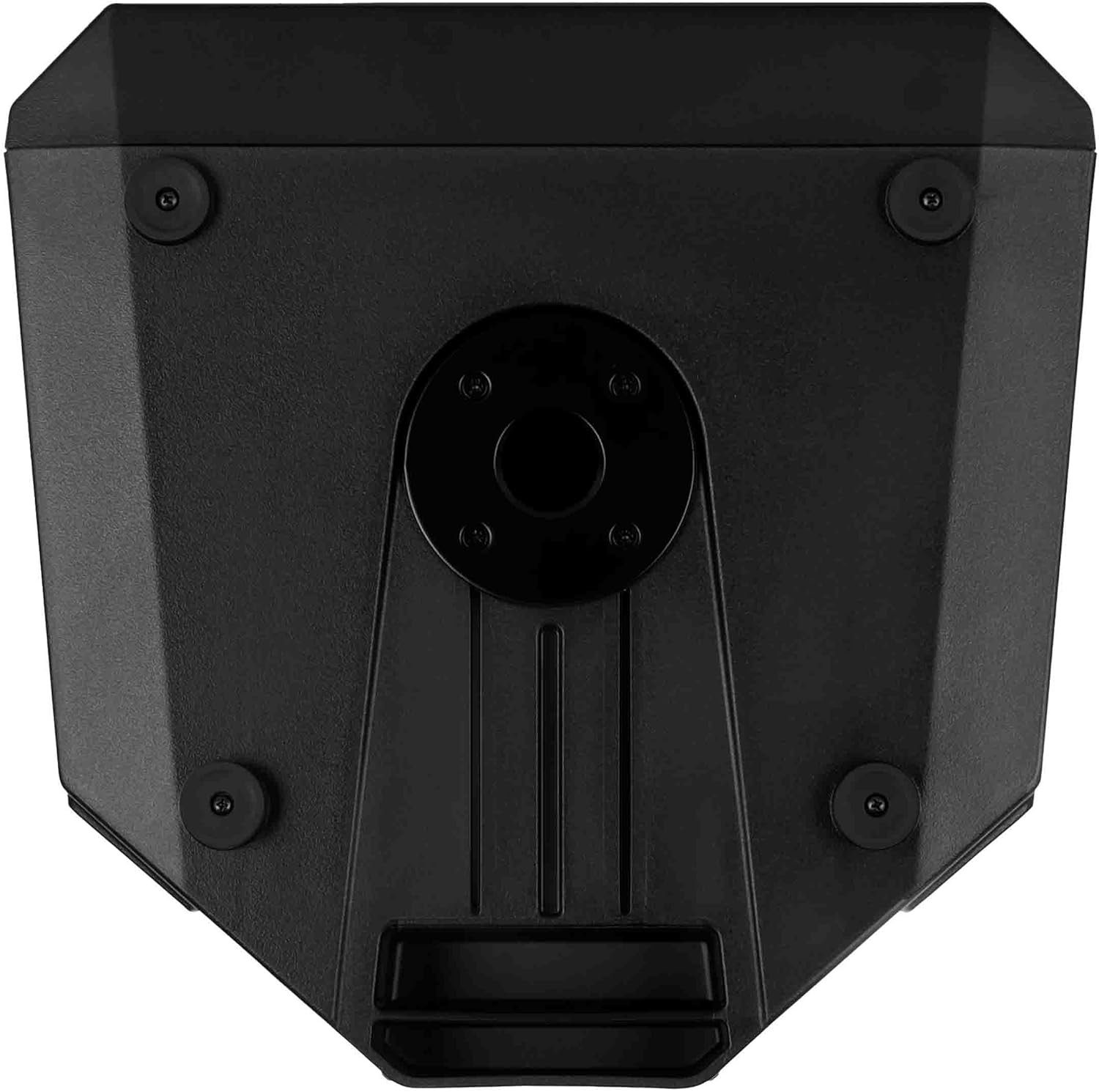
- การติดตั้งเสา: Insert the speaker onto a standard 35mm speaker pole or tripod stand using the integrated pole mount socket on the bottom of the speaker. Ensure the stand is stable and rated for the speaker's weight (approximately 49.3 lbs / 22.4 kg).
- ตำแหน่งการวางพื้น: The speaker can be placed directly on a flat, stable surface. The rubber feet on the bottom provide stability and isolation.
- Stage จอภาพ: การออกแบบตู้ช่วยให้สามารถใช้งานได้เหมือนtage monitor. Position the speaker on its side with the appropriate angle for monitoring.
- การติดตั้งบนผนัง: Utilize the provided vertical mount bracket for secure wall installation. Ensure the wall structure can support the speaker's weight.
5.2. การเชื่อมต่อไฟฟ้า
- Ensure the speaker's VOLUME knob is set to minimum (fully counter-clockwise).
- Connect the supplied Powercon TRUE1 power cable to the POWERCON TRUE1 Input on the rear panel of the speaker.
- Connect the other end of the power cable to a suitable AC mains outlet. Verify that the voltage matches the speaker's requirements (e.g., 100-120V or 220-240V).
- If linking power to another speaker, use a Powercon TRUE1 link cable from the POWERCON TRUE1 Link output to the input of the next speaker.
5.3. การเชื่อมต่อเสียง
- Connect your audio source (e.g., mixer, audio interface) to the BALANCED INPUT (XLR) on the rear panel using a balanced XLR cable.
- If connecting multiple speakers in a daisy chain, use an XLR cable from the BALANCED LINK output of the first speaker to the input of the next speaker.
6. ปฏิบัติการ
6.1. การเปิด/ปิดเครื่อง
- Before powering on, ensure all connections are secure and the VOLUME knob is at its minimum setting.
- Locate the power switch (typically near the power input) and switch it to the 'ON' position. The power LED on the front of the speaker will illuminate.
- To power off, set the VOLUME knob to minimum, then switch the power switch to 'OFF'.
6.2. การควบคุมระดับเสียง
The VOLUME knob on the rear panel controls the output level of the speaker. Slowly turn the knob clockwise to increase the volume to the desired level. Monitor the OVERLOAD LED to prevent clipping.
6.3. Preset Selection
The PRESETS button allows you to select between three different DSP modes:
- ลิเนียร์: Provides a flat frequency response, suitable for general sound reinforcement where a neutral sound is desired.
- บูสต์: Enhances low and high frequencies, often used for music playback or when a more pronounced bass and treble response is needed.
- STAGE: ปรับให้เหมาะสมเพื่อใช้เป็นtage monitor, providing clarity and feedback suppression for performers.
Press the PRESETS button repeatedly to cycle through these modes. The corresponding LED (LINEAR, BOOST, or STAGE) will illuminate to indicate the active preset.
6.4. Signal and Overload Indicators
- สัญญาณไฟ LED: This green LED illuminates when an audio signal is detected at the input. It indicates that the speaker is receiving an audio signal.
- ไฟ LED แสดงสถานะโอเวอร์โหลด: This red LED illuminates when the input signal level is too high, causing the amplifier to clip. If this LED lights up frequently or stays on, reduce the input level from your source or the speaker's VOLUME knob to prevent distortion and potential damage.
7. การบำรุงรักษา
7.1. การทำความสะอาด
เพื่อรักษารูปลักษณ์และประสิทธิภาพของลำโพงของคุณ:
- Disconnect the speaker from the power supply before cleaning.
- Use a soft, dry cloth to wipe down the cabinet.
- สำหรับสิ่งสกปรกฝังแน่น ให้เช็ดออกเล็กน้อยamp สามารถใช้ผ้าชุบสบู่เหลวอ่อนๆ เช็ดทำความสะอาดได้ จากนั้นเช็ดตามด้วยผ้าแห้งอีกผืน
- ห้ามใช้สารทำความสะอาดที่มีฤทธิ์กัดกร่อน ตัวทำละลาย หรือสารเคมีรุนแรง เพราะอาจทำให้สารเคลือบเสียหายได้
- Keep the grille free of dust and debris to ensure proper sound dispersion.
7.2. การจัดเก็บ
เมื่อไม่ได้ใช้งานเป็นเวลานาน:
- เก็บลำโพงไว้ในที่แห้งและเย็น หลีกเลี่ยงแสงแดดโดยตรงและอุณหภูมิที่สูงหรือต่ำเกินไป
- If possible, use the original packaging or a protective cover to shield the speaker from dust and physical damage.
8 การแก้ไขปัญหา
This section addresses common issues you might encounter with your RCF Art 945-A speaker.
| ปัญหา | สาเหตุที่เป็นไปได้ | สารละลาย |
|---|---|---|
| ไม่มีเสียงออก |
|
|
| Distorted sound / OVERLOAD LED on |
|
|
| เสียงฮัมหรือเสียงหวีด |
|
|
| ลำโพงไม่เปิด |
|
|
If the problem persists after attempting these solutions, please contact RCF customer support or a qualified service technician.
9. ข้อมูลจำเพาะ
The following table outlines the technical specifications for the RCF Art 945-A Powered Speaker:
| คุณสมบัติ | ข้อมูลจำเพาะ |
|---|---|
| ชื่อรุ่น | 13000691 |
| หมายเลขรุ่นสินค้า | ART945-A |
| ประเภทลำโพง | วูฟเฟอร์ |
| เส้นผ่านศูนย์กลางวูฟเฟอร์ | 15 นิ้ว |
| เส้นผ่านศูนย์กลางทวีตเตอร์ | 4 นิ้ว |
| กำลังขับสูงสุดของลำโพง | 2100 วัตต์ |
| โหมดเอาต์พุตเสียง | คลาส ดี |
| เทคโนโลยีการเชื่อมต่อ | โคแอกเซียล |
| แหล่งพลังงาน | สายไฟ |
| วิธีการควบคุม | Touch (for presets) |
| ขนาดสินค้า | กว้าง 16.34 นิ้ว x สูง 28.23 นิ้ว |
| น้ำหนักสินค้า | 49.3 ปอนด์ (22.4 กิโลกรัม) |
| ส่วนประกอบที่รวมอยู่ | Vertical mount bracket, pole mount, rain protection |
| ประเภทการติดตั้ง | ติดผนัง ติดเสา |
| กันน้ำได้ | เท็จ |
| ผู้ผลิต | รฟฟ. |
| ASIN | B09GWCSX7R |
10. การรับประกัน
The RCF Art 945-A Powered Speaker comes with a การรับประกันแบบจำกัด. Specific terms and conditions of the warranty may vary by region and retailer. Please refer to the warranty card included with your product or visit the official RCF webดูรายละเอียดการรับประกันได้ที่เว็บไซต์ โปรดเก็บหลักฐานการซื้อไว้เพื่อใช้ในการเรียกร้องการรับประกัน
11. การสนับสนุน
For technical assistance, service, or further information regarding your RCF Art 945-A Powered Speaker, please contact RCF customer support:
- การสนับสนุนทางออนไลน์: เยี่ยมชม RCF อย่างเป็นทางการ webงาน (www.rcf.it) for FAQs, product registration, and support resources.
- ข้อมูลติดต่อ: Refer to the contact section on the RCF website for regional phone numbers or email support.
When contacting support, please have your product model (ART945-A) and serial number (if applicable) ready.


