1. บทนำ
คู่มือนี้ให้คำแนะนำโดยละเอียดสำหรับการใช้งานจอแสดงผลแบบสัมผัส Waveshare 2.13 นิ้ว Touch E-Paper E-Ink Display HAT ซึ่งออกแบบมาเพื่อใช้งานร่วมกับ Raspberry Pi Zero และ Zero W จอแสดงผลนี้มีความละเอียด 250x122 พิกเซล รองรับการสัมผัสแบบ capacitive 5 จุด และมีความสามารถในการรีเฟรชบางส่วน การใช้พลังงานต่ำและเอฟเฟกต์คล้ายกระดาษทำให้เหมาะสำหรับแอปพลิเคชันต่างๆ ที่การแสดงผลอย่างต่อเนื่องและการประหยัดพลังงานเป็นสิ่งสำคัญ

รูปที่ 1: Waveshare 2.13inch Touch E-Paper HAT พร้อมเคส ABS
2. เนื้อหาบรรจุภัณฑ์
ตรวจสอบว่ารายการทั้งหมดที่ระบุไว้ด้านล่างนี้รวมอยู่ในแพ็คเกจของคุณ:
- 2.13 นิ้ว Touch e-Paper HAT x1
- เคส ABS x1
- ไขควง x1
- เทปความร้อน 1 ชิ้น
- แผ่นยางรองขา (4 ชิ้น) x1
- สกรู x2
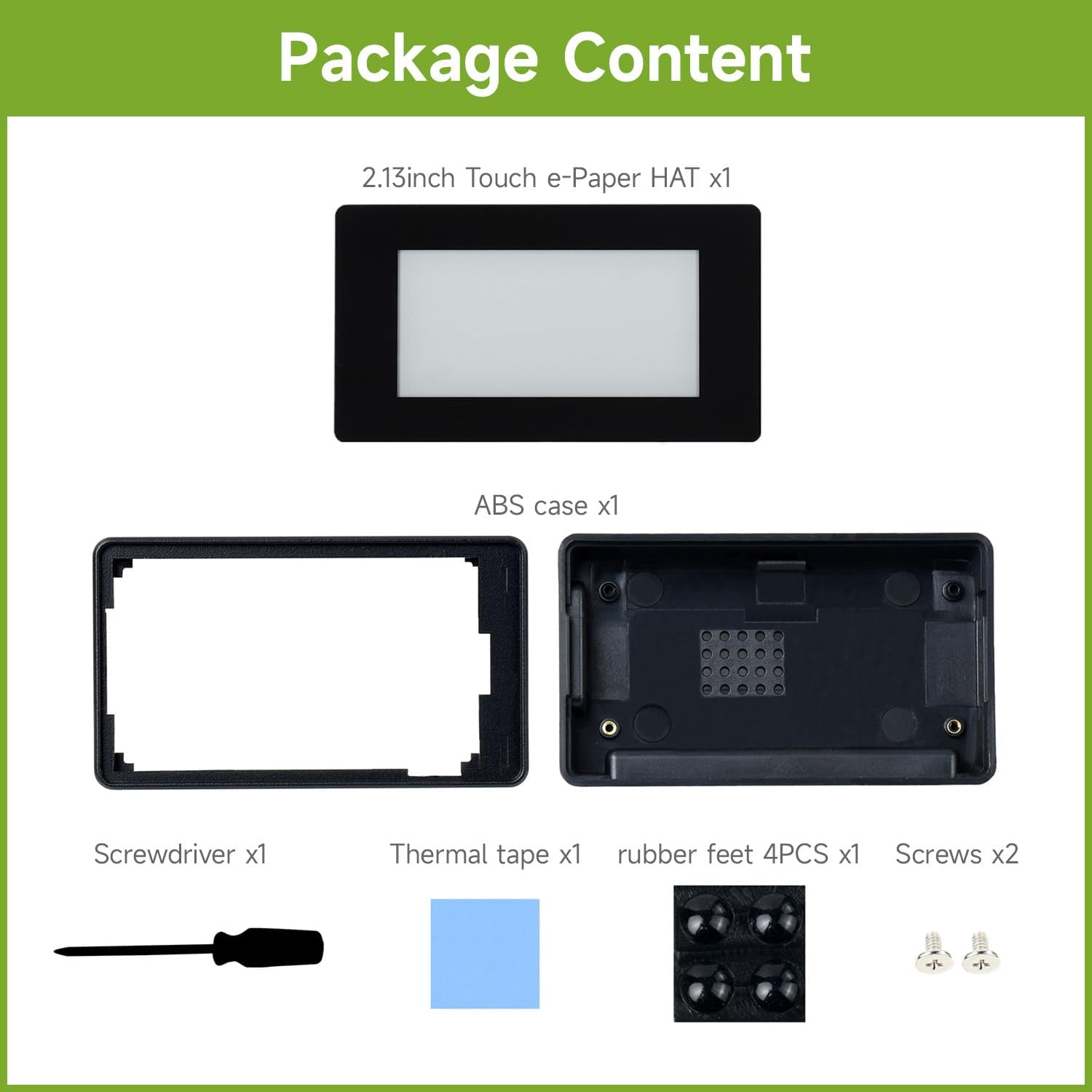
รูปที่ 2: ส่วนประกอบที่รวมอยู่ในแพ็คเกจผลิตภัณฑ์
3. คุณสมบัติโดยสรุป
Waveshare 2.13inch Touch E-Paper HAT มีคุณสมบัติหลักดังต่อไปนี้:
- จอแสดงผล e-Paper ระบบสัมผัสแบบ capacitive ขนาด 2.13 นิ้ว รองรับการสัมผัส 5 จุด
- ความละเอียด 250x122 พิกเซล
- รองรับการปลุกเครื่องด้วยท่าทางที่ผู้ใช้กำหนดเอง
- ไม่ต้องใช้ไฟแบ็คไลท์ สามารถเก็บรักษาข้อมูลได้ตลอดไปแม้ปิดเครื่องแล้ว
- ใช้พลังงานต่ำมาก โดยพลังงานส่วนใหญ่ใช้สำหรับการรีเฟรชเท่านั้น
- หัวต่อขยาย GPIO 40 พินมาตรฐานสำหรับ Raspberry Pi เข้ากันได้กับ Raspberry Pi Zero / Zero W
- รองรับการรีเฟรชบางส่วนเพื่อการอัปเดตที่รวดเร็วยิ่งขึ้น
- กว้าง viewมุมมองที่กว้างและเอฟเฟ็กต์การแสดงผลคล้ายกระดาษ
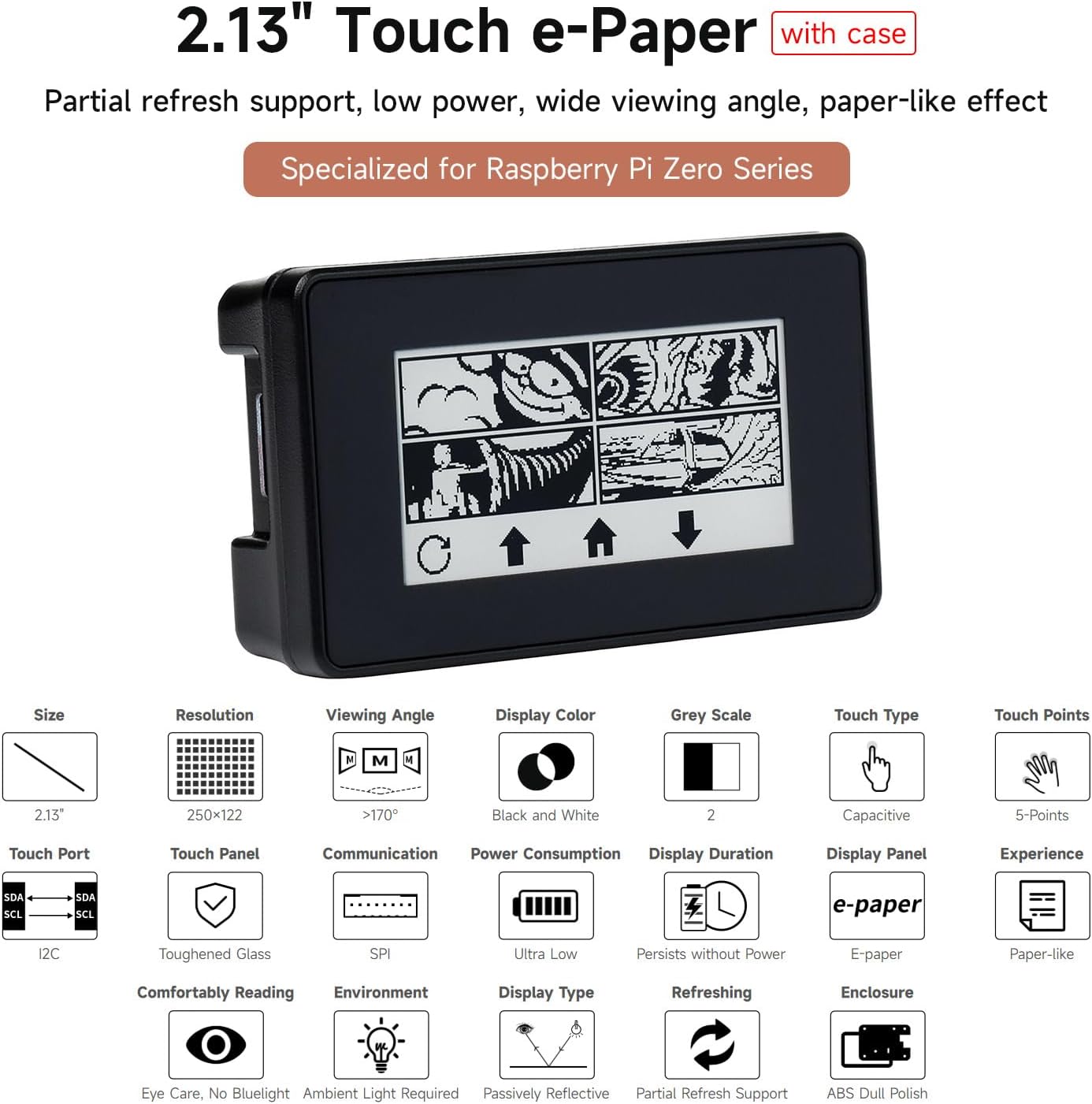
รูปที่ 3: เกินview ของคุณสมบัติหลักของจอแสดงผล
4. แอดวานtagข้อดีของเทคโนโลยีอิเล็กโทรดอิเล็กทริก
จอแสดงผลอีเปเปอร์ใช้เทคโนโลยีอิเล็กโทรโฟเรติกไมโครแคปซูล หลักการนี้เกี่ยวข้องกับอนุภาคที่มีประจุซึ่งแขวนลอยอยู่ในของเหลวใส อนุภาคเหล่านี้จะเคลื่อนที่ไปยังด้านข้างของไมโครแคปซูลเมื่อมีการใช้สนามไฟฟ้า ทำให้ไมโครแคปซูลปรากฏให้เห็นได้โดยการสะท้อนแสงจากสภาพแวดล้อม คล้ายกับกระดาษพิมพ์แบบดั้งเดิม จอแสดงผลอีเปเปอร์แสดงภาพและข้อความได้อย่างชัดเจนภายใต้แสงน้อยampใช้แสงจากหลอดไฟหรือแสงธรรมชาติ ไม่ต้องใช้แสงแบ็กไลท์ และให้มุมมองเกือบ 180° viewเทคโนโลยีนี้มักใช้ในเครื่องอ่านอีบุ๊ก เนื่องจากให้ความรู้สึกเหมือนอ่านกระดาษ ทำให้อ่านได้สบายแม้เป็นเวลานาน
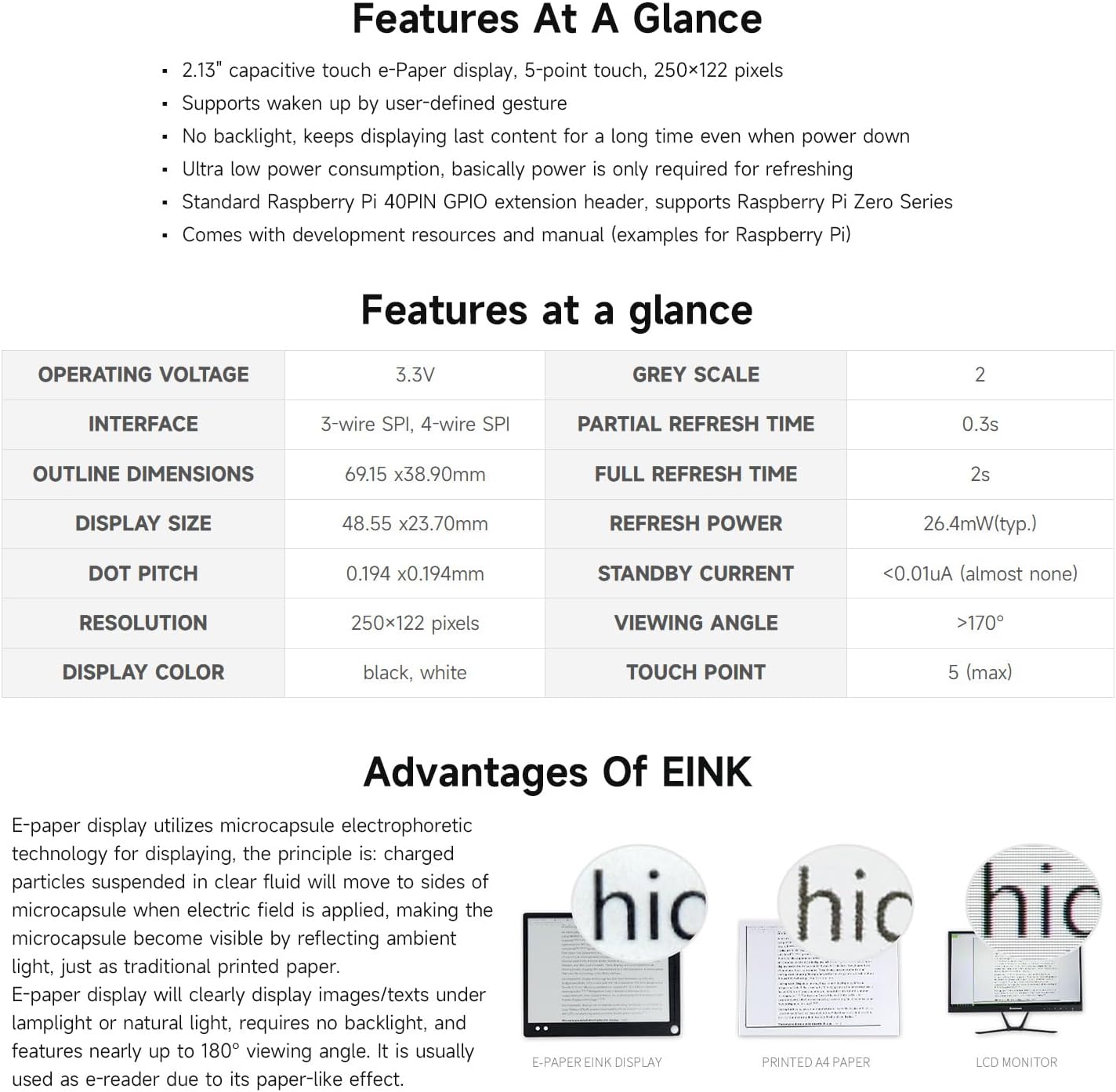
รูปที่ 4: การเปรียบเทียบภาพแสดงผลของจอแสดงผลอิเล็กโทรดอิเล็กโทรดกับจอแสดงผลกระดาษและจอ LCD แบบดั้งเดิม
5. การตั้งค่าและการติดตั้ง
ทำตามขั้นตอนต่อไปนี้เพื่อติดตั้ง Waveshare 2.13inch Touch E-Paper HAT ของคุณ:
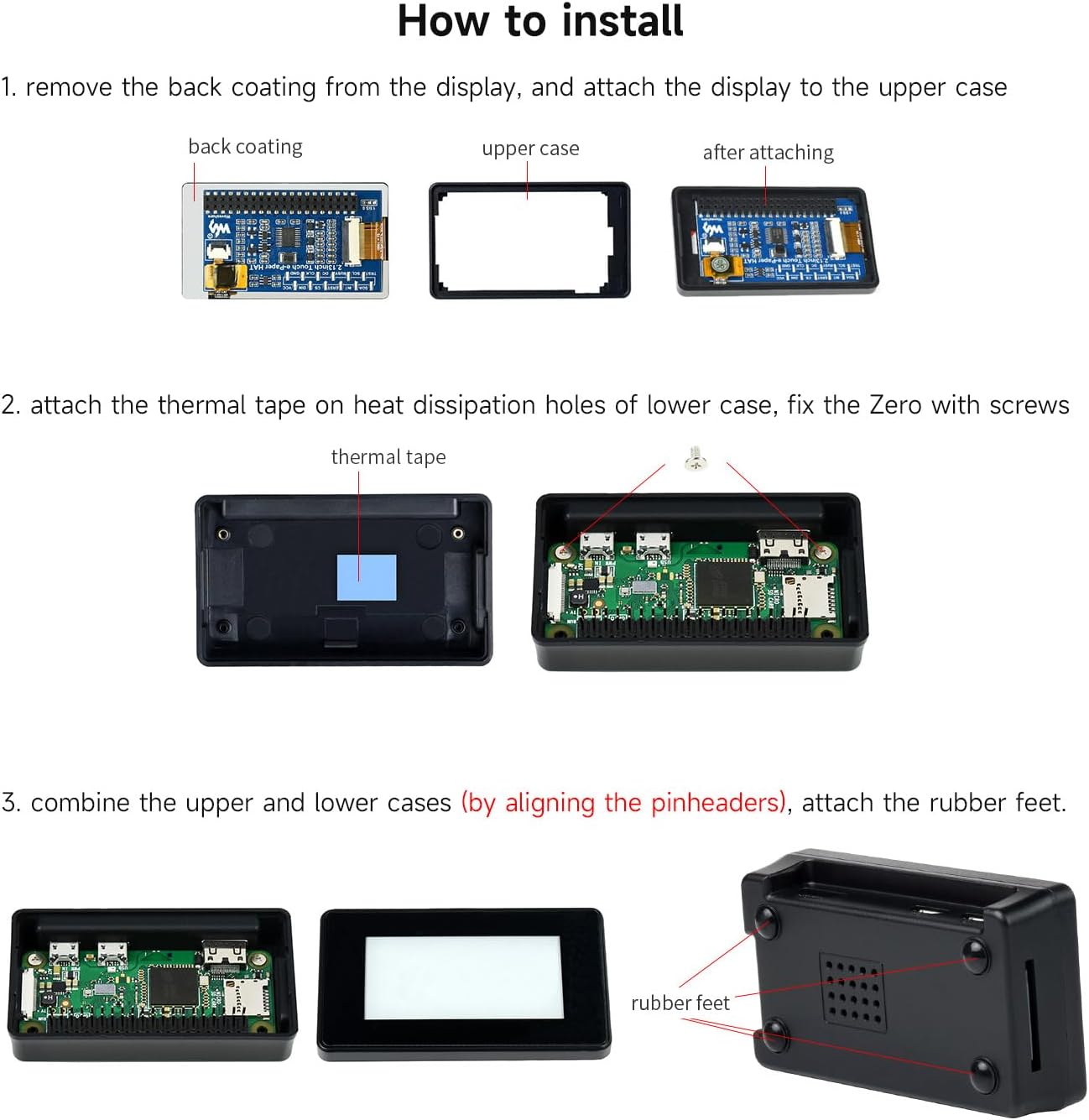
- เตรียมตัวอักษรสำหรับแสดงรายละเอียดและตัวพิมพ์ใหญ่: ค่อยๆ ลอกแผ่นฟิล์มป้องกันด้านหลังของจอแสดงผลอีเปเปอร์ออก จัดวางจอแสดงผลให้ตรงและติดเข้ากับส่วนบนของเคสป้องกัน ABS
- ติดตั้ง Raspberry Pi และเทปความร้อน: ติดเทประบายความร้อนเข้ากับรูระบายความร้อนที่อยู่ด้านล่างของเคส ABS วาง Raspberry Pi Zero/Zero W ลงในเคสส่วนล่างและยึดด้วยสกรูที่ให้มา ตรวจสอบให้แน่ใจว่าขา GPIO ของ Pi ตรงกับส่วนหัวของจอแสดงผลอย่างถูกต้อง
- ประกอบกล่อง: ประกอบส่วนบนและส่วนล่างของเคสเข้าด้วยกัน โดยตรวจสอบให้แน่ใจว่าขั้วต่อของจอแสดงผลตรงกับขั้วต่อ GPIO ของ Raspberry Pi เมื่อปิดเคสแล้ว ให้ติดแผ่นยางรองสี่แผ่นที่ด้านล่างเพื่อเพิ่มความมั่นคง
เคสนี้มีช่องเจาะที่แม่นยำสำหรับช่องเสียบการ์ด TF, พอร์ต Mini HDMI, พอร์ต USB และแหล่งจ่ายไฟ รูระบายความร้อนด้านหลัง ผสานกับเทประบายความร้อน ช่วยให้การจัดการความร้อนมีประสิทธิภาพ หัวต่อ GPIO 40PIN มาตรฐานของ Raspberry Pi ช่วยให้ใช้งานร่วมกับบอร์ด Raspberry Pi Zero Series ได้อย่างกว้างขวาง

รูปที่ 5: ขั้นตอนการติดตั้ง e-Paper HAT และเคส
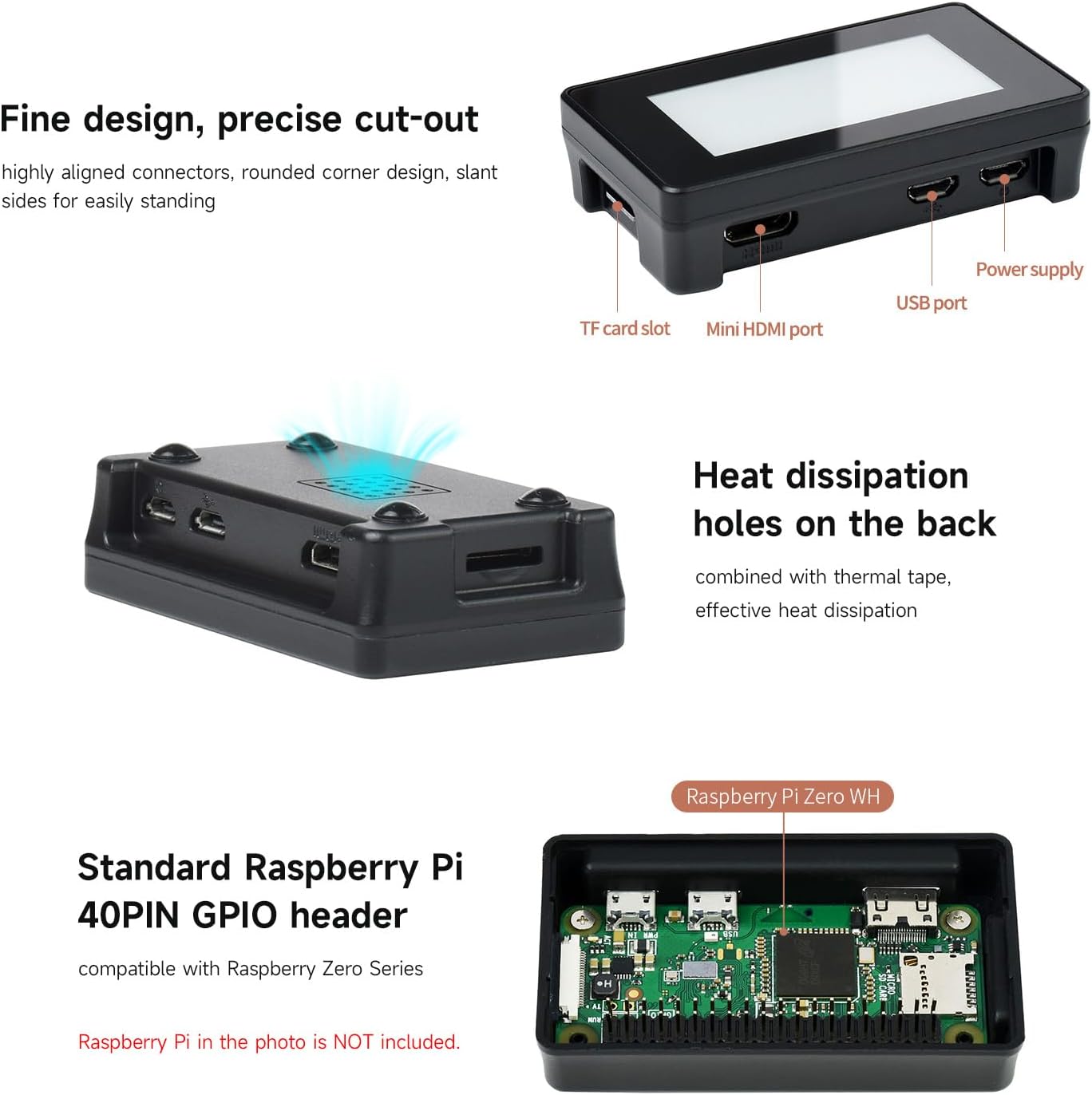
รูปที่ 6: การออกแบบตัวเครื่องโดยเน้นพอร์ตและการระบายความร้อน
รูปที่ 7: หัวต่อ GPIO 40 พินมาตรฐานของ Raspberry Pi เพื่อความเข้ากันได้
6. คู่มือการใช้งาน
บอร์ดแสดงผล E-Paper แบบสัมผัสขนาด 2.13 นิ้ว ออกแบบมาเพื่อความสะดวกในการใช้งานร่วมกับบอร์ด Raspberry Pi มีหน้าจอสัมผัสแบบ capacitive รองรับการสัมผัส 5 จุด ทำให้สามารถใช้งานแอปพลิเคชันแบบโต้ตอบได้ หน้าจอยังคงแสดงข้อมูลอยู่แม้ในขณะที่ถอดปลั๊กไฟ ทำให้ประหยัดพลังงานสูง ฟังก์ชันการรีเฟรชแบบบางส่วนช่วยให้การอัปเดตเนื้อหาแบบไดนามิกเร็วขึ้น ในขณะที่การรีเฟรชแบบเต็มใช้เวลาประมาณ 2 วินาที
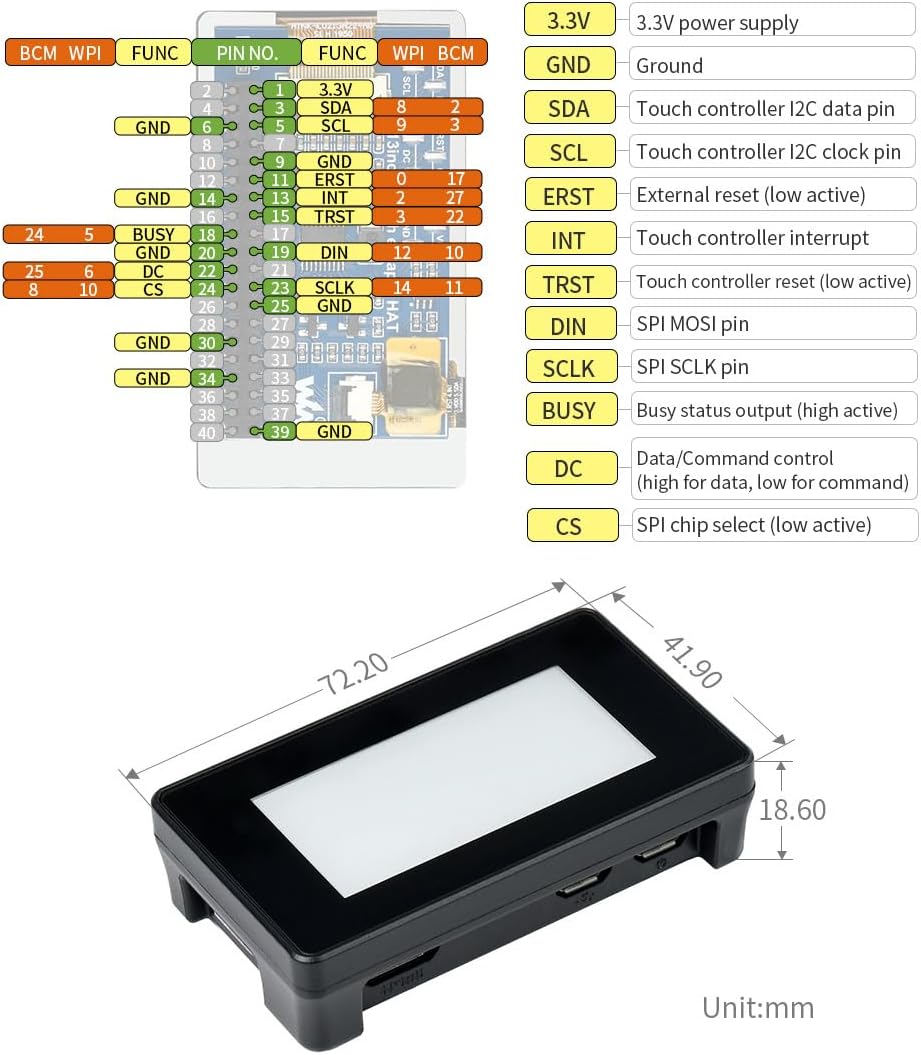
อินเทอร์เฟซควบคุมบนบอร์ดใช้ I2C สำหรับแผงสัมผัสและ SPI สำหรับจอแสดงผล ทำให้มั่นใจได้ว่าการสื่อสารกับ Raspberry Pi ของคุณมีความเสถียร สำหรับตัวอย่างการเขียนโปรแกรมโดยละเอียดampสำหรับไฟล์และการติดตั้งซอฟต์แวร์ โปรดดูคู่มือผู้ใช้ออนไลน์และแหล่งข้อมูลการพัฒนาที่ Waveshare จัดเตรียมไว้ให้
วิดีโอ 1: สาธิตคุณสมบัติและการใช้งานของ Touch e-Paper HAT ขนาด 2.13 นิ้ว รวมถึงความละเอียด การรักษาพลังงาน ความเข้ากันได้กับ Raspberry Pi 4B และ Zero การสัมผัสแบบ capacitive และความสามารถในการรีเฟรชบางส่วน/เต็มรูปแบบ
7. การบำรุงรักษา
เพื่อให้จอแสดงผล e-Paper ของคุณมีอายุการใช้งานยาวนานและทำงานได้อย่างมีประสิทธิภาพสูงสุด โปรดพิจารณาคำแนะนำในการบำรุงรักษาต่อไปนี้:
- การทำความสะอาด: ใช้ผ้าแห้งเนื้อนุ่มที่ไม่เป็นขุยเช็ดทำความสะอาดพื้นผิวหน้าจอเบาๆ หลีกเลี่ยงการใช้สารทำความสะอาดที่มีฤทธิ์กัดกร่อนหรือตัวทำละลาย เพราะอาจทำให้หน้าจอเสียหายได้
- การจัดการ: โปรดระมัดระวังในการประกอบจอแสดงผลและ Raspberry Pi หลีกเลี่ยงการออกแรงกดที่หน้าจอมากเกินไปหรือการดัดงอแผงวงจรพิมพ์ (PCB)
- พื้นที่จัดเก็บ: เมื่อไม่ใช้งาน ควรเก็บอุปกรณ์ไว้ในที่แห้งและเย็น หลีกเลี่ยงแสงแดดโดยตรงและอุณหภูมิที่สูงหรือต่ำเกินไป
- อัพเดตเฟิร์มแวร์: ตรวจสอบเว็บไซต์ทางการของ Waveshare เป็นประจำ webเว็บไซต์นี้เป็นแหล่งรวบรวมข้อมูลการอัปเดตเฟิร์มแวร์หรือซอฟต์แวร์ ซึ่งอาจช่วยปรับปรุงประสิทธิภาพหรือเพิ่มคุณสมบัติใหม่ๆ
8 การแก้ไขปัญหา
หากคุณพบปัญหาเกี่ยวกับ Waveshare 2.13inch Touch E-Paper HAT โปรดดูขั้นตอนการแก้ไขปัญหาทั่วไปต่อไปนี้:
- หน้าจอไม่รีเฟรช/ว่างเปล่า: ตรวจสอบให้แน่ใจว่า Raspberry Pi ได้รับพลังงานอย่างถูกต้องและจอแสดงผลเชื่อมต่อกับส่วนหัว GPIO อย่างแน่นหนา ตรวจสอบว่าได้ติดตั้งและกำหนดค่าไดรเวอร์ซอฟต์แวร์ตามเอกสารของ Waveshare แล้ว หากจอแสดงผลค้าง อาจจำเป็นต้องรีเฟรชหน้าเว็บทั้งหมด
- ฟังก์ชันการสัมผัสใช้งานไม่ได้: ตรวจสอบการเชื่อมต่อ I2C สำหรับแผงสัมผัส ยืนยันว่าได้ติดตั้งและเปิดใช้งานไดรเวอร์สัมผัสที่จำเป็นในระบบปฏิบัติการของ Raspberry Pi แล้ว
- ปัญหาเรื่องความพอดีของเคส (Raspberry Pi Zero 2W): ผู้ใช้บางรายรายงานว่า การติดตั้ง Raspberry Pi Zero 2W ที่มีหัวต่อบัดกรีไว้แล้วลงในเคสอาจค่อนข้างแน่น อาจต้องจัดวางอย่างระมัดระวัง หรือใช้เคสที่มีความสูงต่ำfile ส่วนหัว ตรวจสอบให้แน่ใจว่าได้ใส่ Raspberry Pi ลงในเคสก่อนที่จะติดหน้าจอ
- ขาดเอกสารประกอบ: แม้ว่าคู่มือเล่มนี้จะให้ข้อมูลโดยรวมมากกว่า 100% ก็ตามviewทรัพยากรการพัฒนาที่ครอบคลุมและอดีตampโค้ดสำหรับ Raspberry Pi มีอยู่ใน Waveshare Wiki webเว็บไซต์. ค้นหา โปรดตรวจสอบรุ่นผลิตภัณฑ์ที่เฉพาะเจาะจงของคุณในหน้าสนับสนุนอย่างเป็นทางการของพวกเขา
- อัตราการรีเฟรชช้า: โดยธรรมชาติแล้ว จอแสดงผลอีเปเปอร์จะมีอัตราการรีเฟรชที่ช้ากว่าจอ LCD การรีเฟรชบางส่วนจะเร็วกว่าสำหรับการอัปเดตเล็กน้อย แต่การรีเฟรชเต็มหน้าจออาจใช้เวลานานถึง 2 วินาที นี่เป็นพฤติกรรมปกติของเทคโนโลยีอีเปเปอร์
9. ข้อมูลจำเพาะ
รายละเอียดคุณสมบัติทางเทคนิคสำหรับ Touch E-Paper HAT ขนาด 2.13 นิ้ว:
| คุณลักษณะ | ค่า |
|---|---|
| ขนาดการแสดงผลหน้าจอยืน | 2.13 นิ้ว |
| ปณิธาน | 250 x 122 พิกเซล |
| สีจอแสดงผล | สีดำ, สีขาว |
| ระดับสีเทา | 2 |
| ประเภทสัมผัส | ความจุ |
| จุดสัมผัส | ฮิต (สูงสุด) |
| ปฏิบัติการฉบับที่tage | 3.3โวลต์ |
| อินเทอร์เฟซ | SPI แบบ 3 สาย, SPI แบบ 4 สาย (จอแสดงผล), I2C (แผงสัมผัส) |
| เวลารีเฟรชบางส่วน | 0.3วินาที |
| เวลารีเฟรชเต็ม | 2s |
| รีเฟรชพลัง | 26.4mW (ทั่วไป) |
| กระแสไฟสแตนด์บาย | <0.01 ไมโครแอมป์ (แทบไม่มีเลย) |
| Viewอิงแองเกิล | >170° |
| ขนาดสินค้า (กxยxส) | 2.72 x 1.53 x 1.53 นิ้ว (69.15 x 38.90 x 18.60 มม.) |
| น้ำหนักสินค้า | 2.46 ออนซ์ |
| ระบบปฏิบัติการที่รองรับ | ลินุกซ์ |
| ยี่ห้อโปรเซสเซอร์ (สำหรับ Raspberry Pi) | บรอดคอม |
รูปที่ 8: การกำหนดตำแหน่งขาเชื่อมต่อและขนาดโครงร่าง
10. การรับประกันและการสนับสนุน
ผลิตภัณฑ์ของ Waveshare ได้รับการออกแบบมาเพื่อความน่าเชื่อถือและประสิทธิภาพ หากต้องการความช่วยเหลือด้านเทคนิค เอกสารเพิ่มเติม และซอฟต์แวร์เวอร์ชั่นล่าสุด โปรดติดต่อเราampหากคุณสนใจ โปรดเยี่ยมชม Wiki และหน้าสนับสนุนอย่างเป็นทางการของ Waveshare แหล่งข้อมูลเหล่านี้มีคู่มือที่ครอบคลุมและฟอรัมชุมชนเพื่อช่วยคุณในโครงการต่างๆ
แม้ว่ารายละเอียดการรับประกันเฉพาะเจาะจงจะขึ้นอยู่กับนโยบายของแต่ละภูมิภาค แต่ Waveshare มุ่งมั่นที่จะมอบผลิตภัณฑ์และบริการที่มีคุณภาพ สำหรับข้อสงสัยหรือความช่วยเหลือใดๆ เกี่ยวกับผลิตภัณฑ์ โปรดติดต่อฝ่ายบริการลูกค้าของ Waveshare ผ่านช่องทางอย่างเป็นทางการ
แหล่งข้อมูลออนไลน์:


