1. ข้อมูลด้านความปลอดภัย
Please read all instructions carefully before assembly and use. Failure to follow these instructions may result in injury or product damage. Keep this manual for future reference.
- This desk requires assembly. Ensure all components are correctly installed before use.
- The maximum weight capacity for this desk is 220 pounds (100 kg). Do not exceed this limit.
- When adjusting the desk height, ensure there are no obstructions above or below the desk that could interfere with its movement.
- โปรดกันเด็กและสัตว์เลี้ยงให้อยู่ห่างจากโต๊ะทำงานขณะทำการผ่าตัด
- Do not attempt to manually force the desk up or down. Use only the electric control panel.
- Ensure the power cord is properly connected and routed to prevent tripping hazards or damage.
- For optimal stability, ensure the desk is placed on a level surface.
Important Note: When using the LED control panel to adjust height, the three height keys must be pressed and held continuously until the desired height is reached.
2. เนื้อหาบรรจุภัณฑ์
ตรวจสอบให้แน่ใจว่ามีชิ้นส่วนครบทุกชิ้นก่อนเริ่มประกอบ หากมีชิ้นส่วนใดขาดหายหรือเสียหาย โปรดติดต่อฝ่ายบริการลูกค้า
- Desktop (71"x32" Black Top)
- Desk Frame (Black Frame)
- 4 ขา
- แผงควบคุม
- อะแดปเตอร์แปลงไฟและสายเคเบิล
- อุปกรณ์ประกอบ (สกรู, โบลต์, ฯลฯ)
- คู่มือการใช้งาน
3. คำแนะนำในการประกอบ
Assembly typically requires two people. Please follow these steps carefully. A power drill may be helpful for some steps, but is not strictly required.
- แกะส่วนประกอบ: นำชิ้นส่วนทั้งหมดออกจากบรรจุภัณฑ์อย่างระมัดระวัง และวางเรียงบนพื้นผิวที่สะอาดและนุ่ม เพื่อป้องกันรอยขีดข่วน
- ติดขาเข้ากับโครง: Securely attach the four legs to the desk frame using the provided hardware. Ensure all connections are tight.
- Install Desktop: Place the desktop upside down on a soft surface. Carefully align the assembled frame with the pre-drilled holes on the underside of the desktop. Secure the frame to the desktop using the appropriate screws.
- ติดตั้งแผงควบคุม: Attach the LED control panel to the underside of the desktop, typically on the front edge, using the provided screws.
- เชื่อมต่อสายเคเบิล: Connect the motor cables from the legs to the control box. Connect the control panel cable to the control box. Finally, connect the power adapter to the control box and plug it into a power outlet. Ensure all cables are neatly managed to avoid interference with desk movement.
- ตั้งค่าเริ่มต้น: Once assembled, carefully flip the desk upright. Perform an initial height calibration by pressing and holding the 'Down' button until the desk reaches its lowest point, then release. The desk is now ready for operation.

Figure 3.1: Fully assembled FLEXISPOT 4 Leg Standing Desk.
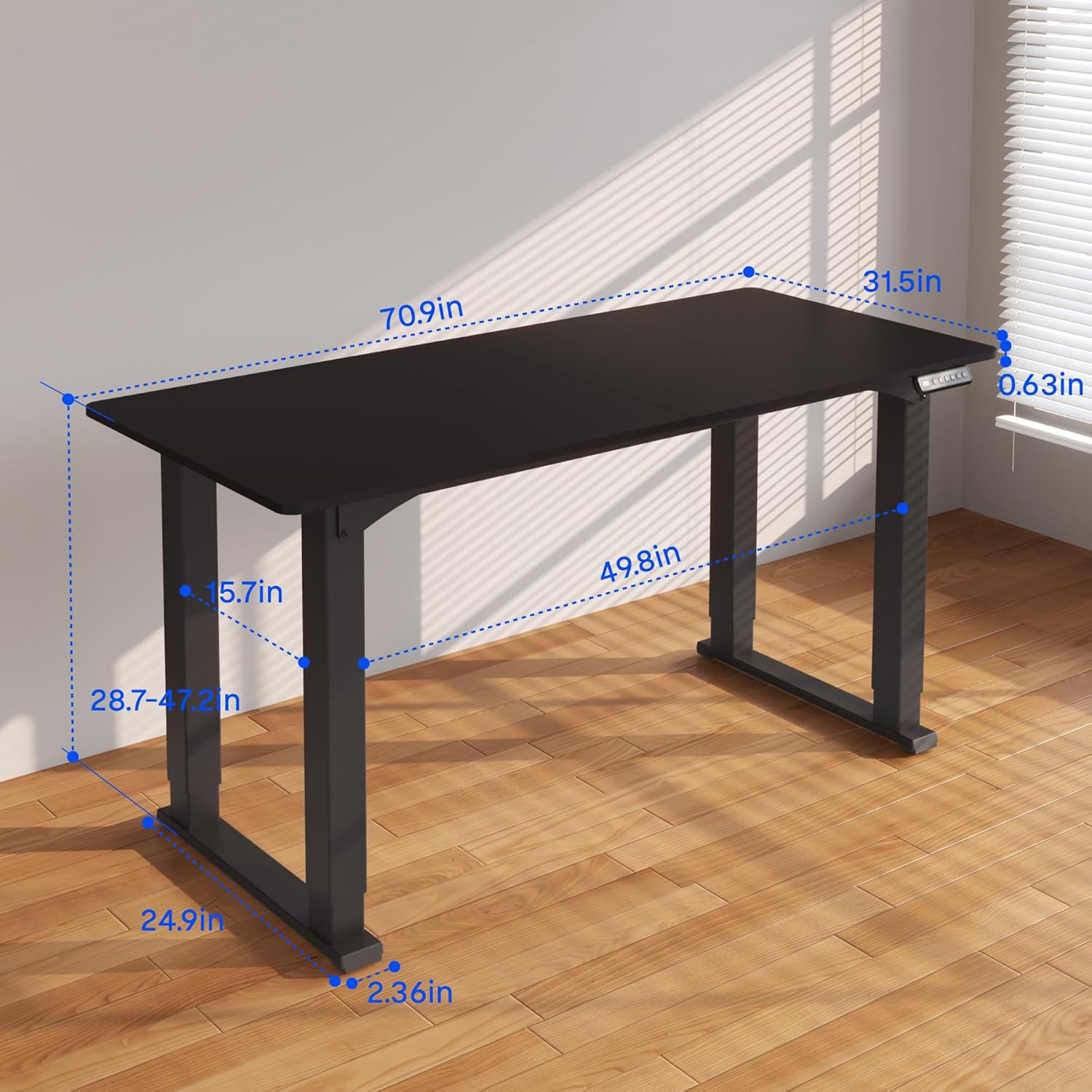
Figure 3.2: Detailed dimensions of the desk, including height range and desktop size.
4. คู่มือการใช้งาน
The FLEXISPOT 4 Leg Standing Desk features an intuitive LED control panel for easy height adjustments and memory settings.
4.1. แผงควบคุมด้านบนview

Figure 4.1: Digital Keypad with memory functions and up/down controls.
- ลูกศรขึ้น/ลง (▲ / ▼): Press and hold to adjust the desk height upwards or downwards. The current height is displayed on the LED screen.
- ปุ่มหน่วยความจำ (1, 2, 3): These buttons allow you to save and recall preferred height settings.
- Memory Set Button (M): Used to program a height into a memory slot.
4.2. การปรับความสูง
To adjust the desk height, press and hold the ▲ (Up) or ▼ (Down) arrow button until the desk reaches your desired position. The desk will move smoothly between 28.7 inches and 47.2 inches.
4.3. Saving Memory Presets
You can save up to three preferred height settings for quick recall:
- ปรับความสูงของโต๊ะตามต้องการโดยใช้ปุ่มลูกศรขึ้น/ลง
- กดปุ่ม 'M' หน้าจอ LED จะแสดง 'S-'
- Within 3 seconds, press one of the memory buttons (1, 2, or 3). The LED display will show 'S-1', 'S-2', or 'S-3' to confirm the setting has been saved.
4.4. Recalling Memory Presets
To move the desk to a saved height, press and ถือ the corresponding memory button (1, 2, or 3) until the desk reaches the programmed height.
4.5. Anti-Collision System
The desk is equipped with an anti-collision system to prevent damage. If the desk encounters an obstruction during movement, it will stop and reverse slightly. Remove the obstruction before resuming operation.

Figure 4.2: Anti-collision system in action, preventing damage from obstructions.
5. การบำรุงรักษา
Regular maintenance ensures the longevity and smooth operation of your standing desk.
- การทำความสะอาด: เช็ดพื้นเดสก์ท็อปและกรอบด้วยผ้าเนื้อนุ่มamp ผ้า หลีกเลี่ยงสารเคมีรุนแรงหรือน้ำยาทำความสะอาดที่มีฤทธิ์กัดกร่อน
- การจัดการสายเคเบิล: Periodically check and organize cables to prevent tangles and ensure they do not interfere with the desk's movement.
- การตรวจสอบตัวยึด: Occasionally check all screws and bolts to ensure they remain tight. Retighten if necessary.
- การดูแลมอเตอร์: The electric motors are maintenance-free. Do not attempt to lubricate or disassemble them.
6 การแก้ไขปัญหา
หากคุณประสบปัญหาเกี่ยวกับโต๊ะทำงานของคุณ โปรดดูปัญหาทั่วไปและวิธีแก้ไขต่อไปนี้:
- โต๊ะไม่เคลื่อนไหว:
- ตรวจสอบว่าสายไฟเสียบเข้ากับโต๊ะและเต้ารับที่ผนังอย่างแน่นหนาแล้ว
- Ensure all motor cables are properly connected to the control box.
- Perform a reset: Press and hold the 'Down' button until the desk reaches its lowest point and slightly retracts, then release.
- Uneven Movement or Wobbling:
- Ensure the desk is on a level surface. Adjust the leveling feet if necessary.
- Check that all assembly screws and bolts are tightened securely.
- Verify that the weight on the desk does not exceed the maximum capacity of 220 lbs and is evenly distributed.
- รหัสข้อผิดพลาดบนจอแสดงผล:
- If an error code appears, try performing a reset as described above.
- If the error persists, disconnect power for 10 minutes, then reconnect and try again.
- ปรึกษาผู้ผลิต website or contact customer support with the specific error code.
- การตั้งค่าหน่วยความจำไม่ทำงาน:
- Ensure you are pressing and การถือครอง the memory button until the desk reaches the saved height.
- Re-program the memory presets if they are not recalling correctly.
หากขั้นตอนเหล่านี้ไม่สามารถแก้ไขปัญหาได้ โปรดติดต่อฝ่ายบริการลูกค้าของ FLEXISPOT เพื่อขอความช่วยเหลือเพิ่มเติม
7. ข้อมูลจำเพาะ
| คุณสมบัติ | ข้อมูลจำเพาะ |
|---|---|
| ยี่ห้อ | เฟล็กซิสพอท |
| หมายเลขรุ่น | QS2B-1880-AU |
| ขนาดเดสก์ท็อป | 71"D x 32"W (approx. 180.3cm x 81.3cm) |
| ช่วงความสูงที่สามารถปรับได้ | 28.7 นิ้ว ถึง 47.2 นิ้ว (ประมาณ 72.9 ซม. ถึง 119.9 ซม.) |
| ความจุน้ำหนักสูงสุด | 220 ปอนด์ (100 กก.) |
| วัสดุกรอบ | โลหะ |
| วัสดุชั้นยอด | ไม้ |
| สี | กรอบสีดำและด้านบนสีดำ |
| ประเภทการควบคุม | LED Digital Keypad with Memory Presets |
| คุณสมบัติพิเศษ | 4-Leg Design, Anti-Collision System, Corded Operation |
| จำเป็นต้องประกอบ | ใช่ |
8. การรับประกันและการสนับสนุน
FLEXISPOT provides comprehensive warranty coverage for your peace of mind:
- รับประกัน 5 ปี: Covers the desk frame and motor components.
- รับประกัน 2 ปี: Covers the control panel and other electronic parts.
For warranty claims, technical support, or any questions regarding your FLEXISPOT product, please visit the official FLEXISPOT website or contact their customer service department. Please have your model number (QS2B-1880-AU) and proof of purchase available when contacting support.


