การแนะนำ
Thank you for choosing the Surfola SF230 Action Camera. This manual provides essential information for setting up, operating, maintaining, and troubleshooting your device. Please read it thoroughly to ensure proper use and to maximize your camera's capabilities.

Image: The Surfola SF230 Action Camera, showcasing its compact design, waterproof housing, external microphone, and remote control.
มีอะไรอยู่ในกล่อง
Your Surfola SF230 Action Camera package includes the following items:
- Action Camera x 1
- กล่องกันน้ำ x 1
- External Microphone x 1
- รีโมทคอนโทรล x 1
- สาย USB x1
- Cycling Accessories x 1
- แบตเตอรี่ x 2
- Other Mounting Accessories (total 20 accessories)

Image: All components of the Surfola SF230 Action Camera package, including the camera, waterproof case, various mounts, and charging cable.
การตั้งค่า
1. การติดตั้งแบตเตอรี่และการ์ด Micro SD
- เปิดฝาช่องใส่แบตเตอรี่ที่ด้านล่างของกล้อง
- Insert a fully charged battery, ensuring correct polarity.
- Insert a Class 10 or higher Micro SD card (up to 128GB, not included) into the card slot until it clicks. Ensure the card is formatted correctly before first use.
- ปิดฝาช่องใส่แบตเตอรี่
2. การชาร์จกล้อง
Connect the camera to a power source using the provided USB cable. The charging indicator will illuminate. A full charge typically takes a few hours.
3 การใช้งานเคสกันน้ำ
The SF230 action camera comes with an official Surfola waterproof case, allowing it to be used up to 40 meters (131 feet) underwater. Before submerging, ensure the case is properly sealed and free of debris. It is recommended to test the waterproof case without the camera inside first.
Video: A demonstration on how to properly install the Surfola SF230 Action Camera into its waterproof housing, ensuring a secure seal for underwater use.
4. Attaching Mounting Accessories
The camera includes 20 accessories for various scenarios, such as cycling, hiking, and diving. Refer to the accessory introduction video for guidance on how to attach different mounts.
วิดีโอ: จบแล้วview of the various accessories included with the SF230 Action Camera and instructions on how to use them for different activities.
Video: Detailed instructions on how to properly utilize the Surfola Action Camera's accessories for various mounting and usage scenarios.
5. Connecting to Your Phone via Wi-Fi
The camera supports Wi-Fi connectivity, allowing you to preview, download, and delete content directly from your smartphone using the Live DV mobile application.
Video: A step-by-step guide on how to connect your Surfola SF230 Action Camera to your smartphone via Wi-Fi for remote control and file การจัดการ.
6. External Microphone and Remote Control
The SF230 includes an external microphone to improve sound quality and reduce ambient noise, and a wireless remote control for convenient operation from a distance.
การใช้งานกล้อง
1. Power On/Off and Mode Switching
Press and hold the Power/Mode button to turn the camera on or off. Short press the Power/Mode button to cycle through different modes (Video, Photo, Playback, Settings).
2. การบันทึกวิดีโอ
The SF230 supports various video resolutions and frame rates, including 4K/30FPS, 2K/30FPS, 1080P/60FPS, 1080P/30FPS, and 720P/120FPS. Press the Shutter/OK button to start and stop recording.

Image: The Surfola SF230 Action Camera set up on a tripod, capturing a scenic outdoor view, demonstrating its use for stable video recording.
3. การจับภาพ
Capture high-quality photos with resolutions up to 20MP, 16MP, 12MP, or 8MP. Switch to Photo mode and press the Shutter/OK button to take a picture.
4. Electronic Image Stabilization (EIS)
The camera is equipped with an electronic image stabilization chip to ensure wider and more stable shooting, especially during motion activities.
Video: A demonstration of the Surfola Action Camera's super anti-shake feature (EIS) in action, showing how it stabilizes footage during movement.
5. Wide-Angle Lens
The 170° wide-angle lens captures a broader field of view, allowing you to record more of your surroundings.
6. ฟังก์ชั่นพิเศษ
The SF230 offers various functions including time-lapse, slow motion, and burst-photo modes. These can be accessed and configured in the camera settings.
Video: A test of the Surfola SF230 Action Camera's 4K slow motion capabilities, demonstrating its ability to capture detailed slow-motion footage.
7. Multi-Scenario Use
The camera is designed for diverse activities, from water sports like swimming and diving (with waterproof case) to land-based adventures like cycling, hiking, and vlogging.

Image: A snowboarder with the Surfola SF230 Action Camera mounted on their helmet, illustrating its use as a helmet camera for winter sports.

Image: The Surfola SF230 Action Camera positioned on a kitchen countertop, recording a person cooking, highlighting its versatility as a vlogging camera.

Image: A child riding a bicycle with the Surfola SF230 Action Camera mounted on the handlebars, demonstrating its suitability as an entry-level sports camera for biking.

Image: The Surfola SF230 Action Camera mounted on a car dashboard, functioning as a dash camera to record driving scenery.
8. เอาท์พุต HDMI
Connect the camera to a larger display using an HDMI cable (not included) to view your recorded content directly on a TV or monitor.
การซ่อมบำรุง
1. การทำความสะอาด
- เช็ดตัวกล้องด้วยผ้าแห้งและนุ่ม
- For the lens, use a lens cleaning cloth and specialized lens cleaning solution. Avoid touching the lens directly.
- After using the waterproof case in saltwater, rinse it thoroughly with fresh water and let it air dry. Ensure no salt residue remains on the seals.
2. การดูแลแบตเตอรี่
- เก็บแบตเตอรี่ไว้ในที่เย็นและแห้งเมื่อไม่ได้ใช้งาน
- ควรหลีกเลี่ยงการปล่อยให้แบตเตอรี่หมดจนเกลี้ยงก่อนชาร์จใหม่ เพื่อยืดอายุการใช้งานของแบตเตอรี่
- หากเก็บรักษาเป็นเวลานาน ควรชาร์จแบตเตอรี่ให้มีความจุประมาณ 50%
3. การจัดเก็บ
When not in use, store the camera and accessories in a dry, dust-free environment, away from direct sunlight and extreme temperatures.
การแก้ไขปัญหา
กล้องไม่เปิด
- ตรวจสอบให้แน่ใจว่าแบตเตอรี่ชาร์จเต็มและใส่เข้าไปอย่างถูกต้อง
- Try using the second included battery.
คุณภาพวิดีโอ/ภาพถ่ายไม่ดี
- Check that the lens is clean and free from smudges.
- Ensure you are recording in the desired resolution (e.g., 4K).
- Verify that Electronic Image Stabilization (EIS) is enabled for smoother footagโดยเฉพาะอย่างยิ่งในระหว่างการเคลื่อนไหว
- ให้แน่ใจว่ามีสภาพแสงสว่างเพียงพอ
Waterproof Case Leakage
- Before each use, inspect the rubber seal for any debris, hair, or damage. Clean it thoroughly.
- Ensure the case is securely latched.
- Always perform a dry test of the case before inserting the camera for underwater use.
Microphone Issues / Poor Audio
- Ensure the external microphone is securely connected to the camera.
- Check microphone settings in the camera menu.
- Note that wind noise can significantly affect audio quality, especially during high-speed activities.
SD Card Not Recognized / Recording Issues
- Ensure the Micro SD card is Class 10 or higher and formatted to FAT32 (or exFAT for larger cards) on the camera itself or a computer.
- ลองใช้การ์ด Micro SD อันอื่นเพื่อตรวจสอบว่าการ์ดเสียหรือไม่
- โปรดตรวจสอบให้แน่ใจว่าเสียบการ์ดถูกต้องแล้ว
For further assistance, please refer to the official user manual PDF or contact Surfola support.
ข้อมูลจำเพาะ
| คุณสมบัติ | รายละเอียด |
|---|---|
| หมายเลขรุ่น | SF230 |
| ความละเอียดวิดีโอ | 4K/30FPS, 2K/30FPS, 1080P/60FPS, 1080P/30FPS, 720P/120FPS |
| ความละเอียดของภาพ | 20MP/16MP/12MP/8MP |
| มุมเลนส์ | มุมกว้าง 170° |
| ระบบป้องกันภาพสั่นไหว | ลดการสั่นไหวของภาพอิเล็กทรอนิกส์ (EIS) |
| ความลึกของน้ำ | Up to 40m (131ft) with included waterproof case |
| พื้นที่จัดเก็บ | Supports up to 128GB Class 10 Micro SD Card |
| การเชื่อมต่อ | ไวไฟ, HDMI, USB |
| ขนาดหน้าจอ | 2 นิ้ว |
| น้ำหนักสินค้า | 2.4 ออนซ์ |
| ขนาดสินค้า | 2.36 x 1.65 x 0.98 นิ้ว |
การรับประกันและการสนับสนุน
Surfola is committed to providing excellent customer service and product reliability.
- การรับประกัน: Surfola provides a 2-year warranty for every customer.
- นโยบายการคืนเงิน: 30-Day Refund available.
- นโยบายการเปลี่ยนทดแทน: 365-Day Replacement available.
- การแก้ไขปัญหา: 24-Hour Troubleshooting support.
- การสนับสนุนตลอดอายุการใช้งาน: Enjoy lifetime support for your Surfola SF230 Action Camera.
For any inquiries or support needs, please contact us at: support.ac@surfola.co


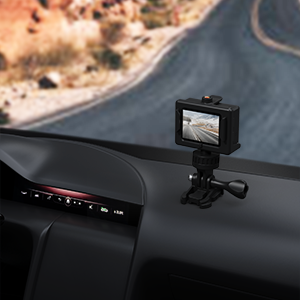

Image: Icons representing Surfola's customer service commitments: 30-Day Refund, 365-Day Replacement, 24-Hour Troubleshooting, and Lifetime Support.


