1. ข้อมูลด้านความปลอดภัย
โปรดอ่านคำแนะนำทั้งหมดอย่างละเอียดก่อนใช้งานเครื่องใช้ไฟฟ้านี้ และเก็บไว้เพื่อใช้อ้างอิงในอนาคต การไม่ปฏิบัติตามคำแนะนำเหล่านี้อาจทำให้เกิดไฟฟ้าช็อต ไฟไหม้ หรือการบาดเจ็บร้ายแรงได้
- ควรถอดปลั๊กพัดลมออกจากเต้ารับไฟฟ้าทุกครั้งก่อนทำความสะอาด ซ่อมบำรุง หรือเคลื่อนย้าย
- Do not operate the fan with a damaged cord or plug. If the cord or plug is damaged, contact customer service for repair or replacement.
- พัดลมนี้ออกแบบมาสำหรับใช้ภายในอาคารเท่านั้น ห้ามใช้กลางแจ้งหรือในที่เปียกชื้น
- เก็บพัดลมให้ห่างจากน้ำและของเหลวอื่นๆ ห้ามจุ่มพัดลมลงในน้ำ
- ตรวจสอบให้แน่ใจว่าพัดลมวางอยู่บนพื้นผิวที่มั่นคงและเรียบเพื่อป้องกันไม่ให้พัดลมล้มคว่ำ
- ควรกันเด็กและสัตว์เลี้ยงให้อยู่ห่างจากพัดลมขณะใช้งาน
- Do not insert fingers or any objects into the grille when the fan is operating.
- Do not block air openings or operate near curtains, drapes, or other objects that could block airflow.
- Do not use the fan in areas where flammable liquids or gases are stored.
2. สินค้าหมดview
The Amazon Basics 40" 70-Degree Oscillating Digital Tower Fan is designed to provide efficient and customizable cooling for various indoor spaces. It features a sleek, compact design and user-friendly controls.
ส่วนประกอบ
- พัดลมทาวเวอร์
- Base (requires assembly)
- รีโมทคอนโทรล
คุณสมบัติหลัก
- การระบายความร้อนที่มีประสิทธิภาพ: Delivers powerful airflow for effective cooling in enclosed spaces.
- ความเร็วที่ปรับแต่งได้: Four intuitive speed settings to adjust airflow.
- หลายโหมด: Includes Standard, Breeze, and Nature modes for varied airflow patterns.
- การสั่น: 70-degree oscillation for wide-range air flow coverage.
- ฟังก์ชั่นจับเวลา: ตั้งเวลาได้สูงสุด 15 ชั่วโมง เพื่อประหยัดพลังงานและเพิ่มความสะดวกสบาย
- รีโมทคอนโทรล: Convenient remote for adjusting settings from a distance.
- ระบบควบคุมแบบดิจิตอล: Easy-to-use digital control panel located on the top of the fan.
- การออกแบบที่กะทัดรัด: Slim tower design (11.4"D x 11.4"W x 39.3"H) fits easily into any room.

รูปที่ 2.1: The Amazon Basics 40-inch Digital Tower Fan shown with its remote control. The fan is black with a sleek, tall design, and the remote is compact with clearly labeled buttons for power, speed, mode, oscillation, and timer.

รูปที่ 2.2: A diagram illustrating the key features of the tower fan, including its 40-inch height, 4 customizable airflow speed settings, timer with auto shutoff (1h, 2h, 4h, 8h options), and convenient remote control for adjusting speed, oscillation, and timer. The diagram highlights the digital display and control panel on top of the fan.
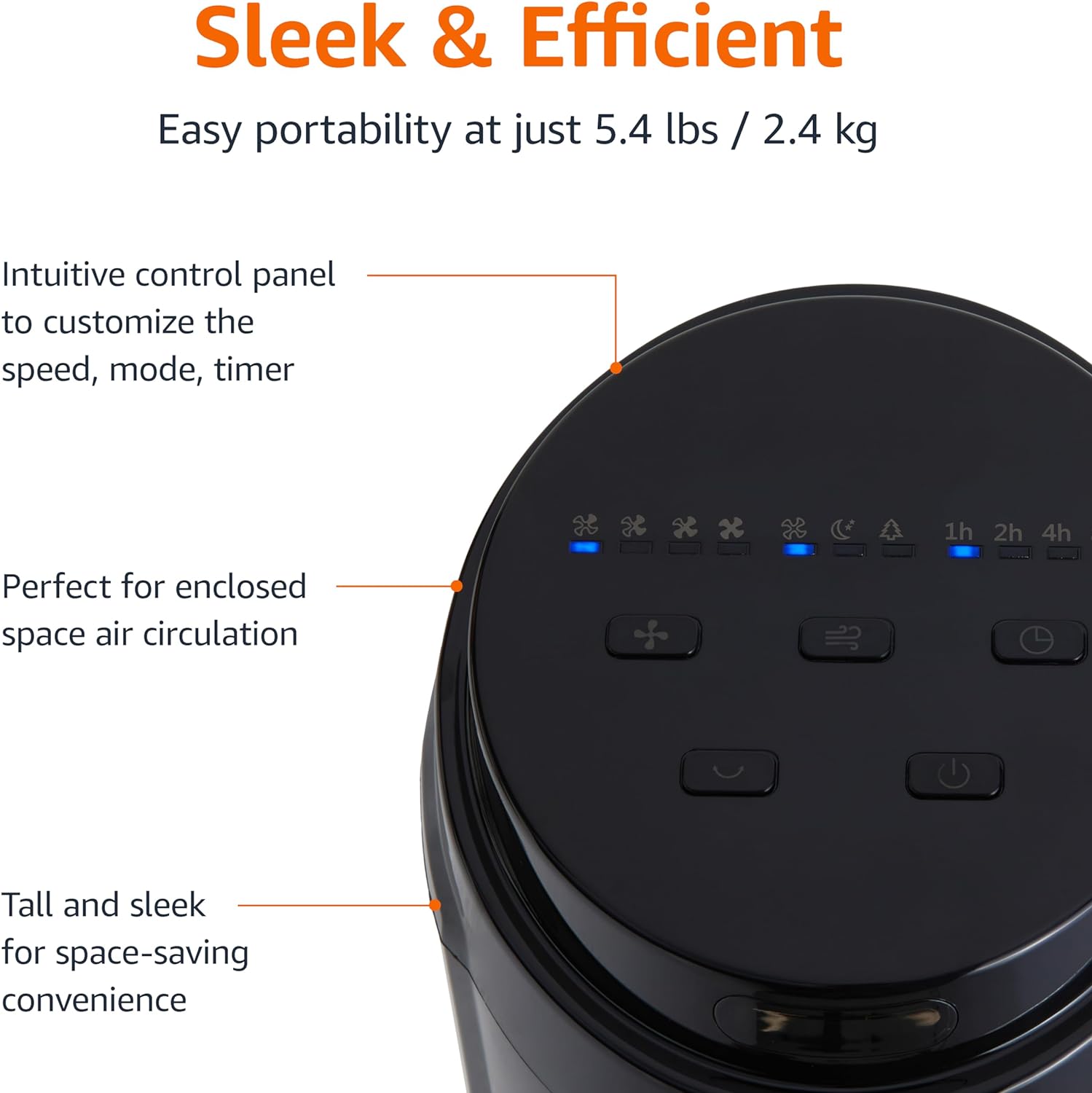
รูปที่ 2.3: ภาพระยะใกล้ view of the intuitive control panel located on the top of the Amazon Basics Tower Fan. The panel features buttons for speed, mode, power, oscillation, and timer, along with LED indicators for selected settings. This design allows for easy customization of fan operation.
3. การตั้งค่า
3.1 การประกอบ
- นำส่วนประกอบทั้งหมดออกจากบรรจุภัณฑ์อย่างระมัดระวัง
- Attach the fan base to the main tower unit. Align the slots on the base with the corresponding tabs on the bottom of the fan.
- Secure the base using the provided screws, if any, ensuring it is firmly attached.
3.2 การจัดวาง
- วางพัดลมบนพื้นผิวที่มั่นคงและระดับเดียวกัน
- Ensure there is adequate space around the fan for proper air circulation, especially for the oscillation feature.
- Keep the fan at least 1 foot (30 cm) away from walls, furniture, and other objects.
- Plug the power cord into a standard NEMA 5-15 (US Standard Wall Outlet) electrical outlet.
4. คู่มือการใช้งาน
The fan can be operated using either the control panel on top of the unit or the included remote control.
4.1 Control Panel & Remote Control Functions
| ปุ่ม/ฟังก์ชั่น | คำอธิบาย |
|---|---|
| เพาเวอร์ (เปิด/ปิด) | เปิดหรือปิดพัดลม |
| ความเร็ว | Cycles through 4 fan speed settings (Low, Medium, High, Max). |
| โหมด | เลือกโหมดการทำงานได้ 3 โหมด:
|
| การสั่น | Activates or deactivates the 70-degree oscillation feature, allowing the fan to sweep air across a wider area. |
| ตัวจับเวลา | Sets the fan to automatically turn off after a specified period (up to 15 hours in 1-hour increments). |
4.2 การใช้งานรีโมทคอนโทรล
The remote control allows for convenient operation of all fan functions from a distance. Ensure the remote is pointed towards the fan's control panel for optimal response.
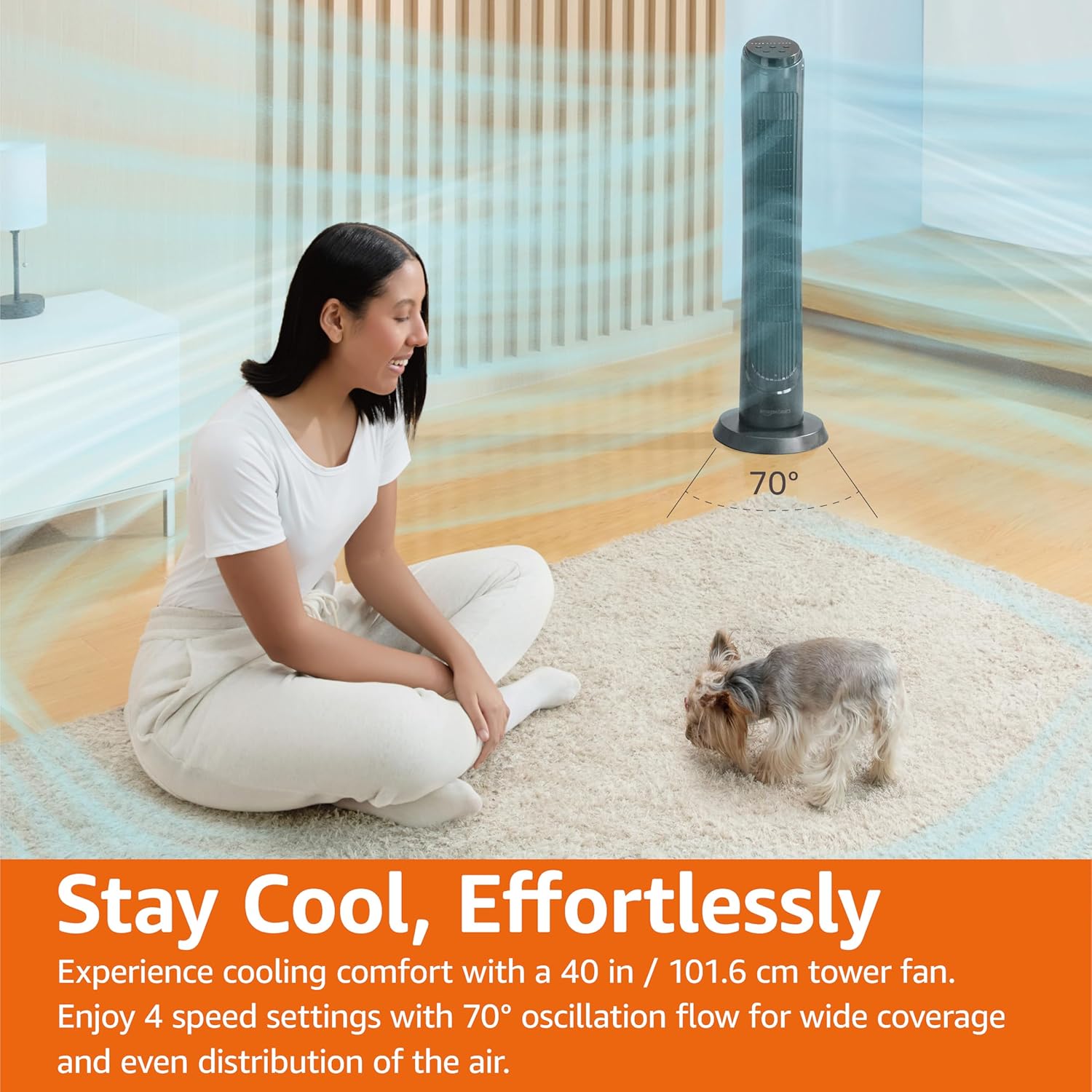
รูปที่ 4.1: The Amazon Basics Tower Fan oscillating 70 degrees, providing wide coverage and even air distribution in a room. A person and a small dog are comfortably seated on a rug, benefiting from the airflow.

รูปที่ 4.2: The Amazon Basics Tower Fan positioned in a modern living space, demonstrating its effective airflow. The image visually represents the air movement from the fan, highlighting its ability to circulate air throughout the room.
5. การบำรุงรักษา
5.1 การทำความสะอาด
- ควรถอดปลั๊กพัดลมทุกครั้งก่อนทำความสะอาด
- ใช้แบบนุ่มๆamp ใช้ผ้าเช็ดทำความสะอาดพื้นผิวด้านนอกของพัดลม
- Do not use abrasive cleaners or harsh chemicals, as these may damage the fan's finish.
- For dust accumulation on the air intake or output grilles, use a vacuum cleaner with a brush attachment to gently remove dust.
- ตรวจสอบให้แน่ใจว่าพัดลมแห้งสนิทก่อนเสียบปลั๊กกลับเข้าไป
5.2 พื้นที่จัดเก็บ
- If storing the fan for an extended period, clean it thoroughly as described above.
- Store the fan in its original packaging or a suitable box to protect it from dust and damage.
- เก็บไว้ในที่แห้งและเย็น
6 การแก้ไขปัญหา
หากคุณพบปัญหาเกี่ยวกับพัดลม โปรดดูปัญหาและวิธีแก้ไขที่พบบ่อยต่อไปนี้:
| ปัญหา | สาเหตุที่เป็นไปได้ | สารละลาย |
|---|---|---|
| พัดลมไม่เปิด | ไม่มีแหล่งจ่ายไฟ; ไม่ได้กดปุ่มเปิด/ปิด | Ensure the power cord is securely plugged into a working outlet. Press the Power button on the control panel or remote. |
| การไหลเวียนของอากาศอ่อนหรือไม่มีเลย | Air intake/output blocked; Fan speed too low. | Check for any obstructions around the fan grilles. Increase the fan speed setting. |
| การแกว่งไม่ทำงาน | ฟังก์ชันการสั่นไม่ได้เปิดใช้งาน | Press the Oscillation button on the control panel or remote. Ensure the fan is on a flat surface. |
| รีโมทคอนโทรลไม่ทำงาน | Batteries are dead; Remote not pointed correctly. | Replace the remote control batteries. Ensure the remote is pointed directly at the fan's control panel. |
| เสียงรบกวนที่ผิดปกติ | Fan not on a level surface; Internal obstruction. | Place the fan on a stable, level surface. Unplug the fan and check for any foreign objects inside the grilles (do not attempt to disassemble). |
หากปัญหายังคงมีอยู่หลังจากลองวิธีแก้ไขเหล่านี้แล้ว โปรดติดต่อฝ่ายสนับสนุนลูกค้า
7. ข้อมูลจำเพาะ
| คุณลักษณะ | รายละเอียด |
|---|---|
| ยี่ห้อ | พื้นฐานของ Amazon |
| ชื่อรุ่น | ดีซี2021 |
| สี | สีดำ |
| การออกแบบพัดลมไฟฟ้า | พัดลมตั้งพื้น |
| แหล่งพลังงาน | ไฟฟ้ากระแสสลับ |
| สไตล์ | 40" - Digital |
| ขนาดสินค้า | ลึก 11.4 นิ้ว x กว้าง 11.4 นิ้ว x สูง 39.3 นิ้ว |
| ประเภทห้อง | ห้องนอน, ห้องนั่งเล่น, ห้องทำงาน |
| คุณสมบัติพิเศษ | Oscillating, 4 Speeds, 3 Modes, Timer, Remote Control |
| การใช้ที่แนะนำ | Cooling and Air Circulation for Indoor Spaces |
| ระดับเสียง | 60 เดซิเบล |
| วัดtage | 50 วัตต์ |
| น้ำหนักสินค้า | 7.5 ปอนด์ (ประมาณ 3.4 กก.) |
| ส่วนประกอบที่รวมอยู่ | ระยะไกล |
| การใช้งานภายใน/ภายนอกอาคาร | ในร่ม |
| วิธีการควบคุม | ระยะไกล |
| วัสดุใบมีด | พลาสติก |
| จำนวนระดับพลังงาน | 4 |
| ประเภทขั้วต่อสายไฟหลัก | NEMA 5-15 (US Standard Wall Outlet) |
| ผู้ผลิต | อเมซอน |
| ยูพีซี | 840095880428 |
| ประเทศต้นกำเนิด | จีน |
8. การรับประกันและการสนับสนุน
For detailed warranty information, please refer to the official Warranty PDF document provided by Amazon Basics. This document outlines the terms and conditions of your product's warranty.
For further assistance, troubleshooting not covered in this manual, or to inquire about replacement parts, please contact Amazon Basics customer support.
- คู่มือผู้ใช้อย่างเป็นทางการ (PDF): ดาวน์โหลด PDF
- Official Warranty (PDF): ดาวน์โหลด PDF
- Amazon Basics Store: เยี่ยมชมร้านค้า


