1. บทนำ
Thank you for choosing the Aurora AU200MA 200-Sheet Auto-Feed Micro-Cut Paper Shredder. This manual provides essential information for the safe and efficient operation, maintenance, and troubleshooting of your new shredder. Please read these instructions thoroughly before use and retain them for future reference.

Figure 1.1: Aurora AU200MA Paper Shredder
The Aurora AU200MA is designed for commercial and home office use, offering high-security micro-cut shredding for sensitive documents. It features an automatic feed for up to 200 sheets and a manual feed slot for up to 10 sheets, including credit cards and small paper clips.
2. คำแนะนำด้านความปลอดภัยที่สำคัญ
เพื่อลดความเสี่ยงจากไฟไหม้ ไฟฟ้าช็อต หรือการบาดเจ็บ โปรดปฏิบัติตามข้อควรระวังด้านความปลอดภัยขั้นพื้นฐานทุกครั้งเมื่อใช้เครื่องใช้ไฟฟ้านี้:
- Read all instructions before operating the shredder.
- เก็บเด็กและสัตว์เลี้ยงให้ห่างจากเครื่องทำลายเอกสาร
- โปรดระมัดระวังอย่าให้เสื้อผ้าหลวม เครื่องประดับ ผม และมืออยู่ใกล้ช่องใส่เอกสาร
- Do not spray any aerosol-based products into or around the shredder.
- Do not shred metal objects, cardboard, or plastic other than credit cards.
- ห้ามใช้งานเครื่องทำลายเอกสารหากสายไฟชำรุด
- ควรดึงปลั๊กเครื่องทำลายเอกสารออกทุกครั้งก่อนเคลื่อนย้าย ทำความสะอาด หรือเทถังขยะ
- ตรวจสอบให้แน่ใจว่าวางเครื่องทำลายเอกสารไว้บนพื้นผิวที่มั่นคงและเรียบเสมอกัน
3. สินค้าหมดview
3.1 ส่วนประกอบ
- Auto-Feed Tray: For automatic shredding of up to 200 sheets.
- ช่องป้อนกระดาษแบบแมนนวล: For manual shredding of up to 10 sheets, credit cards, and small paper clips.
- แผงควบคุม: Features power button and indicator lights.
- ถังขยะ: 8.5-gallon pullout bin for shredded materials.
- ล้อ: เพื่อความสะดวกในการเคลื่อนย้ายตัวเครื่อง
3.2 แผงควบคุมและไฟแสดงสถานะ

รูปที่ 3.1: แผงควบคุมด้านบนview
The control panel includes various LED indicators to communicate the shredder's status:
- สแตนด์บาย: แสดงว่าเครื่องทำลายเอกสารเปิดใช้งานอยู่และพร้อมใช้งาน
- ความร้อนสูงเกินไป: Illuminates when the shredder has exceeded its continuous run time and needs to cool down.
- Bin-full: Indicates the waste bin is full and needs to be emptied.
- โอเวอร์โหลด: Lights up if too much paper is inserted, triggering the anti-jam auto-reverse function.
- เปิดประตู: Indicates the waste bin is not properly closed or inserted.
4. การตั้งค่า
- แกะกล่องเครื่องทำลายเอกสาร: นำเครื่องทำลายเอกสารออกจากบรรจุภัณฑ์อย่างระมัดระวัง
- จัดวางเครื่องทำลายเอกสารให้อยู่ในตำแหน่งที่เหมาะสม: Place the shredder on a flat, stable surface. The integrated casters allow for easy movement.
- เชื่อมต่อพลังงาน: เสียบสายไฟเข้ากับเต้ารับ AC 120V มาตรฐาน
- Ensure Bin is Closed: Make sure the pullout waste bin is fully and correctly inserted into the shredder. The "Door Open" indicator should not be lit.
5. คู่มือการใช้งาน
5.1 Auto-Feed Shredding

Figure 5.1: Auto-Feed Tray with Documents
The auto-feed feature allows for convenient shredding of multiple sheets without manual feeding.
- เปิดฝาถาดป้อนกระดาษอัตโนมัติ
- Stack up to 200 sheets of paper neatly into the auto-feed tray. Ensure the paper is free of staples, paper clips (except small ones in manual feed), and other foreign objects.
- Close the auto-feed tray cover. The shredder will automatically begin processing the documents.
- The shredder has a continuous run time of 60 minutes. After this period, it may enter an overheat state to cool down.
5.2 Manual Feed Shredding

Figure 5.2: Manual Feed Slot and Shredding Capabilities
For smaller quantities of paper or other shreddable items:
- Insert up to 10 sheets of paper into the manual feed slot.
- The manual feed slot can also shred credit cards and small paper clips. Insert these items one at a time into the center of the manual feed slot.
5.3 Anti-Jam Auto-Reverse
The shredder is equipped with an anti-jam auto-reverse function. If too much paper is inserted, the shredder will automatically reverse to clear the jam. If a jam persists, press the reverse button on the control panel to manually clear the paper.
5.4 Auto Power-Sleep
For energy efficiency, the shredder will automatically enter a power-sleep mode after a period of inactivity. It will reactivate when paper is detected or a button is pressed.
6. การบำรุงรักษา
6.1 การล้างถังขยะ

Figure 6.1: Pullout Waste Bin
When the "Bin-full" indicator illuminates, the waste bin needs to be emptied.
- Ensure the shredder is in standby mode or unplugged.
- Gently pull out the 8.5-gallon waste bin from the front of the shredder.
- กำจัดวัสดุที่บดแล้วทิ้งไป
- Slide the waste bin back into the shredder until it clicks securely into place. Ensure the "Door Open" indicator is off.
6.2 Shredder Oiling
Regular oiling of the shredder blades is recommended to maintain optimal performance and extend the life of your micro-cut shredder. Use shredder oil specifically designed for paper shredders.
- หยอดน้ำมันหล่อลื่นสำหรับเครื่องทำลายเอกสารเป็นเส้นบางๆ บริเวณช่องใส่กระดาษ
- Run a few sheets of paper through the manual feed slot to distribute the oil.
- Repeat this process after every 30 minutes of accumulated shredding or when you notice a decrease in performance.
6.3 การทำความสะอาด
เช็ดทำความสะอาดภายนอกเครื่องทำลายเอกสารด้วยผ้าแห้งเนื้อนุ่ม ห้ามใช้สารทำความสะอาดที่มีฤทธิ์กัดกร่อนหรือตัวทำละลาย
7 การแก้ไขปัญหา
| ปัญหา | สาเหตุที่เป็นไปได้ | สารละลาย |
|---|---|---|
| เครื่องทำลายเอกสารไม่ทำงาน | No power; Waste bin not properly inserted; Overheat protection activated. | Check power connection; Ensure waste bin is fully closed (Door Open indicator off); Allow shredder to cool down if Overheat indicator is on. |
| กระดาษติด. | Too much paper inserted; Paper not inserted straight. | The shredder has an anti-jam auto-reverse function. If it persists, press the reverse button on the control panel to manually clear the paper. Reduce the amount of paper for future shredding. |
| เครื่องทำลายเอกสารหยุดทำงานระหว่างการใช้งาน | Overheat protection activated; Waste bin full. | Allow shredder to cool down if Overheat indicator is on; Empty the waste bin if Bin-full indicator is on. |
| วัสดุที่บดแล้วยังไม่ละเอียดพอ | Not applicable (Micro-cut shredder). | The Aurora AU200MA is a micro-cut shredder, producing tiny particles (P-5 security level). |
8. ข้อมูลจำเพาะ
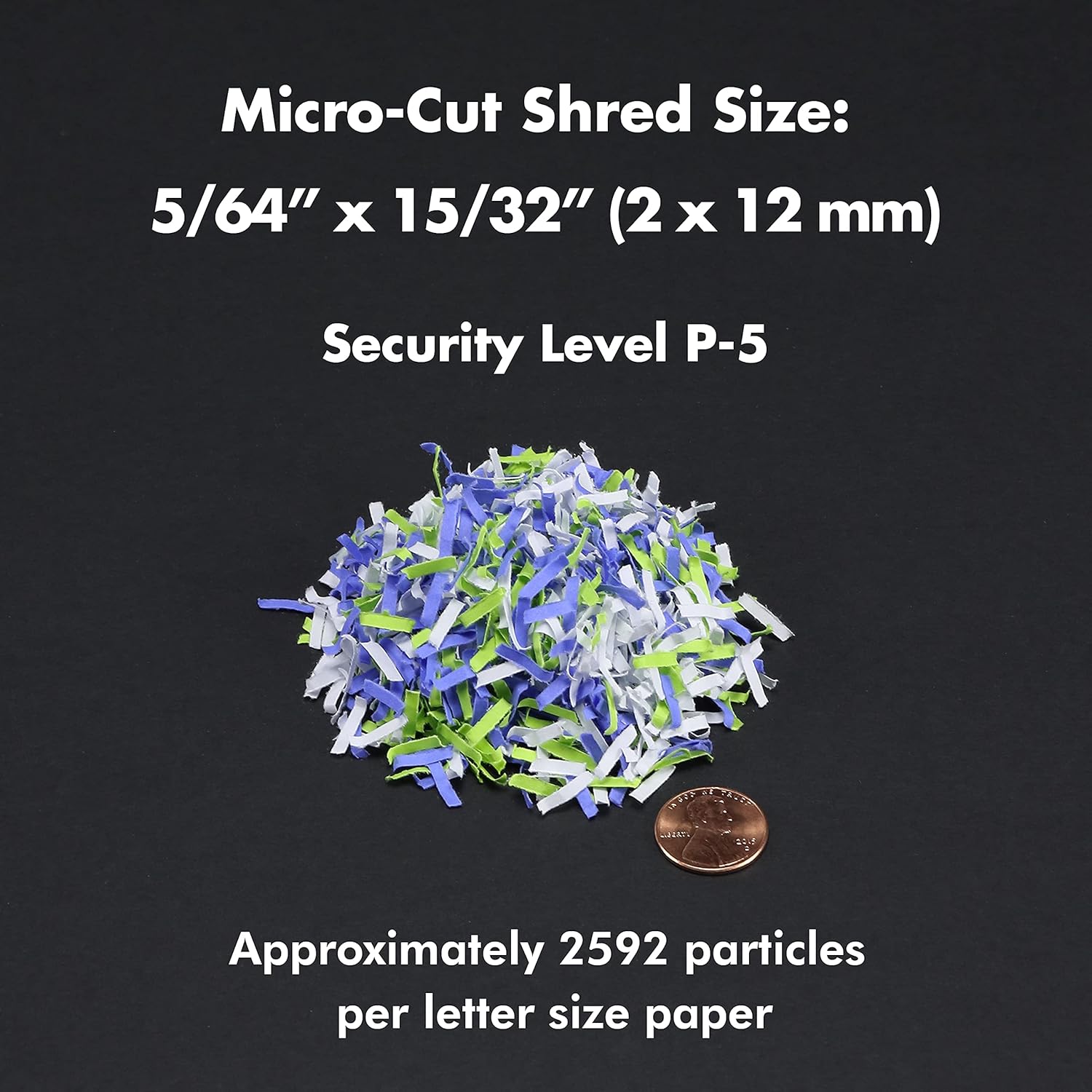
Figure 8.1: Micro-Cut Shred Size and Security Level
- แบบอย่าง: AU200MA
- ประเภทฉีก: ไมโคร - คัท
- ขนาดฉีก: 5/64" x 15/32" (2 x 12 mm)
- ระดับความปลอดภัย: พี-5
- Auto-Feed Capacity: สูงสุด 200 แผ่น
- ความจุการป้อนด้วยมือ: สูงสุด 10 แผ่น
- เวลาทำงานต่อเนื่อง: 60 นาที
- เวลาเย็นลง: Approximately 30-40 minutes (after 60 min continuous use)
- ความจุถังขยะ: 8.5 แกลลอน
- เศษ: Paper, Credit Cards, Small Paper Clips
- เล่มที่tage: กระแสสลับ 120 โวลต์
- ความถี่: 60 เฮิรตซ์
- Product Dimensions (H x W x L): 22.83" x 14.02" x 18.35"
- น้ำหนักสินค้า: 38.1 ปอนด์
9. การรับประกันและการสนับสนุน
For warranty information or technical support, please refer to the warranty card included with your product or visit the official Aurora website. You may also contact Aurora customer service directly for assistance.
Aurora Customer Service: Please refer to your product packaging or the official Aurora webเว็บไซต์สำหรับข้อมูลการติดต่อล่าสุด


