1. บทนำ
This manual provides detailed instructions for the installation, operation, and maintenance of the DAVITU US-52 AC Motor Speed Controller. The US-52 is designed to regulate the speed of adjustable AC induction motors, offering precise control and directional options (forward/reverse). It is suitable for various industrial applications including machine tools, textile machinery, conveying machines, and printing mechanisms.
2. ข้อมูลด้านความปลอดภัย
- อันตรายจากไฟฟ้า: This device operates on AC 220V. Ensure all power is disconnected before installation, wiring, or maintenance to prevent electric shock.
- บุคลากรที่ผ่านการรับรอง: Installation and wiring should only be performed by qualified electricians or technicians.
- กำลังโหลดที่เหมาะสม: The PWM controller requires a load to function correctly. Do not test without a connected motor.
- ความเข้ากันได้ของมอเตอร์: The US-52 is specifically designed for adjustable AC induction motors. Using it with other motor types is not recommended and may cause damage or malfunction.
- สภาพแวดล้อม : Install the controller in a dry, well-ventilated area, away from excessive heat, moisture, and corrosive substances.
3. สินค้าหมดview
The DAVITU US-52 AC Motor Speed Controller features a robust design for reliable performance. Key components include:
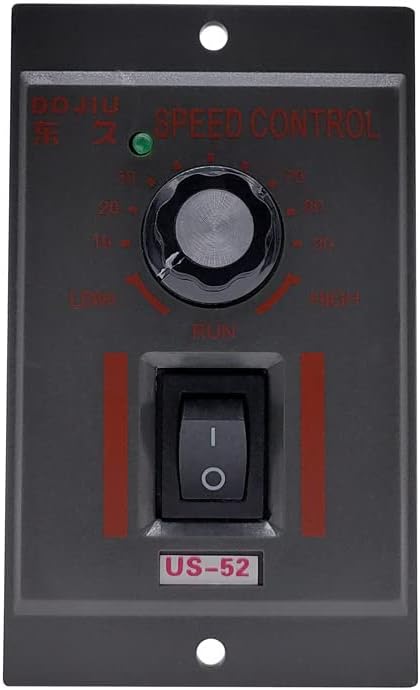
- ปุ่มควบคุมความเร็ว: Used to adjust the motor's rotational speed from low to high.
- สวิตช์เปิด/ปิด: Toggles power to the motor.
- ไฟ LED แสดงสถานะสีเขียว: Illuminates when the controller is powered on.
- เทอร์มินัลบล็อก: For main power input and motor connections.
- ขั้วต่อ 6 ขา: For connecting to the motor's control wiring.
- Filter Capacitor: Models with power ratings of 300W and 400W include a filter capacitor for enhanced performance. Lower wattage models (6W-250W) do not include this feature.
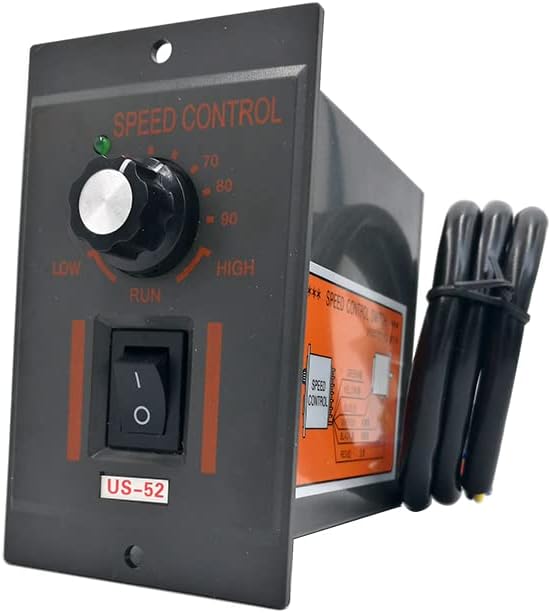
รูปที่ 3.1 : ด้านหน้า view of the US-52 controller, showing the speed control knob, ON/OFF switch, and power indicator.
รูปที่ 3.2: ด้านข้าง view illustrating the integrated wiring diagram for motor and power connections.
4. ข้อมูลจำเพาะ
| คุณสมบัติ | คำอธิบาย |
|---|---|
| แบบอย่าง | สหรัฐอเมริกา-52 |
| จัดอันดับVoltage | ไฟฟ้ากระแสสลับ 220 โวลต์ 50 เฮิร์ต |
| กำลังไฟฟ้า | 6W - 400W (This specific model is 15W) |
| ประเภทขั้วต่อ | 6 พิน |
| ความยาวสายเคเบิล | 60ซม. |
| คุณสมบัติการควบคุม | Corotation/Reverse Option, Green LED Indicator, ON/OFF Switch, Speed Adjustment Knob |
| ประสิทธิภาพ | ไออี 2 |
| การรับรอง | ไม่มี |
| วัสดุ | พีวีซี |
5. การตั้งค่าและการติดตั้ง
Careful wiring is essential for the correct and safe operation of the US-52 controller. Refer to the wiring diagram provided on the product and in Figure 5.1.
5.1 การเชื่อมต่อสายไฟ
- กำลังไฟเข้า: Connect the AC 220V, 50Hz power supply to the designated AC terminals on the controller's terminal block. Ensure proper polarity if indicated.
- การเชื่อมต่อมอเตอร์: Connect your adjustable AC induction motor to the motor output terminals. The controller includes a 6-pin connector for this purpose.
- Rotation Direction (Corotation/Reverse):
- สำหรับ Corotation (Forward): Connect the 'CW' (Clockwise) terminal and the 'COM' (Common) terminal.
- สำหรับ Reverse (Counter-Clockwise): Connect the 'CW' (Clockwise) terminal and the 'CCW' (Counter-Clockwise) terminal.
บันทึก: The specific wiring for these directional options is typically indicated on the controller's internal diagram or the motor's specifications. Incorrect wiring may prevent speed adjustment or stable operation.
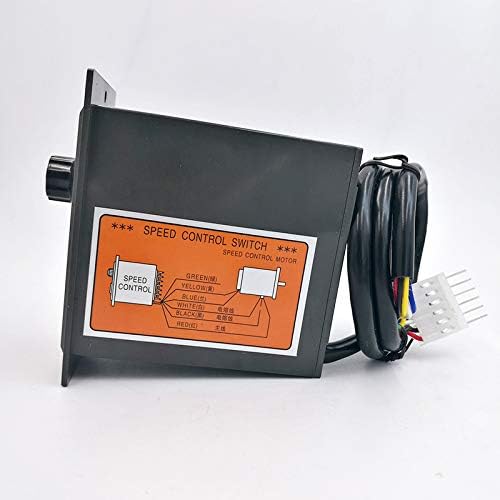
Figure 5.1: Detailed wiring diagram for connecting the speed controller to an AC induction motor.

Figure 5.2: Close-up of the terminal block, showing connections for power input and motor control.
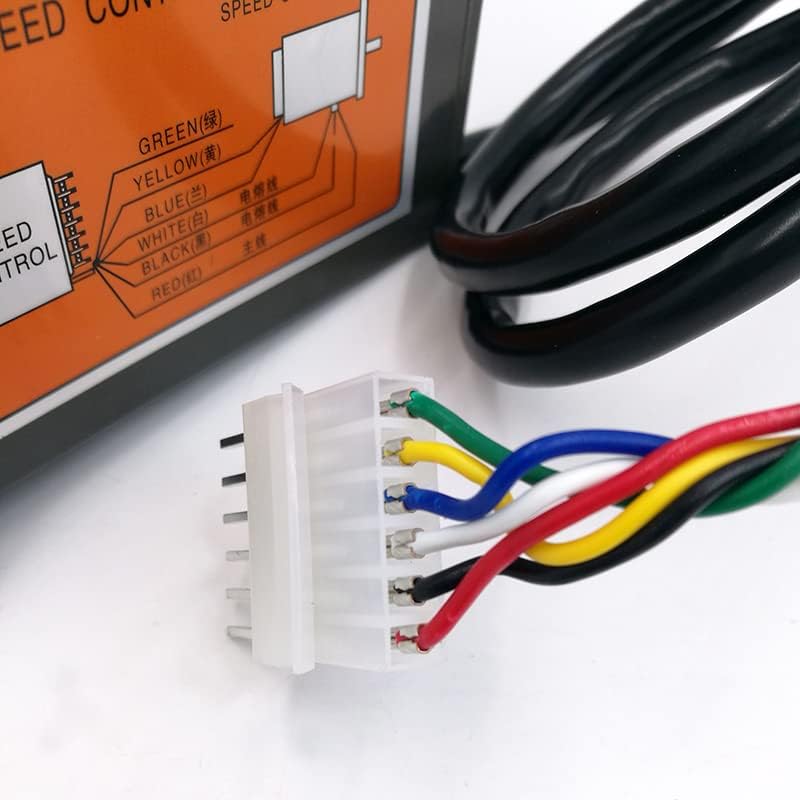
Figure 5.3: The 6-pin connector used for motor wiring, showing individual wire colors.
5.2 การตรวจสอบก่อนปฏิบัติการ
Before applying power, double-check all wiring connections to ensure they are secure and correctly configured according to the diagram. Verify that the motor is an adjustable AC induction type and that the controller is loaded with the motor.
6. การดำเนินการ
- เปิดเครื่อง: Flip the ON/OFF switch to the 'ON' position. The green LED indicator should illuminate, signifying that the controller is powered.
- ปรับความเร็ว: Rotate the speed control knob clockwise to increase the motor speed and counter-clockwise to decrease it. The knob allows for continuous adjustment from low to high speed.
- Change Direction (if wired): If your motor is wired for directional control (CW/CCW), ensure the appropriate connection is made as described in Section 5.1. The controller itself does not have a separate switch for direction; it is determined by the wiring configuration.
- หมดแรง: To stop the motor, flip the ON/OFF switch to the 'OFF' position.
7. การบำรุงรักษา
The DAVITU US-52 AC Motor Speed Controller is designed for durability and requires minimal maintenance. Follow these guidelines to ensure optimal performance and longevity:
- การทำความสะอาดปกติ: Keep the controller free from dust and debris. Use a soft, dry cloth for cleaning. Do not use liquid cleaners or solvents.
- ตรวจสอบการเชื่อมต่อ: ตรวจสอบความแน่นของการเชื่อมต่อสายไฟทั้งหมดเป็นระยะ และตรวจสอบว่ามีร่องรอยการสึกหรอหรือการกัดกร่อนหรือไม่ การเชื่อมต่อที่หลวมอาจทำให้การทำงานไม่สม่ำเสมอหรือเกิดความเสียหายได้
- การตรวจสอบสิ่งแวดล้อม: Ensure the operating environment remains within recommended conditions (dry, well-ventilated, stable temperature).
8 การแก้ไขปัญหา
If you encounter issues with your DAVITU US-52 AC Motor Speed Controller, refer to the following troubleshooting guide:
| ปัญหา | สาเหตุที่เป็นไปได้ | สารละลาย |
|---|---|---|
| มอเตอร์ไม่ทำงาน | No power supply; ON/OFF switch is off; Loose wiring connections; Controller not loaded with motor. | Check power source; Ensure switch is ON; Verify all wiring connections are secure; Connect an appropriate AC induction motor. |
| Speed is not adjustable or unstable | Incorrect motor type; Specific control wires not connected correctly (e.g., the two lines mentioned in product description); Faulty speed control knob. | Ensure motor is an adjustable AC induction type; Review wiring diagram and ensure all control wires are correctly connected; Contact support if knob is suspected faulty. |
| มอเตอร์ทำงานผิดทิศทาง | Incorrect CW/CCW wiring for desired rotation. | Refer to Section 5.1 and adjust the CW/CCW wiring as needed for corotation or reverse. |
| Green LED does not light up | No power supply; Controller is off; LED malfunction. | Check power source and connections; Ensure ON/OFF switch is in the 'ON' position; If power is present and switch is on, LED may be faulty. |
9. การรับประกันและการสนับสนุน
Information regarding product warranty and customer support is not provided in the available product details. Please refer to your purchase documentation or contact your retailer for specific warranty terms and support options.


