การแนะนำ
This manual provides essential information for the installation, operation, and maintenance of your Intel® Core™ i7-12700KF Desktop Processor. Designed for high performance, this processor is built with Intel's performance hybrid architecture, offering exceptional capabilities for gaming, content creation, and demanding applications.

Figure 1: Intel Core i7-12700KF Processor Retail Packaging. This image shows the blue and white retail box for the Intel Core i7 processor, indicating it is a 12th Gen unlocked model.
สินค้าเกินview
The Intel® Core™ i7-12700KF is a 12th Generation Intel Core processor featuring 12 cores (8 Performance-cores and 4 Efficient-cores) and a maximum turbo frequency of up to 5.0 GHz. It is designed for the LGA1700 socket and is compatible with Intel 600 and 700 series chipset-based motherboards. This 'KF' variant requires a discrete graphics card as it does not include integrated graphics.
- สถาปัตยกรรมไฮบริดประสิทธิภาพสูง: Combines Performance-cores and Efficient-cores to optimize performance for gaming, productivity, and content creation.
- ปลดล็อกตัวคูณ: ช่วยให้สามารถโอเวอร์คล็อกเพื่อเพิ่มประสิทธิภาพได้ (ต้องใช้เมนบอร์ดและระบบระบายความร้อนที่รองรับ)
- ซ็อกเก็ต LGA1700: Designed for the latest Intel motherboards.
- ต้องใช้การ์ดจอแยก: This processor does not have integrated graphics.
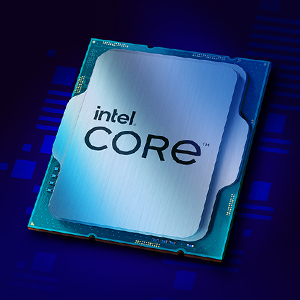
Figure 2: Close-up of the Intel Core i7 Processor Chip. This image displays the metallic surface of the Intel Core processor, highlighting its intricate design.
การติดตั้งและการตั้งค่า
Proper installation is crucial for optimal performance and longevity of your processor. Always handle the processor by its edges to avoid touching the gold contacts or the top surface.
ก่อนที่คุณจะเริ่มต้น:
- Ensure your motherboard has an LGA1700 socket and is compatible with 12th Gen Intel Core processors (600 or 700 series chipset).
- Acquire a compatible CPU cooler (not included with KF series processors).
- Gather necessary tools: Phillips head screwdriver, thermal paste (if not pre-applied to cooler).
- Work in a static-free environment. Use an anti-static wrist strap.
ขั้นตอนการติดตั้ง:
- เตรียมเมนบอร์ด: เปิดคันโยกยึดซ็อกเก็ต CPU บนเมนบอร์ดของคุณ
- ติดตั้งโปรเซสเซอร์: Carefully align the triangular marker on the processor with the corresponding marker on the socket. Gently place the processor into the socket without forcing it.
- โปรเซสเซอร์ที่ปลอดภัย: Close the retention lever to secure the processor in place.
- ใช้วางความร้อน: Apply a small amount of thermal paste to the center of the processor's integrated heat spreader (IHS) if your cooler does not have it pre-applied.
- ติดตั้งตัวระบายความร้อน CPU: Mount your chosen CPU cooler according to its manufacturer's instructions, ensuring even pressure distribution.
- เชื่อมต่อพัดลมระบายความร้อน: เชื่อมต่อสายพัดลมระบายความร้อน CPU เข้ากับหัวต่อ CPU_FAN ที่กำหนดไว้บนเมนบอร์ด
For detailed visual instructions, refer to your motherboard's user manual or Intel's official installation guides available on their support webเว็บไซต์.
ข้อควรพิจารณาในการดำเนินงาน
Once installed, the Intel Core i7-12700KF processor will operate automatically with your system's operating system. Key operating considerations include:
- การตั้งค่า BIOS/UEFI: Ensure your motherboard's BIOS/UEFI is updated to the latest version for optimal compatibility and performance. Verify that XMP (Extreme Memory Profile) is enabled for your RAM if applicable.
- การติดตั้งไดร์เวอร์: ติดตั้งไดรเวอร์ชิปเซ็ตเวอร์ชั่นล่าสุดจากผู้ผลิตเมนบอร์ดของคุณ webเว็บไซต์หรือหน้าสนับสนุนอย่างเป็นทางการของ Intel
- การระบายความร้อน: Monitor CPU temperatures, especially during heavy loads (gaming, video editing). Adequate cooling is essential to prevent thermal throttling and ensure stable performance.
- การโอเวอร์คล็อก (ไม่บังคับ): The 'KF' designation indicates an unlocked multiplier, allowing for overclocking. This should only be attempted by experienced users with robust cooling solutions. Refer to Intel's official guidelines and third-party resources for safe overclocking practices.

รูปที่ 3: อดีตample of a high-performance desktop setup utilizing an Intel Core processor. This image illustrates a multi-monitor workstation configured for gaming, streaming, and content creation, demonstrating the processor's capability to handle demanding tasks.
การซ่อมบำรุง
Processors generally require minimal maintenance. However, periodic checks can help ensure long-term stability and performance.
- การกำจัดฝุ่น: Regularly clean dust from your CPU cooler and case fans to maintain optimal airflow and cooling efficiency. Use compressed air for best results.
- การนำวางความร้อนกลับมาใช้ใหม่: If you notice consistently high temperatures, consider reapplying thermal paste every few years or if you remove and reinstall your CPU cooler.
- การอัปเดตซอฟต์แวร์: Keep your operating system, motherboard BIOS/UEFI, and chipset drivers updated to benefit from performance improvements and security patches.
การแก้ไขปัญหา
หากคุณพบปัญหาเกี่ยวกับโปรเซสเซอร์ โปรดลองทำตามขั้นตอนการแก้ไขปัญหาต่อไปนี้:
- ไม่มีปัญหาการแสดงผล/การบูต:
- Ensure your discrete graphics card is properly seated and powered.
- ตรวจสอบให้แน่ใจว่าสายไฟทั้งหมด (24-pin ATX, 8-pin CPU) เชื่อมต่อกับเมนบอร์ดอย่างแน่นหนาแล้ว
- ติดตั้งโมดูล RAM ใหม่
- ล้าง CMOS (โปรดดูคู่มือเมนบอร์ด)
- ความไม่เสถียรของระบบ/การขัดข้อง:
- ตรวจสอบอุณหภูมิ CPU โดยใช้ซอฟต์แวร์ตรวจสอบ อุณหภูมิที่สูงเกินไปอาจทำให้ระบบเสถียรได้
- เรียกใช้เครื่องมือตรวจสอบหน่วยความจำเพื่อตรวจสอบปัญหาเกี่ยวกับ RAM
- ตรวจสอบให้แน่ใจว่าหน่วยจ่ายไฟ (PSU) ของคุณมีกำลังไฟเพียงพอtage สำหรับส่วนประกอบทั้งหมด
- If overclocked, revert to default settings to rule out instability from overclocks.
- ประสิทธิภาพการทำงานต่ำ:
- Verify CPU is running at expected clock speeds (check with CPU-Z or similar tools).
- Ensure background applications are not consuming excessive resources.
- Check for thermal throttling (CPU reducing speed due to high temperatures).
For further assistance, consult Intel's official support resources or your motherboard manufacturer's support.
ข้อมูลจำเพาะ
| คุณสมบัติ | รายละเอียด |
|---|---|
| รุ่นโปรเซสเซอร์ | Intel Core i7-12700KF |
| จำนวนแกนรวม | 12 (8 Performance-cores + 4 Efficient-cores) |
| จำนวนกระทู้ทั้งหมด | 20 |
| ความถี่เทอร์โบสูงสุด | สูงสุด 5.0 GHz |
| ความถี่พื้นฐานของโปรเซสเซอร์ | 3.6 กิกะเฮิรตซ์ |
| แคช | สมาร์ทแคช Intel® 25MB |
| แคช L2 | 12MB |
| ทีดีพี | 125วัตต์ |
| รองรับซ็อกเก็ต | LGA1700 |
| Chipset Compatibility | อินเทล ซีรีส์ 600, อินเทล ซีรีส์ 700 |
| กราฟิกแบบบูรณาการ | ไม่มี (ต้องใช้การ์ดจอแยก) |
| การรองรับหน่วยความจำ | DDR5 up to 4800 MT/s, DDR4 up to 3200 MT/s |
| การแก้ไข PCI Express | 5.0 และ 4.0 |
| ขนาดสินค้า | 4.57 x 1.73 x 3.98 นิ้ว |
| น้ำหนักสินค้า | 1.76 ออนซ์ |
การรับประกันและการสนับสนุน
โดยทั่วไปแล้ว โปรเซสเซอร์ Intel จะมาพร้อมกับการรับประกันแบบจำกัด สำหรับข้อกำหนดและเงื่อนไขการรับประกันโดยละเอียด โปรดดูที่เว็บไซต์อย่างเป็นทางการของ Intel website or the documentation included with your processor. Warranty coverage usually applies to defects in materials and workmanship under normal use.
การสนับสนุนด้านเทคนิค:
For technical assistance, driver downloads, and compatibility information, visit the official Intel Support webเว็บไซต์:
You can also find compatible motherboards and other related information using the Intel Product Compatibility Tool: เครื่องมือความเข้ากันได้ของผลิตภัณฑ์ Intel


