1. ความเข้ากันได้ของผลิตภัณฑ์
This keyboard case is designed for specific iPad models. Please verify your iPad's model number, typically found on the back of your device, to ensure compatibility.
- iPad 9th Generation (2021) 10.2 inch: รุ่น A2602, A2603, A2604, A2605
- iPad 8th Generation (2020) 10.2 inch: รุ่น A2270, A2428, A2429
- iPad 7th Generation (2019) 10.2 inch: รุ่น A2197, A2198, A2200
- iPad Air 3rd Generation (2019): รุ่น A2152, A2123, A2153
- iPad Pro 10.5 inch (2017): รุ่น A1701, A1709
This product is not compatible with any other iPad models.
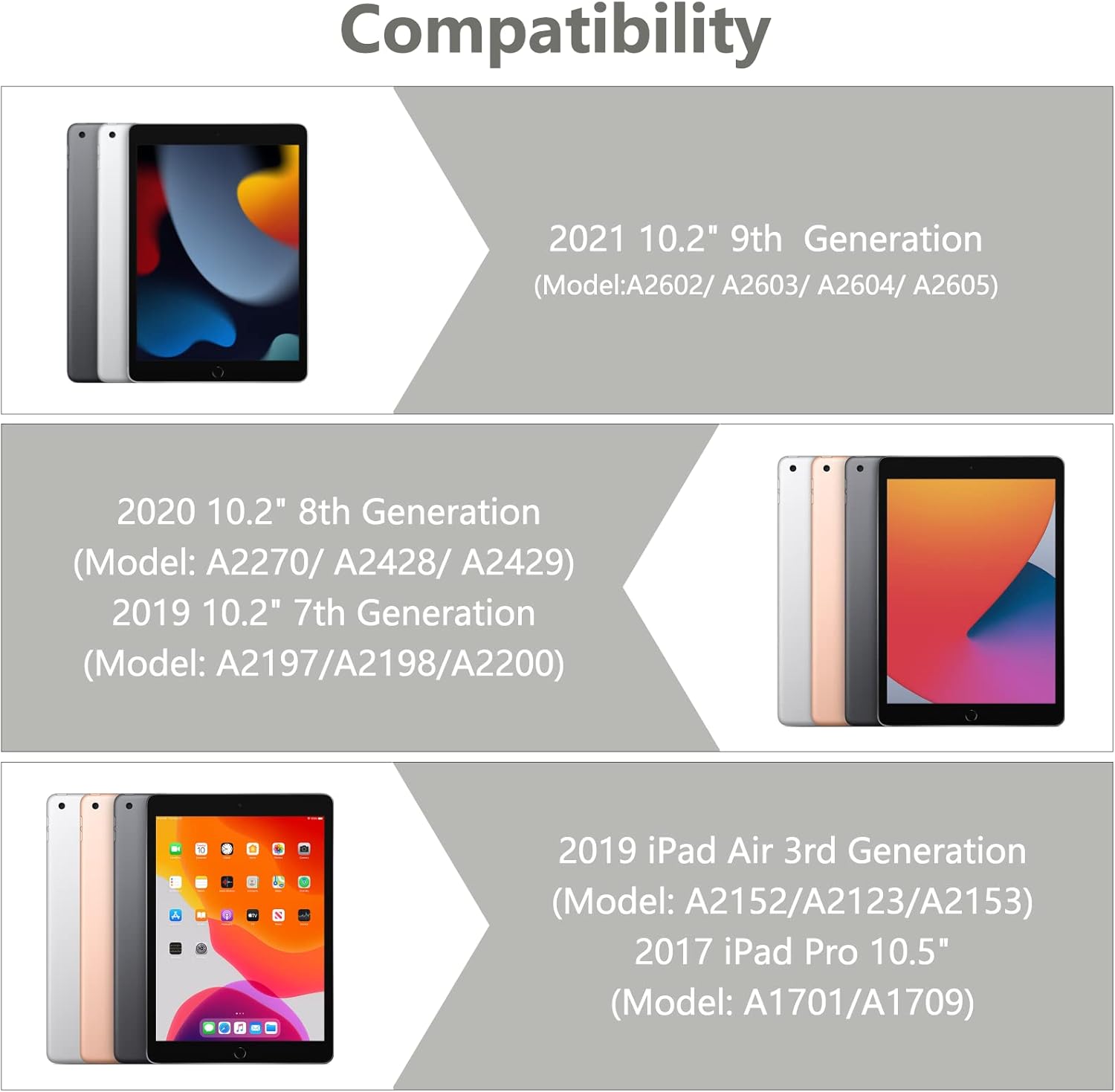
Image 1.1: Visual guide illustrating the compatible iPad models for this keyboard case.
2. เนื้อหาบรรจุภัณฑ์
Please ensure all items are present in the package upon unboxing:
- 1 x iPad Case with Keyboard (integrated)
- 1 x Wireless Bluetooth Keyboard (detachable)
- 1 x Transparent Keyboard Protector
- สายชาร์จ USB 1 เส้น
- 1 x คู่มือผู้ใช้

ภาพที่ 2.1: จบแล้วview of all components included in the product package.
3. คำแนะนำในการตั้งค่า
3.1 การติดตั้ง iPad ของคุณ
- Gently align your iPad with the case's frame.
- Press the iPad firmly into the case, ensuring all edges are securely seated. The precise cutouts will align with your iPad's ports and buttons.
3.2 Connecting the Wireless Bluetooth Keyboard
The keyboard connects to your iPad via Bluetooth. Follow these steps to pair the devices:
- ตรวจสอบให้แน่ใจว่าแป้นพิมพ์มีประจุไฟเต็มแล้ว
- Turn on the keyboard by sliding the power switch to the 'ON' position. The indicator light will illuminate.
- Press the 'Connect' button on the keyboard. The Bluetooth indicator light will begin to flash, indicating it is in pairing mode.
- บน iPad ของคุณไปที่ การตั้งค่า > บลูทูธ.
- เปิดบลูทูธ iPad ของคุณจะค้นหาอุปกรณ์ที่พร้อมใช้งาน
- Select 'Bluetooth Keyboard' (or a similar name) from the list of devices.
- If prompted, enter the pairing code displayed on your iPad onto the keyboard and press 'Enter'.
- Once paired, the Bluetooth indicator light on the keyboard will stop flashing and remain solid or turn off, and your iPad will show the keyboard as 'Connected'.

Image 3.1: The BAIBAO keyboard case with an iPad inserted and the detachable keyboard positioned for typing.
4. คู่มือการใช้งาน
4.1 Detachable Keyboard Functionality
The keyboard is magnetically attached to the case, allowing for easy detachment and repositioning. This provides flexibility for various usage scenarios.

Image 4.1: Illustration of the magnetic adsorption mechanism that secures the keyboard to the case.
4.2 หลายอย่าง Viewอิงแองเกิลส์
The case features a thoughtful design that allows you to adjust your iPad to various comfortable viewing angles. This is ideal for typing, watching videos, or making presentations.

Image 4.2: Diagram demonstrating the adjustable viewing angles of the iPad when placed in the case.
4.3 ฟังก์ชั่นปิด/เปิดเครื่องอัตโนมัติ
The smart cover automatically puts your iPad to sleep when closed and wakes it up when opened, helping to conserve battery life.

Image 4.3: Visual representation of the automatic sleep and wake functionality when opening and closing the case.
4.4 Integrated Pencil Holder
The case includes a dedicated slot for your Apple Pencil, preventing it from being lost and keeping it readily accessible.
4.5 คุณสมบัติของแป้นพิมพ์
- Tactile Response: Each key features a spring mechanism for a responsive typing experience.
- Hotkeys and Media Keys: The keyboard includes special function keys for quick access to common iPad features.
- รองรับหลายระบบ: The keyboard supports Android, iOS, and Windows systems, enhancing its versatility.
5. การบำรุงรักษา
5.1 การชาร์จคีย์บอร์ด
The keyboard is powered by a built-in Li-ion battery. Use the provided USB charging cable to charge it.
- Connect the small end of the USB cable to the charging port on the keyboard.
- ต่อปลายสาย USB ด้านที่ใหญ่กว่าเข้ากับอะแดปเตอร์แปลงไฟ USB (ไม่ได้รวมอยู่ในชุด) หรือพอร์ต USB ของคอมพิวเตอร์
- The keyboard power indicator will flash red when charging is required.
- การชาร์จเต็มโดยทั่วไปจะใช้เวลา 2-3 ชั่วโมง
- The keyboard can operate for at least 80 hours on a full charge and has a standby time of 130 days.
5.2 Cleaning the Case and Keyboard
To maintain the appearance and functionality of your product:
- เช็ดเคสด้วยผ้าเนื้อนุ่มamp ผ้า หลีกเลี่ยงสารเคมีรุนแรงหรือน้ำยาทำความสะอาดที่มีฤทธิ์กัดกร่อน
- For the keyboard, use a soft, dry cloth. A transparent keyboard protector is included to help keep the keys clean.
- Ensure the keyboard is powered off before cleaning.
6 การแก้ไขปัญหา
6.1 Keyboard Not Connecting to iPad
- ตรวจสอบให้แน่ใจว่าคีย์บอร์ดเปิดใช้งานอยู่และชาร์จแบตเตอรี่เต็มแล้ว
- Verify that Bluetooth is enabled on your iPad.
- ตรวจสอบให้แน่ใจว่าแป้นพิมพ์อยู่ในโหมดจับคู่ (ไฟแสดงสถานะบลูทูธกะพริบ)
- Forget the device on your iPad's Bluetooth settings and attempt to re-pair.
- รีสตาร์ททั้ง iPad และคีย์บอร์ดของคุณ
6.2 คีย์ไม่ตอบสนอง
- ตรวจสอบระดับแบตเตอรี่ของคีย์บอร์ดและชาร์จหากจำเป็น
- ตรวจสอบให้แน่ใจว่าแป้นพิมพ์เชื่อมต่อผ่านบลูทูธอย่างถูกต้อง
- Remove the keyboard protector to ensure it is not interfering with key presses.
6.3 Auto Sleep/Wake Not Functioning
- Ensure your iPad is correctly seated within the case.
- Check your iPad's settings to ensure 'Lock/Unlock' is enabled under 'Display & Brightness' (or similar, depending on iOS version).
7. ข้อมูลจำเพาะ
| ขนาดสินค้า | 11.38 x 8.15 x 1.18 นิ้ว |
| น้ำหนักสินค้า | 1.9 ปอนด์ |
| เทคโนโลยีการเชื่อมต่อ | บลูทูธ |
| คำอธิบายแป้นพิมพ์ | มัลติฟังก์ชั่น |
| คุณสมบัติพิเศษ | Hotkeys, Media Keys, Ergonomic |
| วัสดุ | อะคริโลไนไตรล์ บิวทาไดอีน สไตรีน (ABS) |
| ประเภทแบตเตอรี่ | แบตเตอรี่ลิเธียมไอออน 1 ก้อน (รวมอยู่ด้วย) |
| อายุการใช้งานแบตเตอรี่ (ขณะใช้งาน) | นานถึง 80 ชั่วโมง |
| อายุการใช้งานแบตเตอรี่ (สแตนด์บาย) | นานถึง 130 วัน |
8. การรับประกันและการสนับสนุน
This product is designed for durability and performance. While specific warranty details are not provided in this manual, BAIBAO is committed to customer satisfaction.
If you encounter any issues with your product, have questions regarding its model or function, or require assistance, please contact BAIBAO customer service. We are eager to resolve any problems you may experience.
Please refer to the contact information provided with your purchase or visit the official BAIBAO webเว็บไซต์สำหรับการสนับสนุน


