1. บทนำ
The CYCPLUS Cadence/Speed Sensor is a versatile device designed to track your cycling performance. It supports both ANT+ and Bluetooth 4.0 protocols, allowing seamless connection with various cycling computers and smartphone applications. This sensor can function as either a speed sensor or a cadence sensor, providing accurate data for your training and rides.
This manual provides detailed instructions for setting up, operating, and maintaining your CYCPLUS Cadence/Speed Sensor to ensure optimal performance and longevity.

Image 1: Two CYCPLUS Cadence/Speed Sensors, showcasing ดีไซน์กะทัดรัด
2. เนื้อหาบรรจุภัณฑ์
โปรดตรวจสอบว่ารายการทั้งหมดที่ระบุไว้ด้านล่างมีอยู่ในแพ็คเกจของคุณหรือไม่:
- CYCPLUS Cadence/Speed Sensor Unit
- Rubber Spacers (2 pieces)
- Rubber Rings (2 pieces)
- แบตเตอรี่เซลล์แบบกระดุม CR2032 (ติดตั้งไว้ล่วงหน้า)
- คู่มือการใช้งาน

Image 2: Package contents including the sensor, rubber spacers, rubber rings, and user guide.
3. การตั้งค่าและการติดตั้ง
3.1. การเปิดใช้งานแบตเตอรี่
The sensor comes with a pre-installed CR2032 battery. Before first use, you need to remove the insulation sheet to activate the battery.
- Gently press the cover and rotate the lever to align with the center line.
- Remove the cover and the insulation sheet from the battery compartment.
- Place the battery back with the positive (+) side facing up.
- Align the cover with the center line, gently press, and rotate the lever to secure it.
Video 1: This video demonstrates the process of removing the insulation sheet and installing the battery for the CYCPLUS Cadence/Speed Sensor.
3.2. การเลือกโหมด
The sensor can operate in two modes: Speed Mode and Cadence Mode. To switch between modes, gently press the cover and rotate the sensor body until the indicator aligns with the desired mode (SPEED or CADENCE). The LED light will flash to indicate the current mode:
- แสงสีฟ้า: โหมดความเร็ว
- ไฟเขียว: โหมดจังหวะ

Image 3: The sensor displaying its mode selection and Bluetooth pairing process.
3.3. Installation - Speed Mode
When using the sensor as a speed sensor, attach it to the wheel hub.
- Ensure the sensor is in Speed Mode (blue light flashes).
- Select the appropriate rubber spacer (thicker one for larger hubs) and rubber ring.
- Place the sensor on the front or rear wheel hub.
- Secure the sensor firmly with the rubber ring around the hub and sensor.

Image 4: The CYCPLUS sensor installed on a bicycle wheel hub for speed tracking.
3.4. Installation - Cadence Mode
When using the sensor as a cadence sensor, attach it to the crank arm.
- Ensure the sensor is in Cadence Mode (green light flashes).
- Select the appropriate rubber spacer (thinner one for crank arms) and rubber ring.
- Place the sensor on the inside of the left crank arm.
- Secure the sensor firmly with the rubber ring around the crank arm and sensor.

Image 5: The CYCPLUS sensor installed on a bicycle crank arm for cadence tracking.
4. การเชื่อมต่อและการจับคู่
The CYCPLUS sensor supports both ANT+ and Bluetooth 4.0 for broad compatibility.
4.1. Pairing with Cycling Computers (ANT+ & Bluetooth)
To pair the sensor with your cycling computer:
- Ensure the sensor is in the correct mode (Speed or Cadence) and active (rotate the wheel or crank to wake it up).
- On your cycling computer, navigate to the sensor pairing menu.
- Select to add a new speed or cadence sensor.
- The cycling computer should detect the CYCPLUS sensor. Select it to pair.
- Once paired, the data will be displayed on your cycling computer.

Image 6: The sensor demonstrating ANT+ compatibility with a cycling computer, displaying speed and cadence data.
4.2. Pairing with Smartphone Applications (Bluetooth)
To pair the sensor with a cycling app on your smartphone:
- โปรดตรวจสอบให้แน่ใจว่าได้เปิดใช้งานบลูทูธและบริการระบุตำแหน่งบนสมาร์ทโฟนของคุณแล้ว
- สำคัญ: Do not pair the sensor directly through your phone's Bluetooth settings. Instead, open your preferred cycling application (e.g., Zwift, Wahoo Fitness, Strava).
- Within the app, navigate to the sensor pairing or device connection section.
- The app will search for available sensors. Select the CYCPLUS sensor (it may appear as 'Speed' or 'Cadence' followed by a number) to connect.
- Once connected, the app will display your speed or cadence data.
5. โหมดการทำงาน
The CYCPLUS sensor offers two distinct operating modes:
- โหมดความเร็ว: When the sensor is attached to the wheel hub and the blue LED flashes, it measures and transmits speed data.
- Cadence Mode: When the sensor is attached to the crank arm and the green LED flashes, it measures and transmits cadence data.
Always ensure the sensor is in the correct mode for the data you wish to track. The mode can be switched by rotating the sensor body as described in Section 3.2.

Image 7: The sensor can be used for indoor training setups, providing data to compatible devices or apps.
6. การบำรุงรักษา
6.1. การเปลี่ยนแบตเตอรี่
The sensor uses a standard CR2032 button cell battery. The battery life is approximately 600 hours in cadence mode and 400 hours in speed mode. To replace the battery, follow the steps for battery activation (Section 3.1) to open the compartment, replace the old battery with a new CR2032, and then securely close the cover.

Image 8: The sensor's battery compartment, showing the CR2032 battery and its estimated operational hours.
6.2. การทำความสะอาดและการกันน้ำ
The CYCPLUS sensor has an IP67 waterproof rating, meaning it is protected from dust and can withstand immersion in water up to 1 meter for 30 minutes. This makes it suitable for use in various weather conditions.
To clean the sensor, wipe it with a soft, damp ผ้า หลีกเลี่ยงการใช้สารเคมีรุนแรงหรือวัสดุขัดถูที่อาจทำให้ผ้าเสียหายได้asing หรือส่วนประกอบภายใน
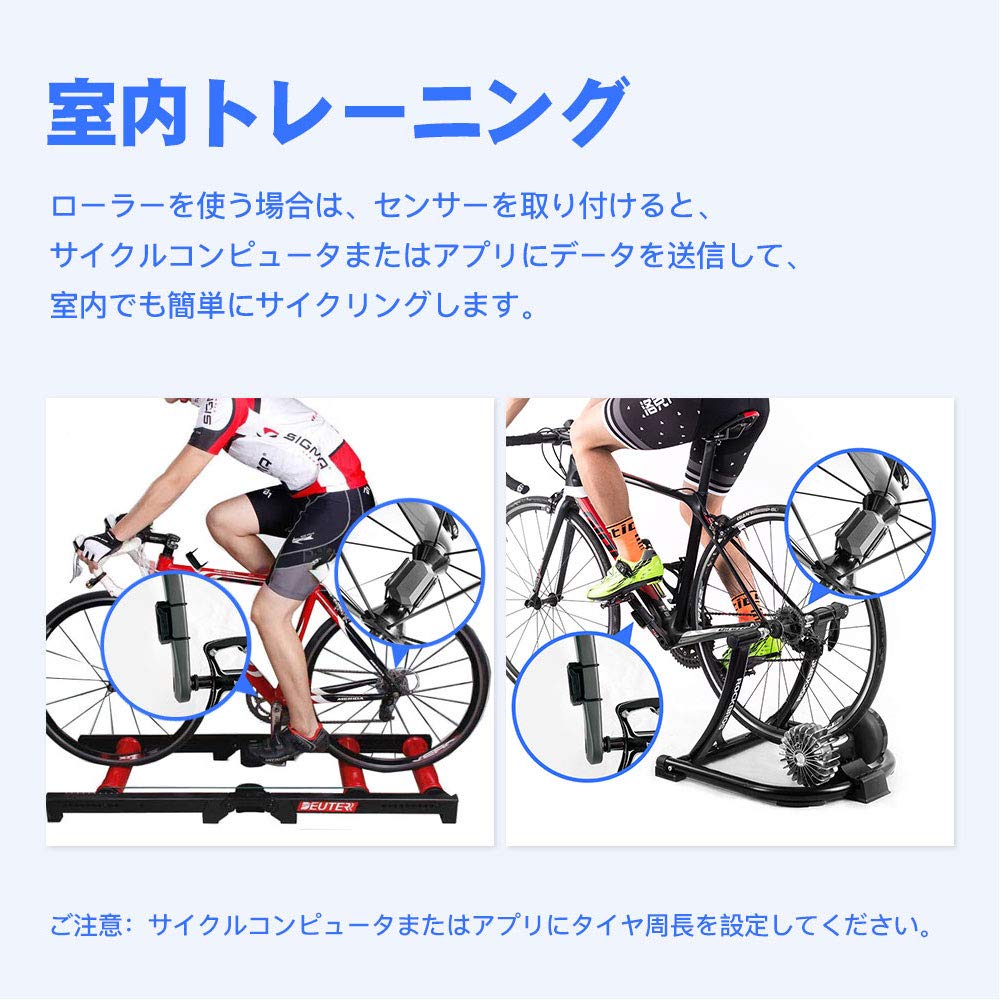
Image 9: The sensor being exposed to water, highlighting its IP67 waterproof and dustproof capabilities.
7 การแก้ไขปัญหา
7.1. No Data Displayed
- ตรวจสอบแบตเตอรี่: ตรวจสอบให้แน่ใจว่าติดตั้งแบตเตอรี่อย่างถูกต้องและมีประจุเพียงพอ เปลี่ยนแบตเตอรี่หากจำเป็น
- เปิดใช้งานเซ็นเซอร์: Rotate the wheel (for speed) or crank (for cadence) to wake up the sensor. The LED should flash.
- ตรวจสอบโหมด: Verify the sensor is in the correct mode (blue for speed, green for cadence).
- ซ่อมแซมอุปกรณ์: Try unpairing and re-pairing the sensor with your cycling computer or app.
- ความใกล้ชิด: ตรวจสอบให้แน่ใจว่าเซ็นเซอร์อยู่ในระยะที่อุปกรณ์รับสัญญาณของคุณสามารถรับได้
7.2. Incorrect or Intermittent Data
- ตำแหน่งเซนเซอร์: Ensure the sensor is securely mounted and not moving during your ride. For cadence, ensure it's on the inside of the crank arm. For speed, ensure it's on the hub.
- การรบกวน: Strong electromagnetic fields or other wireless devices nearby can cause interference. Try moving away from such sources.
- Wheel Size (Speed Mode): For accurate speed readings, ensure the correct wheel circumference is set in your cycling computer or app.
- อัพเดตเฟิร์มแวร์: Check the CYCPLUS website or app for any available firmware updates for the sensor.
7.3. การจับคู่ล้มเหลว
- การตั้งค่าบลูทูธ: If using a smartphone app, ensure you are pairing within the app itself, not directly through the phone's Bluetooth settings.
- อุปกรณ์อื่น ๆ: Disconnect the sensor from any other devices it might be currently paired with.
- เริ่มต้นใหม่อีกครั้ง: Restart your cycling computer or smartphone.
8. ข้อมูลจำเพาะ
| คุณสมบัติ | ข้อมูลจำเพาะ |
|---|---|
| น้ำหนักผลิตภัณฑ์ | 9.2 กรัม |
| ขนาดบรรจุภัณฑ์ | 13.4 x 9.7 x 3 ซม. |
| สไตล์ | Speed Sensor (Dual Mode: Speed/Cadence) |
| ประเภทการติดตั้ง | Easy Installation (Wireless) |
| ประเภทแบตเตอรี่ | ถ่านกระดุม CR2032 |
| การเชื่อมต่อ | ANT+, บลูทูธ 4.0 |
| ระดับการกันน้ำ | IP67 |
| Cadence Mode Operating Time | 600 ชั่วโมง |
| Speed Mode Operating Time | 400 ชั่วโมง |
9. การรับประกันและการสนับสนุน
CYCPLUS provides a 12-month quality assurance service for this product. If you have any questions or concerns, please contact us through your purchase platform. For Amazon purchases, navigate to "Account Service" → "Order History" → "Sold by: CYCPLUS" → "Ask a question." We aim to respond within 24 hours and provide prompt assistance for returns, refunds, or exchanges as quickly as possible.


