การแนะนำ
This manual provides detailed instructions for the assembly, operation, and maintenance of your FLEXISPOT E4 Classic Electric Standing Desk. Please read this manual thoroughly before use to ensure proper function and longevity of your product.

Figure 1: The FLEXISPOT E4 Classic Electric Standing Desk, featuring a bamboo contour desktop and silver frame, set up with dual monitors in an office environment.
ข้อมูลด้านความปลอดภัย
- ตรวจสอบให้แน่ใจว่าส่วนประกอบทั้งหมดได้รับการยึดอย่างแน่นหนาก่อนการใช้งาน
- โปรดกันเด็กและสัตว์เลี้ยงให้อยู่ห่างจากโต๊ะทำงานขณะทำการผ่าตัด
- Do not overload the desk beyond its specified weight capacity (220 lbs).
- หลีกเลี่ยงการวางของเหลวลงบนแผงควบคุมหรือชิ้นส่วนมอเตอร์โดยตรง
- ถอดสายไฟก่อนทำความสะอาดหรือบำรุงรักษา
- ใช้อะแดปเตอร์ไฟฟ้าที่ให้มาเท่านั้น
เนื้อหาแพ็คเกจ
โปรดตรวจสอบให้แน่ใจว่ามีชิ้นส่วนครบทุกชิ้นก่อนเริ่มประกอบ หากมีชิ้นส่วนใดขาดหายหรือเสียหาย โปรดติดต่อฝ่ายบริการลูกค้า
- Bamboo Contour Whole-Piece Desktop (55"x28")
- Silver Frame Legs (Dual Motor)
- แผงควบคุม
- อะแดปเตอร์แปลงไฟและสายเคเบิล
- อุปกรณ์ประกอบ (สกรู เครื่องมือ ฯลฯ)
- คู่มือการใช้งาน (เอกสารนี้)
การติดตั้งและการประกอบ
ผลิตภัณฑ์นี้จำเป็นต้องประกอบเอง โปรดปฏิบัติตามขั้นตอนเหล่านี้อย่างระมัดระวัง
- แกะส่วนประกอบ: นำชิ้นส่วนทั้งหมดออกจากบรรจุภัณฑ์อย่างระมัดระวัง และวางเรียงบนพื้นผิวที่สะอาดและนุ่ม เพื่อป้องกันรอยขีดข่วน
- Attach Legs to Desktop: Position the desktop upside down. Align the leg frames with the pre-drilled holes on the underside of the desktop. Secure them using the provided screws and tools.
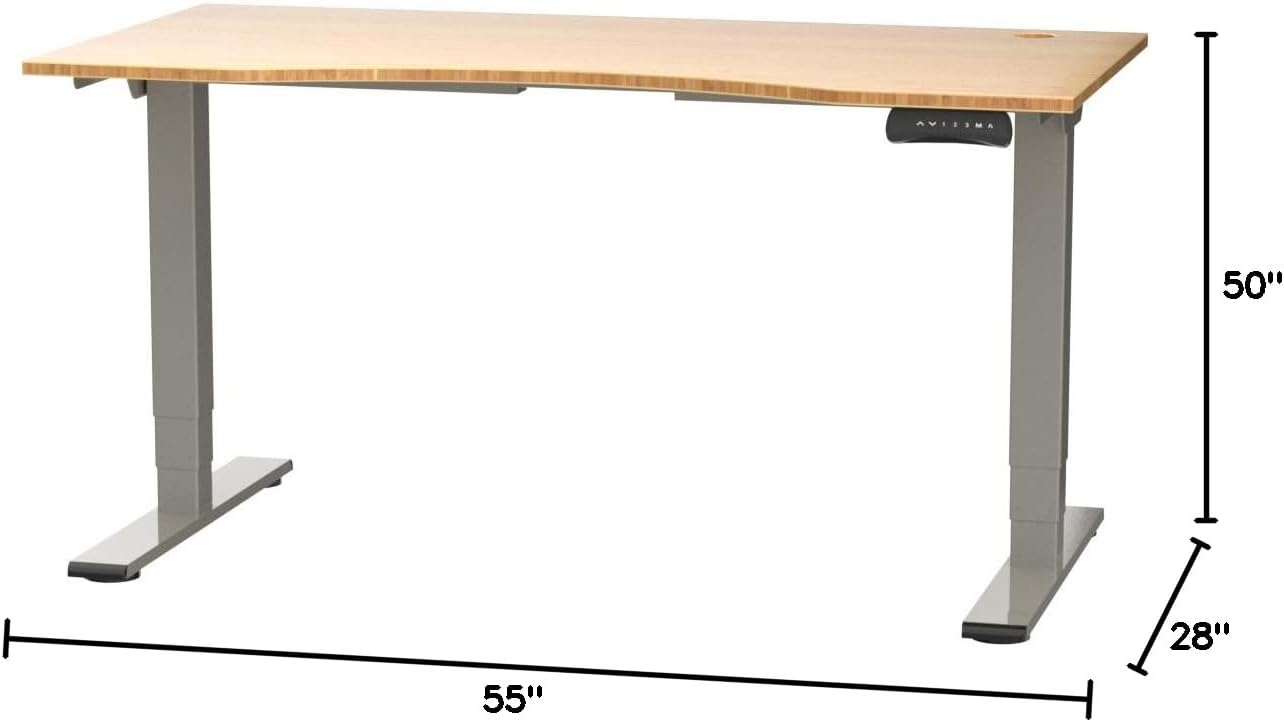
Figure 2: Desk dimensions indicating 55 inches width, 28 inches depth, and adjustable height up to 50 inches.
- ติดตั้งแผงควบคุม: Mount the control panel to the desired location on the underside of the desktop, typically on the front edge for easy access. Connect the control panel cable to the motor control box.

Figure 3: The programmable control panel with LED display, up/down buttons, and memory presets (1, 2, 3, M, A).
- เชื่อมต่อพลังงาน: Plug the power adapter into the control box, and then plug the power cable into a standard electrical outlet.
- การจัดการสายเคเบิล: Utilize the two cable management holes on the desktop to route and organize your cables, preventing clutter.

Figure 4: Detail showing the integrated cable management holes and the water-resistant surface of the bamboo desktop.
- การสอบเทียบเบื้องต้น: After assembly and power connection, the desk may require an initial calibration. Refer to the "Operating Instructions" section for details on resetting or calibrating the desk.
คำแนะนำการใช้งาน
การปรับความสูง
The FLEXISPOT E4 Classic desk features a dual-motor lift system for smooth and quiet height adjustments.
- ปรับระดับโต๊ะทำงาน: กดปุ่มค้างไว้ ลูกศรขึ้น button (▲) on the control panel. The desk will move upwards.
- โต๊ะล่าง: กดปุ่มค้างไว้ ลูกศรลง button (▼) on the control panel. The desk will move downwards.
- Release the button at your desired height. The desk can adjust from 24.4 inches to 50 inches.
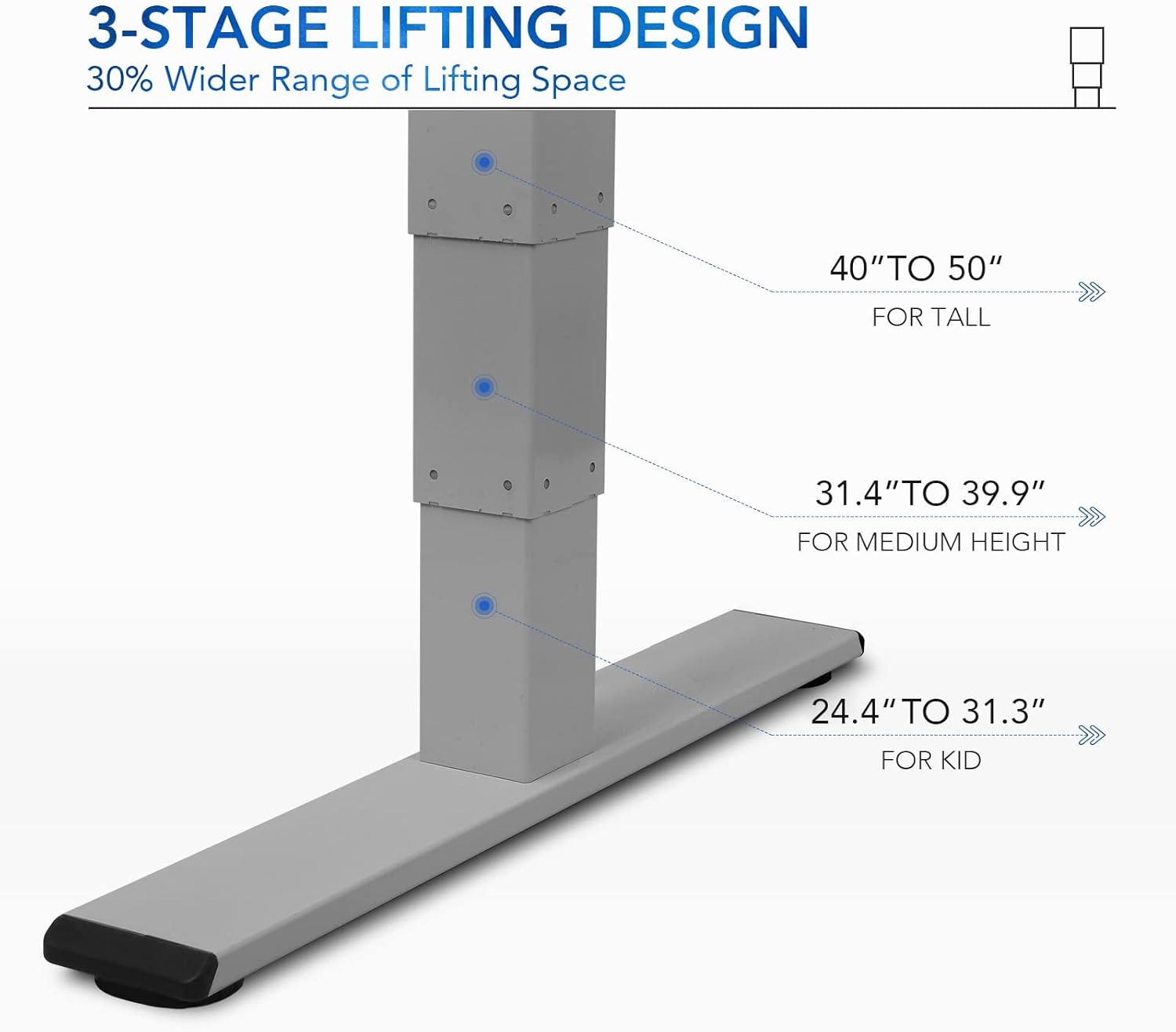
รูปที่ 5: 3-stage lifting design provides a wide range of height adjustments, suitable for various user heights, from 24.4" (kid) to 50" (tall).
Programmable Memory Presets
The control panel allows you to save up to three preferred height settings for quick adjustments.
- Set a Memory Position:
- ปรับความสูงของโต๊ะตามต้องการโดยใช้ปุ่มขึ้น/ลง
- กดปุ่ม "เอ็ม" button. The LED display will show "S-".
- Within 3 seconds, press one of the number buttons ("1", "2", หรือ "3") to save the current height to that preset. The display will show "S-1", "S-2", or "S-3" to confirm.
- Recall a Memory Position: Simply press the corresponding number button ("1", "2", หรือ "3"). The desk will automatically move to the saved height.
Sit/Stand Reminder
The "A" button can be used to set a reminder to switch between sitting and standing positions.
- Consult the full manual for detailed instructions on setting and customizing the sit/stand reminder function.
Ergonomic Curved Design
The 55"x28" desktop features an ergonomic curved design for enhanced comfort and efficiency during work or study.

Figure 6: The ergonomic curved edge of the desktop, designed to provide a more comfortable and natural working posture.
การซ่อมบำรุง
- การทำความสะอาด: เช็ดพื้นโต๊ะและกรอบโต๊ะด้วยผ้าเนื้อนุ่มและแห้งamp cloth. Avoid abrasive cleaners or harsh chemicals. The bamboo surface is designed to be water-resistant, making it easy to clean.
- การดูแลมอเตอร์: The dual-motor system is designed for low noise and durability. No specific user maintenance is required for the motors.
- การจัดการสายเคเบิล: Periodically check that all cables are neatly routed through the cable management holes and are not pinched or tangled.
- การตรวจสอบตัวยึด: ตรวจสอบสกรูและตัวยึดทั้งหมดเป็นระยะ เพื่อให้แน่ใจว่ายังแน่นอยู่ ขันให้แน่นอีกครั้งหากจำเป็น
การแก้ไขปัญหา
| ปัญหา | สาเหตุที่เป็นไปได้ | สารละลาย |
|---|---|---|
| โต๊ะไม่ขยับ | Power cable disconnected; overload protection activated; motor error. | Check power connections. Reduce weight on desk. Unplug and replug power after 10 minutes. Perform a reset (see below). |
| โต๊ะขยับไม่สม่ำเสมอหรือมีเสียงผิดปกติ | Loose fasteners; obstruction; motor synchronization issue. | Check and tighten all assembly screws. Ensure no obstructions under the desk. Perform a reset. |
| LED display shows an error code (e.g., "E01", "RST"). | System error; need for reset. | ขั้นตอนการรีเซ็ต: Press and hold the Down Arrow button until the desk reaches its lowest position and then slightly rises. Release the button. If the error persists, unplug the desk for 10 minutes and try again. |
| การตั้งค่าหน่วยความจำล่วงหน้าใช้งานไม่ได้ | ค่าที่ตั้งไว้ล่วงหน้าถูกบันทึกไม่ถูกต้อง | Re-save your desired memory positions following the "Programmable Memory Presets" instructions. |
If the issue persists after attempting these solutions, please contact FLEXISPOT customer support.
ข้อมูลจำเพาะ
| คุณสมบัติ | รายละเอียด |
|---|---|
| แบบอย่าง | E4 Classic |
| ยี่ห้อ | เฟล็กซิสพอท |
| วัสดุเดสก์ท็อป | Bamboo Contour Whole-Piece Board |
| วัสดุกรอบ | Alloy Steel (Silver Frame) |
| ขนาดสินค้า (ลึก x กว้าง x สูง) | 28"D x 55"W x 50"H (Max Height) |
| ช่วงการปรับความสูง | 24.4" ถึง 50" |
| ระบบยกของ | มอเตอร์คู่ 3 เซลล์tage Lifting |
| ความจุน้ำหนัก | สูงสุด 220 ปอนด์ |
| คุณสมบัติพิเศษ | Electric Height Adjustment, Programmable Memory Presets, Sit/Stand Reminder, Curved Ergonomic Design, Cable Management Holes, Waterproof Surface |
| จำเป็นต้องประกอบ | ใช่ |
การรับประกันและการสนับสนุน
FLEXISPOT products are designed for durability and performance. For specific warranty details regarding your E4 Classic Electric Standing Desk, please refer to the warranty card included with your purchase or visit the official FLEXISPOT webเว็บไซต์.
For technical support, troubleshooting assistance, or to inquire about replacement parts, please contact FLEXISPOT customer service:
- Webเว็บไซต์: www.flexispot.com
- อีเมล: support@flexispot.com
- โทรศัพท์: อ้างถึงเจ้าหน้าที่ webเว็บไซต์สำหรับหมายเลขติดต่อในภูมิภาค
When contacting support, please have your product model (E4 Classic) and purchase information ready.


