1. บทนำ
This manual provides essential instructions for the safe operation and maintenance of your Potensic T25 2K GPS FPV Camera Drone. Please read this manual thoroughly before operating the drone to ensure proper usage and to prevent damage or injury. Keep this manual for future reference.
2 ส่วนประกอบ
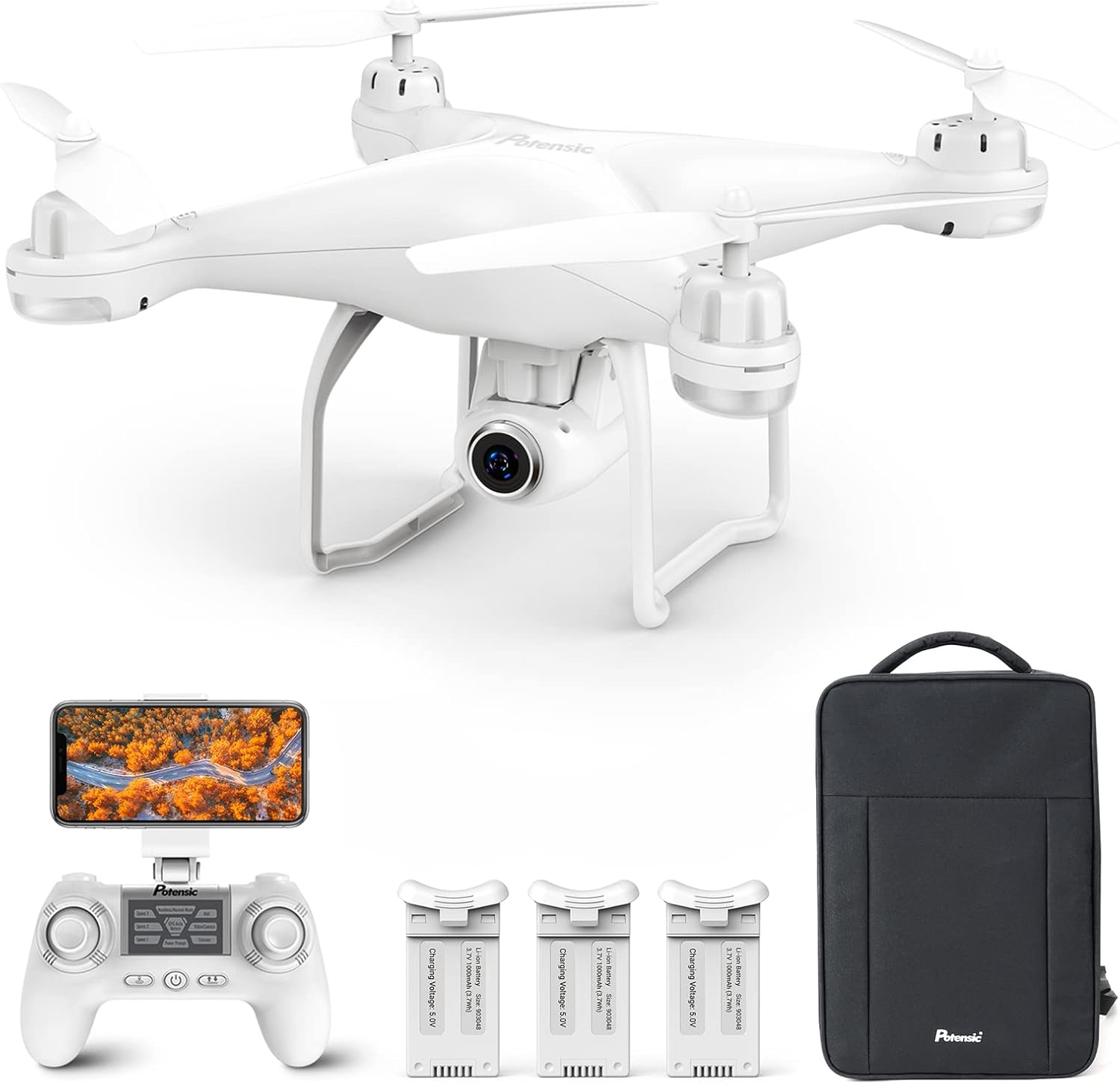
The Potensic T25 drone package includes the following items:
- Potensic T25 Drone
- รีโมทคอนโทรล
- 3 x Intelligent Flight Batteries
- Backpack for transport
- สายชาร์จ USB
- ใบพัดสำรอง
- ยามใบพัด
- คู่มือการใช้งาน (เอกสารนี้)
3. คุณสมบัติหลัก
- 2K HD 75° Adjustable Camera: Equipped with a 2K HD camera for capturing high-resolution photographs and videos. The camera angle can be adjusted remotely during flight, offering a 120° Field of View (เอฟโอวี).
- เวลาบินขยาย: Includes three upgraded 1000 mAh intelligent batteries, providing up to 30 minutes of flight time per battery.
- GPS Auto Return & Stable Flight: Features a dual positioning system (GPS and Optical Flow Positioning) for enhanced flight stability. The drone can automatically return to its home point upon pressing the Return-to-Home (RTH) button, loss of signal, or low battery.
- โหมดการบินอัจฉริยะ: Supports various user-friendly modes including Headless Mode, Altitude Hold, One Key Take-off/Landing for beginners, and advanced modes like Follow Me and Waypoint Fly for enriched flight experiences.
- การออกแบบพกพา: Comes with a backpack for convenient outdoor use. The drone's weight is less than 250g, which may exempt it from FAA registration requirements in some regions.
4. การตั้งค่า
4.1 การชาร์จแบตเตอรี่
Ensure all drone and remote control batteries are fully charged before each flight. Use the provided USB charging cable. The intelligent flight batteries are 1000 mAh Lithium Polymer batteries.
4.2 การติดตั้งใบพัด
- Identify the 'A' and 'B' marked propellers and motors.
- Attach 'A' propellers to 'A' motors and 'B' propellers to 'B' motors. Ensure they are securely fastened.
- Install propeller guards if desired for added protection.
4.3 การควบคุมระยะไกลและการเชื่อมต่อแอปพลิเคชัน
- เปิดใช้งานโดรนและรีโมทคอนโทรล
- Download and install the Potensic drone application on your smartphone.
- Connect your smartphone to the drone's Wi-Fi network.
- Open the Potensic app to establish a connection and view ฟีด FPV
5. คู่มือการใช้งาน
5.1 รายการตรวจสอบก่อนบิน
- Ensure all batteries are fully charged.
- Check that propellers are correctly installed and secure.
- Verify the drone and remote control are paired.
- Confirm GPS signal acquisition before flying outdoors.
- Fly in open areas, away from obstacles, people, and animals.
5.2 การควบคุมการบินขั้นพื้นฐาน
- เคล็ดลับสำคัญในการขึ้นบิน/ลงจอด: Press the designated button on the remote control for automatic take-off or landing.
- การรักษาระดับความสูง: The drone maintains a stable altitude, allowing for easier control and photography.
- โหมดไม่มีหัว: In this mode, the drone's orientation is relative to the pilot, simplifying flight control regardless of the drone's front direction.
5.3 โหมดการบินอัจฉริยะ
The Potensic T25 offers advanced flight modes for enhanced user experience:
- โหมดติดตามฉัน: The drone will automatically follow the remote control or the connected smartphone, capturing footage ขณะที่คุณเคลื่อนไหว
- บินตามจุดหมาย: Plan a custom flight path by drawing points on the map within the app. The drone will then fly along the specified route.


5.4 Camera Operation and FPV
The drone is equipped with a 2K HD camera. You can adjust its angle by 75° via the remote control. The FPV (First Person View) feature allows real-time video transmission to your smartphone, enabling you to see what the drone sees.


5.5 GPS Auto Return
For safety, the drone can automatically return to its take-off point. This feature activates under the following conditions:
- Manual activation via the RTH button on the remote control.
- Loss of signal between the drone and the remote control.
- ระดับแบตเตอรี่ต่ำ

5.6 วิดีโอผลิตภัณฑ์view
Video: An official product video from Potensic showcasing the T25 drone's features, including one-key take-off/landing, dual GPS, Follow Me mode, Waypoint Fly, Headless Mode, LED lights, and Smart Return Home functionality.
6. การบำรุงรักษา
6.1 การดูแลแบตเตอรี่
- Always use the original charger and cables.
- ห้ามชาร์จแบตเตอรี่มากเกินไปหรือปล่อยประจุมากเกินไป
- เก็บแบตเตอรี่ไว้ในที่เย็นและแห้ง ห่างจากแสงแดดโดยตรงและอุณหภูมิที่สูงหรือต่ำเกินไป
- หากเก็บรักษาเป็นเวลานาน ควรชาร์จแบตเตอรี่ให้มีความจุประมาณ 50-60%
6.2 การทำความสะอาดและการเก็บรักษา
- Clean the drone with a soft, dry cloth. Avoid using solvents or harsh chemicals.
- Regularly check propellers for damage and replace if necessary.
- Store the drone and its components in the provided backpack to protect them from dust and physical damage.
7 การแก้ไขปัญหา
If you encounter issues with your Potensic T25 drone, refer to the following common problems and solutions:
| ปัญหา | สาเหตุที่เป็นไปได้ | สารละลาย |
|---|---|---|
| โดรนไม่เปิดเครื่อง | Low or uncharged battery | ตรวจสอบให้แน่ใจว่าแบตเตอรี่ชาร์จเต็มแล้วและใส่ถูกต้องแล้ว |
| Drone cannot connect to remote control/app | Incorrect pairing procedure; Wi-Fi interference | Follow the pairing instructions in the manual. Ensure no other devices are interfering with the Wi-Fi signal. |
| Unstable flight or drifting | Improper calibration; strong winds; damaged propellers | Perform IMU and compass calibration. Fly in calm conditions. Check and replace damaged propellers. |
| Poor camera image quality or no FPV feed | Weak Wi-Fi signal; camera lens obstruction; app issue | Ensure strong Wi-Fi connection. Clean the camera lens. Restart the app and drone. |
| GPS features (RTH, Follow Me) not working | Insufficient GPS satellites; flying indoors/under cover | Ensure the drone has acquired enough GPS satellites (usually 7 or more) before flight. Fly in open outdoor areas. |
8. ข้อมูลจำเพาะ
| คุณสมบัติ | รายละเอียด |
|---|---|
| ยี่ห้อ | โพเทนสิค |
| ชื่อรุ่น | T25 |
| ช่วงอายุ (คำอธิบาย) | ผู้ใหญ่ |
| สี | สีขาว |
| ความละเอียดในการจับภาพวิดีโอ | 2K |
| เทคโนโลยีการเชื่อมต่อ | Wired (for charging), Wi-Fi (for FPV) |
| ระดับทักษะ | ผู้เริ่มต้น |
| ความจุของแบตเตอรี่ | 1000 มิลลิวินาทีamp ชั่วโมง (ต่อแบตเตอรี่) |
| ส่วนประกอบของเซลล์แบตเตอรี่ | ลิเธียมโพลีเมอร์ |
| ขนาดสินค้า | ยาว 7.48 นิ้ว x กว้าง 7.48 นิ้ว x สูง 4.3 นิ้ว |
| น้ำหนักสินค้า | 2.72 ปอนด์ |
9. การรับประกันและการสนับสนุน
Potensic offers a 360-day free return or exchange policy for this product. For any questions, technical assistance, or warranty claims, please contact Potensic customer support directly. Refer to the product packaging or the official Potensic webเว็บไซต์สำหรับข้อมูลการติดต่อล่าสุด


