การแนะนำ
This manual provides instructions for the MageGee Typewriter Mechanical Gaming Keyboard. It covers setup, operation, maintenance, and troubleshooting to ensure optimal performance and longevity of your device. Please read this manual thoroughly before using the keyboard.
เนื้อหาแพ็คเกจ
- MageGee Typewriter Mechanical Gaming Keyboard
- ที่วางข้อมือแบบแม่เหล็ก
- สาย USB
- คู่มือการใช้งาน (เอกสารนี้)
การตั้งค่า
1. การเชื่อมต่อคีย์บอร์ด
- Locate the USB cable provided with your keyboard.
- Connect the USB Type-A end of the cable to an available USB port on your computer (PC, Laptop, or Mac).
- Connect the other end of the USB cable to the port on the keyboard.
- The keyboard is plug-and-play; no additional drivers or software are required for basic functionality. Your operating system should automatically detect and configure the device.
2. การติดตั้งที่พักข้อมือ
If your model includes a magnetic wrist rest, align it with the front edge of the keyboard. The magnets will help secure it in place, providing ergonomic support during use.
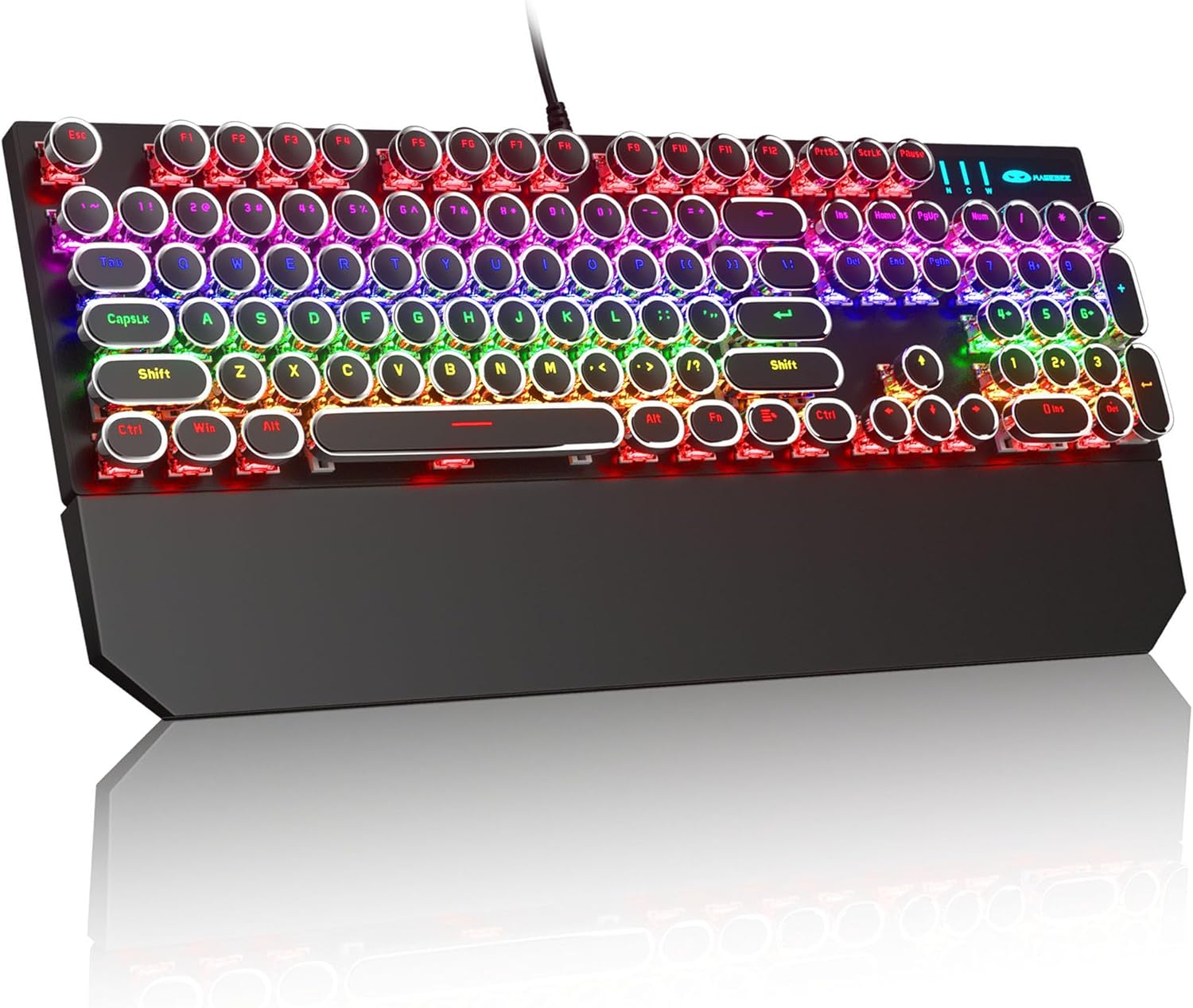
Image: The MageGee Typewriter Mechanical Gaming Keyboard connected via USB, with its magnetic wrist rest attached. The keyboard features retro round keycaps and vibrant RGB backlighting.
คำแนะนำการใช้งาน
เค้าโครงแป้นพิมพ์
The MageGee Typewriter Mechanical Gaming Keyboard features a full-size 104-key layout, including a numeric keypad and dedicated function keys (F1-F12).

ภาพ: เหนือศีรษะ view of the keyboard, highlighting the full 104-key layout and the LED backlighting effect.
การควบคุมแบ็คไลท์
The keyboard features multiple RGB rainbow backlit modes. Use the following key combinations to adjust the lighting effects:
- Fn + อิน: Cycle through various backlight modes.
- Fn + บ้าน: ปรับความสว่างของไฟแบ็คไลท์
- Fn + PgUp: เพิ่มความเร็วไฟแบ็คไลท์
- Fn + PgDn: ลดความเร็วไฟแบ็คไลท์
- Fn + เดล: Change backlight color (if applicable to the current mode).
- Fn + จบ: Turn backlight on/off.

ภาพ: ภาพระยะใกล้ view of the keyboard's keys, illustrating the RGB backlighting and the visible blue mechanical switches beneath the round keycaps.
ปุ่มมัลติมีเดียและฟังก์ชัน
The F1-F12 keys can be used in conjunction with the Fn key to access multimedia and system functions. Specific functions may vary slightly depending on your operating system.
| คีย์ผสม | การทำงาน |
|---|---|
| Fn+F1 | เครื่องเล่นสื่อ |
| Fn+F2 | ลดระดับเสียง |
| Fn+F3 | เพิ่มระดับเสียง |
| Fn+F4 | ปิดเสียง |
| Fn+F5 | หยุด |
| Fn+F6 | เพลงก่อนหน้า |
| Fn+F7 | เล่น/หยุดชั่วคราว |
| Fn+F8 | เพลงถัดไป |
| Fn+F9 | อีเมล |
| Fn+F10 | Web เบราว์เซอร์ |
| Fn+F11 | คอมพิวเตอร์ของฉัน |
| Fn+F12 | เครื่องคิดเลข |
การซ่อมบำรุง
ทำความสะอาดคีย์บอร์ด
- ถอดแป้นพิมพ์ออกจากคอมพิวเตอร์ของคุณก่อนทำความสะอาด
- ใช้ผ้านุ่มไม่เป็นขุยเช็ดเล็กน้อยampล้างออกด้วยน้ำหรือน้ำยาทำความสะอาดอ่อนๆ เพื่อเช็ดปุ่มกดและพื้นผิวแป้นพิมพ์
- สำหรับฝุ่นละอองและเศษต่างๆ ระหว่างคีย์ ให้ใช้ลมอัด
- หลีกเลี่ยงการใช้สารเคมีรุนแรง น้ำยาทำความสะอาดที่มีฤทธิ์กัดกร่อน หรือการฉีดของเหลวลงบนแป้นพิมพ์โดยตรง
การดูแลทั่วไป
- ควรหลีกเลี่ยงการวางแป้นพิมพ์ไว้ในที่ที่มีอุณหภูมิสูงหรือต่ำเกินไป ความชื้นสูง หรือแสงแดดโดยตรง
- Do not drop the keyboard or subject it to strong impacts.
- Keep liquids away from the keyboard to prevent damage.
การแก้ไขปัญหา
แป้นพิมพ์ไม่ตอบสนอง
- ตรวจสอบให้แน่ใจว่าสาย USB เชื่อมต่อกับคีย์บอร์ดและคอมพิวเตอร์อย่างแน่นหนา
- ลองเชื่อมต่อคีย์บอร์ดกับพอร์ต USB อื่นบนคอมพิวเตอร์ของคุณ
- ทดสอบแป้นพิมพ์บนคอมพิวเตอร์เครื่องอื่นเพื่อตัดปัญหาเฉพาะคอมพิวเตอร์เครื่องนั้นออกไป
- รีสตาร์ทเครื่องคอมพิวเตอร์ของคุณ
ไฟแบ็คไลท์ไม่ทำงานหรือไม่ถูกต้อง
- Ensure the backlight is not turned off (Fn + End).
- Adjust backlight brightness (Fn + Home).
- Cycle through different backlight modes (Fn + Ins) to see if the issue persists across all modes.
คีย์ไม่ลงทะเบียนหรือพิมพ์ซ้ำ
- ทำความสะอาดปุ่มที่ได้รับผลกระทบโดยใช้ลมเป่าเพื่อขจัดเศษฝุ่นหรือสิ่งสกปรกออก
- If the issue persists, it may indicate a hardware fault. Contact customer support for assistance.
ข้อมูลจำเพาะ
| คุณสมบัติ | รายละเอียด |
|---|---|
| แบบอย่าง | Typewriter Mechanical Gaming Keyboard |
| การเชื่อมต่อ | สาย USB 2.0 |
| ประเภทกุญแจ | กลไก (สวิตช์สีฟ้า) |
| ปุ่มกด | Retro Round, Double-shot injection molded |
| แสงไฟแบ็คไลท์ | RGB Rainbow Backlit |
| เค้าโครง | 104-Key Full-Size, Anti-ghosting |
| ความเข้ากันได้ | ระบบปฏิบัติการ Windows (2000, XP, ME, Vista, 7, 8), Linux, Mac |
| ขนาด (กว้าง x ยาว x สูง) | 17.1 x 4.9 x 1.3 นิ้ว (434 มม. x 130 มม. x 37 มม.) |
| น้ำหนักสินค้า | 1.99 ปอนด์ |
| วัสดุ | Aluminum alloy metal panel |

Image: A diagram illustrating the physical dimensions of the keyboard and its detachable wrist rest.
การรับประกันและการสนับสนุน
ข้อมูลการรับประกัน
MageGee products are designed for quality and reliability. This product comes with a standard manufacturer's warranty against defects in materials and workmanship. Please refer to the product packaging or the official MageGee webโปรดตรวจสอบเงื่อนไขและระยะเวลาการรับประกันโดยละเอียดได้ที่เว็บไซต์
การสนับสนุนลูกค้า
If you encounter any issues or have questions regarding your MageGee Typewriter Mechanical Gaming Keyboard, please contact our customer support team:
- อีเมล: support@magegee.com
- Webเว็บไซต์: www.mageee.com
When contacting support, please provide your product model and a detailed description of the issue.


