1. บทนำ
This manual provides essential instructions for the proper setup, operation, and maintenance of your SGPRO SG-14 Dual Handheld Wireless Microphone Set. Please read this manual thoroughly before using the product to ensure optimal performance and longevity. Keep this manual for future reference.

Image 1.1: The SGPRO SG-14 Dual Handheld Wireless Microphone Set, featuring two handheld microphones and a compact receiver.
2. เนื้อหาบรรจุภัณฑ์
ตรวจสอบว่ามีสินค้าทั้งหมดที่ระบุไว้ด้านล่างอยู่ในแพ็คเกจของคุณ:
- 2 x Handheld Microphones (Transmitters)
- 1 x Compact Wireless Receiver
- สายชาร์จ USB 1 เส้น
- 2 x Anti-roll Rings
- 2 x Mic Foam Covers
- 1 x 6.35mm to 3.5mm Connector
- 1 x คู่มือผู้ใช้ (เอกสารนี้)
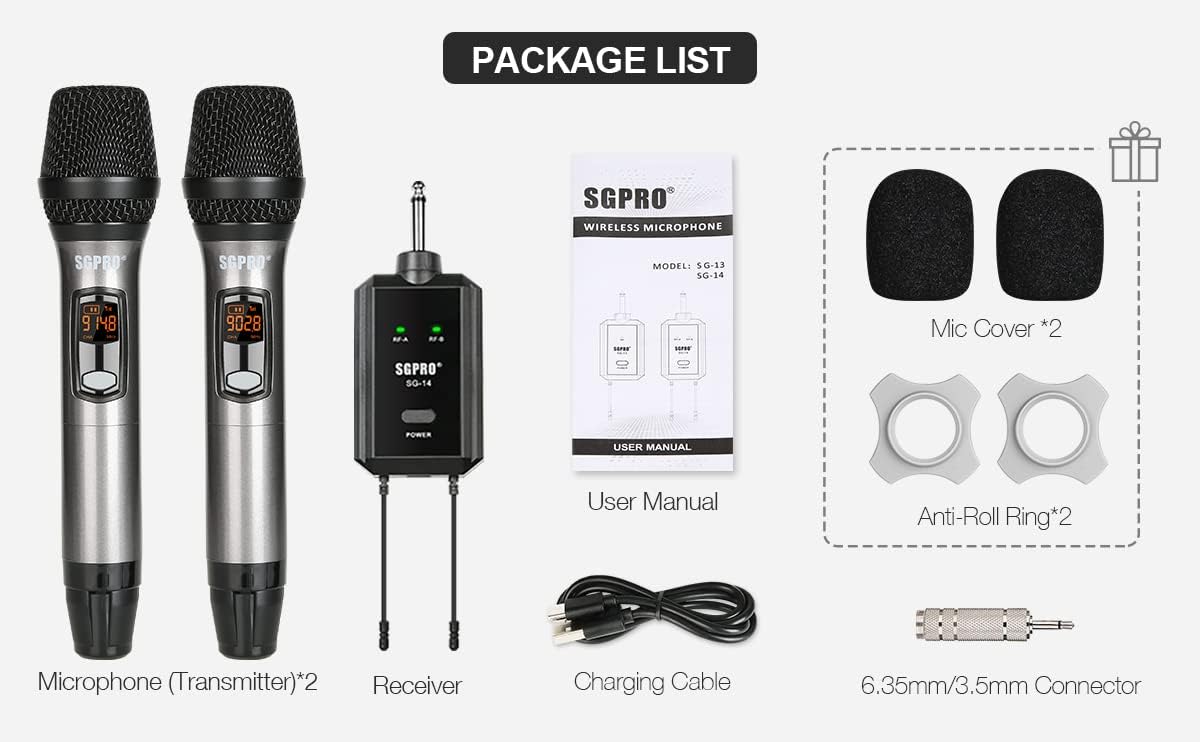
Image 2.1: Visual representation of all items included in the SGPRO SG-14 package.
3. สินค้าหมดview
3.1 Handheld Microphone (Transmitter)
- Durable Capsule Cover: ช่วยปกป้องแคปซูลไมโครโฟน
- LCD Indicator: Displays battery level, channel, and frequency.
- ปุ่มเปิดปิด/ปิดเสียง: Turns the microphone on/off and mutes/unmutes the audio.
- ปุ่มตั้งค่า: Used for channel selection and pairing.
- ปุ่ม CH+/CH-: ปรับความถี่ของช่องสัญญาณ
- AA Batteries Compartment: Houses two AA batteries for power.
3.2 Compact Wireless Receiver
- แจ็คขนาด 6.35 มม.: Connects to audio input devices (e.g., amp(เครื่องขยายเสียง, เครื่องผสมสัญญาณ)
- RF-A/RF-B Indicators: Lights up when a microphone signal is received for channel A or B.
- ปุ่มเปิด/ปิด: Turns the receiver on/off and initiates pairing.
- เสาอากาศ: Ensures stable signal transmission.
- พอร์ต USB Type-C: For charging the receiver's internal battery.

Image 3.1: Detailed diagram illustrating the various parts and controls of the handheld microphone and the compact receiver.
4. การตั้งค่า
- ชาร์จผู้รับ: Connect the receiver to a USB power source using the provided Type-C charging cable. The power indicator will show charging status. Ensure it is fully charged before first use.
- ติดตั้งแบตเตอรี่ในไมโครโฟน: Unscrew the bottom part of each handheld microphone to access the battery compartment. Insert two AA batteries into each microphone, observing the correct polarity (+/-).
- เชื่อมต่อเครื่องรับ: Plug the 6.35mm jack of the receiver directly into the microphone input of your audio device (e.g., amplifier, mixer, powered speaker). If your device has a 3.5mm input, use the included 6.35mm to 3.5mm adapter.
- เปิดเครื่อง: Press and hold the Power button on the receiver to turn it on. Press and hold the Power/Mute button on each microphone to turn them on.


Image 4.1: The receiver connected to a power source for charging and a diagram showing compatible audio devices.
5. การดำเนินการ
5.1 เปิด/ปิดเครื่อง
- ไมโครโฟน: Press and hold the Power/Mute button for approximately 3 seconds.
- ผู้รับ: กดปุ่มเปิด/ปิดค้างไว้ประมาณ 3 วินาที
5.2 ฟังก์ชั่นปิดเสียง
While the microphone is on, a short press of the Power/Mute button will mute or unmute the microphone. The LCD display will indicate the mute status.

Image 5.1: A hand pressing the Power/Mute button on the microphone.
5.3 การเลือกช่องสัญญาณ
The SGPRO SG-14 system operates on UHF frequencies with 32 available channels to minimize interference. To change the channel on a microphone:
- เปิดไมโครโฟน
- Use the CH+ or CH- buttons to cycle through the available channels.
- Ensure the selected channel on the microphone matches the receiver's paired channel (A or B).
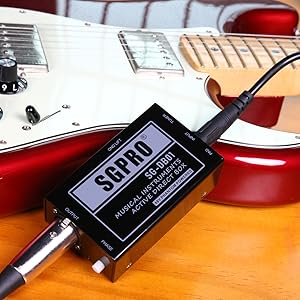

Image 5.2: Microphone LCD displays showing channel frequency changes and channel indicators.
6. Pairing (Sync Operation)
If a microphone loses connection or you need to pair a new microphone, follow these steps:
- Turn on the microphone. Unscrew the mid & tail covers. Long-press the 'SET' button for 10 seconds. The microphone screen should then indicate a running '----'.
- Turn off the receiver. Long-press the 'POWER' button on the receiver for 10 seconds until the LED light flashes red and green.
- Wait until the receiver's LED light changes to steady green. This indicates the microphone is synchronized (SYNC) with the receiver.
- Click the receiver's 'POWER' button to exit pairing mode. The microphone's 'SET' button can also be pressed to complete the pairing process.
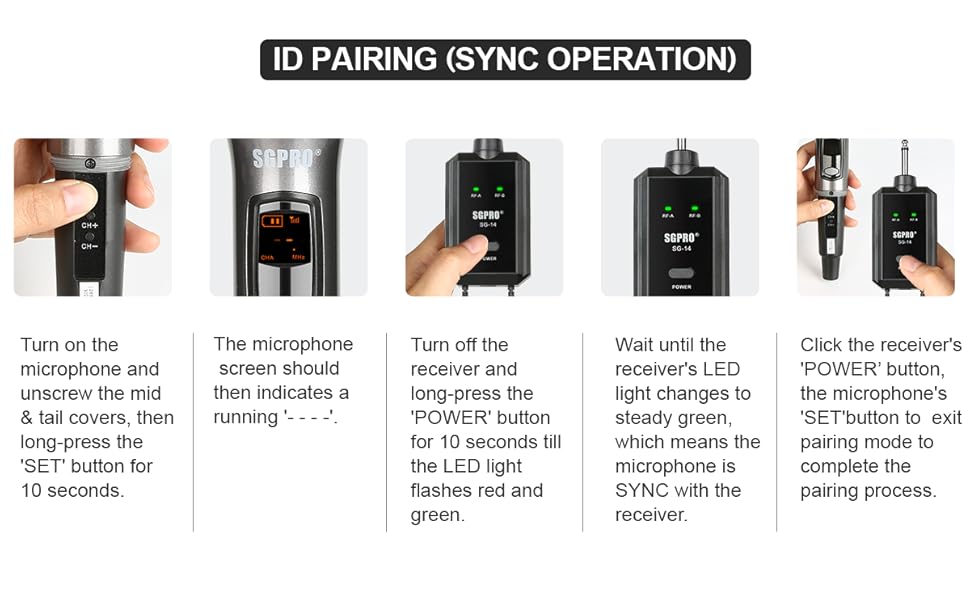
Image 6.1: Visual guide for the ID pairing process between the microphone and receiver.
7. การสมัคร
The SGPRO SG-14 Dual Handheld Wireless Microphone Set is suitable for a variety of uses:
- Singing and Karaoke
- DJ Performances
- Public Speaking and Presentations
- Classroom Instruction
- Church Services
- ความบันเทิงในบ้าน

Image 7.1: Individuals using the handheld microphones in a social setting.
8. การบำรุงรักษา
- การทำความสะอาด: ใช้ผ้านุ่มและแห้งเช็ดทำความสะอาดไมโครโฟนและตัวรับสัญญาณ ห้ามใช้น้ำยาทำความสะอาดหรือตัวทำละลาย
- การดูแลแบตเตอรี่ Remove AA batteries from the microphones if they will not be used for an extended period to prevent leakage. Recharge the receiver regularly to maintain battery health.
- พื้นที่จัดเก็บ: เก็บชุดอุปกรณ์ไว้ในที่แห้งและเย็น หลีกเลี่ยงแสงแดดโดยตรงและอุณหภูมิที่สูงหรือต่ำเกินไป
- การป้องกัน: Use the provided anti-roll rings and foam covers to protect the microphones from damage and reduce plosive sounds.
9 การแก้ไขปัญหา
| ปัญหา | สาเหตุที่เป็นไปได้ | สารละลาย |
|---|---|---|
| ไม่มีเสียงออกจากไมโครโฟน | Microphone or receiver not powered on; Low batteries; Microphone muted; Incorrect pairing; Receiver not connected to audio input. | Ensure both devices are on; Replace AA batteries in mic, charge receiver; Unmute microphone; Re-pair devices (Section 6); Verify receiver is plugged into correct audio input. |
| สัญญาณรบกวนหรือเสียงรบกวนคงที่ | Other wireless devices operating on similar frequencies; Obstructions between mic and receiver; Distance too great. | Change microphone channel (Section 5.3); Ensure clear line of sight; Reduce distance between mic and receiver (max 196 ft / 60 meters). |
| ไมโครโฟนไม่จับคู่ | Incorrect pairing procedure; Receiver already paired with another device. | Follow pairing instructions carefully (Section 6); Ensure only one receiver is in pairing mode at a time. |
| อายุการใช้งานแบตเตอรี่สั้น | Old or low-quality AA batteries; Receiver not fully charged. | Use fresh, high-quality AA batteries; Fully charge receiver before use. |
10. ข้อมูลจำเพาะ
| คุณสมบัติ | รายละเอียด |
|---|---|
| หมายเลขรุ่น | SG-HM (Microphone), SG-14 (Set) |
| ปัจจัยรูปแบบไมโครโฟน | แบบถือด้วยมือ |
| เทคโนโลยีการเชื่อมต่อ | UHF (ความถี่สูงพิเศษ) |
| จำนวนช่องสัญญาณ | 32 |
| รูปแบบขั้ว | ทิศทางเดียว (Cardioid) |
| อัตราส่วนสัญญาณต่อเสียงรบกวน | 120 เดซิเบล |
| ความไวเสียง | 95 เดซิเบล |
| แหล่งพลังงานไมโครโฟน | แบตเตอรี่ AA 2 ก้อน (ไม่รวม) |
| ตัวรับ แหล่งพลังงาน | แบตเตอรี่ลิเธียมโพลิเมอร์แบบชาร์จไฟได้ |
| ประเภทขั้วต่อ | แจ็ค 6.35 มม. |
| อุปกรณ์ที่รองรับ | Amplifiers, Mixers, Powered Speakers |
| คุณสมบัติพิเศษ | Noise Reduction, Mute Function, Battery Indicator |
| วัสดุ | อะคริโลไนไตรล์ บิวทาไดอีน สไตรีน เหล็กอัลลอยด์ |
| ขนาดรายการ (ยาว x กว้าง x สูง) | 0.94 x 0.2 x 0.2 inches (Microphone) |
| น้ำหนักสินค้า | 0.635 ounces / 18 Grams (Microphone) |
| ระยะที่มีประสิทธิภาพ | Up to 196 feet (60 meters) in optimal conditions |


Image 10.1: Illustrations of the high-quality dynamic mic capsule with cardioid polar pattern and the effective wireless range.
11. ข้อมูลด้านความปลอดภัย
- อย่าให้ผลิตภัณฑ์โดนน้ำหรือความชื้นมากเกินไป
- หลีกเลี่ยงการทำผลิตภัณฑ์หล่นหรือกระแทกอย่างรุนแรง
- ห้ามถอดประกอบหรือดัดแปลงผลิตภัณฑ์ การกระทำดังกล่าวจะทำให้การรับประกันเป็นโมฆะและอาจทำให้เกิดความเสียหายได้
- เก็บให้พ้นจากมือเด็ก
- ทิ้งแบตเตอรี่ตามระเบียบข้อบังคับในท้องถิ่น
12. การรับประกันและการสนับสนุน
For warranty information or technical support, please refer to the contact details provided with your purchase or visit the official SGPRO webไซต์ โปรดเก็บหลักฐานการซื้อไว้เพื่อใช้ในการเรียกร้องการรับประกัน


