1. บทนำ
ขอบคุณสำหรับการซื้อasing the MUSE M-175 WI Radio Alarm Clock. This device combines a digital alarm clock with an FM radio, dual alarm functions, and convenient wireless and USB charging capabilities. Please read this manual carefully before operating the unit and retain it for future reference.
2. ข้อมูลด้านความปลอดภัย
- อย่าให้เครื่องนี้โดนน้ำหยดหรือกระเซ็น
- ห้ามวางวัตถุที่บรรจุของเหลว เช่น แจกัน บนเครื่องใช้ไฟฟ้า
- ตรวจสอบให้แน่ใจว่ามีการระบายอากาศที่เหมาะสมรอบ ๆ เครื่อง อย่าปิดกั้นช่องระบายอากาศใด ๆ
- ควรวางอุปกรณ์ให้ห่างจากแสงแดดโดยตรง แหล่งความร้อน และสนามแม่เหล็กแรงสูง
- ใช้เฉพาะอะแดปเตอร์ไฟฟ้าที่มาพร้อมกับเครื่องเท่านั้น
- อย่าพยายามถอดประกอบหรือดัดแปลงตัวเครื่อง แนะนำให้ช่างผู้ชำนาญเข้ารับบริการทั้งหมด
- ทำความสะอาดตัวเครื่องด้วยผ้าแห้งเนื้อนุ่มเท่านั้น
3. เนื้อหาบรรจุภัณฑ์
- MUSE M-175 WI Radio Alarm Clock
- อะแดปเตอร์ AC
- คู่มือการใช้งาน (เอกสารนี้)
4. สินค้าหมดview
Familiarize yourself with the main components and controls of your MUSE M-175 WI.

ภาพที่ 1: ด้านหน้าและด้านบน view of the MUSE M-175 WI Radio Alarm Clock. The image shows the large white LED display, control buttons on the top panel, and the wireless charging pad indicator.
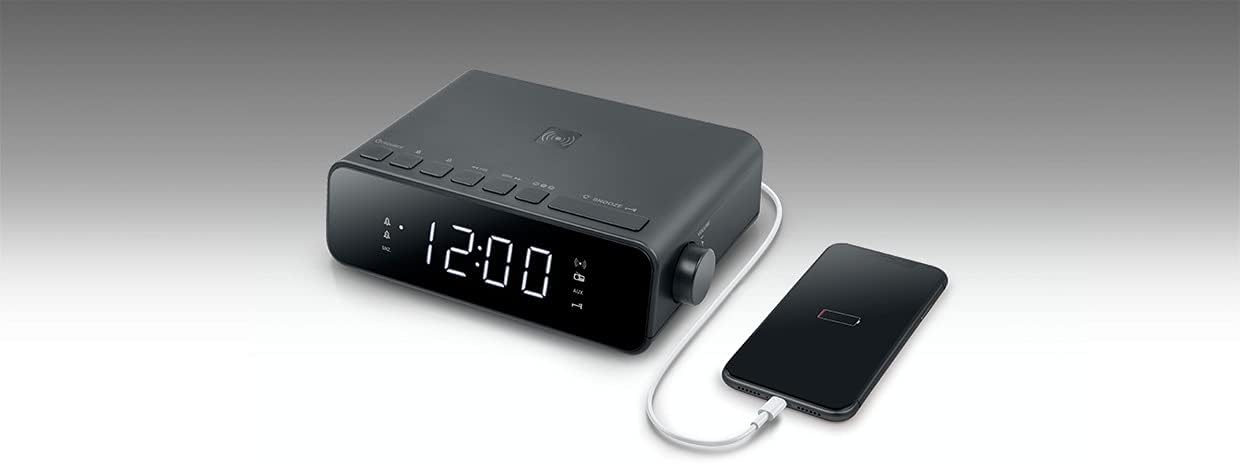
ภาพที่ 2: สูงสุด view of the MUSE M-175 WI Radio Alarm Clock demonstrating a smartphone placed on the wireless charging pad. A USB cable is also connected to the side for wired charging.
การควบคุมและตัวบ่งชี้:
- จอแสดงผล LED: Large white 0.9-inch display for time, radio frequency, and alarm indicators.
- ปุ่มแหล่งที่มา: To switch between FM radio and AUX input.
- Tuning/Volume Buttons: For adjusting radio frequency or volume.
- ปุ่มที่ตั้งไว้ล่วงหน้า: To save and recall FM radio stations.
- ปุ่มเลื่อน: To temporarily silence the alarm.
- ปุ่มหรี่ไฟ: To adjust display brightness (High / Low / Off).
- แผ่นชาร์จไร้สาย: Located on the top surface for compatible devices.
- พอร์ตชาร์จ USB: For wired charging of external devices.
- ช่องต่อ AUX (3.5 มม.): สำหรับเชื่อมต่อแหล่งเสียงภายนอก
5. การตั้งค่า
5.1. การเชื่อมต่อพลังงาน
- Connect the supplied AC power adapter to the DC IN port on the back of the unit.
- เสียบอะแดปเตอร์เข้ากับเต้ารับที่ผนังมาตรฐาน
- The LED display will light up, and the clock will be ready for initial setup.
5.2. การตั้งเวลา
Refer to the specific instructions in your full manual for detailed time setting procedures. Generally, there will be a 'TIME SET' or 'CLOCK' button to initiate time adjustment, followed by 'HOUR' and 'MINUTE' buttons.
6. คู่มือการใช้งาน
6.1. การใช้งานวิทยุ FM
- กดปุ่ม แหล่งที่มา ปุ่มเพื่อเลือกโหมดวิทยุ FM
- กดปุ่ม การปรับแต่ง buttons (e.g., ◀◀ / ▶▶) to manually tune to a desired frequency.
- หากต้องการสแกนและบันทึกสถานีโดยอัตโนมัติ ให้กดปุ่มค้างไว้ การปรับแต่ง buttons. The radio will scan and store up to 20 preset stations.
- กดปุ่ม พรีเซ็ต buttons (e.g., M+ / M-) to cycle through saved stations.
- ปรับระดับเสียงโดยใช้ปุ่มควบคุมระดับเสียงที่ให้มา
6.2. Setting and Using Alarms
The M-175 WI features a dual alarm system.
- To set Alarm 1 or Alarm 2, press and hold the respective นาฬิกาปลุก 1 or นาฬิกาปลุก 2 ปุ่ม.
- ใช้ ชั่วโมง และ นาที ปุ่มสำหรับตั้งเวลาปลุกที่ต้องการ
- Select the alarm source: บัซเซอร์ or วิทยุ. If Radio is selected, the last tuned FM station will be used.
- กดปุ่ม เตือน button again to confirm and activate the alarm. An alarm indicator will appear on the display.
- เมื่อเสียงปลุกดัง ให้กด เลื่อน button to temporarily silence it for a few minutes.
- To turn off the alarm completely, press the corresponding นาฬิกาปลุก 1 or นาฬิกาปลุก 2 ปุ่ม.
6.3. Wireless Charging (5W)
The top surface of the M-175 WI features a 5W wireless charging pad.
- วางสมาร์ทโฟนหรืออุปกรณ์ที่รองรับ Qi ลงบนแท่นชาร์จไร้สายโดยตรง
- ตรวจสอบให้แน่ใจว่าวางอุปกรณ์ไว้ตรงกลางแท่นชาร์จเพื่อการชาร์จที่มีประสิทธิภาพสูงสุด
- A charging indicator on the display or your device will confirm that charging has begun.
6.4. พอร์ตชาร์จ USB
A USB port is provided for charging non-Qi compatible devices or for faster wired charging.
- เสียบสายชาร์จ USB ของอุปกรณ์เข้ากับพอร์ต USB บนตัวเครื่อง
- เชื่อมต่อปลายสายอีกด้านเข้ากับอุปกรณ์ของคุณ
- การชาร์จจะเริ่มโดยอัตโนมัติ
6.5. AUX Input (3.5mm)
เชื่อมต่ออุปกรณ์เสียงภายนอกโดยใช้สายสัญญาณเสียงขนาด 3.5 มม.
- Connect one end of a 3.5mm audio cable to the AUX IN port on the unit.
- ต่อปลายอีกด้านหนึ่งเข้ากับช่องเสียบหูฟังหรือช่องสัญญาณเสียงออกของอุปกรณ์ภายนอกของคุณ
- กดปุ่ม แหล่งที่มา กดปุ่มไปเรื่อยๆ จนกระทั่งปรากฏคำว่า 'AUX'
- เล่นเสียงจากอุปกรณ์ภายนอกของคุณ
6.6. ความสว่างของจอแสดงผล
กดปุ่ม หรี่ไฟ button repeatedly to cycle through display brightness levels: High, Low, and Off.
6.7. ฟังก์ชั่นการนอนหลับ
The sleep function allows the radio to play for a set duration before automatically turning off. Refer to your full manual for specific steps to activate and adjust the sleep timer.
7. การบำรุงรักษา
- การทำความสะอาด: Disconnect the power adapter before cleaning. Use a soft, dry cloth to wipe the surfaces of the unit. Do not use abrasive cleaners or solvents.
- พื้นที่จัดเก็บ: If not in use for an extended period, unplug the unit and store it in a cool, dry place.
8 การแก้ไขปัญหา
| ปัญหา | สาเหตุที่เป็นไปได้ | สารละลาย |
|---|---|---|
| ไม่มีไฟเลี้ยง / หน้าจอปิด | ไม่ได้เชื่อมต่ออะแดปเตอร์ไฟหรือเต้ารับไฟฟ้าชำรุด | Ensure the power adapter is securely connected to the unit and a working wall outlet. |
| การรับสัญญาณวิทยุไม่ดี | สัญญาณอ่อนหรือมีสัญญาณรบกวน | Adjust the position of the unit. Extend the FM antenna fully. Move away from other electronic devices. |
| นาฬิกาปลุกไม่ส่งเสียง | สัญญาณเตือนภัยไม่ได้เปิดใช้งานหรือตั้งค่าไม่ถูกต้อง | Verify that the alarm time is set correctly and the alarm is activated (indicator visible on display). Check alarm volume. |
| การชาร์จแบบไร้สายไม่ทำงาน | Device not Qi-compatible, not centered, or foreign objects on pad. | Ensure your device supports Qi wireless charging. Reposition the device on the pad. Remove any metal objects or thick cases. |
| การชาร์จ USB ไม่ทำงาน | Cable faulty or device not compatible. | Try a different USB cable. Ensure the device is compatible with USB charging. |
9. ข้อมูลจำเพาะ
- ยี่ห้อ: มิวส์
- แบบอย่าง: M-175 WI
- แสดง: 0.9-inch White LED, adjustable intensity
- วิทยุ: PLL FM with 20 preset stations
- เตือน: Dual alarm (Radio or Buzzer), Snooze function, Sleep function
- การชาร์จแบบไร้สาย: 5W
- พอร์ตชาร์จ USB: ใช่
- อินพุตเสริม: 3.5มม.
- กำลังไฟเข้า: DC 5V, 2.5A
- Dimensions (H x D x L): 54 มม. x 130 มม. x 175 มม. (ประมาณ 2.1 x 5.1 x 6.9 นิ้ว)
- น้ำหนักสุทธิ: 0.44 กก. (ประมาณ 0.97 ปอนด์)
- แหล่งพลังงาน: สายไฟฟ้า
10. การรับประกันและการสนับสนุน
MUSE products are designed and manufactured to the highest quality standards. For detailed warranty information and customer support, please refer to the warranty card included with your product or visit the official MUSE webไซต์ เก็บหลักฐานการซื้อของคุณไว้เพื่อใช้ในกรณีเรียกร้องการรับประกัน


