1. บทนำ
The ION Audio Boombox Deluxe Stereo is a versatile audio system designed to provide a range of listening experiences. It combines classic audio playback options with modern connectivity, featuring an AM/FM radio, a cassette player, Bluetooth streaming, and USB/Micro SD card playback. This manual provides detailed instructions for setting up, operating, and maintaining your device.

รูปที่ 1 : ด้านหน้า view of the ION Audio Boombox Deluxe Stereo, showcasing its dual speakers, cassette deck, and radio tuner display.
2. อะไรอยู่ในกล่อง
- Boombox Deluxe Unit
- สายไฟ
- คู่มือการเริ่มต้นอย่างรวดเร็ว
3. การตั้งค่า
3.1 การจ่ายไฟให้กับอุปกรณ์
The Boombox Deluxe can be powered using the included AC power cable or by batteries for portable use. Insert the AC power cable into the AC IN port on the back of the unit and plug it into a standard wall outlet. For battery operation, open the battery compartment (typically on the bottom or back) and insert the required D-cell batteries (not included), ensuring correct polarity.
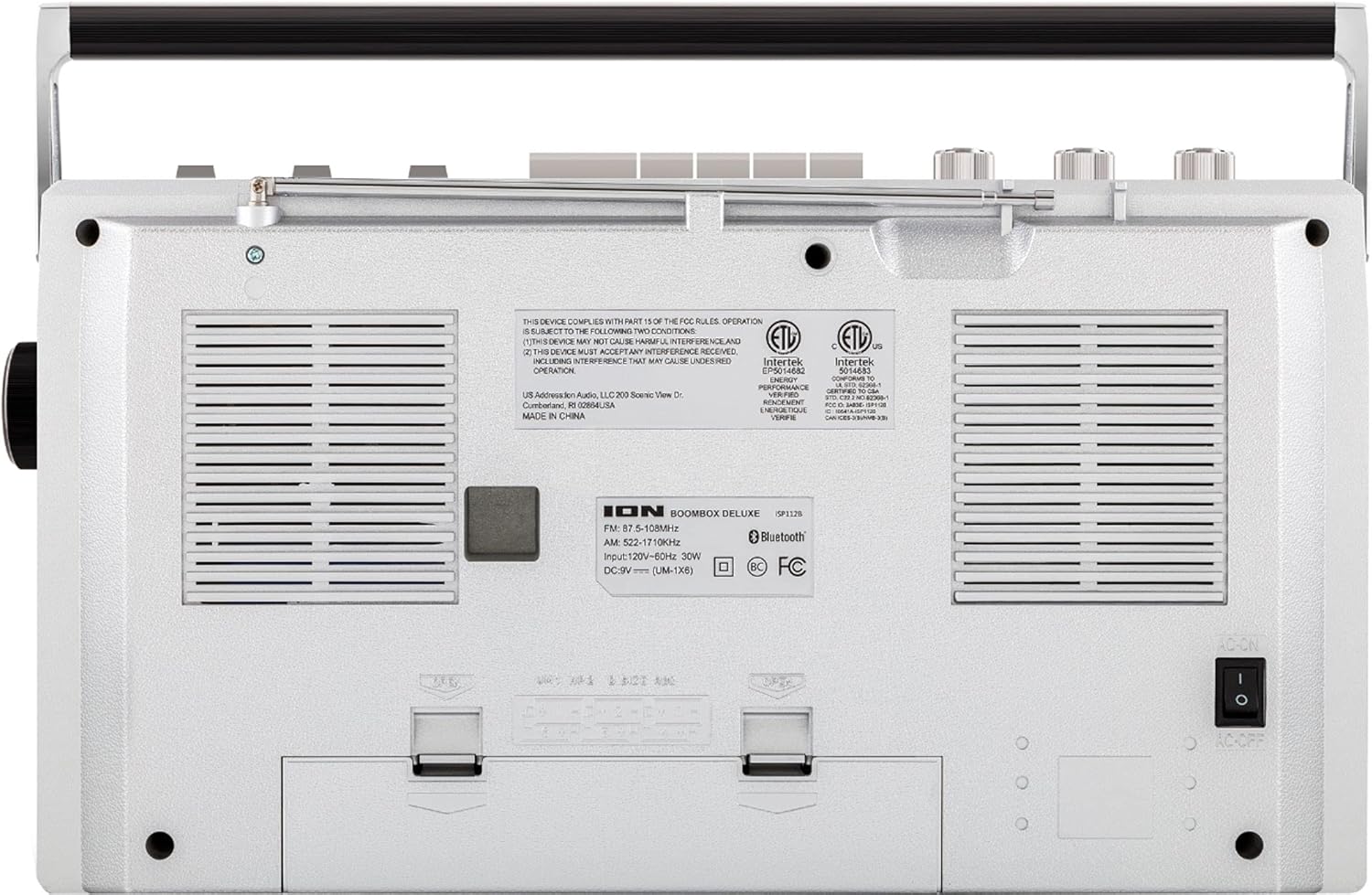
Figure 2: Rear panel of the Boombox Deluxe, highlighting the AC power input and battery compartment location.
3.2 การปรับเสาอากาศ
For optimal AM/FM radio reception, extend the telescopic antenna located on the top of the unit. Adjust its position for the clearest signal.
4. คู่มือการใช้งาน
4.1 การควบคุมทั่วไป
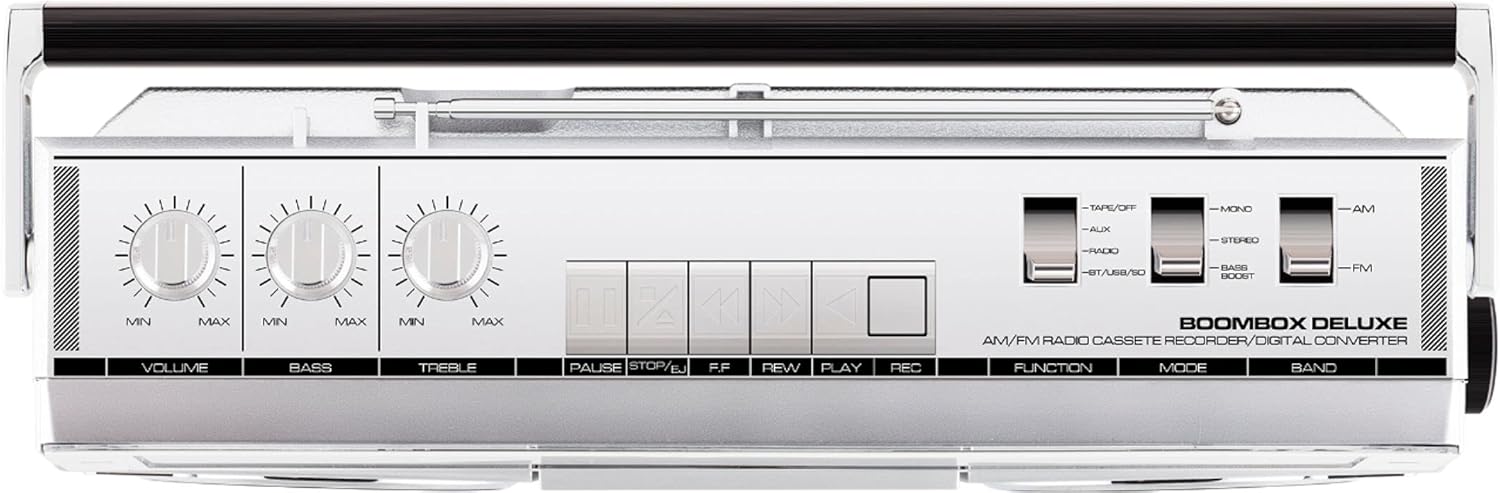
Figure 3: Top panel controls, including Volume, Bass, Treble knobs, and cassette playback buttons.
- ปุ่มปรับระดับเสียง: ปรับระดับเสียงโดยรวม
- ปุ่มเบส: ปรับระดับเสียงความถี่ต่ำ
- ปุ่มเสียงแหลม: ปรับระดับเสียงความถี่สูง
- สวิตช์ฟังก์ชั่น: Selects between Tape/Off, Aux, Radio, and BT/USB/SD modes.
- สวิตช์โหมด: Selects between Mono, Stereo, and Bass Boost audio modes.
- Band Switch: Selects between AM and FM radio bands.
4.2 การใช้งานวิทยุ
- ตั้งค่า ฟังก์ชั่นสลับ to 'Radio'.
- ตั้งค่า วงดนตรีสวิตช์ to 'AM' or 'FM'.
- ใช้ ลูกบิดปรับแต่ง to select your desired radio station. The frequency will be displayed on the tuner scale.
4.3 การทำงานของเครื่องเล่นเทปคาสเซ็ต
- ตั้งค่า ฟังก์ชั่นสลับ to 'Tape/Off'.
- กดปุ่ม หยุด/นำออก ปุ่มเพื่อเปิดช่องใส่ตลับเทป
- Insert a cassette tape with the open edge facing upwards. Close the compartment.
- กดปุ่ม เล่น ปุ่มเพื่อเริ่มเล่น
- ใช้ Rewind (REW) และ กรอไปข้างหน้า (FF) ปุ่มสำหรับนำทางเทป
- กด หยุดชั่วคราว to temporarily stop playback. Press again to resume.
- กด หยุด/นำออก เพื่อหยุดการเล่นและนำเทปออก
- To record, ensure the ฟังก์ชั่นสลับ is set to 'Tape/Off' and press the Record (REC) button simultaneously with the เล่น ปุ่ม.
4.4 การเชื่อมต่อบลูทูธ

Figure 4: Side panel with USB and Micro SD card slots, and playback controls for digital media.
- ตั้งค่า ฟังก์ชั่นสลับ to 'BT/USB/SD'. The unit will enter Bluetooth pairing mode, indicated by a flashing LED.
- On your Bluetooth-enabled device (e.g., smartphone, tablet), search for 'ION Boombox Deluxe' in the Bluetooth settings.
- Select 'ION Boombox Deluxe' to pair. Once connected, a confirmation tone will sound, and the LED will stop flashing.
- You can now stream audio from your device to the Boombox Deluxe. Use your device's controls or the boombox's playback buttons (Play/Pause, Next/Previous Track) for media control.
4.5 การเล่นไฟล์ผ่าน USB/Micro SD
- ตั้งค่า ฟังก์ชั่นสลับ to 'BT/USB/SD'.
- Insert a USB flash drive or Micro SD card (with compatible audio files) into the respective slot on the side of the unit.
- The unit will automatically detect and begin playing audio files.
- Use the playback control buttons (Play/Pause, Next/Previous Track, Delete) on the side panel to manage your music.
4.6 อินพุตเสริม

Figure 5: Side panel with headphone output and auxiliary input jacks.
- ตั้งค่า ฟังก์ชั่นสลับ to 'Aux'.
- เชื่อมต่ออุปกรณ์เสียงภายนอก (เช่น เครื่องเล่น MP3, เครื่องเล่นซีดี) เข้ากับ AUX IN เสียบเข้ากับแจ็คโดยใช้สายสัญญาณเสียงขนาด 3.5 มม. (ไม่รวมอยู่ในชุด)
- Audio from the connected device will play through the boombox speakers. Control playback from your external device.
5. คุณสมบัติ
- Integrated Stereo System with Dual Speakers
- บลูทูธไร้สายสตรีมมิ่ง
- เครื่องรับสัญญาณวิทยุ AM/FM
- Cassette Player/Recorder
- การเล่น USB และการ์ด Micro SD
- Auxiliary Input for External Devices
- Adjustable Bass and Treble Controls
- ดีไซน์พกพาสะดวก พร้อมหูหิ้ว
6. ข้อมูลจำเพาะ
| ข้อมูลจำเพาะ | รายละเอียด |
|---|---|
| ยี่ห้อ | ไออ้อน ออดิโอ |
| แบบอย่าง | Boombox Deluxe |
| เทคโนโลยีการเชื่อมต่อ | บลูทูธ, ยูเอสบี |
| ประเภทลำโพง | สเตอริโอ |
| แหล่งพลังงาน | Battery Powered (D-cell), AC Power |
| สี | สีดำ,สีเงิน |
| น้ำหนักสินค้า | 8.93 ปอนด์ |
| ขนาดแพ็คเกจ | 18.1 x 11.1 x 7.6 นิ้ว |
7 การแก้ไขปัญหา
- ไม่มีไฟฟ้า:
Ensure the AC power cable is securely connected to both the unit and a working power outlet. If using batteries, check that they are inserted correctly and are not depleted. - การรับสัญญาณวิทยุไม่ดี:
Fully extend the telescopic antenna and adjust its position. Try relocating the unit to an area with better signal reception, away from potential interference sources like other electronic devices. - Cassette Tape Not Playing/Recording:
Ensure the tape is inserted correctly and the cassette compartment is fully closed. Check that the tape is not tangled or damaged. For recording, ensure both Play and Record buttons are pressed simultaneously. - บลูทูธไม่เชื่อมต่อ:
Make sure the Boombox Deluxe is in 'BT/USB/SD' mode and in pairing mode (flashing LED). Ensure Bluetooth is enabled on your external device and it is within range (typically 30 feet). Try unpairing and re-pairing the device. - No Sound from USB/Micro SD:
Verify that the USB drive or Micro SD card is inserted correctly and contains compatible audio files (e.g., MP3). Ensure the volume is turned up on the boombox.
8. การบำรุงรักษา
- การทำความสะอาด: ใช้ผ้านุ่มและแห้งเช็ดทำความสะอาดภายนอกตัวเครื่อง ห้ามใช้น้ำยาทำความสะอาดหรือตัวทำละลาย
- การดูแลรักษาเทปคาสเซ็ต: ทำความสะอาดหัวเทปและลูกกลิ้งบีบเป็นระยะด้วยสำลีเบาๆampened with isopropyl alcohol to ensure optimal playback and recording quality.
- การจัดเก็บแบตเตอรี่: If the unit will not be used for an extended period, remove the batteries to prevent leakage and damage.
9. การรับประกันและการสนับสนุน
This product is offered as an Amazon Renewed item. Amazon Renewed products are professionally inspected and tested to work and look like new. If you are not satisfied with your purchase, renewed products are eligible for replacement or refund under the Amazon Renewed Guarantee. For specific details regarding the Amazon Renewed Guarantee, please refer to the Amazon Renewed program terms and conditions on the Amazon webเว็บไซต์.
For further assistance or technical support, please contact ION Audio customer service or refer to their official webเว็บไซต์สำหรับทรัพยากรสนับสนุน


